


 वीडियो कनवर्टर अंतिम
 स्क्रीन अभिलेखी
 वीडियो मरम्मत
 सुरक्षित डाउनलोड
विंडोज, मैक, ऑनलाइन और फोन पर पिच चेंजर के बारे में समीक्षा करें
अक्सर, एक पिच चेंजर की मदद से हम मूल पिच को बहुत जल्दी बढ़ा या घटा सकते हैं। अधिकांश प्रोड्यूसर गाने में मेलोडिक इफेक्ट जोड़ने के लिए पिच शिफ्टर का इस्तेमाल करते हैं, ताकि गाना कच्चे वर्ज़न से भी बेहतर लगे। दूसरी ओर, पिच बदलने के लिए कोई टूलसेट खरीदना आपको काफी डॉलर खर्च करवाएगा और इसे इस्तेमाल करना सीखने में भी समय लगेगा। महंगा भी और समझने में मुश्किल भी। जिन सेट्स पर आप पैसा खर्च करने वाले हैं, उनकी जगह क्यों न ऐसा सॉफ़्टवेयर इस्तेमाल करें जो आपके पास मौजूद वीडियो या ऑडियो की पिच बदलने में आपकी मदद कर सके।.
इस समीक्षा के साथ, हमने चार बेहतरीन ऐप्स और प्रोग्राम एकत्र किए हैं जिनका उपयोग आप बिना भारी पैसे खर्च किए ऑडियो पिच को बदलने के लिए कर सकते हैं। हम किस बारे में बात कर रहे हैं, यह जानने के लिए इस लेख को पढ़ते रहें।

भाग 1. डेस्कटॉप, ऑनलाइन और मोबाइल उपकरणों पर उपलब्ध शीर्ष 4 पिच परिवर्तक
वीडियो कनवर्टर अल्टीमेट - विंडोज़ और मैक पर सर्वश्रेष्ठ वीडियो पिच परिवर्तक
फ्री डाउनलोडWindows 7 या बाद के संस्करण के लिएसुरक्षित डाउनलोड
फ्री डाउनलोडMacOS 10.7 या बाद के संस्करण के लिएसुरक्षित डाउनलोड
उपलब्ध प्रोग्राम: Windows और Mac
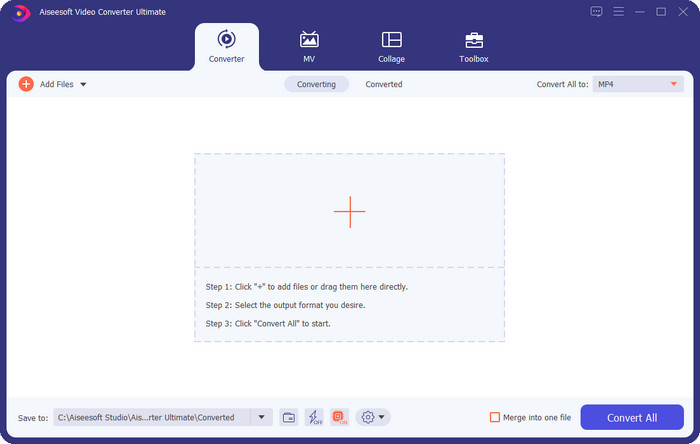
सूची में सबसे पहले आता है Windows और Mac ऑपरेटिंग सिस्टम के लिए सबसे अच्छा वीडियो पिच चेंजर। Video Converter Ultimate एक शक्तिशाली टूल है, जिसकी मदद से आप अपने ऑडियो की पिच को नियंत्रित कर सकते हैं, यानी आपके पास मौजूद वीडियो की स्पीड बढ़ाकर या घटाकर। दूसरे डेस्कटॉप सॉफ़्टवेयर के विपरीत, जो यही काम कर सकते हैं, यह टूल सीखने में आपका ज़्यादा समय नहीं लेगा, क्योंकि यह एक सीधा‑सा, आसान टूल है। आप रिकॉर्ड किए गए मूल वर्ज़न से बेहतर ध्वनि पाने के लिए एक मिनट से भी कम समय में ऑडियो पिच को सुधार सकते हैं।.
पिच बदलने की क्षमता के साथ, आप टूलबॉक्स के अंतर्गत वॉल्यूम बूस्टर का उपयोग करके ऑडियो वॉल्यूम को इसकी अधिकतम क्षमता तक बढ़ा सकते हैं। इस सुविधा में, आप स्लाइडर्स का उपयोग करके अपने वीडियो में ऑडियो के आयाम या लाभ को तेज़ी से बढ़ा या घटा सकते हैं। भले ही आप ऐसे निर्माता नहीं हैं जो इस प्रकार की चीजें करना चाहते हैं, फिर भी यह सुखद है और विंडोज़ और मैकोज़ पर उपलब्ध इस अंतिम टूल की सहायता से जल्दी से किया जाता है। इसलिए, यदि आप इस अंतिम टूल का उपयोग करना चाहते हैं, तो हम भाग दो में प्रदर्शित करते हैं कि इस टूल का उपयोग विस्तृत चरणों के साथ कैसे किया जाए, जिसका पालन करके आप इसे एक मिनट से भी कम समय में समाप्त कर सकते हैं।
वोकल रिमूवर.org
उपलब्ध प्रोग्राम: ऑनलाइन
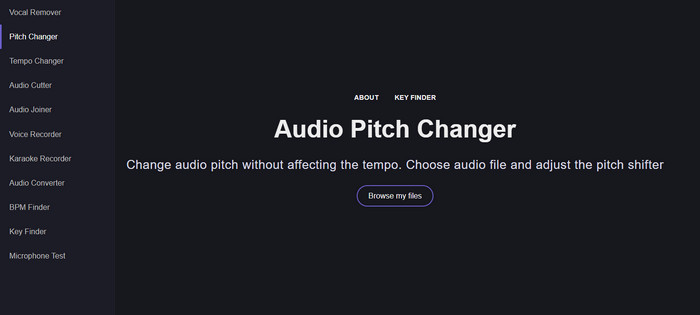
अगर आपको ऑनलाइन पिच चेंजर चाहिए, तो बिना किसी संदेह के Vocal Remover.org इस काम को पूरा करने के लिए एकदम सही टूल है। पहले टूल के विपरीत, यह टूल ऑडियो एन्हांसिंग के लिए ज़्यादा उपयुक्त है। इस टूल से आप आसानी से ऑडियो की पिच बदल सकते हैं और यह भी जान सकते हैं कि गाने में कौन‑सी की (Key) इस्तेमाल हुई है। इसमें एक इंडिकेटर भी है, जो आपको ऑडियो के सेमी‑टोन चुनने में मदद करता है। आप चाहें तो इसे मैन्युअल रूप से एडजस्ट करें या स्लाइडर को खिसकाकर स्टेप‑बाय‑स्टेप बदलें। ज़्यादातर यूज़र जिन्होंने इसे इस्तेमाल किया है, इसको पसंद करते हैं और पिच चेंज इफेक्ट के नतीजों से संतुष्ट हैं।.
इस पर उपकरण ठीक काम करता है, लेकिन आप यहां केवल एक सीमित ऑडियो प्रारूप फ़ाइल अपलोड कर सकते हैं, और वीडियो प्रारूप समर्थित नहीं है। फ़ाइल को अपलोड करना टूल के लिए थोड़ा कठिन हो सकता है, क्योंकि यह केवल कुछ ऑडियो प्रारूपों का समर्थन करता है। हालांकि यह सभी के लिए एक समस्या हो सकती है, फिर भी हम इसे सबसे अच्छे ऑनलाइन टूल में से एक मानते हैं जिसे आप वेब पर एक्सेस कर सकते हैं। लेकिन सुनिश्चित करें कि आप जटिलताओं और अन्य समस्याओं से बचने के लिए सही वेबसाइट का उपयोग करते हैं। इसके अलावा, एक स्थिर इंटरनेट कनेक्शन रखना याद रखें क्योंकि यदि आपका इंटरनेट मजबूत है तो यह टूल सबसे अच्छा काम करता है।
अप टेम्पो: पिच, स्पीड चेंजर
उपलब्ध प्रोग्राम: Android
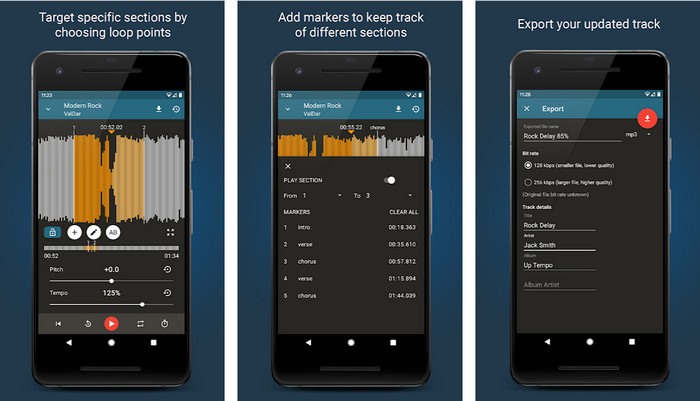
अगर आपके पास डेस्कटॉप नहीं भी है, तो भी Android यूज़र्स के लिए आप यह ऑडियो पिच चेंजर डाउनलोड कर सकते हैं और काम कर सकते हैं। Up Tempo: Pitch, Speed Changer के साथ प्लेबैक स्पीड और पिच बदलने का काम तेज़ और सभी के लिए आसान हो गया है। इसका GUI वेवफॉर्म सपोर्ट करता है, जो आपको यह तय करने में मदद कर सकता है कि आप किस हिस्से को बेहतर या बदला हुआ बनाना चाहते हैं। ऑनलाइन टूल की तरह ही, यह ऐप भी म्यूज़िक को संभाल सकता है और ज़रूरत पड़ने पर आपके बहुत काम आ सकता है।.
हालाँकि ऐप डाउनलोड करने के लिए स्वतंत्र है, लेकिन अगर आप इस ऐप का उपयोग करना चाहते हैं तो आपको कुछ बातों पर ध्यान देना चाहिए। अधिकांश उपयोगकर्ता अनुभव करते हैं कि ऐप आपके फ़ोन पर डाउनलोड की गई नई ऑडियो फ़ाइलों का पता नहीं लगा सकता है। यदि आप इस समस्या का सामना करते हैं, तो यह इस ऐप में ऑडियो फ़ाइल का समर्थन नहीं कर सकता है, या एक बग हो सकता है। फिर भी, यदि आपके हाथ में एक Android फ़ोन है, तो इस ऐप को डाउनलोड करके देखें कि क्या यह समस्या को हल करने वाला ऐप है।
टाइमपिच-पिच, स्पीड चेंजर 4+
उपलब्ध प्रोग्राम: iOS
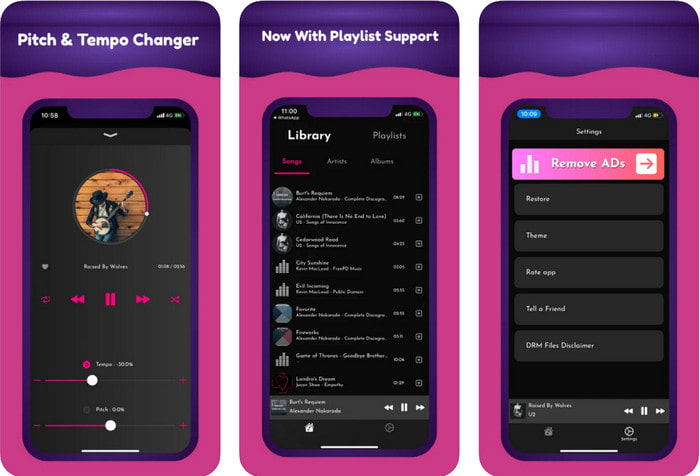
अगर आप iOS यूज़र हैं, तो आपको यह पिच चेंजर ऐप ज़रूर पता होना चाहिए, जो इस समस्या का हल दे सकता है। TimePitch-Pitch, Speed Changer 4+ एक म्यूज़िक प्लेयर, लाइब्रेरी और चेंजर है, जिसे आप ज़रूरत पड़ने पर अपने iOS डिवाइस पर इस्तेमाल कर सकते हैं। यह ऐप दूसरों से अलग तरह से काम करता है, क्योंकि आप जिस ऑडियो को सुन रहे हैं उसकी पिच को रीयल‑टाइम में बदल सकते हैं, यानी जैसे ही आप इसे एडजस्ट करेंगे, वह बदलाव सेव नहीं होगा। पर यह इसकी मज़बूती भी हो सकती है, क्योंकि आपको प्रोसेस होने का इंतज़ार नहीं करना पड़ेगा; बस एडजस्ट करते ही आप अपनी पसंद के अनुसार पिच को तुरंत बदल सकते हैं।.
हालाँकि, यह इसकी कमजोरी भी हो सकती है; यदि आप फ़ाइल को अन्य उपकरणों पर स्थानांतरित करते हैं, तो इस ऐप का उपयोग करके आपने जो पिच बदली है वह रिसीवर पर लागू नहीं होगी। साथ ही, आपको यह याद रखना होगा कि यदि आप iTunes या Apple Music पर संगीत खरीदते हैं, तो आप पिच बदलने के लिए इस ऐप का उपयोग नहीं कर सकते। क्यों? क्योंकि संरक्षित फाइलें इस तरह के किसी तीसरे पक्ष के ऐप को फाइल तक पहुंचने की अनुमति नहीं देगी। संगीत फ़ाइल अपलोड करने के बावजूद, हम अभी भी इस लेख में इस ऐप को शामिल करते हैं क्योंकि यह हर आईओएस डिवाइस पर सबसे अच्छा काम करता है।
भाग 2. अल्टीमेट पिच चेंजर सॉफ्टवेयर का उपयोग करके वीडियो की पिच को कैसे बदलें
अपने डेस्कटॉप पर इस संगीत पिच और गति परिवर्तक का उपयोग कैसे करें, यह जानने के लिए नीचे दिए गए चरणों का पालन करें। इसलिए, यदि आपको अंतिम सॉफ़्टवेयर का उपयोग करने के लिए एक सरल लेकिन प्रभावी ट्यूटोरियल की आवश्यकता है, तो निम्नलिखित विवरण पढ़ते रहें।
चरण 1. कृपया डाउनलोड बटन दबाएँ ताकि यह अल्टीमेट सॉफ़्टवेयर आपके डेस्कटॉप पर आ जाए। यह चुनें कि आप Windows या Mac प्रोग्राम का इस्तेमाल कर रहे हैं। डाउनलोड होने तक प्रतीक्षा करें, फिर डाउनलोड की गई फ़ाइल पर क्लिक करें और इसे इंस्टॉल करें। पूरी सेट‑अप और इंस्टॉलेशन प्रक्रिया के बाद, इस अल्टीमेट टूल का इस्तेमाल शुरू करने के लिए सॉफ़्टवेयर लॉन्च करें।.
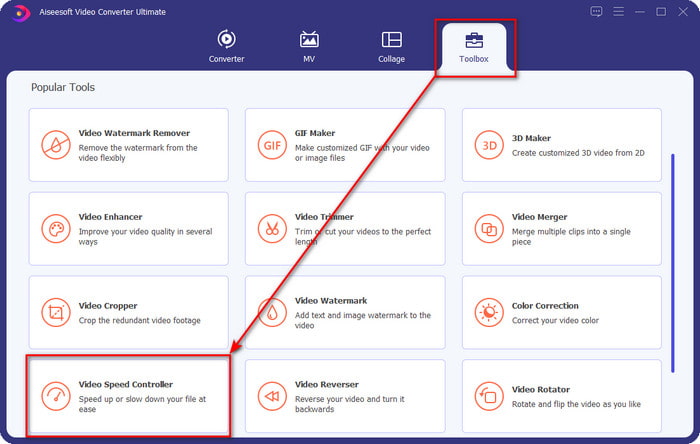
चरण 2. Toolbox मेनू खोलें और उसके अंदर Video Speed Controller खोजें; इसे खोलने के लिए उस पर क्लिक करें। नीचे की तरफ स्क्रॉल करें, जहाँ यह फीचर निचले हिस्से के पास होगा।.
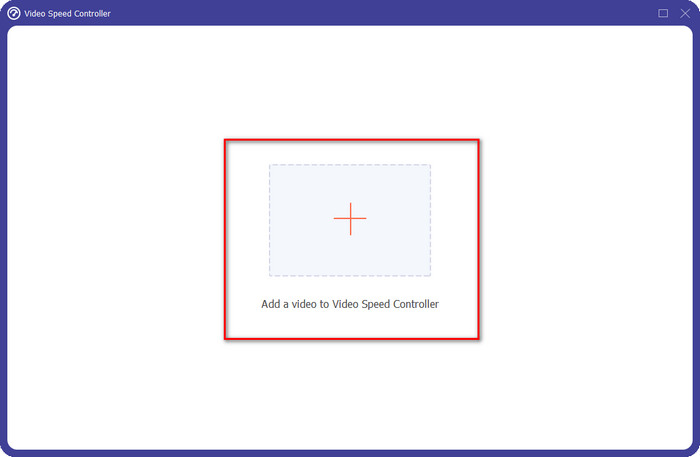
चरण 3. आपकी स्क्रीन पर एक नया मिनी‑विंडो दिखाई देगा, + बटन पर क्लिक करें, वह वीडियो फ़ाइल ढूँढें जिसकी पिच आप बदलना चाहते हैं, फिर उसे अपलोड करने के लिए Open पर क्लिक करें।.
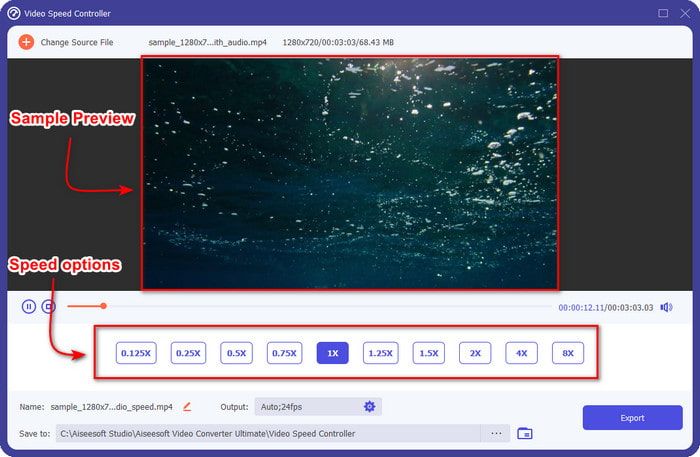
चरण 4. इस हिस्से में अब आपको ऑडियो स्पीड बदलने की अनुमति होगी। आप देखेंगे कि स्पीड बदलने पर ऑडियो की पिच भी बदल जाएगी। आप प्रीव्यू स्क्रीन पर ऑटोमैटिक रूप से इसका आवाज़ और दृश्य पूर्वावलोकन सुन और देख सकते हैं।.
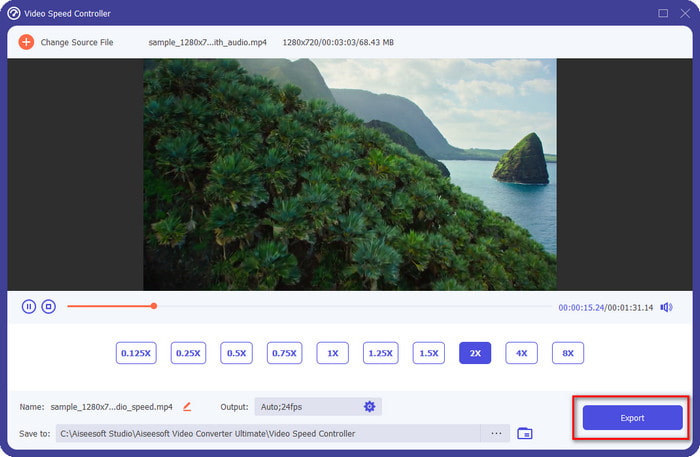
आप केवल 2x गति के तहत वीडियो का पूर्वावलोकन चला सकते हैं; आप देखेंगे कि 4x और 8x आपको विरोध से बचने के लिए वीडियो का पूर्वावलोकन करने की अनुमति नहीं देंगे, लेकिन यह वीडियो और ऑडियो की गुणवत्ता को कम नहीं करेगा।
चरण 5. अगर आप pich से संतुष्ट हैं, तो अब Export बटन पर क्लिक करें। आसान नहीं है? ऐसे सॉफ़्टवेयर की मदद से आप कुछ ही मिनटों में अलग‑अलग वीडियो और ऑडियो समस्याओं को आसानी से संभाल सकते हैं।.
संबंधित:
ऑनलाइन वीडियो की स्पीड कैसे बढ़ाएँ
MP4 वीडियो की स्पीड कैसे बढ़ाएँ
भाग 3. पिच परिवर्तक के बारे में अक्सर पूछे जाने वाले प्रश्न
पिच क्या है?
यह उस गुणवत्ता का मूल्यांकन करता है जो आपकी ध्वनि के साथ प्रतिध्वनित होती है, उन्हें सीमा में मापकर, चाहे वे उच्च या निम्न हों। यह आवृत्ति के समान ध्वनि तरंग है, लेकिन वे समान नहीं हैं।
मानव पिच कितनी ऊंची सुन सकता है?
Hz जितना कम होगा, आप इसे होशपूर्वक सुन सकते हैं, लेकिन कुछ लोग इसे तभी सुनते हैं जब Hz अधिक हो जाता है। शोधकर्ताओं के मुताबिक, हर कोई 8000 हर्ट्ज सुन सकता है, और अगर आप 12,000 हर्ट्ज सुन सकते हैं, तो आपके कान 50 साल से कम उम्र के लोगों के समान अच्छे हैं। और 40 से कम उम्र में आप 15,000 हर्ट्ज सुन सकते हैं, लेकिन 30 से कम के लिए साल पुराना, 16,000 हर्ट्ज़, आप अब भी इसे सुन सकते हैं। हर 25 साल और उससे कम उम्र के लिए, आप अभी भी 17,000 हर्ट्ज सुन सकते हैं, और 20 साल से कम उम्र के लिए, आप 20,000 हर्ट्ज सुन सकते हैं। हम जितने बड़े होते जाते हैं, समय-समय पर हम जो पिच सुनते हैं वह कम प्रभावी होती जाती है। इसलिए, यदि आप हमारे द्वारा बताई गई आवृत्ति को नहीं सुन सकते हैं, तो आपको यह जांचने के लिए डॉक्टर से मिलना चाहिए कि क्या कोई समस्या है।
हम पिच रेंज की गणना कैसे कर सकते हैं?
पिच रेंज गणना करने के लिए सप्तक का उपयोग करती है, जो गायक और सहायक को यह निर्धारित करने की अनुमति देती है कि क्या वह गीत पर सही पिच है। कंपन के साथ, आप उच्च और निम्न आवृत्ति को नोटिस कर सकते हैं कि ध्वनि तरंग का निर्माण होता है।
निष्कर्ष
ऊपर बताए गए वीडियो और वॉइस पिच चेंजर की मदद से अब हम अपने पास मौजूद ध्वनि की पिच को आसानी से एडजस्ट कर सकते हैं। काम के लिए कोई खास तकनीकी डिवाइस खरीदने की बजाय, आप ऊपर दिया गया सॉफ़्टवेयर इस्तेमाल कर सकते हैं। हालाँकि इनकी विशेषताएँ और फ़ंक्शन अलग‑अलग हैं, फिर भी हम देख सकते हैं कि हर एक की अपनी अलग खासियत क्या है। लेकिन अगर आप कंप्यूटर का इस्तेमाल कर रहे हैं, तो आपको अपने डेस्कटॉप पर ज़रूर Video Converter Ultimate डाउनलोड करना चाहिए, क्योंकि यह टूल न केवल पिच बदलने में मदद करता है, बल्कि और भी कई जादुई काम करके आपके वीडियो और ऑडियो को और बेहतर बना देता है। जानना चाहते हैं कि यह टूल और कौन‑कौन‑से जादुई काम कर सकता है? तो ऊपर दिए गए डाउनलोड बटन पर क्लिक करके इसे अभी डाउनलोड करें।.
-
 IPhone पर वीडियो को गति देने के 3 तरीके [सिद्ध]
 अपने वीडियो की प्लेबैक गति को समायोजित करने में समस्या हो रही है क्योंकि आप iPhone का उपयोग कर रहे हैं? आपकी समस्या में मदद करने के लिए यह एक उत्कृष्ट लेख है।
-
 विंडोज मीडिया प्लेयर | वीडियो को गति देना सीखें [सिद्ध]
 आप अपने विंडोज मीडिया प्लेयर का उपयोग करके अपनी वीडियो क्लिप को धीमा करना चाहते हैं, लेकिन आपको यह कैसे करना है, इसके साथ परेशानी हो रही है? यह लेख पढ़ने के लिए आदर्श है और विंडोज मीडिया प्लेयर का उपयोग करके वीडियो को गति देने के तरीके के बारे में आपके दृष्टिकोण को स्पष्ट कर सकता है।
-
 स्लो मोशन वीडियो को सामान्य गति में कैसे बदलें [आसान कदम]
 जानना चाहते हैं कि आपके द्वारा इंटरनेट से डाउनलोड किए गए या गलती से स्लो-मोशन में रिकॉर्ड किए गए स्लो-मोशन वीडियो को कैसे वापस लाया जाए? Mac, Windows, iOS और Android पर स्लो-मोशन वीडियो को सामान्य गति में बदलने का तरीका जानें।
