


 Video Converter Ultimate
 Snimač zaslona
 Video popravak
Kako pretvoriti MP4 u M4A na sustavu Windows / Mac (besplatno i na mreži)
MP4 je rašireni format datoteke koji se koristi s više stanica i video uređaja. MP4 datoteke mogu pohraniti video, audio i drugi sadržaj. Sada mnogi ljudi više vole slušati audio zapis MP4 video zapisa. Za očuvanje kvalitete izvrsna je pretvorba MP4 u M4A. M4A znači MPEG 4 Audio. Većina programa može reproducirati M4A datoteke, uključujući iTunes, QuickTime, Windows Media Player i još mnogo toga.

Možda se pitate kako izdvojiti zvuk iz MP4 datoteke. Postoji mnogo načina da MP4 datoteku pretvorite u M4A datoteku. Pogledajte ovaj članak kako biste saznali kako pretvoriti MP4 u M4A za buduće slušanje na svojim mobilnim uređajima.
Dio 1. Najbolji besplatni internetski način za pretvorbu MP4 u M4A bez gubitka kvalitete
FVC Free Online Video Converter je besplatni pretvarač datoteka iz MP4 u M4A koji može format MP4 pretvoriti ne samo u M4A, već i u druge formate poput MP3, WAV, M4R, WMA, AIFF, AC3 itd. Omogućuje skupnu konverziju, tako da možete istovremeno pretvoriti više MP4 videozapisa u M4A. Također, ovaj besplatni internetski alat omogućuje vam i pretvaranje MP4 videa u MOV, AVI, FLV i druge video formate.
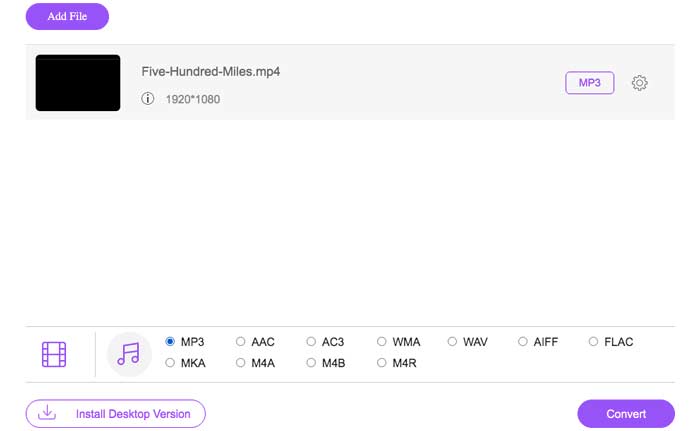
Korak 1. Otvorite https://www.free-videoconverter.net/free-online-video-converter/ u svom pregledniku. Kliknite gumb Add Files to Convert, a zatim trebate preuzeti i instalirati njegov pokretač (launcher).

Korak 2. Učitajte MP4 video koji želite pretvoriti, a zatim kliknite Open za nastavak.
Korak 3. Nakon što učitate svoje video datoteke u ovu aplikaciju, kliknite ikonu Audio i odaberite format M4A kao izlazni format.
Korak 4. Na kraju kliknite gumb Convert u donjem desnom kutu. Pričekajte neko vrijeme i dobit ćete svoj M4A audio iz MP4 datoteke.
Dio 2. Kako pretvoriti MP4 u M4A pomoću besplatnog audio pretvarača
FVC Free Audio Converter besplatni je softver koji vam omogućuje pretvaranje MP4 datoteka u M4A bez napora. Sposoban je promijeniti bilo koju video ili audio datoteku u M4A, MP3, WAV itd. Možete je preuzeti i instalirati na svoje računalo sa sustavom Windows kako biste započeli pretvorbu.
Besplatno preuzimanjeZa Windows 7 ili novijiSigurno preuzimanje
Besplatno preuzimanjeZa macOS 10.7 ili novijiSigurno preuzimanje
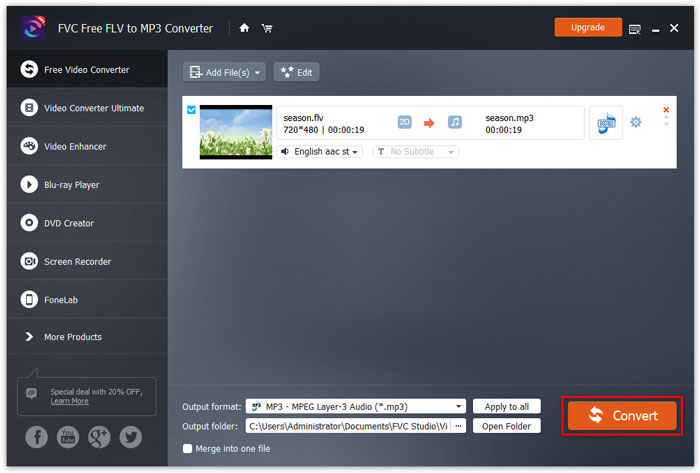
Korak 1. Pokrenite ovaj audio pretvarač na svom računalu. Kliknite gumb Add File(s) kako biste u ovaj program učitali MP4 datoteke.

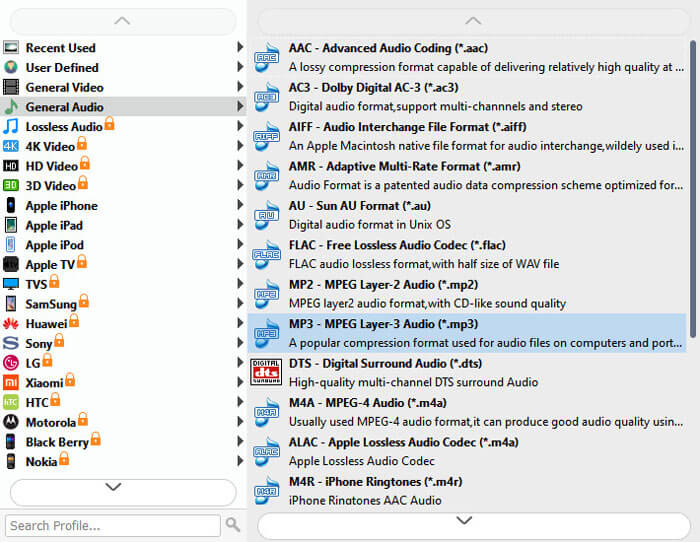
Korak 2. Pronađite opciju Output formats i odaberite M4A kao izlazni format s padajućeg izbornika.
Korak 3. Kliknite gumb Convert da biste započeli pretvaranje MP4 datoteka u M4A.
Osim u M4A, njime možete pretvoriti MP4 u MP3, AAC ili druge audio formate.
Dio 3. Kako pretvoriti MP4 u M4A pomoću iTunesa
Da biste pretvorili MP4 u M4A s iTunes za Windows ili Mac, morate promijeniti postavke uvoza iTunes, a zatim upotrijebiti opciju izbornika Pretvori za izradu M4A kopije.
Korak 1. Otvorite iTunes na svom računalu sa sustavom Windows ili Macu.
Korak 2. Odaberite Edit, zatim u traci izbornika kliknite Preferences. Zatim idite na karticu General i kliknite Import Settings.
Korak 3. Pronađite i kliknite izbornik pokraj opcije Import Using, a zatim odaberite kodiranje (encoding) u koji želite pretvoriti video. Zatim kliknite OK.
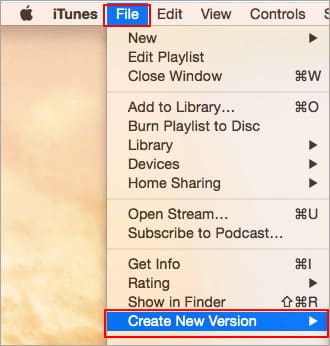
Korak 4. Odaberite pjesme u svojoj knjižnici koje želite pretvoriti. Nakon toga odaberite File, zatim kliknite Create New Version, a potom stvorite M4A verziju.
Pretvorene audio datoteke pojavit će se u vašoj knjižnici pored izvornih datoteka.
Dio 4. Česta pitanja o pretvorbi MP4 u M4A
1. Što je M4A datoteka?
Datoteka s nastavkom datoteke M4A je MPEG-4 audio datoteka. M4A se često može naći u Appleovoj trgovini iTunes Store kao format preuzimanja pjesama.
2. Kako otvoriti M4A datoteke?
Programi koji otvaraju M4A datoteke uključuju iTunes, QuickTime, Windows Media Player itd. Android tableti i telefoni, iPhone, iPad i iPod touch također podržavaju reprodukciju M4A datoteka.
3. Kako spojiti MP4 datoteke na mreži?
FVC Free Online Video Merger može vam pomoći da spojite ili pridružite razne MP4 ili druge video formate poput MOV, AVI, FLV i mnoge druge online.
4. Može li Windows Media Player pretvoriti MP4 u M4A?
Ne. Windows Media Player podržava samo pretvaranje video datoteka u MP3 ili WAV.
Zaključak
Gore navedena tri načina mogu vam pomoći da pretvorite MP4 u M4A besplatno bez puno truda. Ako više želite pretvoriti putem interneta, FVC Free Online Video Converter trebao bi biti izvrstan izbor. Ako su vaše MP4 datoteke velike veličine, FVC Free Audio Converter ili iTunes bit će pouzdaniji za pretvaranje MP4 datoteka u M4A.
-
 Kako pretvoriti MP4 u WMV za Mac / Windows
 Ovaj post dijeli kako pretvoriti MP4 video u WMV format na Macu ili Windowsu. Također ćemo vam ponuditi nekoliko opcija, uključujući softver za stolna računala i mrežne pretvarače putem weba. Jeste li spremni znati najbolje alate za pretvorbu MP4 u WMV?
-
 Kako pretvoriti WMV u MP3 na radnoj površini i na mreži
 U FVC studiju možete pronaći bilo koji besplatni softver za video pretvornike. Podržan je bilo koji video / audio format, uključujući MP4, MOV, TS, AVI, WMV, FLAC, MP3 itd.
-
 Kako besplatno pretvoriti AVCHD u MP4 videozapise na sustavu Windows / Mac / Online
 Postoji 5 jednostavnih načina za pretvorbu AVCHD u MP4 videozapise na računalu. Možete kopirati AVCHD videozapise u MP4, bez gubitka kvalitete s bilo kojim pretvaračem ovdje.
