


 Video Converter Ultimate
 Snimač zaslona
 Video popravak
Najpouzdaniji uređivač MP4 metapodataka za jednostavno dodavanje, uređivanje i uklanjanje MP4 metapodataka
MP4 oznake mogu vam pomoći organizirati i upravljati datotekama tako da ih razvrstavate prema metapodacima. Zbog toga mnogi korisnici traže savršen uređivač metapodataka kako bi ovaj zadatak obavili bez muke. Srećom, danas smo izdvojili najbolje uređivače oznaka za MP4 datoteke koje se mogu naći na tržištu. Uz pomoć detaljnog istraživanja, pogledajmo koji MP4 uređivač metapodataka biste trebali koristiti da uredite datoteke kako vam odgovara.

Dio 1. 4 najbolja besplatna uređivača MP4 oznaka dostupnih na webu i izvan mreže
VLC Media Player
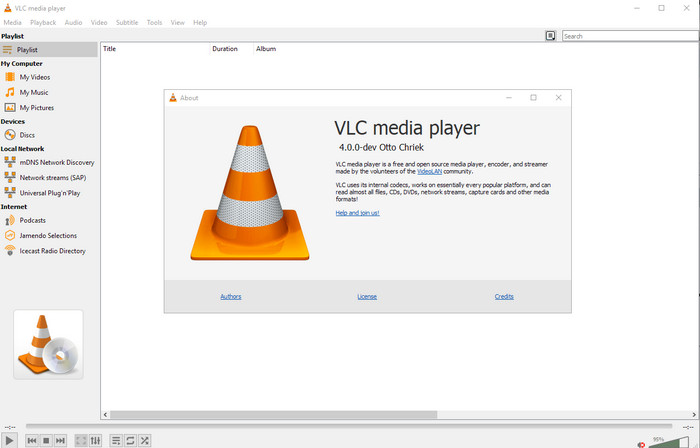
Dostupno na: Windows, Mac i Linux
Prvi na našem popisu je najbolji video reproduktor, ali ako želite besplatni mp4 uređivač metapodataka, ovaj bi vam mogao zatrebati. VLC Media Player omogućuje vam besplatno uređivanje ili uklanjanje oznaka vezanih uz vaše MP4 datoteke. S ovim alatom lako možete mijenjati metapodatke datoteke, poput naslova, autorskih prava, žanra, izvođača, datuma, vremena i još mnogo toga. Iako mnogi korisnici kažu da je ovdje jednostavno uređivati metapodatke, neki se s tim ne slažu. Njima je ovaj postupak zbunjujući i neučinkovit, za razliku od drugih uređivača oznaka. Ipak, ako želite siguran alat za preuzimanje koji se već dokazao brojnim korisnicima, isprobajte ovaj program.
Amvidia uređivač oznaka
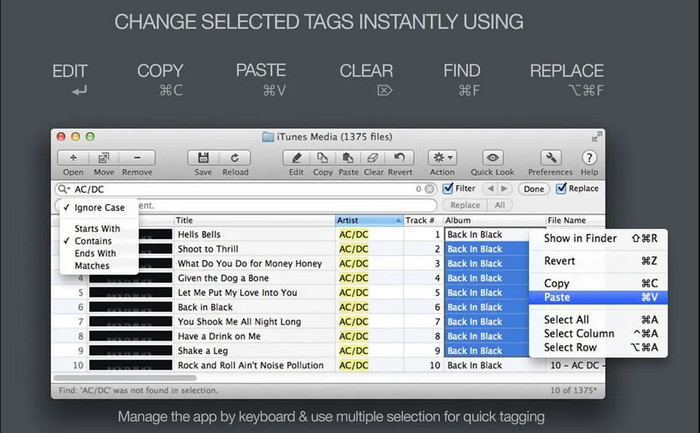
Dostupno na: Mac
Još jedan MP4 uređivač metapodataka za Mac je Amvidia Tag Editor. Ako trebate dodati metapodatke, naslovnice, oznake za iTunes ili promijeniti naziv datoteke, sve to možete učiniti ovdje; ako trebate grupno označavanje, ovaj će vam alat također pomoći. Osim toga, ovaj besplatni program podržava znatan broj medijskih formata koje možete učitati u alat, ali ga je potrebno prethodno preuzeti. Zbog vrlo detaljnih funkcija koje nudi, početnicima će možda trebati vremena da nauče koristiti alat, jer je potrebno proći više koraka prije samog dodavanja metapodataka. Također, sučelje je zastarjelo, slično kao kod VLC‑a.
TigoTago
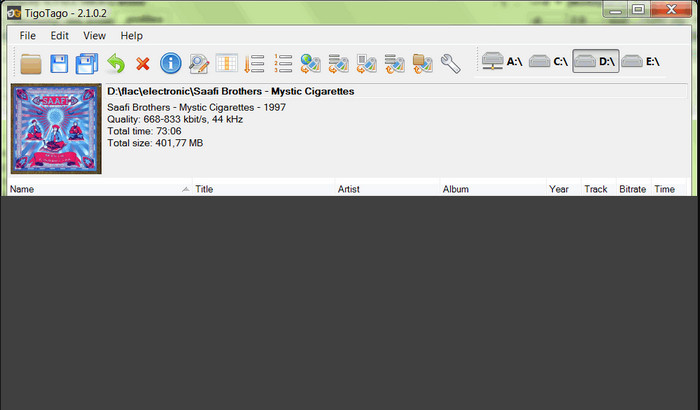
Dostupno na: Windows
TigoTago je još jedan MP4 uređivač metapodataka koji možete besplatno koristiti na Windowsu. Dakle, ako trebate urediti određene podatke ili oznake svoje MP4 datoteke, preuzmite alat i jednostavno mijenjajte MP4 oznake, jednu po jednu. Ovim alatom možete popuniti osnovne oznake koje datoteka može imati, poput naslova, albuma, broja pjesme i izvođača, ali možete dodati i napredne oznake, poput stihova, komentara itd. Ako usporedimo ovaj alat s VLC‑om, možemo reći da je znatno bolji jer je primarno usmjeren na uređivanje oznaka. Iako nudi više od video reproduktora, još uvijek mu je potrebno poboljšanje, uključujući GUI i druge funkcije.
InstantD3 - besplatni uređivač ID3 oznaka na mreži
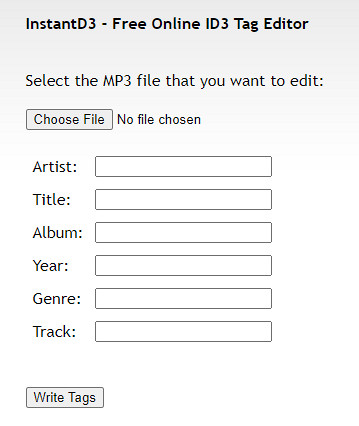
Dostupno na: webu
Ako ne želite preuzimati softver, možete pristupiti ovom mrežnom uređivaču MP4 video oznaka, InstantD3 - besplatnom mrežnom uređivaču ID3 oznaka. Iako je alat dostupan na webu, ne može pretraživati metapodatke na mreži kako bi automatski primijenio oznake koje su vam potrebne na vaš MP4. Alat nudi intuitivno sučelje koje korisnicima omogućuje jednostavan način dodavanja oznaka svojim audio datotekama. Budući da je alat besplatan, oglasi se nalaze na web stranici, ali vas moramo upozoriti da su oglasi na web stranici neprikladni za osobe mlađe od 18 godina. Također, pristupite alatu na vlastitu odgovornost; nakon što pristupite web stranici alata, vaša internetska veza nije zaštićena.
Dio 2. Najbolji izbor uređivača videozapisa za dodavanje, uređivanje i uklanjanje metapodataka na Windows i Macu
Dostupno na: Windows, Mac i Linux
Gore spomenuti MP4 uređivači metapodataka su odlični, ali FVC Video Converter Ultimate je snažan uređivač metapodataka koji će vam zatrebati za uređivanje ili uklanjanje metapodataka. Ovaj alat nudi najbolje funkcije uređivanja koje je jednostavno koristiti, a daju profesionalne rezultate. Za razliku od gore navedenih alata koji podržavaju ograničen broj medijskih formata, s ovim alatom možete učitati MP4, MOV, MKV, FLV, AVI i još preko 1000 drugih formata te brzo promijeniti njihove metapodatke. Nije li nevjerojatno što ovaj alat može učiniti? Kad vidite što sve nudi, lako možete slijediti naš korak‑po‑korak vodič za uređivanje, dodavanje i uklanjanje oznaka na svojim MP4 datotekama.
Korak 1. Najprije pritisnite gumb za preuzimanje da biste preuzeli MP4 uređivač oznaka na Mac ili Windows. Nakon klika na datoteku, slijedite postupak instalacije i zatim je otvorite.
Besplatno preuzimanjeZa Windows 7 ili novijiSigurno preuzimanje
Besplatno preuzimanjeZa MacOS 10.7 ili novijiSigurno preuzimanje
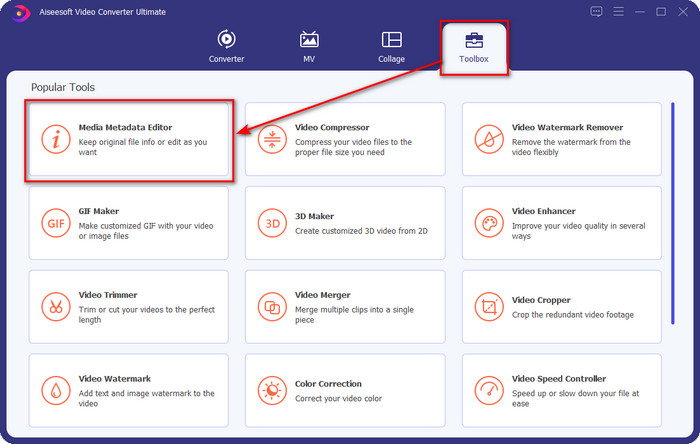
Korak 2. Kad ste otvorili uređivač, među tri dostupna odjeljka odaberite Toolbox, a zatim pod njim kliknite Media Metadata Editor.
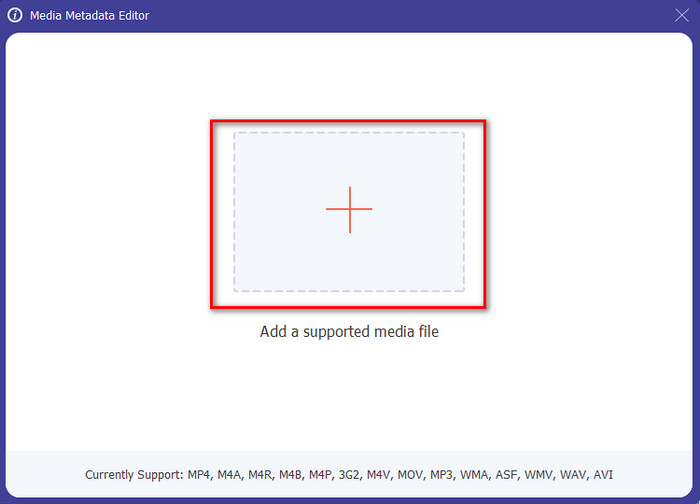
Korak 3. Da biste učitali MP4 datoteku, kliknite gumb +, pronađite .mp4 u mapi koja će se pojaviti i pritisnite Open da biste je uspješno umetnuli.
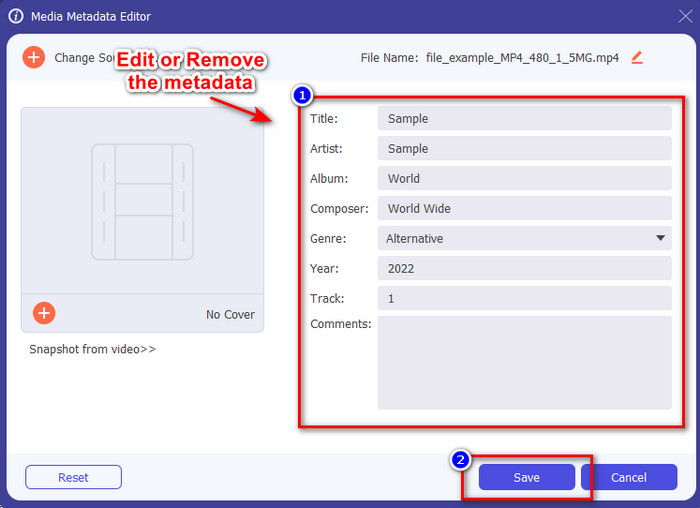
Korak 4. Dodajte, uklonite i uredite podatke u tekstualnom okviru koji će se pojaviti na zaslonu; ispunite ih prema vlastitim željama. Da biste spremili promjene koje ste napravili na MP4 oznaci, kliknite gumb Save. Lako ćete zaključiti da je zadatak vrlo jednostavan ako odaberete ovaj vrhunski uređivač.
Povezano:
Najbolji uređivač oznaka za glazbu
Najbolji uređivač oznaka za audioknjige
Dio 3. Često postavljana pitanja o MP4 uređivaču oznaka
Kako provjeriti MP4 metapodatke u sustavu Windows?
Ako želite provjeriti metapodatke vaše MP4 datoteke, slijedite ove korake. Najprije pronađite .mp4 datoteku, pritisnite desnu tipku miša, idite na Svojstva i na kraju kliknite Detalji. Sve informacije koje trebate o svojim metapodacima nalaze se na ovom popisu. Dakle, ako ih želite urediti prema svojim željama, odaberite gore navedeni alat koji biste trebali koristiti.
Gdje mogu gledati MP4 datoteke?
Većina medijskih reproduktora podržava MP4 datoteke jer je to standardni format video datoteka. No, pitanje je: gdje možete gledati MP4 videozapise visoke rezolucije? U tom slučaju morate kliknuti ovu poveznicu. Sve što trebate znati nalazi se u tom članku.
Kako odabrati najbolji uređivač MP4 oznaka?
Morat ćete zapamtiti nekoliko stvari prije nego što odaberete uređivač MP4 metapodataka koji ćete koristiti; ako ne znate što su to, možete se pouzdati u te standarde. Prvo provjerite podržava li uređivač metapodataka format koji imate; ne podržavaju svi uređivači širok raspon formata. Korištenje uređivača metapodataka koji ne podržava vaš format bilo bi beskorisno. Drugo, provjerite je li alat jednostavan za korištenje; ako ste novi u uređivanju metapodataka, provjerite da alat koji odaberete nije previše težak za učenje. Na kraju, provjerite je li sigurno koristiti; ako se može preuzeti ili na mreži, morat ćete znati je li sigurna za upotrebu. Uvjerite se da ćete prije korištenja uređivača morati slijediti sve ove jednostavne standarde kako biste imali samo najbolje.
Zaključak
MP4 uređivači metapodataka koje smo naveli u ovom članku mogu vam pomoći da brzo uredite, dodate ili uklonite metapodatke na svojim MP4 datotekama. Uz relevantne recenzije alata koje smo napisali, sada ih možemo usporediti i vidjeti koji najviše odgovara našim potrebama pri uređivanju MP4 oznaka. Ako još uvijek niste odlučili koji biste trebali koristiti, nudimo vam najbolji na popisu: FVC Video Converter Ultimate. Ovaj fantastičan alat ispunit će vaše potrebe; jedini način da ga imate jest da ga preuzmete. Stoga kliknite gumb za preuzimanje, slijedite korake koje smo naveli za vas i uživajte u uređivanju oznaka bez kapi znoja.
-
 5 najjednostavnijih načina za uklanjanje metapodataka iz bilo koje medijske datoteke
 Kako ukloniti metapodatke? Je li teško to učiniti? Trebam li kupiti ili koristiti besplatni alat za uklanjanje oznaka? Sva ova pitanja imaju odgovore u ovom članku.
-
 5 najboljih alata za izvlačenje metapodataka dostupnih online i offline [2025.]
 Na tržištu možete pronaći više alata za izvlačenje metapodataka, ali danas biramo samo pet najodabranijih alata za izvlačenje oznaka prema publici.
-
 5 najboljih uređivača videopodataka za 2025. [Nepristrana recenzija]
 Želite li vidjeti metapodatke svog videozapisa? Ako je tako, pročitajte detalje u nastavku kako biste u potpunosti shvatili temu i znali koji vam alat najbolje odgovara.
