


 Video Converter Ultimate
 Snimač zaslona
 Video popravak
Najbolji uređivač MKV metapodataka za dodavanje/promjenu/uklanjanje metapodataka na MKV-u
There isn't a wide variety of MKV metadata editors on the market because the MKV isn't much supported. But it doesn't mean that we can't edit the tags on our MKV files, so don't look gloomy. So for you to find out what is the best metadata editor that supports MKV, you can read the full scope of this article as we review different tools. What are you waiting for? Keep the ball on a roll because this won't last more than 7 minutes to have a tag editor.

Dio 1. Najbolji uređivač MKV oznaka koji se preporučuje za Windows i Mac: FVC Video Converter Ultimate
FVC Video Converter Ultimate is the most popular MKV metadata editor on Windows and Mac. This tool lives up to its name and expectation, so downloading the software to edit the metadata is the best choice you will make. Its powerful features and functions will easily handle the job as if it is a piece of cake. Furthermore, this tool supports other formats to upload, such as MP4, AVI, MOV, FLV, WMV, and the 1000+ media formats without re-encoding the file for a less hassle experience.
Što je više? Pretpostavimo da preuzmete alat. Imat ćete najbrži alat za dodavanje metapodataka na MKV i najljepši GUI uređivača metapodataka koji drugi alat ne može ponuditi. Ako ste zainteresirani za korištenje uređivača, nastavite s čitanjem 2. dijela dok objašnjavamo kako urediti podatke MKV datoteka.
Dio 2. Kako urediti MKV metapodatke pomoću preporučenog uređivača MKV metapodataka
Slijedite korake u skladu s tim, počevši od preuzimanja alata i tako dalje. Počnimo s korištenjem najboljeg uređivača metapodataka MKV koji možete preuzeti na svoj Windows ili macOS.
Step 1. Tick the download button we present below; select which operating systems you are currently using. Install it immediately after you've downloaded the file, follow the installation process, and we promise that you wouldn't get wrong, then open it to proceed. Before we start, you'll need to get familiarized with the tool to have a smooth sailing process using the MKV tag editor.
Besplatno preuzimanjeZa Windows 7 ili novijiSigurno preuzimanje
Besplatno preuzimanjeZa MacOS 10.7 ili novijiSigurno preuzimanje
Step 2. Open the Toolbox, look for the Media Metadata Editor, and tap it to open.
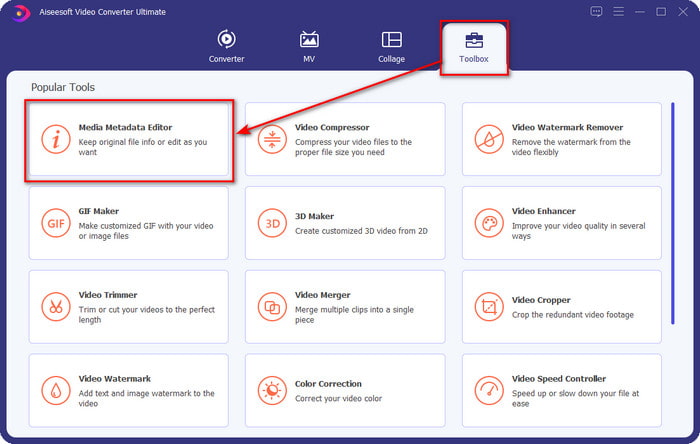
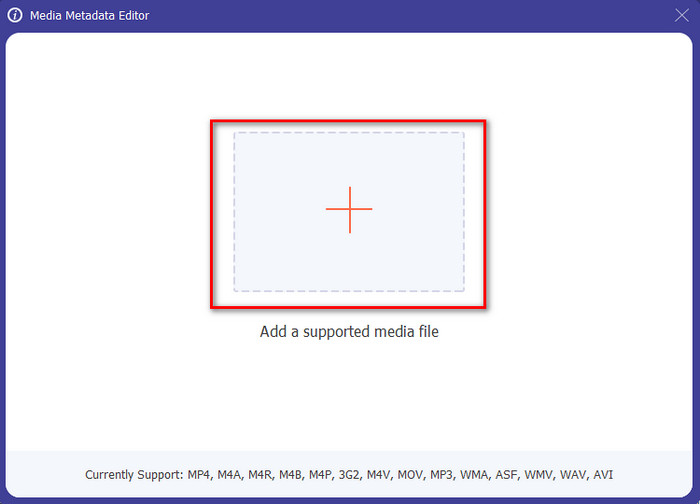
Step 3. Upload your MKV file by clicking the + icon, and a file folder will show, select the MKV file and press Open.
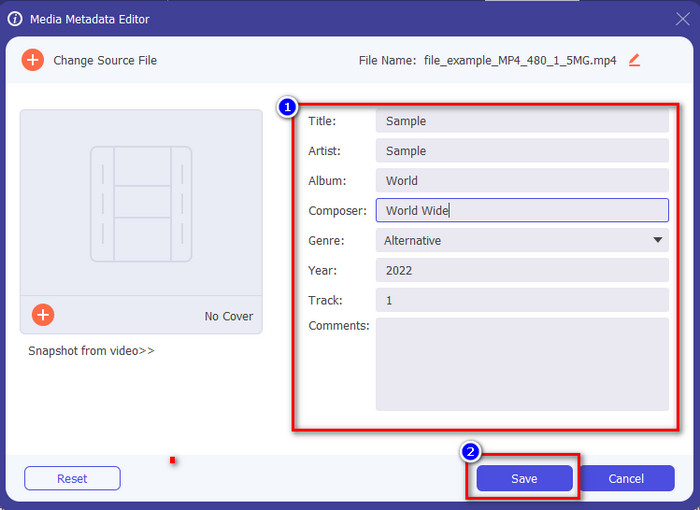
Step 4. Edit the metadata textbox; you can either fill them or remove them, do what you want to do with the metadata. After all of that, click Save to apply the change you've made earlier. With that, you have now edited the MKV tags.
Dio 3. 3 besplatna uređivača MKV oznaka koje biste trebali znati dostupni su na Windowsima, Macu i na mreži
GROUPDOCS.Metapodaci [besplatno na webu]
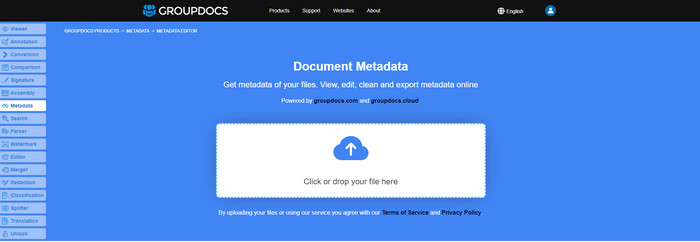
If you want to use an MKV metadata editor for free on the web, we highly suggest you try the GROUPDOCS.Metadata. It is the best choice to view and edit the metadata on your MKV as it works on all platforms, which means it is flexible and adaptable in any case. Moreover, it can easily manipulate the search and update of the tag according to the properties you will need, and if it needs to be removed, it will automatically do it. However, the tool can be challenging to handle on specific tasks, like updating the file's tags. So to get the hang of using the web tool, you will need to use it most of the time to improve your knowledge about the website functions and make it easier to handle.
Svojstva u sustavu Windows [ugrađeni uređivač u sustavu Windows]
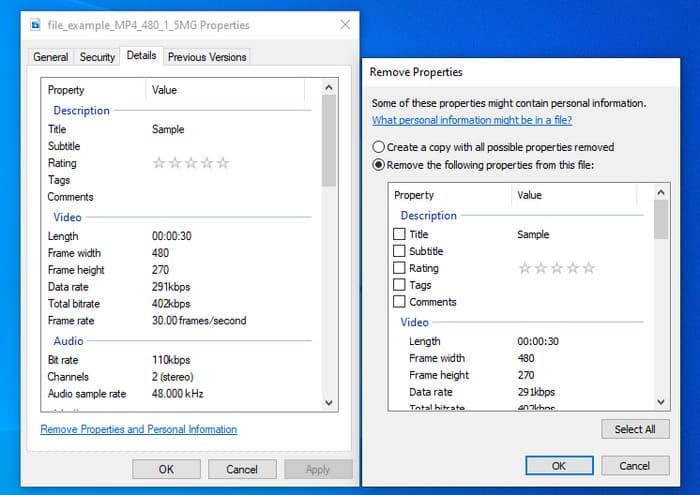
Ne želite preuzeti alat za promjenu MKV metapodataka i želite koristiti ugrađenu funkciju u sustavu Windows za uređivanje metapodataka? Tada bi bilo najbolje da koristite Svojstva na Windowsima. Ova je funkcija dostupna na svim Windows računalima i nećete morati preuzimati nikakav alat ili internet da biste je koristili. Pomoću ove besplatne značajke možete brzo pregledati metapodatke i uspješno ih urediti. Međutim, postoje izvješća o oznakama koje nedostaju nakon što su pokušali koristiti ovu značajku. Prema korisnicima, može automatski ukloniti oznake iz vaše datoteke. Umjesto da koriste ovu značajku, namjeravaju preuzeti pravi alat kako bi utrošili trud na oznake koje uključuju na svoju MKV ili medijsku datoteku. Ali ako želite vidjeti gdje je ova značajka, samo pritisnite desnom tipkom miša na datoteku, uglavnom na donjem dijelu.
iFlicks [za Mac]
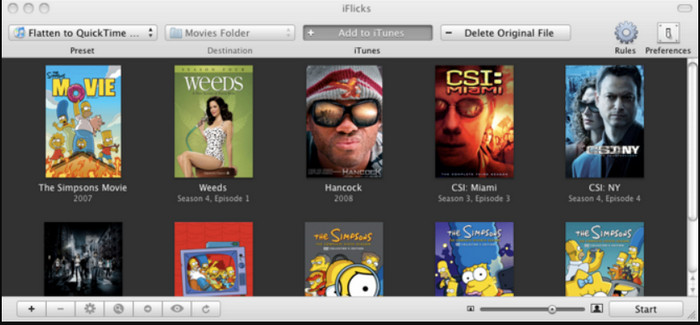
iFlicks vam može pomoći pretvoriti MKV u format koji se može igrati ili vas naučiti kako uređivati MKV metapodatke na Macu. Ovaj alat dobro komunicira s iTunesom jer pruža detaljne metapodatke o svakoj medijskoj datoteci. Pomoću ovog softvera možete dodati različite informacije o vašoj datoteci, kao što su slogan, žanr, datum. ocjene, rezolucije i ostalo dohvaćaju se u bazama podataka na mreži. Nadalje, ovaj softver prikuplja metapodatke o tome gdje ih možete preuzeti i automatski ih primijeniti na datoteke. Međutim, besplatna probna verzija može trajati samo sedam dana, pa ako želite ponovno koristiti alat, morat ćete platiti njegovu pretplatu.
Dio 4. Često postavljana pitanja o MKV uređivaču metapodataka
Može li se MKV igrati na Macu?
MKV is playable on Mac if you use a third-party tool, such as the Blu-ray Player. But if you intentionally play the video on Quicktime, it won't work because it is unsupported. So, if you want to watch your MKV files on Mac, we highly recommend that you use a third-party Blu-ray Player, or you can convert the MKV format into MOV with the help of FVC Video Converter Ultimate.
Trebam li pretvoriti MKV prije uređivanja metapodataka?
Ako alat koji želite koristiti ne podržava prijenos MKV formata, savjetujemo vam da prvo pretvorite format u kompatibilan format. Ali s naplatom koju smo spomenuli na vrhu, ne biste trebali pretvoriti datoteku u podržani format. Međutim, nema puno opcija ili alata za uređivanje MKV oznaka jer je format nepoznat. Iako ga je teško tražiti, dali smo sve od sebe da pretražimo sve uređivače koje možete koristiti za ažuriranje ili promjenu metapodataka koji podržavaju MKV format.
Zašto su MKV datoteke prevelike?
The main reason why MKV files are big is that they can contain multiple contents of a video, audio, and subtitle with different codecs and elements. And you've added metadata on that file, and the file size will become even enormous. So, the best way to save space while having an MKV file on your drive is to compress it without destroying the quality or losing the information on the file. Click this link to learn more about compressing video files.
Zaključak
Even though there is a limited MKV metadata editor on the market, there are still powerful tools you can depend on available on different platforms. As we reviewed different software you can use, it is always still on your hands; which do you prefer to use on changing the metadata of your MKV file. Indeed, it is a tough decision because all of the tools are awesome to use. If you haven't decided which you prefer, we suggest you use the FVC Video Converter Ultimate because it is the most flexible software and has more advanced features that anyone can use. By pressing the download button, you will attain the best tag editor you can have on Windows and Mac!
-
 5 najjednostavnijih načina za uklanjanje metapodataka iz bilo koje medijske datoteke
 Kako ukloniti metapodatke? Je li teško to učiniti? Trebam li kupiti ili koristiti besplatni alat za uklanjanje oznaka? Sva ova pitanja imaju odgovore u ovom članku.
-
 5 najviših uređivača MP4 metapodataka [Ažurirano 2022.]
 Kako mogu promijeniti svoje MP4 metapodatke? Najbolji način za promjenu metapodataka vašeg MP4 je korištenje uređivača oznaka koji podržava MP4 format poput uzorka koji navodimo u nastavku.
-
 Top 5 AVI uređivača video oznaka po izboru korisnika za 2022
 Koji je najbolji uređivač AVI oznaka koji mogu koristiti? Tržište uređivača oznaka za AVI datoteke je preširoko. Stoga ćemo danas predstaviti pet najodabranijih urednika u 2022. godini.
