


 Video Converter Ultimate
 Snimač zaslona
 Video popravak
Komprimirati video za tekstualne poruke Android? Ovdje su temeljita rješenja
Ako ste korisnik Androida koji često snima videozapise, možda ste primijetili da oni zauzimaju znatnu količinu prostora na vašem uređaju. To može biti frustrirajuće jer ograničava količinu sadržaja koji možete pohraniti. Osim toga, pohranjivanje više videozapisa na Androidu može naštetiti radu vašeg uređaja, usporiti procese i on više ne može dobro funkcionirati. Srećom, postoje načini kako komprimirati video na Androidu bez ugrožavanja kvalitete. Neka od tih rješenja spomenuta su u ovom članku. Možete ih pročitati i analizirati u nastavku dok razotkrivamo njihove značajke.
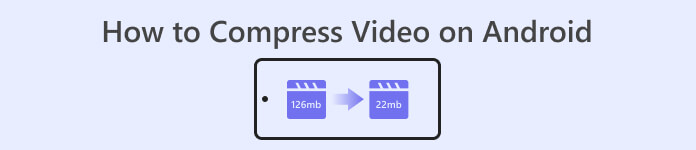
Dio 1. Kako komprimirati video na Androidu
1. Compressor Video Size Compressor
Tražite li dobro traženi video kompresor na svom Android uređaju? Compress Video Size Compressor je alat koji će vam nesumnjivo zazvoniti na pamet. Sudeći po nazivu, ovaj uslužni program za video može komprimirati veličinu videozapisa prikladnu za vaš Android uređaj. Korisnici mogu koristiti širok raspon kompatibilnih video spremnika na svojim videozapisima. Mogu koristiti MP4, MKV, 3GP, MTS, MPG, WMV, M4V, VOB, FLV, MOV, MPEG, AVI i još mnogo toga. Ovaj je alat jedinstven kao alat za kompresiju videa jer može ručno komprimirati video unosom točnog broja veličina datoteka koje korisnici trebaju za svoj video. Ova je značajka povoljna za korisnike kojima je potreban točan broj veličina videodatoteka kada pohranjuju svoje videozapise na Android. Provjerite navedenu metodu u nastavku kako upravljati ovom aplikacijom.
Ključne značajke
◆ Dolazi s postupkom skupne kompresije.
◆ Korisnici mogu odabrati prilagođenu rezoluciju za svoj video.
◆ Može izravno spremiti video na vaš Android uređaj ili aplikaciju Galerija.
Korisnički vodič:
Korak 1. Idite u Trgovinu Play i pristupite aplikaciji Compress Video Size Compressor tako da je potražite u traci za pretraživanje. Dodirnite ikonu Instaliraj da biste je preuzeli na svoj uređaj.
Korak 2. Pokrenite aplikaciju na svom Android uređaju i dodirnite gumb Import kako biste dodali video koji trebate komprimirati.
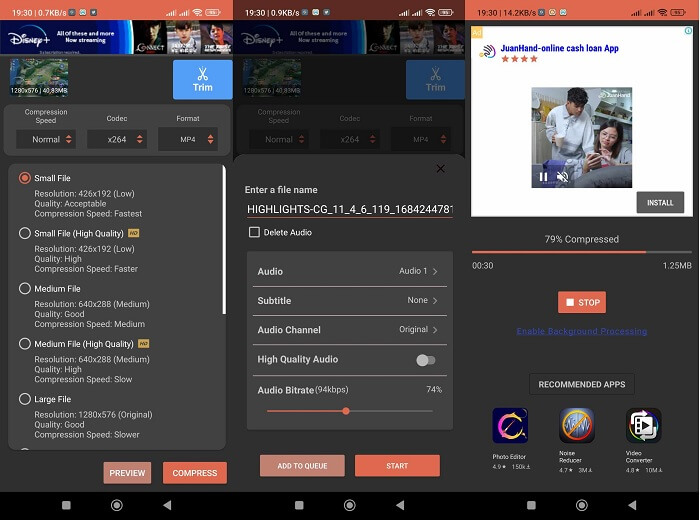
Korak 3. Kada odaberete video, alat će ga analizirati i ponuditi različite opcije za komprimirane videozapise. Odaberite male datoteke koje zadržavaju prihvatljivu kvalitetu videa.
Korak 4. Dodirnite compress i spremite videosnimku na svoj uređaj. Možete također odabrati opciju koja će izbrisati izvornu, veću datoteku.
Pros
- S ovom aplikacijom moguća je kompresija visoke i niske kvalitete.
- Dolazi s ugrađenim video playerom za reprodukciju komprimiranih videozapisa.
- Korisnici mogu izravno dijeliti videozapise s ovom aplikacijom.
- Dolazi s HEVC kodecima.
- Ovaj alat ima unaprijed definirane postavke video kompresije.
- Korisnici mogu kompresirani video usporediti s izvornom datotekom.
Protiv
- Previše oglasa na sučelju.
- Morat ćete se poslužiti njegovim premium planovima da biste uživali u naprednim značajkama kompresije.
2. FVC besplatni video kompresor
Trebate li pouzdan alat za komprimiranje videa s vašeg Android uređaja? FVC Free Video Compressor je alat koji biste trebali isprobati. Ova web-aplikacija dovoljno je fleksibilna za korisnike koji žele izbjeći instaliranje aplikacija za komprimiranje videoisječaka na Androidu. Pouzdan je alat koji vas može osloboditi potrebe instaliranja aplikacija na uređaj, jer radi u web-preglednicima na računalu. Ovaj alat može prilagoditi bitrate, sample rate, frame rate, glasnoću i rezoluciju datoteke kako bi smanjio ili komprimirao njezinu veličinu. Također je kompatibilan s raznim video-kontejnerima, uključujući MP4, MKV, AVI, MOV i druge. Nema ograničenja u njegovom API-ju; aplikaciji možete pristupiti besplatno. Ono što ovaj alat izdvaja od sličnih jest to što izlazna datoteka nema vodeni žig. Stoga ovaj alat možete koristiti kao alternativnu metodu umjesto različitih aplikacija koje mogu komprimirati videozapise na Androidu.
Ključne značajke
◆ Radi na Chromeu, Firefoxu, Mozilli, Operi Mini i drugim web preglednicima.
◆ Dolazi s klizačem za ručno smanjenje video datoteka.
◆ Dolazi sa značajkom skupne kompresije.
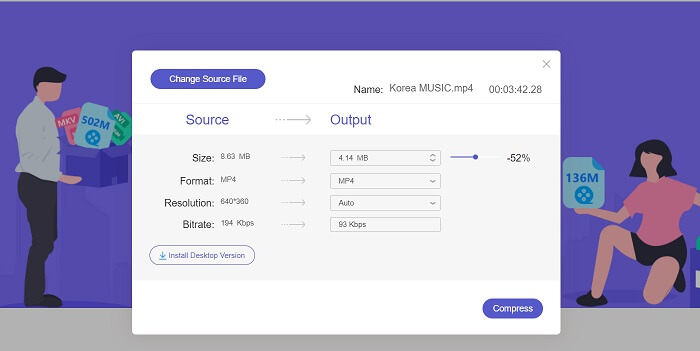
Korak 1. Pristup mrežnom alatu
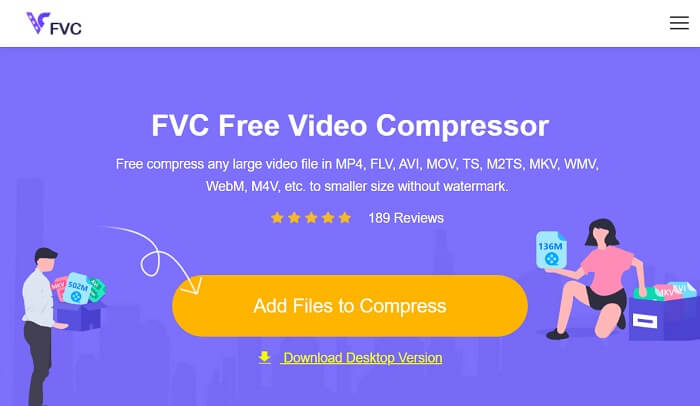
Početni korak za komprimiranje video datoteka preuzetih s Android uređaja je pristup FVC Free Video Compressoru. Aplikaciju možete pretraživati pomoću preglednika Chrome, Firefox, Opera Mini ili ugrađenog preglednika. Pronađite glavnu stranicu aplikacije iz rezultata pretraživanja i pristupite njezinoj glavnoj stranici.
Korak 2. Uvezite videozapis
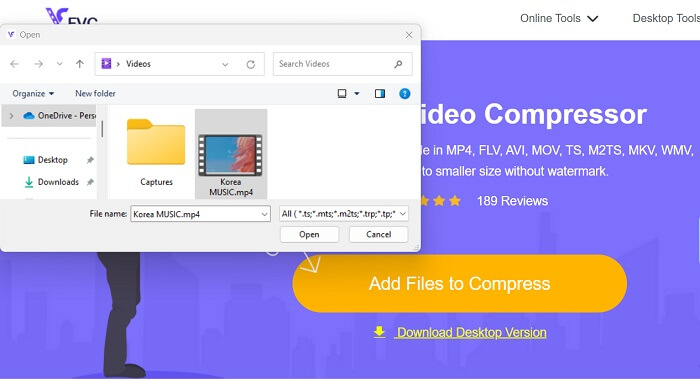
Kako biste uvezli videosnimku koju trebate komprimirati, pritisnite Add Files to Convert, čime ćete otvoriti mapu svog uređaja. Odaberite videosnimku koju morate komprimirati i kliknite Open kako biste uvezli svoje datoteke.
Korak 3. Smanjite veličinu video datoteke
Zatim će se na zaslonu pojaviti dijaloški okvir. Povucite klizač kako biste odabrali točan postotak smanjenja veličine datoteke. Pritisnite gumb Compress da biste smanjili veličinu datoteke. Izlaznu datoteku možete provjeriti na svom računalu i dvokliknuti na nju kako biste reproducirali i pregledali komprimirani video.
Pros
- Može komprimirati 4K videozapise.
- Korisnici također mogu smanjiti veličinu datoteke 3D videa.
- Aplikacija štiti privatnost vaših video datoteka.
- Video možete komprimirati bez vodenog žiga na izlaznom videu.
- Dolazi s brzinom kompresije od 30x.
- Možete jednostavno promijeniti izvornu datoteku bez zatvaranja aplikacije.
Protiv
- Oslanja se na brzinu interneta.
Dio 2. Komprimirajte Android Video na računalu
Tražite li učinkovit alat za komprimiranje video datoteka na svom uređaju? Uvijek možete koristiti Video Converter Ultimate za smanjivanje i prilagodbu veličine video datoteka na računalu. Ova aplikacija je kompatibilna i dostupna na Macu i Windowsu, pa je možete nabaviti na bilo kojem uređaju. Osim toga, podržava širok raspon video formata, uključujući MP4, MOV, MKV, WebM, AVI i druge. Dolazi s klizačem pomoću kojeg korisnici mogu komprimirati određeni postotak veličine video datoteke bez skraćivanja trajanja videa. Također, ova aplikacija bez poteškoća obrađuje 4K videozapise. Koristi naprednu tehnologiju za obradu i komprimiranje vaših videa. Sposobnost ovog alata da smanji veličinu datoteka bez ograničenja i restrikcija čini ga jedinstvenim kompresorom. Pogledajte i procijenite detaljni vodič za korištenje ovog alata.
Korak 1: Instalirajte aplikaciju
Korisnici najprije trebaju preuzeti Video Converter Ultimate na svoje stolno ili prijenosno računalo. Kako biste aplikaciju lakše instalirali, kliknite ikonu Free Download prikazanu u nastavku.
Besplatno preuzimanjeZa Windows 7 ili novijiSigurno preuzimanje
Besplatno preuzimanjeZa macOS 10.7 ili novijiSigurno preuzimanje
Korak 2: Uvezite videosnimku
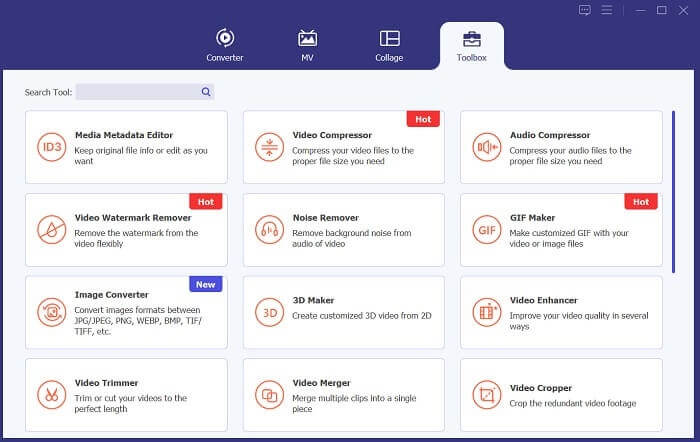
Sljedeći korak je uvoz vašeg videa u sučelje aplikacije. To možete učiniti tako da otvorite sučelje alata i kliknete opciju Toolbox. S popisa odaberite značajku Video Compressor i pritisnite ikonu +.
Korak 3: Komprimirajte video
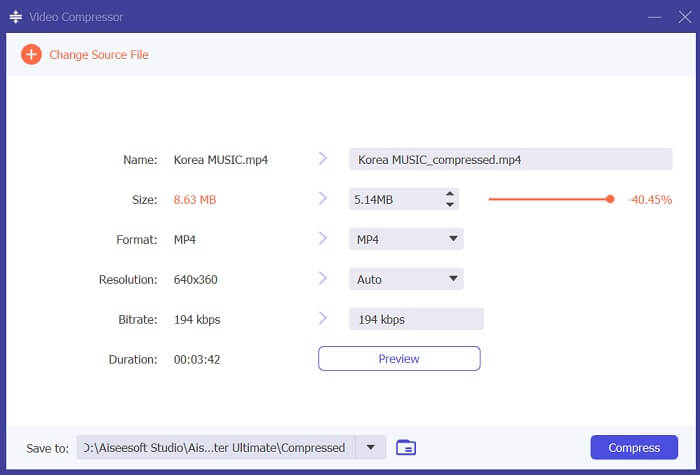
Zatim ćete moći pristupiti mapama na računalu. Odaberite video koji trebate pretvoriti i dodirnite Open da biste ga uvezli. Pojavit će se nova stranica na kojoj ćete moći smanjiti veličinu datoteke. Povucite klizač ili promijenite parametre videa, kao što su rezolucija, format i bitrate. Pritisnite opciju Compress da biste pokrenuli postupak.
Daljnje čitanje:
Kako komprimirati video za Twitter? 4 pouzdane metode
3 izvrsne metode za rezanje videa na Androidu
Dio 3. Često postavljana pitanja o sažimanju videa za Android
Kako zipovati video na svom Samsung telefonu?
Za komprimiranje videozapisa na vašem Samsung telefonu možete koristiti aplikaciju za upravljanje datotekama koja podržava komprimiranje datoteka. Najprije pronađite videodatoteku koju želite komprimirati u pohranu telefona. Zatim odaberite datoteku i odaberite želite li je komprimirati ili komprimirati. Također možete odabrati format kompresije i razinu kompresije. Nakon što je videodatoteka komprimirana, možete je podijeliti ili pohraniti u pohranu svog telefona sa smanjenom veličinom datoteke.
Zašto ne mogu poslati veliki video putem e-pošte?
Možda nećete moći poslati veliki video putem e-pošte iz nekoliko razloga. Prvo, davatelji usluga e-pošte često imaju ograničenja veličine datoteka priloženih e-porukama. Ova značajka sprječava preopterećenje njihovih poslužitelja i osigurava brzu i učinkovitu isporuku e-pošte. Osim toga, neki klijenti e-pošte mogu ograničiti vrste videodatoteka koje se mogu priložiti, poput videozapisa u određenim formatima. U tim ćete slučajevima možda morati upotrijebiti drugu metodu za dijeljenje svog videozapisa, kao što je prijenos na uslugu za dijeljenje datoteka i slanje veze primatelju.
Hoće li komprimiranje videa na Androidu smanjiti njegovu kvalitetu?
Sažimanje videozapisa na Androidu može izgubiti kvalitetu, osobito ako odaberete visoke razine kompresije. Međutim, postoje načini da se gubitak kvalitete svede na najmanju moguću mjeru, poput odabira ispravnih postavki kompresije i upotrebe aplikacije za kompresiju visoke kvalitete.
Zaključak
Sve u svemu, ako ste korisnik Androida koji često snima videozapise, možda ste primijetili da oni zauzimaju znatan prostor na vašem uređaju. Ovakva situacija može biti frustrirajuća jer ograničava količinu sadržaja koji možete pohraniti i može usporiti rad vašeg uređaja. Razumijevanje kako komprimirati video na Androidu može vam pomoći u očuvanju prostora za pohranu i poboljšanju performansi mobilnog uređaja. Uz odgovarajuće alate i tehnike, poput onih navedenih gore, ovaj postupak možete obaviti bez žrtvovanja kvalitete svojih videa.
-
 Najlakši načini kako ubrzati video na svojim Android uređajima [2023]
 Jeste li znali da možete ubrzati video na svom Androidu? Dakle, ako želite znati kako ubrzati video na svom Android telefonu, pročitajte ovaj tekst.
-
 Kako izrezati video na Androidu da biste obnovili svoj videosadržaj
 Ne'ne dopustite da vas preveliki video uspori! Naučite kako promijeniti veličinu videozapisa na Androidu pomoću našeg vodiča korak po korak.
-
 Vodič za popravak videozapisa koji se ne reproduciraju na Android telefonima
 Želite znati razloge zašto se videozapisi na vašem android uređaju ne mogu'reprodukovati? Ako je tako, da biste sami riješili problem, možete nastaviti čitati i saznati više.
