


 Video Converter Ultimate
 Snimač zaslona
 Video popravak
Fotor Ukloni pozadinske značajke i pregled poboljšanja
Kada se bavite uređivanjem fotografija, uklanjanje pozadine i alati za poboljšanje fotografija uobičajeni su u toj oblasti; oni mogu podići kvalitetu vašeg rada i učiniti da se istakne. Tada se na sceni uređivanja fotografija pojavio Fotor, s naglaskom na uklanjanje pozadine i poboljšanje fotografija. Česta pitanja, poput toga je li Fotor siguran, prirodno se nameću. U ovoj recenziji detaljno proučavamo višeslojne značajke Fotora i razotkrivamo njegove mogućnosti. Istodobno krećemo na put istraživanja značajne alternative koju biste također mogli razmotriti. Nastavite čitati ovu Fotor recenziju kako biste otkrili mogućnosti Fotora u uklanjanju pozadine i poboljšavanju fotografija te odlučili je li to doista pravi alat za vaše potrebe.

Dio 1. Fotor recenzija - Uklanjanje pozadine i pojačivač fotografija
Pristup svestranim i snažnim alatima za uređivanje ključan je u dinamičnom svijetu digitalne fotografije i kreativnog dizajna. Fotor, sveobuhvatan program za uređivanje fotografija, ističe se u pružanju alata potrebnih korisnicima za navigaciju u ovom svijetu koji se neprestano razvija. Istražite njegove mogućnosti, posebice značajke koje se ističu kao što su Background Remover i Photo Enhancer, kako biste već danas poboljšali svoje kreativno putovanje!
Fotor
Fotor, svestrani alat za uređivanje fotografija, poznat je po svom jednostavnom sučelju i impresivnim mogućnostima poboljšavanja slika i uklanjanja pozadine. Njegov Background Remover omogućuje korisnicima da bez napora uklone pozadine i unaprijede svoje slike. Uparivanje s njihovim photo enhancerom donijet će vam savršen rezultat visoke kvalitete koji tražite. Ovaj alat nije namijenjen samo klasičnom uređivanju fotografija, nego nudi i mnoštvo predložaka kako bi se i neprofesionalci mogli lako pokrenuti ili raditi na svojim projektima. Ako tražite softver koji sadrži gotovo sve osnovne alate, uz mogućnosti uklanjanja pozadine i poboljšavanja vaših fotografija, Fotor bi mogao biti jedan od vaših izbora.
Najbolje za
Fotor je idealan za pojedince i tvrtke koji traže intuitivnu platformu za poboljšanje svojih fotografija, posebno kada je precizno uklanjanje pozadine ključno za uglađen konačni rezultat. Ispod su neke od mogućnosti koje Fotor zapravo ima i za koje se najbolje koristi:
◆ Pojedinci i poduzeća. Ovaj je intuitivan softver osmišljen i za profesionalce i za početnike, što ga čini savršenim rješenjem koje omogućuje pojedincima ili tvrtkama da lako stvaraju i unapređuju projekte zahvaljujući njegovom jednostavnom sučelju i funkcijama.
◆ Alati za poboljšavanje slika. Fotor je prepun predložaka i filtera koji pomažu da vaše fotografije izgledaju u što boljoj mogućoj kvaliteti. Dodatno, Fotor uklanja zamućenja i nedostatke korištenjem funkcija za poboljšavanje fotografija, što ga čini idealnim alatom kod problema s kvalitetom slika.
◆ Uklanjanje pozadine. Fotorova preciznost u uklanjanju pozadine nedvojbeno je pohvalna jer vam pruža vrlo točne rezultate u usporedbi s drugim programima na internetu.
◆ Uređivanje fotografija. Sastoji se od alata koji su nužni za rad na uređivanju fotografija i sličnim zadacima. Zbog toga je Fotor često prvi izbor softvera kada se radi o obavljanju više različitih zadataka pri uređivanju fotografija.
Određivanje cijene
Model određivanja cijene: Basic i Pro
Fotor Basic: Besplatan
Fotor Pro: $8.99/mjesečno
◆ Skupna obrada slike.
◆ Uređivač i pojačivač slika.
◆ Dostupnost na više uređaja.
◆ Unaprijed izrađeni predlošci.
◆ Sredstvo za uklanjanje pozadine.
◆ Alat za kolaž fotografija.
◆ pretvarač RAW datoteka.
◆ Napredni filtri i efekti.
◆ Izrađivač dizajna.
Koraci za korištenje Fotor Photo Enhancer
Korak 1. Posjetite web-stranicu Fotor Photo Enhancer i učitajte fotografiju koju želite poboljšati u polje Enhance Photo Now.
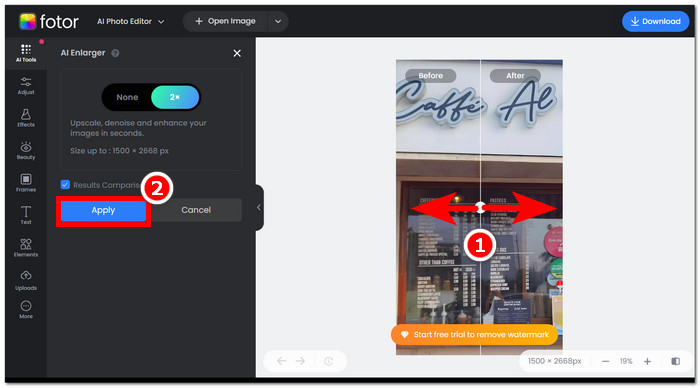
Korak 2. Fotor će automatski obraditi vašu sliku. Sve što vam preostaje jest usporediti prikaz prije i poslije povlačenjem kursora–strelice slijeva nadesno.
Korak 3. Kada ste zadovoljni, kliknite Apply kako biste spremili napredak na vašoj fotografiji.
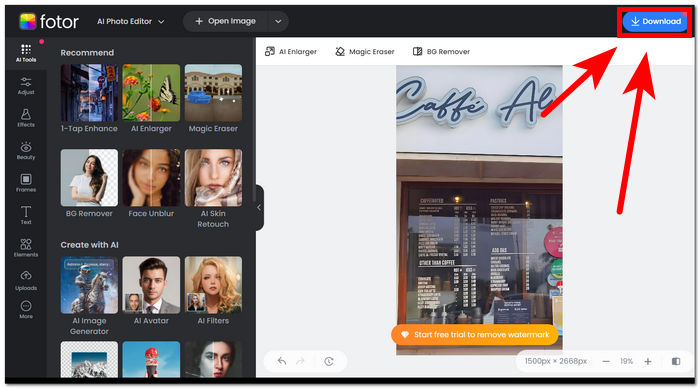
Korak 4. Kada spremate sada poboljšanu sliku, kliknite na Download, koji se nalazi u gornjem desnom kutu zaslona.,
Koraci za korištenje Fotor Background Removera
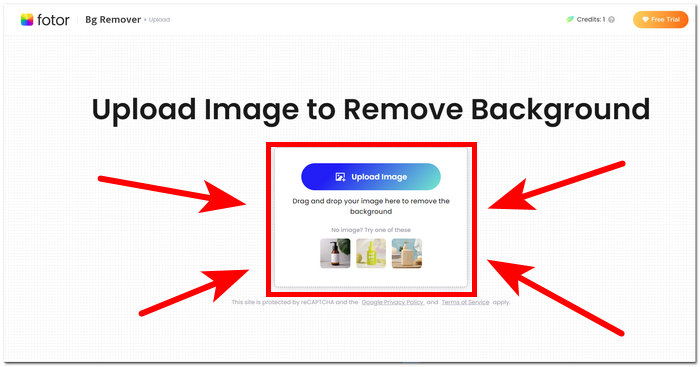
Korak 1. Posjetite web-stranicu Fotor Background Remover i učitajte fotografiju kojoj želite ukloniti pozadinu u polju Upload Image.
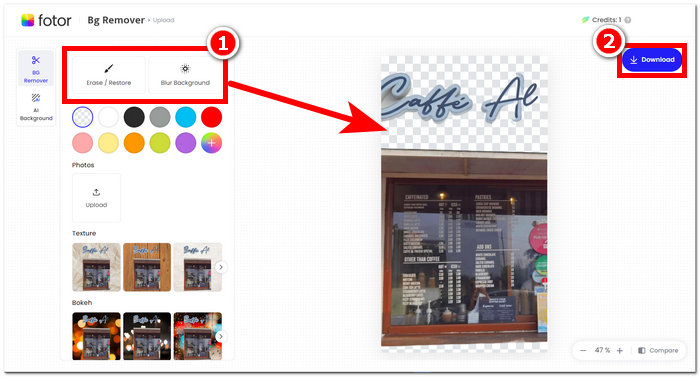
Korak 2. Kada se vaša fotografija učita u softver, pozadina će automatski biti uklonjena s učitane fotografije.
Korak 3. Pozadinu možete ručno brisati/vraćati eksperimentiranjem s alatom Erase/Restore prema vlastitim željama; nalazi se u gornjoj lijevoj navigaciji.
Korak 4. Kada ste zadovoljni rezultatom, kliknite na Download, koji se nalazi u gornjem desnom dijelu zaslona, kako biste je spremili na svoje računalo.
Da sumiramo recenziju o Fotoru, njegove karakteristike su značajno prevelike u polju uređivanja fotografija. Dakle, ovo će vam omogućiti stvaranje prekrasnih projekata s lakoćom. Osim što se sastoji od svih osnovnih alata za rukovanje fotografijama, naglasak na poboljšanju fotografija i uklanjanju pozadine je neprimjetan, jer je prikladno jednostavno kretati se sučeljem. Međutim, od svih njegovih značajki koje su dostupne, u značajkama i funkcionalnosti Fotora možete u potpunosti uživati samo kada se pretplatite na njegov mjesečni plan.
Dio 2. Fotor alternativa za uklanjanje pozadine i fotografija visoke kvalitete
FVC se proširio razvijajući alate i softver koji odgovaraju potrebama kreatora u industriji vizualnog uređivanja. Dva od tih alata su FVC Free Background Remover i FVC Free Image Upscaler; ova dva alata imaju vlastite web-domaine kako bi se jasno razlikovala njihova namjena i izbjegla zbrka kod korisnika. Nasuprot tome, softverska rješenja često stavljaju sve alate za različite zadatke u jedan program, što zadatak upoznavanja sa softverom čini prilično dugotrajnim. Osim toga, ovi FVC alati pomažu kreatorima da besplatno koriste njihove funkcije, uz manje gnjavaže pri preuzimanju i instalaciji. U nastavku su navedeni koraci za korištenje FVC alata za uklanjanje pozadine i povećavanje slike.
Koraci za korištenje FVC Free Background Remover alata:
Korak 1. Posjetite web-stranicu FVC Free Background Remover i Upload učitajte fotografiju s koje želite ukloniti pozadinu.
Korak 2. FVC AI automatski detektira i uklanja pozadinu s vaše fotografije.
Korak 3. Kada je proces dovršen, možete Download preuzeti svoju fotografiju.
Koraci za korištenje funkcija alata FVC Free Image Upscaler:
Korak 1. Učitajte svoju fotografiju na web-stranicu FVC Image Upscaler.
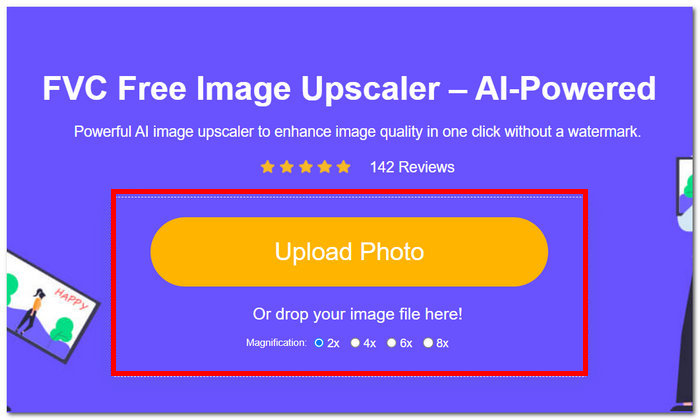
Korak 2. Odaberite željenu Magnification povećanje i samo kliknite na nju.
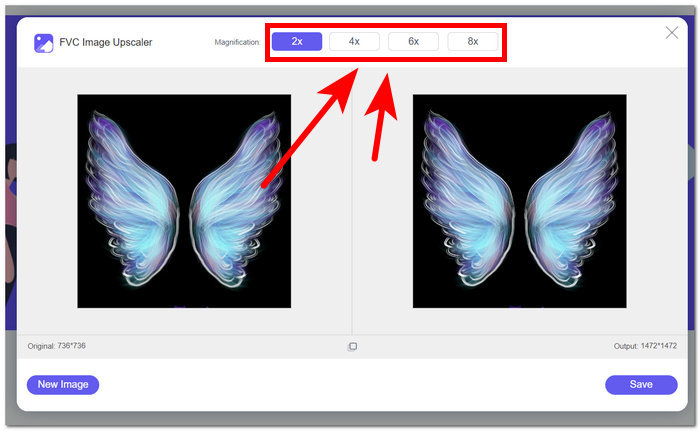
Korak 3. Alat će automatski obraditi fotografiju, a razliku možete vidjeti na temelju odabranog povećanja.
Korak 4. Vaša sada uvećana fotografija spremna je za spremanje. Samo kliknite na Download.
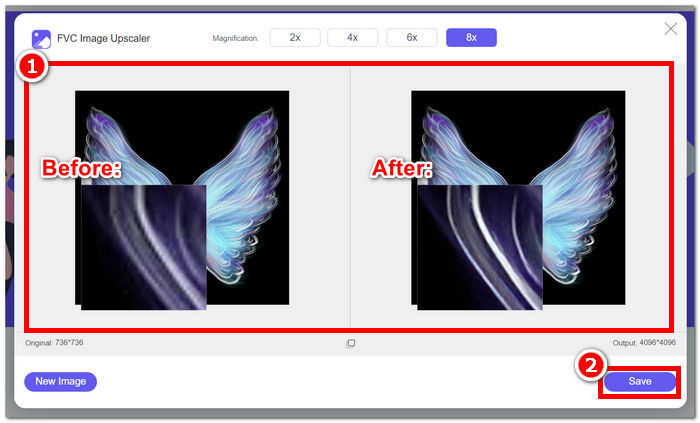
Alati Fotor i FVC mogu proizvesti rezultate iste kvalitete i točnosti kada je riječ o rukovanju uklanjanjem pozadine i povećanjem razmjera slike. Međutim, razlikuju se po dostupnosti kada su FVC alati besplatni za korištenje u bilo kojem lokalnom pregledniku, dok Fotor može imati osnovne besplatne značajke, ali su ograničene. Svakako najprije provjerite funkcionalnost i praktičnost koju vam donose i prepustite se korištenju online alata koji su brzi, učinkoviti i sigurni. FVC vam čuva leđa kako biste uštedjeli vrijeme i vratili se na vrijeme završavanju svojih projekata koji su na čekanju.
Dio 3. Često postavljana pitanja o Fotoru
Je li Fotor besplatan za korištenje?
Da, Fotor nudi besplatnu verziju svoje platforme za uređivanje fotografija, koja korisnicima omogućuje besplatan pristup osnovnim alatima. To pojedincima omogućuje korištenje bitnih značajki bez ikakvih troškova.
Koliko Fotor košta mjesečno?
Fotor nudi različite planove cijena, koji obuhvaćaju mjesečne i godišnje pretplate, s varijacijama u cijeni ovisno o uključenim značajkama. Kako bi vidjeli ažurne i točne informacije o cijenama, korisnici se potiču da pogledaju Fotorovu službenu web stranicu za pojedinosti o njihovoj trenutnoj ponudi.
Koliko traje besplatna probna verzija Fotora?
Fotor može ponuditi besplatnu probnu verziju svojih premium značajki, iako je trajanje probnog razdoblja podložno promjenama. Za najnovije informacije o trajanju besplatnog probnog razdoblja, preporučljivo je provjeriti Fotorovu službenu web stranicu.
Fotor ne radi?
Ako imate problema s Fotorom koji ne radi, razmislite o provjeri internetske veze, brisanju predmemorije preglednika ili ažuriranju aplikacije ako koristite verziju za stolno računalo. Ako problemi potraju, preporuča se da se za pomoć obratite Fotorovoj korisničkoj podršci. Oni vas mogu voditi u rješavanju tehničkih problema ili ponuditi uvid u sva moguća ažuriranja sustava.
Je li Fotor dobar program?
Da, Fotor se smatra dobrim programom za uređivanje fotografija, koji nudi korisničko sučelje prikladno i za početnike i za iskusnije korisnike. Njegove različite značajke, uključujući Background Remover, čine ga svestranim za različite potrebe uređivanja. Međutim, prikladnost Fotora ovisi o individualnim preferencijama i specifičnim zahtjevima za poboljšanje fotografija.
Zaključak
Fotor je značajan konkurent, osobito zbog svojih mogućnosti uklanjanja pozadine i poboljšavanja slika. Postao je jedan od standardnih alata pri uređivanju fotografija zahvaljujući raznolikosti funkcija i sučelju koje sadrži gotovo sve osnovne alate potrebne u tom području. Međutim, uvažavajući raznolike potrebe korisnika, istraživanje alternativa poput FVC pruža širu perspektivu. Bez obzira odlučite li se za Fotor ili njegove alternative, ključno je da svojem kreativnom putovanju pridružite alate koji su usklađeni s vašom vizijom. Svakako isprobajte i maksimalno iskoristite svaki alat kako biste pronašli najbolje rješenje za svoje projekte uklanjanja pozadine i poboljšavanja fotografija.
-
 Kako ukloniti pozadinu sa slike pomoću GIMP-a
 Započnite s GIMP-om i korak-po-korak procesom uklanjanja pozadine sa slika. Otkrijte učinkovite načine za stvaranje prozirnih slika pomoću GIMP-a danas!
-
 Kako povećati veličinu slike online i offline
 Otkrijte najlakši način za povećanje veličine slike bez gubitka kvalitete. Pogledajte naše alate za promjenu veličine i softver kako biste osigurali optimalnu kvalitetu svojih slika.
-
 Kako promijeniti veličinu slike u Photoshopu: Vodič koji morate znati
 Naučite korak po korak postupak kako promijeniti veličinu slike u Photoshopu. Slijedite ovaj vodič kako biste učinkovito i kvalitetno promijenili veličinu svojih slika!
