


 Video Converter Ultimate
 Snimač zaslona
 Video popravak
Kako pretvoriti RAR u MP4: Ispravno raspakirajte i promijenite RAR datoteke u MP4
Ako ste tehnički potkovana osoba, znate da su RAR i MP4 datoteke česte u svakodnevnoj upotrebi. U osnovi, RAR datoteke su poput komprimiranih paketa koji mogu sadržavati svakakve stvari – videozapise, slike, što god poželite. No, jeste li se ikad zapitali o pretvaranju RAR datoteke u MP4 radi bolje kompatibilnosti? To je pitanje koje se javlja kada s interneta preuzmete filmove označene kao RAR ili dobijete videozapise zapakirane u RAR putem e‑pošte, zar ne? Dakle, da biste ih prebacili u MP4, morate najprije raspakirati ili „unzipati” RAR, a zatim te videozapise pretvoriti u MP4 format. Stoga ostanite uz ovaj tekst kako biste otkrili dva jednostavna načina, offline i online, kojima možete ostvariti ovu pretvorbu RAR u MP4.

Dio 1. Pretvorite RAR u MP4 na mreži pomoću ezyZip-a
Počevši od preporučenog mrežnog pretvarača koji može učinkovito rukovati RAR datotekama. Ezyzip je vaš saveznik kad god ste u nevolji s konverzijama datoteka. To je najbolji online izbor za izdvajanje MP4 datoteka iz RAR arhive na jednostavan način. Nećete morati zatrpati svoj računalni uređaj dodatnim softverom za pretvaranje MP4. To je zato što ezyZip radi izravno u vašem pregledniku, štedeći vas od problema s instalacijom. Nadalje, ovaj alat nije ograničen samo na besplatnu online konverziju RAR datoteke u MP4 jer podržava i niz drugih opcija ekstrakcije i konverzije datoteka.
Ono što ezyZip izdvaja od ostalih online pretvarača je njegov jedinstveni pristup. Čuva vaše datoteke sigurnim i zdravim obrađujući cijelu stvar lokalno unutar vašeg preglednika. To znači da nije potrebno zamorno učitavanje ili preuzimanje na vanjske poslužitelje, što rezultira munjevito brzim konverzijama. Nevjerojatno, možete zaboraviti na ograničenja veličine kada koristite ezyZip jer ovaj alat ne nameće nikakva ograničenja. To također znači da vaša privatnost ostaje netaknuta jer vaše datoteke nikada ne napuštaju vaš preglednik! Nećemo dopustiti da ovaj slajd prođe, a da vas ne naučimo procesu ezyZipa za pretvaranje vaših datoteka iz RAR u MP4. Stoga je u nastavku dan vodič.
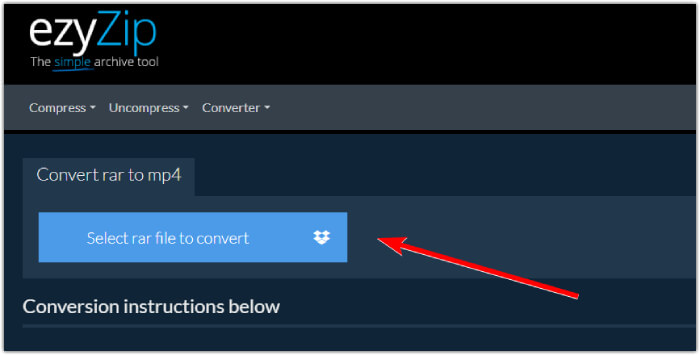
Korak 1. Otvorite službenu web-stranicu pretvarača i uvezite svoju RAR datoteku klikom na gumb Select rar file to convert.
Korak 2. Kada se datoteke učitaju, alat će ih automatski pretvoriti za vas unutar RAR arhive. Sada kliknite gumb Save kako biste spremili svaku MP4 datoteku na željeno odredište.
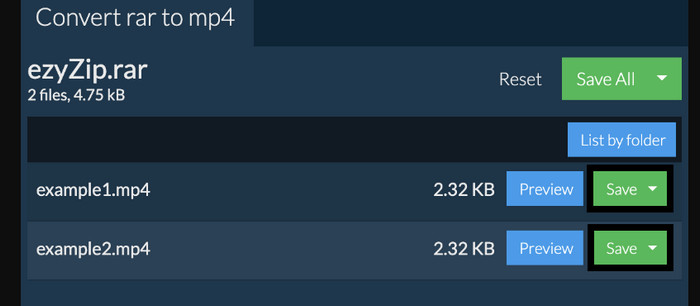
Korak 3. Ako je, u slučaju, gumb Save onemogućen, trebate znati da preglednik koji koristite nije podržan od strane pretvarača. U suprotnom, kada se datoteke uspješno spreme, dobit ćete mogućnost pregledavanja pretvorenih datoteka.
Dio 2. Pretvorite RAR u MP4 izvan mreže s WinRAR-om
Postoje sjajni izvanmrežni načini pretvaranja RAR-a u MP4 pomoću WinRAR-a. WinRAR je popularan softver dizajniran posebno za korisnike Windowsa. To je softver koji nudi niz korisnih značajki za upravljanje komprimiranim datotekama. Nadalje, ovaj program pojednostavljuje postupak raspakiranja ili dekompresije RAR datoteka kako bi se mogle izdvojiti i pristupiti im. Štoviše, WinRAR nastavlja jer također pruža mogućnost pretvaranja RAR datoteka u različite video formate poput MP4 ili M4V. Ova se funkcionalnost pokazala neprocjenjivom za korisnike koji trebaju raditi s multimedijskim sadržajem pohranjenim u RAR arhivama. Stoga, ako želite znati kako raspakirati i promijeniti RAR datoteke u MP4 pomoću WinRar-a, nastavite čitati za upute korak po korak u nastavku.
Korak 1. Najprije preuzmite popularan stručni program za RAR na svoje računalo. Prilikom preuzimanja koristite pouzdan izvor. Zatim ga, nakon instalacije, brzo pokrenite kako biste započeli proces pretvorbe.
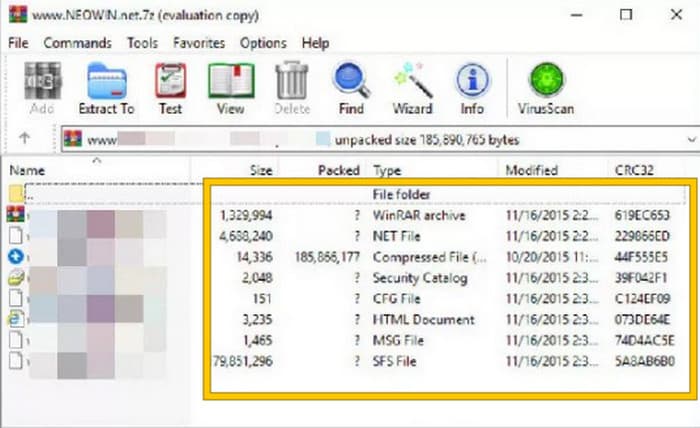
Korak 2. Kada se program pokrene, možete odmah otvoriti ili učitati RAR datoteku koju želite pretvoriti u MP4. Znate da je datoteka učitana jer će se prikazati u središtu sučelja.
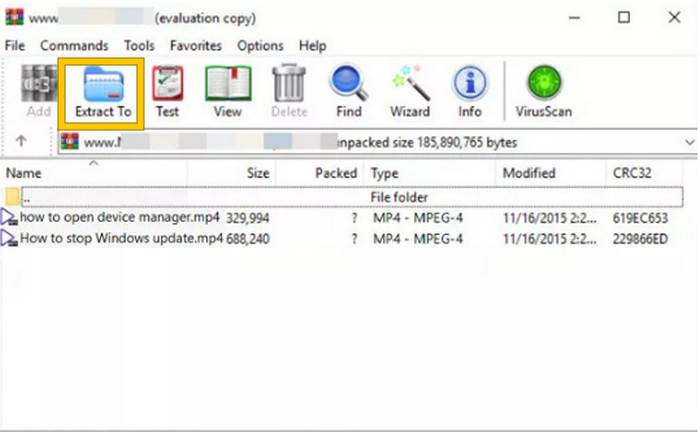
Korak 3. Na kraju, da biste započeli pretvorbu ili raspakiravanje, kliknite gumb Extract To na popisu kartica izbornika. Kada završite, možete izravno otvoriti pretvorene datoteke u sučelju.
Dio 3. Dodatni savjet: Najbolji način za pretvaranje bilo kojeg audio/video zapisa u MP4 na mreži
Dopustite nam da vam damo bonus savjet uz koji možete pretvoriti bilo koju video ili audio datoteku u MP4 na najbolji i najbrži način! Upoznajte FVC Free Video Converter Online, pretvarač koji vam omogućuje iznimno jednostavno i potpuno besplatno mijenjanje video i audio datoteka u različite formate poput MP4. Osim toga, možete brzo prebaciti svoje visokokvalitetne (HD) videozapise u popularne formate, a da pritom zadržite njihovu izvornu kvalitetu i oštrinu. Štoviše, svidjet će vam se i njegov munjevito brz rad, koji vam omogućuje da pretvorite više datoteka odjednom u vrlo kratkom roku!
Ima još! Ovaj FVC besplatni video konverter na mreži također vam omogućuje podešavanje vaših video zapisa i zvuka do mile volje. To je zato što vam ovaj pretvarač omogućuje podešavanje stvari kao što su razlučivost, broj sličica u sekundi, brzina prijenosa, pa čak i postavke zvuka kao što su glasnoća i brzina prijenosa prema vašim željenim postavkama. To znači da možete prilagoditi svoje medije baš onako kako vam se sviđa i izvesti ih lako. Stoga, ako se pitate kako pretvoriti svoje video ili audio datoteke u MP4 online, slijedite jednostavne korake prikazane u nastavku.
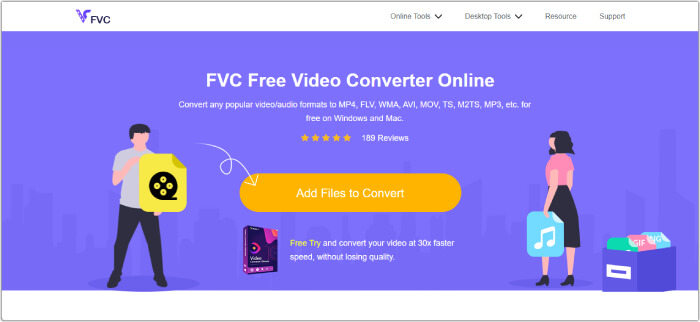
Korak 1. Započnite proces posjetom službenoj web-stranici alata FVC Free Video Converter Online. Kada stignete tamo, kliknite gumb Add Files to Convert kako biste preuzeli pokretač i učitali početnu datoteku.
Korak 2. Kada se datoteka učita, možete dodati još medijskih datoteka klikom na gumb Add File u glavnom radnom prostoru. Zatim ih postavite na MP4 tako da kliknete na datoteke, a potom odaberete MP4 format pri dnu.
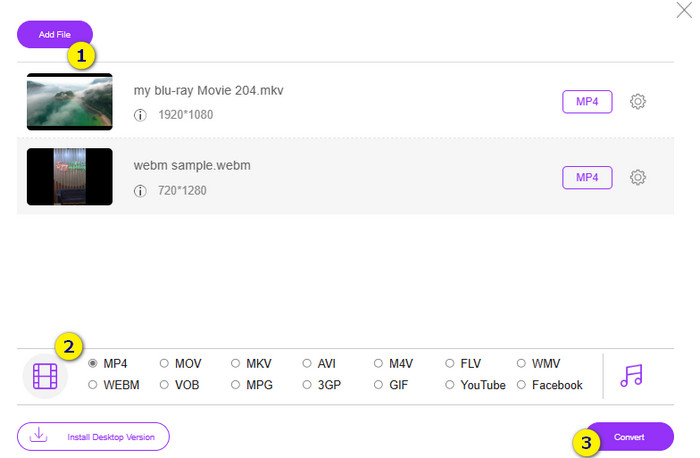
Korak 3. Nakon toga vrijeme je za pokretanje brze i skupne pretvorbe klikom na gumb Convert pri dnu.
Daljnje čitanje:
MOV VS MP4 – Koji format odabrati?
Najbolji MP4 uređivač za Windows i Mac u 2025.
Dio 4. Često postavljana pitanja o RAR i MP4 pretvorbi
Što je RAR datoteka?
RAR datoteke komprimirane su u format arhivske datoteke. Omogućuje pohranjivanje više datoteka u jedan spremnik uz istovremeno smanjenje njihove ukupne veličine.
Kako pretvoriti RAR u MP4 na Macu?
Da biste pretvorili RAR u MP4 na Macu, možete koristiti softver za video‑pretvorbu kao što je Unarchiver za izdvajanje sadržaja iz RAR arhive. Zatim se sve kompatibilne video datoteke unutar izdvojenog sadržaja mogu pretvoriti u MP4 format pomoću snažnog pretvarača. Za to možete koristiti FVC Video Converter Ultimate.
Može li RAR datoteka sadržavati videozapise?
RAR datoteka je poput zip mape koja može sadržavati bilo koju vrstu datoteke. Dakle, da, RAR datoteka može sadržavati videozapise.
Zaključak
Ovaj je tekst savršen za vaš zadatak pretvorbe RAR u MP4 jer vam pruža najbolje načine da to učinite na svom uređaju. Srećom, tu je i najbolji online pretvarač video i audio datoteka uz koji ćete raditi kao profesionalac!
-
 Načini komprimiranja videa na mreži za smanjenje veličine video datoteke
 Ako tražite video kompresore na mreži, ne pronađite ih više jer mi ćemo vas pokriti! Ovdje su neki od najprikladnijih alata koje možete koristiti.
-
 Kako komprimirati MP4 video u manju veličinu
 MP4 video je prevelik za prijenos? Želite smanjiti veličinu videozapisa? Evo 3 učinkovita načina za sažimanje MP4 datoteke u manju veličinu bez ograničenja.
-
 Kako komprimirati videozapise besplatno / Isprobajte ovih 7 mrežnih videokompresora
 Pročitajte i nabavite 7 načina za besplatno komprimiranje videozapisa na računalu ili telefonu. Velike videozapise s lakoćom možete smanjiti u male datoteke za e-poštu, Twitter, Instagram, YouTube, WhatsApp i još mnogo toga.
