


 Video Converter Ultimate
 Snimač zaslona
 Video popravak
Kako komprimirati PDF datoteke za e-poštu 3 učinkovita načina za odabir
Doista, slanje velikih datoteka e-poštom može biti gnjavaža. Štoviše, može vam stvoriti probleme ili uopće ne biti isporučeno. Također, mnogi pružatelji usluga e-pošte ograničavaju privitke na određene veličine datoteka, što je lako premašiti složenim PDF-om. To je osobito točno za PDF-ove s mnogo slika ili opsežnim sadržajem. Kako bi to zaobišli, većina ljudi u takvoj situaciji pribjegava servisima za razmjenu datoteka kao što su Dropbox ili Google Drive. Međutim, gotovo zaboravljaju jedan zgodan trik, a to je kompresija datoteka. Mnogi besplatni mrežni alati to mogu učiniti, a neki su prilično popularni. No, kako učinkovito komprimirati PDF za slanje e-poštom? Upravo ćete to naučiti dok nastavite čitati sadržaj u nastavku.

Dio 1. Koja je najbolja veličina PDF-a za e-poštu
Evo činjenice: ne postoji magični broj za idealnu veličinu PDF-a za e-poštu. Ono na što treba pripaziti je ograničenje privitaka vaše platforme za e-poštu. Popularne usluge ograničavaju privitke na oko 20 MB, što može biti iznenađujuće lako dostupno, posebno s PDF-ovima koji sadrže puno slika ili su vrlo dugi dokumenti. Stoga, ako je vaš PDF veći od navedenog ograničenja od 20 MB, vaša e-pošta vjerojatno neće biti poslana, a dobit ćete poruku o pogrešci. Ipak, umjesto da težite određenoj veličini ili najboljoj veličini PDF-a za e-poštu, najbolje je igrati na sigurno i držati ga ispod 20 MB. Na taj način možete biti sigurni da će se priložiti i uspješno poslati.
Dio 2. Jednim klikom za komprimiranje PDF datoteka za e-poštu
Evo odličnog i brzog načina za komprimiranje datoteka za e-poštu. Pripremite se isprobati ovaj besplatni alat pod nazivom FVC Free PDF Compressor, koji može smanjiti vaše glomazne PDF datoteke bez njihovog narušavanja. Budući da većina servisa e-pošte dopušta privitke od oko 20 MB, PDF-ovi sa slikama ili puno teksta lako mogu dosegnuti tu granicu. Ovaj kompresor može znatno smanjiti vaš PDF, čak i ispod 100 kilobajta! Ne trebate brinuti o tome kako toliko smanjuje PDF-ove za e-poštu, jer i dalje zadržava kvalitetu datoteka. Štoviše, vjerojatno nećete ni primijetiti razliku između izvornika i smanjene verzije.
Štoviše, ovaj je nevjerojatan alat iznimno jednostavan za korištenje i može ga koristiti svatko s bilo kojom razinom stručnosti. Sve što trebate učiniti je povući i ispustiti PDF datoteku u program, a on je automatski smanjuje. Zatim, samo jednim klikom, možete spremiti manji PDF na svoje računalo. Na ovaj način možete brzo komprimirati PDF u veličinu e-pošte na mreži do veličine koja je savršena za slanje e-poštom ili učitavanje bez ikakvih vodenih žigova na konačnom dokumentu. Da biste bolje razumjeli njegov proces, pogledajte detaljne smjernice u nastavku.
Korak 1. Na njegovom glavnom sučelju kliknite karticu Add PDF File i odaberite PDF datoteku koju trebate komprimirati.
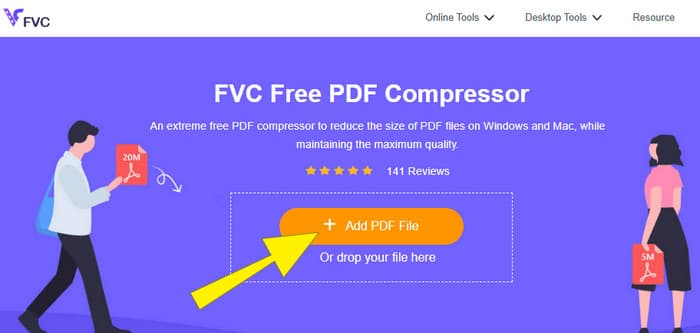
Korak 2. Dok se PDF datoteka učitava, alat istovremeno radi na njezinoj kompresiji.
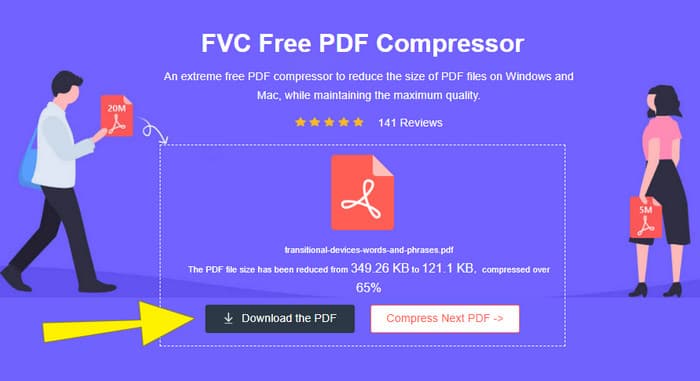
Korak 3. Kada je gotovo, kliknite gumb Download the PDF.
Dio 3. Komprimirajte PDF datoteke za e-poštu sa značajkama uređivanja
Ako više volite alat koji dolazi s funkcijama uređivanja, onda je Adobe Acrobat ono što vam treba za ovaj zadatak. Adobe Acrobat je program poznat po stvaranju, uređivanju i upravljanju PDF datotekama. To je poput snažnog kompleta alata posebno dizajniranog za rad s PDF-ovima. Jedna od njegovih korisnih funkcija je kompresija PDF-a, koju možete upotrijebiti kada imate glomazan PDF koji ne može stati u e-poruku zbog ograničenja veličine. Adobe Acrobat, koji dolazi u mrežnoj i stolnoj verziji, može vam pomoći komprimirati velike PDF datoteke za slanje e-poštom bez velikog narušavanja kvalitete. To postiže na nekoliko načina, primjerice smanjivanjem veličine slika u PDF-u ili uklanjanjem nepotrebnih fontova. Ipak, poznavajući Adobe i njegov paket, ne biste se trebali iznenaditi ako vam se njegova krivulja učenja učini strmom. Stoga u nastavku slijede koraci koji će vam olakšati postupak.
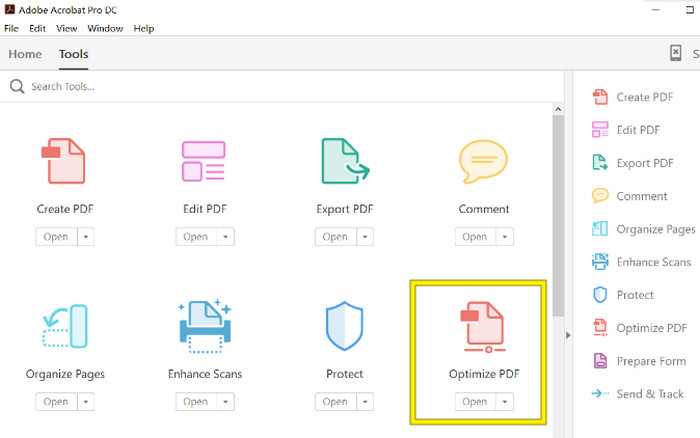
Korak 1. Pokrenite Acrobat i otvorite PDF datoteku na kojoj trebate raditi. Da biste to učinili, idite na Tools-Optimize PDF-Open.
Korak 2. Kada otvorite PDF datoteku, kliknite opciju Reduce File Size iz novog prikazanog izbornika. Zatim postavite ili upotrijebite ponuđene opcije uređivanja kako biste postigli željenu kompresiju i optimizaciju.
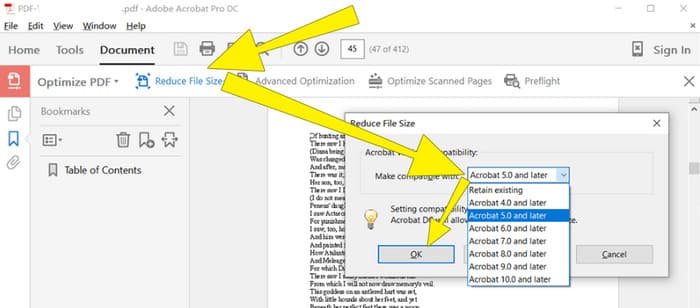
Korak 3. Nakon toga spremite komprimiranu PDF datoteku.
Dio 4. Komprimirajte PDF datoteke za e-poštu pretvaranjem
Želite naučiti novi trik kako komprimirati PDF za slanje e-poštom? Pretvorimo datoteku u JPG. Ovaj trik s pretvorbom možete savršeno izvesti pomoću PowerPointa. PowerPoint je program koji vjerojatno koristite za izradu prezentacija. Zamislite prezentaciju sa tekstom, slikama i možda čak videozapisima. PowerPoint vam omogućuje izradu takvih prezentacija s pojedinačnim dijapozitivima kroz koje klikate kako biste ih prikazali publici. To je popularan alat za nastavnike, studente, poslovne ljude i sve koji žele vizualno prenijeti informacije.
Sada, umetanje PDF-a u vašu PowerPoint prezentaciju može biti zgodno, ali možda neće biti najintuitivniji postupak. Ali kad to učinite, izrada JPG datoteke bit će laka stvar. Ipak, ne brinite! Možemo vas provesti kroz to korak po korak, a morate ga slijediti da bi vaš PDF bio ugrađen u tren oka.
Korak 1. Pokrenite PowerPoint na svom računalu i odaberite odgovarajući slajd na kojem možete otvoriti PDF datoteku.
Korak 2. Sada prijeđite na izbornik kartice Insert i potražite opciju Object u odjeljku Text. Kliknite tu opciju i pojavit će se novi prozor. U tom prozoru uključite opciju Create from File koja se nalazi na lijevoj strani sučelja. Zatim kliknite gumb Browse, što će vam omogućiti uvoz PDF datoteke na slajd.
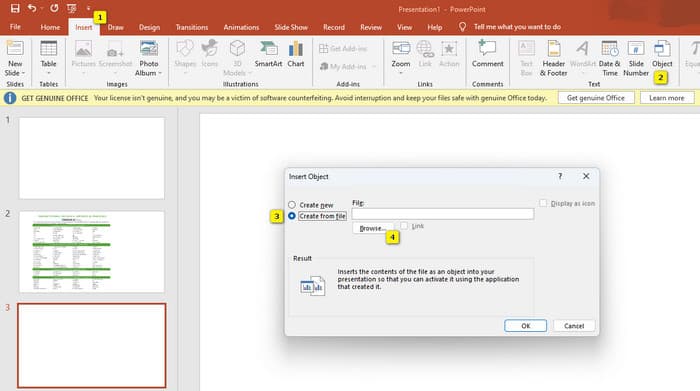
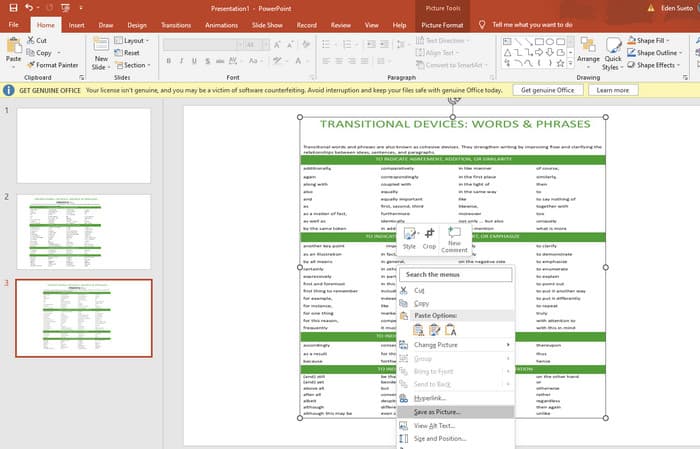
Korak 3. Kada se PDF datoteka učita, možete je pretvoriti u JPG. Da biste to učinili, desnom tipkom miša kliknite PDF na slajdu, odaberite Save As Picture i spremite ga kao JPEG.
Dio 5. Često postavljana pitanja o PDF-u i kompresiji
Koje veličine možete poslati PDF privitak e-poštom?
To ovisi o vašem davatelju usluga e-pošte, ali većina ograničava privitke na oko 20 MB.
Koji je najbolji besplatni PDF kompresor?
Dostupni su besplatni PDF kompresori, ali najbolji uvijek ovisi o željama korisnika. Do sada je besplatni online alat FVC Free PDF Compressor koji se najviše preporučuje.
Kako komprimirati PDF datoteke za e-poštu?
U stvari, komprimiranje funkcionira za PDF-ove jer su oni već komprimirane datoteke.
Zaključak
Ovaj članak govori o tome kako na najbolji način komprimirati PDF datoteke za e-poštu. Sada možete osigurati jednostavnije i bolje slanje svojih PDF-ova e-poštom, sve dok ih pravilno smanjite kako biste zadovoljili ograničenje veličine datoteke.
-
 3 najbolja rješenja o tome kako jednostavno ukloniti vodeni žig s videozapisa
 Želite ukloniti dosadni vodeni žig na videu? Uz ovaj blog možete naučiti različite ideje o uklanjanju vodenog žiga na videozapisu.
-
 4 najbolja načina kako brzo dodati vodeni žig na bilo koji videozapis
 Naučimo kako dodati vodeni žig na bilo koji videozapis na Windows, Mac, Online, iOS i Android s detaljnim koracima ako pročitate ovaj članak.
-
 3 najlakša načina za dodavanje vodenog žiga u GIF online i izvan mreže
 Dodavanje vodenog žiga GIF-u može biti jednostavno kao 1-2-3 ako pravilno koristite pravi alat. Alati na tržištu su preširoki, ali mi ćemo vam predstaviti tri alata na koja se možete osloniti.
