


 Video Converter Ultimate
 Snimač zaslona
 Video popravak
Kako pretvoriti M2TS u MP4 bez smanjenja kvalitete
“Kad videozapise sa svoje Sony kamere prebacim na računalo, to su M2TS datoteke koje se ne mogu dijeliti na Facebooku ili YouTubeu. Gdje mogu pronaći video pretvarač za pretvaranje datoteka u MP4 i gledati na računalu? "
Ponekad želite reproducirati M2TS datoteke na prijenosnim uređajima ili ih učitati na YouTube ili Facebook. Pametno ih je pretvoriti u uobičajeni videoformat poput MP4. U ovom ćemo vam članku podijeliti 5 besplatnih načina kako pretvoriti M2TS u MP4 na Windowsu i Macu.

Dio 1. Najbolji način za besplatnu konverziju M2TS u MP4
Ne podržavaju svi medijski reproduktori M2TS datoteke. Kako biste bolje uživali u M2TS videu s HD kamkordera, najbolje je promijeniti M2TS u često korišteni MP4 za reprodukciju. FVC Free M2TS Converter je sveobuhvatan M2TS pretvarač i uređivač. Možete ne samo pretvarati M2TS datoteke u MP4, MKV, AVI, MOV itd., već i uređivati M2TS datoteke, primjerice komprimirati, spajati, dodavati temu i još mnogo toga.
Besplatno preuzimanjeZa Windows 7 ili novijiSigurno preuzimanje
Besplatno preuzimanjeZa MacOS 10.7 ili novijiSigurno preuzimanje
Korak 1.Klikom na gumb Free Download možete brzo preuzeti Free M2TS Converter. Zatim ga instalirajte i pokrenite na svom Windows računalu. Kliknite gumb Add File(s) za uvoz M2TS datoteke u program.
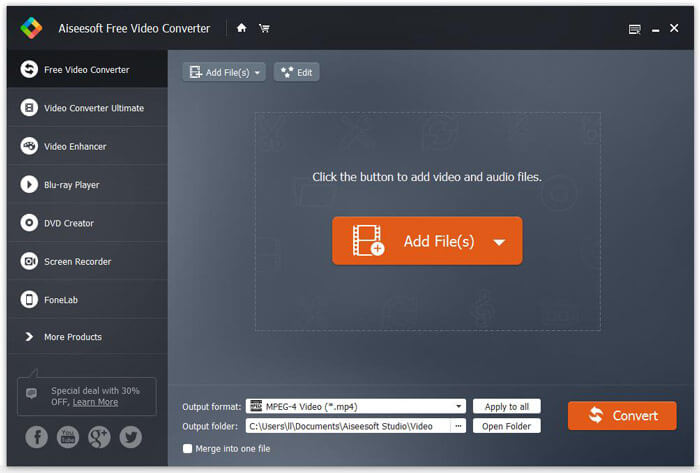
Korak 2.Kliknite padajući gumb Output format i odaberite MPEG-4 Video (*.mp4) kao izlazni format. Također možete postaviti izlaznu mapu za spremanje pretvorene datoteke.

Korak 3.Ako želite dodati određenu temu za video, možete kliknuti gumb Edit u gornjem izborniku i odabrati odgovarajuću temu. Nakon što sve postavke budu podešene, možete kliknuti gumb Convert kako biste započeli pretvaranje M2TS datoteke u MP4.

Dio 2. Kako promijeniti M2TS u MP4 Online
Ako želite besplatno pretvoriti M2TS u MP4 online, FVC Free Online Video Converter bit će izvrstan izbor. Kao besplatni mrežni multimedijski pretvarač, podržava pretvaranje gotovo svih glavnih video i audio datoteka u MP4, FLV, MKV, MOV, M4V, MTS, TS, M2TS, WMV, ASF, VOB, MP3, AAC itd. Osim toga, vrlo je jednostavan za korištenje.
Korak 1. Posjetite web-stranicu FVC Free Online Video Converter. Kliknite Add Files to Convert na vrhu. Zatim preuzmite i instalirajte FVC launcher.

Korak 2. Odaberite video koji želite pretvoriti. Ako želite MP4 video, jednostavno kliknite MP4. Zatim Convert.

Korak 3. MP4 video možete jednostavno spremiti na radnu površinu. Nakon toga, pretvorba će se automatski pokrenuti.
Dio 3. Kako pretvoriti M2TS u MP4 pomoću ConvertFiles
ConvertFiles je mrežni pretvarač M2TS u MP4 koji podržava više od 200 formata videozapisa, zvuka, slika, dokumenata, prezentacija i arhiva. Slijedite jednostavne korake u nastavku da biste započeli pretvaranje M2TS datoteke u MP4 putem interneta.
Korak 1.Idite na službenu stranicu ConvertFiles. Kliknite gumb Browse za učitavanje svoje lokalne M2TS datoteke.
Korak 2.Kliknite polje Input format i odaberite HDV Video File(.m2ts), a zatim kliknite polje Output format i odaberite MPEG-4 Video File(.mp4) kao izlazni format.
Korak 3.Kliknite gumb Convert kako biste besplatno započeli pretvaranje M2TS u MP4. Pretvorba može potrajati nekoliko minuta. Nakon toga možete kliknuti poveznicu za preuzimanje kako biste preuzeli pretvorenu MP4 datoteku.
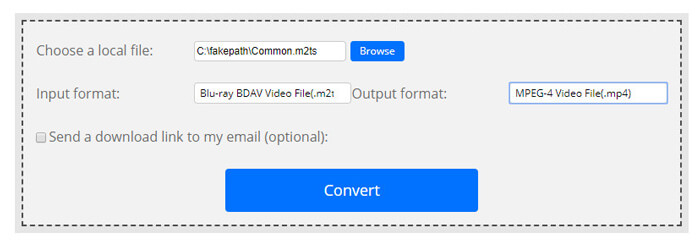
Ponekad pretvorba može propasti zbog nevaljanog formata unosa. Da biste postigli visoku stopu uspjeha, umjesto toga možete isprobati Free M2TS Converter.
Dio 4. Kako transformirati M2TS u MP4 pomoću VLC-a
VLC Media Player je multimedijski uređaj s otvorenim kodom za Windows, Mac, Linux, iOS i Android. Također radi kao izvrstan pretvarač M2TS u MP4 za pretvaranje M2TS datoteka u MP4, MOV, AVI i još mnogo toga. Štoviše, možete uređivati M2TS datoteke kao što su obrezivanje, rezanje, rotiranje, dodavanje efekata slike i još mnogo toga.
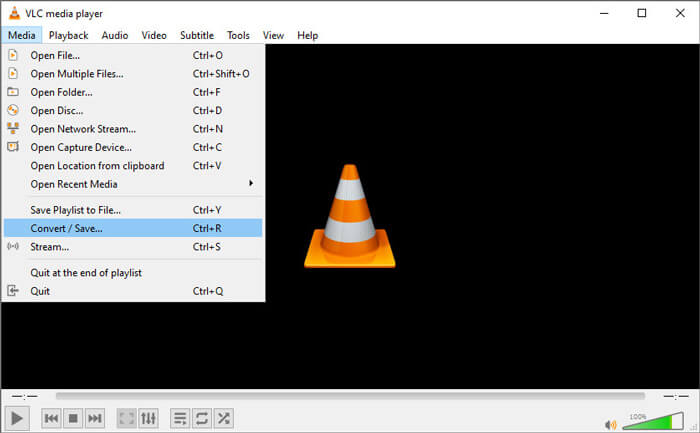
Korak 1.Preuzmite i pokrenite VLC Media Player na svom računalu. Kliknite Media > Convert / Save... za nastavak. Zatim kliknite gumb Add... da biste dodali svoju M2TS datoteku.
Korak 2.Kliknite gumb Convert / Save da biste ušli u prozor za pretvorbu. Kliknite padajući gumb Profile i odaberite Video - H.264 + MP3 (MP4) kao izlazni format.
Korak 3.Kliknite gumb Browse za odabir odredišne mape. Zatim kliknite gumb Start kako biste započeli pretvaranje M2TS u MP4.
Dio 5. Kako izvesti MP4 s M2TS s ručnom kočnicom
HandBrake je još jedan besplatni video transkoder otvorenog koda koji može pretvoriti video iz gotovo bilo kojeg formata. Možete pokušati ručnom kočnicom pretvoriti M2TS datoteku u MP4 slijedeći korake.
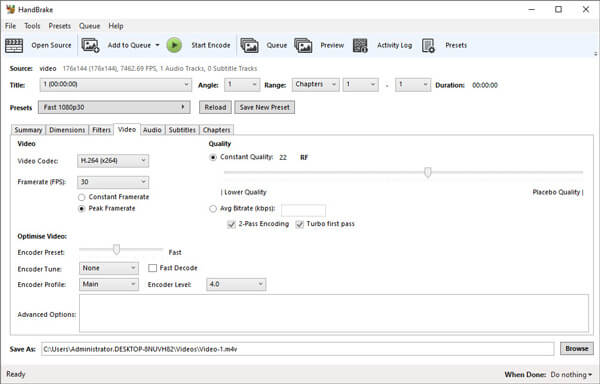
Korak 1.Besplatno preuzmite, instalirajte i pokrenite HandBrake na svom Windows/Mac računalu. Kliknite Open Source u lijevom kutu kako biste uvezli M2TS datoteku iz svoje lokalne mape.
Korak 2.Možete prilagoditi postavke za M2TS datoteku. Odaberite MP4 iz padajućeg izbornika Format na kartici Summary. Na kartici Video možete podesiti video kodek, kvalitetu videa, broj sličica u sekundi i optimizirati video.
Korak 3.Kliknite gumb Browse za postavljanje odredišne mape. Zatim kliknite gumb Start Encode kako biste besplatno započeli pretvaranje M2TS u MP4.
Dio 6. Česta pitanja o pretvaranju M2TS u MP4
Koja je razlika između M2TS i MP4?
M2TS je kratica za MPEG-2 transportni sustav. To je format datoteke Blu-ray Disc Audio Video spremnika i koristi se za multipleksiranje video, audio i drugih tokova. Općenito su M2TS datoteke veće od MP4 datoteka iste kvalitete. MP4 datoteke podržane su na gotovo svim media playerima, ali M2TS datoteke mogu se reproducirati samo na nekoliko playera.
Kako mogu reproducirati M2TS datoteke na svom računalu?
M2TS datoteke možete izravno otvoriti u nekim popularnim programima za reprodukciju medija, uključujući Windows Media Player, VLC Media Player, 5K Player, SMPlayer, Splash itd. M2TS datoteke možete reproducirati i pomoću softvera Sony Picture Motion Browser.
Može li VLC reproducirati M2TS datoteke?
Da. M2TS datoteke možete reproducirati s VLC Media Playerom na sustavima Windows i Mac. Jednostavno pokrenite VLC media player i pritisnite Media to Open File da biste reproducirali M2TS datoteku u VLC-u. Ako to ne uspije za problem s kodekom, prvo trebate pretvoriti M2TS u VLC podržani video format.
Zaključak
Pomoću gore navedenih 5 besplatnih metoda možete jednostavno pretvoriti M2TS datoteke u MP4. Nakon usporedbe, FVC Free M2TS Converter trebao bi biti najbolji M2TS u MP4 pretvarač. Tehnologijom hardverskog ubrzanja izvozi MP4 datoteke u visokoj kvaliteti za samo nekoliko minuta. Možete isprobati ovaj besplatni pretvarač odjednom.
-
 Sveobuhvatan vodič za pretvaranje TS u MP4
 Što su TS datoteke i želite li TS pretvoriti u MP4? U ovom postu podijelit ćemo vam besplatne i mrežne metode za pretvaranje TS u MP4.
-
 Kako pretvoriti MTS datoteke u MP4
 Ne znate kako pretvoriti MTS datoteku u MP4? U ovom ćete vodiču pronaći 6 besplatnih i jednostavnih načina za promjenu MTS formata u MP4 na sustavu Windows ili Mac bez gubitka kvalitete.
-
 2 jednostavna načina za besplatno pretvaranje MTS-a u MP3
 Imate potrebu za izdvajanjem MP3 zvuka iz MTS datoteke, ali ne znate kako? Ovaj post dijeli 2 jednostavna načina koja će vam pomoći pretvoriti MTS / M2TS u MP3 s visokom kvalitetom zvuka.
