


 Video Converter Ultimate
 Snimač zaslona
 Video popravak
Kako brzo pretvoriti MTS u MKV besplatno
Ukratko, za MPEG Transport System, MTS datoteka je standardni format koji podržava 720p i 1080i videozapise. Međutim, izlazna veličina datoteke u ovom formatu može biti ogromna. Stoga je morate pretvoriti u format datoteke koji je široko podržan i ima manju veličinu, poput MKV formata. U ovom članku predstavljamo najbolje načine kako besplatno pretvoriti MTS u MKV.

Dio 1. 2 najbolja besplatna online alata koji pretvaraju MTS u MKV
FVC besplatni video pretvarač na mreži
Ljudi danas radije koriste online konverter umjesto instaliranja softverskog konvertera. FVC Free Online Video Converter je online konverter koji vam omogućuje pretvaranje datoteka poput MTS u MKV, MP4, WMV, AVI, FLV i druge. Iako je besplatan online konverter, ne narušava kvalitetu vaše datoteke tijekom pretvorbe. Osim toga, ima značajke kojima možete urediti razlučivost te video ili audio bitrate.
Evo koraka za pretvaranje datoteke MTS u MKV pomoću ovog besplatnog mrežnog alata:
Korak 1. Da biste koristili ovaj konverter, kliknite ovu poveznicu kako biste bili preusmjereni na njihovu web-stranicu.
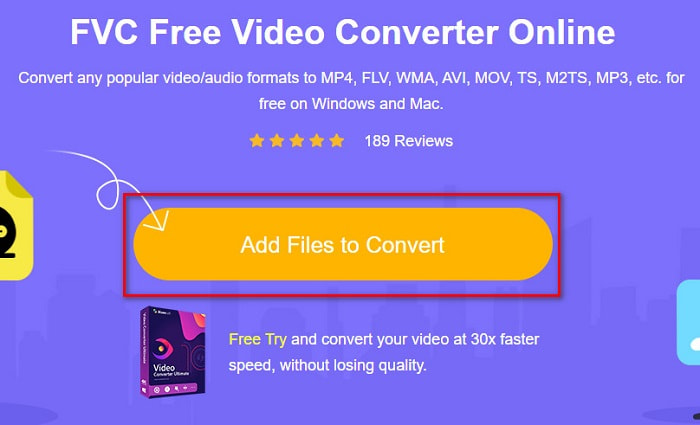
Korak 2. Sljedeći korak je kliknuti gumb Add Files to Convert kako biste preuzeli pokretač (launcher). Nakon što se pokretač preuzme, pojavit će se datoteke vašeg računala, zatim odaberite svoju MTS datoteku za učitavanje.
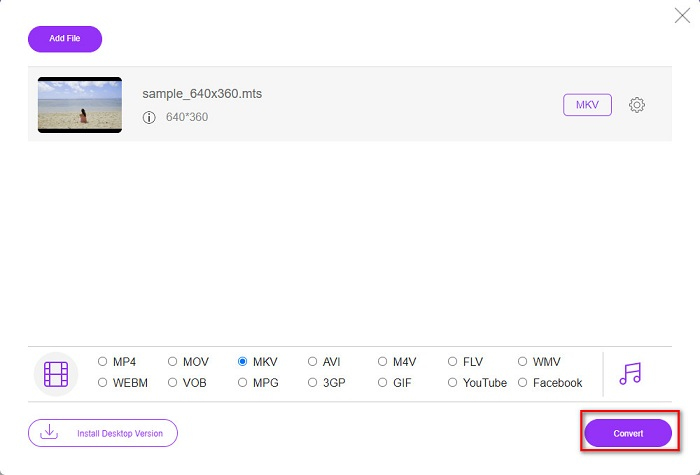
Korak 3. Nakon što odaberete svoju MTS datoteku, kliknite MKV datoteku ispod sučelja softvera.
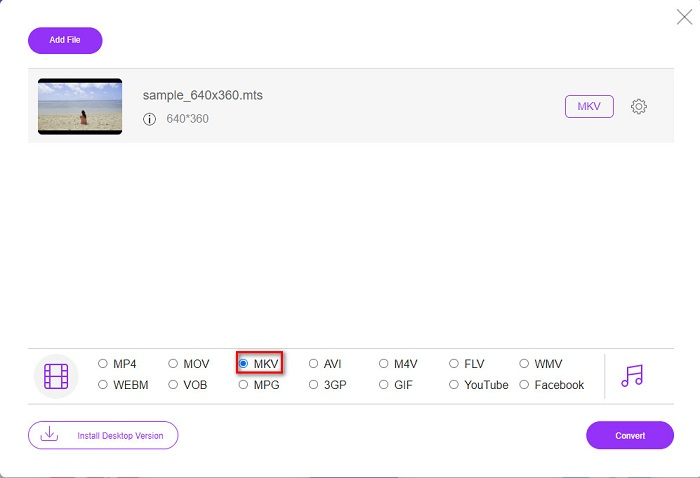
Korak 4. Na kraju kliknite gumb Convert kako biste pretvorili svoju MTS datoteku u MKV datoteku. Zatim pričekajte da se datoteka pretvori.
Slijedeći ove jednostavne korake, možete pretvoriti MTS u MKV besplatno i online.
AnyConv
Još jedan online konverter koji možete koristiti za pretvaranje datoteka bez gubitka kvalitete je AnyConv File Converter. Ovaj konverter također pretvara brojne formate datoteka, uključujući MTS u MKV, AVI, MP4, MOV, MPEG itd. Međutim, ima samo ograničene funkcije. Ne možete urediti ili promijeniti razlučivost svoje datoteke. Također je temeljen na webu, stoga možete iskusiti sporiju pretvorbu. Ipak, koristi ga mnogo ljudi zbog njegove praktičnosti.
Koraci za korištenje AnyConv File Converter:
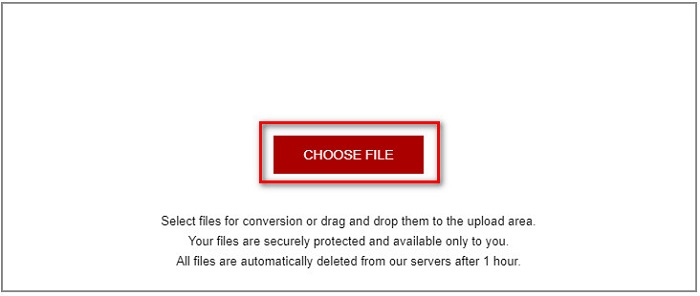
Korak 1. U pregledniku potražite AnyConv File Converter. Nakon što otvorite njihovu web-stranicu, kliknite gumb Choose Files kako biste odabrali svoju MTS datoteku u datotekama na računalu.
Korak 2. Nakon što odaberete svoju MTS datoteku, kliknite gumb drop-down i izaberite format datoteke MKV.
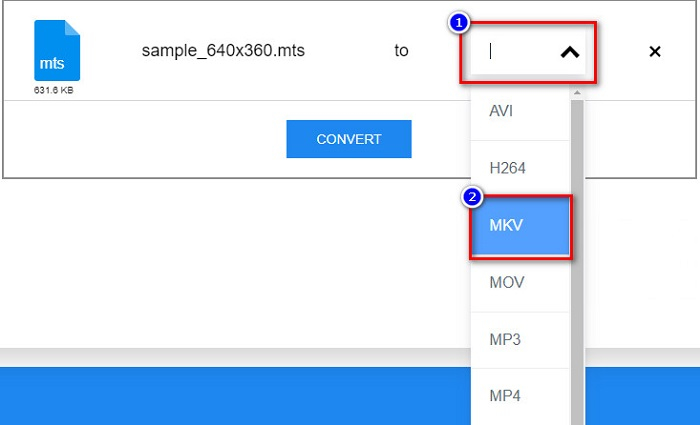
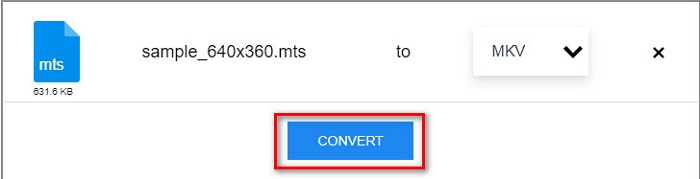
Korak 3. Na kraju kliknite gumb Convert kako biste započeli pretvorbu svoje MTS datoteke u MKV datoteku.
Dio 2. Pretvorite MTS u MKV na Windows 10/11 bez gubitaka
Ako tražite pretvarač za Windows 10/11, FVC Video Converter Ultimate je najbolji alat za vas. Podržava različite formate datoteka i može pretvoriti MTS u MKV, MP4, WebM, VOB, MPG, AVI i mnoge druge. Osim toga, ovaj pretvarač ima značajku pomoću koje možete stvarati GIF-ove, pa čak i stvarati 3D video. Također možete brzo i bez napora pretvoriti MTS u MKV bez gubitka kvalitete vaše datoteke.

FVC Video Converter Ultimate
5.689.200+ preuzimanja- Pomoću ovog pretvarača možete skupno pretvoriti svoje datoteke.
- Omogućuje pretvaranje različitih formata datoteka kao što su MTS, MKV, MP4, WMV itd.
- Ima značajku koja vam omogućuje ultrabrzu pretvorbu.
Besplatno preuzimanjeZa Windows 7 ili novijiSigurno preuzimanje
Besplatno preuzimanjeZa MacOS 10.7 ili novijiSigurno preuzimanje
Evo kako možete koristiti FVC Video Converter Ultimate pomoću ovih jednostavnih koraka:
Korak 1. Prvo preuzmite aplikaciju klikom na gumb Download ispod za Windows. Zatim pokrenite softversku aplikaciju kako biste nastavili na sljedeći korak.
Besplatno preuzimanjeZa Windows 7 ili novijiSigurno preuzimanje
Besplatno preuzimanjeZa MacOS 10.7 ili novijiSigurno preuzimanje
Korak 2. Nakon otvaranja konvertera kliknite gumb Add Files, ili možete povuci i ispusti svoju datoteku na gumb sa znakom + kako biste učitali svoju MTS datoteku. Zatim će se vaša datoteka pojaviti na popisu.
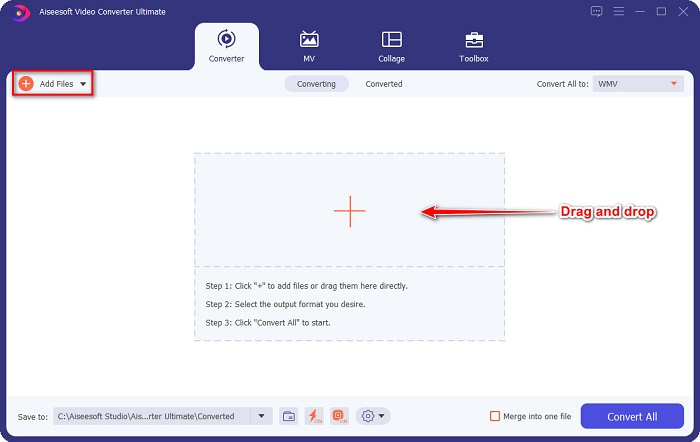
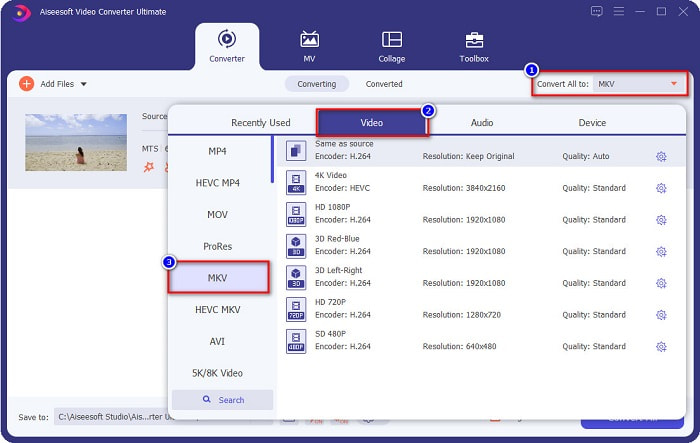
Korak 3. Da biste odabrali format datoteke u koji želite pretvoriti svoju MTS datoteku, kliknite gumb Convert All to i odaberite MKV datoteku.
Korak 4. Za kraj, kliknite gumb Convert All kako biste započeli pretvaranje svoje MTS datoteke u MKV datoteku. I voila! Za samo nekoliko sekundi vaša pretvorena datoteka je spremna.
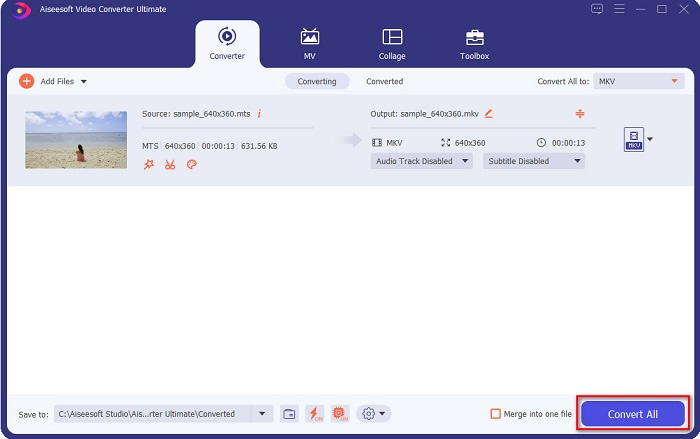
Slijedeći ove jednostavne korake, možete pretvoriti MTS u MKV brzo kao 1-2-3!
Dio 3. Zašto pretvoriti MTS datoteku u MKV format datoteke
MTS datoteka, skraćeno za MPEG Transport System, standardni je format datoteke koji uglavnom koriste SONY i Panasonic HD kamkorderi. To je datoteka koja koristi video kompresiju MPEG4/H.264. Štoviše, podržava 720p i 1080i videozapise, koje drugi formati datoteka ne podržavaju. Budući da su Panasonic i Sony razvili ovu datoteku, ona koristi datoteku naprednog audio kodiranja koja se odnosi na AVCHD format datoteke. S druge strane, MKV datoteka ili Matroska standardni je format datoteke koji podržava mnoge audio i video kodeke. Obično se koristi za pohranu kratkih video zapisa i filmova.
Štoviše, podržava i titlove. Zbog toga brojni obožavatelji koji se pretplate koriste ovaj format datoteke. Dakle, zašto pretvoriti MTS u MKV? Jednostavno zato što je veličina MKV datoteke manja od one koju sadrži MTS format datoteke.
Dio 4. Tablica usporedbe o online i offline pretvaračima
| ZNAČAJKE | FVC besplatni online pretvarač | AnyConv pretvarač datoteka | FVC Video Converter Ultimate |
| Brzina pretvorbe | Normalan | Normalan | Vrlo brzo |
| Formati datoteka za pretvorbu | MKV, MP4, MTS, MPG, MOV, AVI, WMV, FLV i drugi formati datoteka | MTS, MKV, AVI, MOV, MP4, MPEG i drugi formati | Podržava preko 1000 formata datoteka |
| Značajke uređivanja | – | – |  |
| Skupna konverzija | – | – | |
| Priključak za internet | Potrebno | Potrebno | Nije potrebno |
Dio 5. Često postavljana pitanja o pretvaranju MTS u MKV
Možete li smanjiti veličinu MTS datoteke?
Da. Možete komprimirati veličinu MTS datoteke pomoću alata za kompresiju koji su dostupni online i offline, poput Free Video Compressor.
Gdje možete reproducirati MKV formate datoteka?
MKV datoteke možete reproducirati u Windows Media Playeru, VLC Media Playeru, DivX Playeru, MX Playeru i drugima. Također možete koristiti medijske kodeke za kodiranje i dekodiranje medijskih datoteka. Ili možete pretvoriti svoju MKV datoteku u MP4 format, koji je široko korišten format.
Možete li pretvoriti MTS u MKV u ručnoj kočnici?
Da. Ovaj vam pretvarač također omogućuje pretvaranje vaše MTS datoteke u MKV format datoteke. Međutim, ne podržava više datoteka i ne može ih kombinirati u jednu.
Zaključak
Danas postoji mnogo online i offline konvertera dostupnih na tržištu. Konverteri koje smo gore naveli spadaju među one koje koristi mnogo korisnika i koji su se pokazali kao izvrsni za upotrebu. Štoviše, ovi konverteri imaju različite funkcije i mogućnosti u besplatnoj online pretvorbi MTS u MKV. Ali ako tražite praktičan i učinkovit konverter, preporučujemo korištenje programa FVC Video Converter Ultimate. Ovaj iznimno brzi konverter neće iznevjeriti vaša očekivanja. Dakle, ako ste spremni za pretvorbu datoteka, preuzmite ga odmah!
-
 [Besplatno i online] 6 načina za pretvaranje MTS-a u MP4 visoke kvalitete
 Ne znate kako pretvoriti MTS datoteku u MP4? U ovom ćete vodiču pronaći 6 besplatnih i jednostavnih načina za promjenu MTS formata u MP4 na sustavu Windows ili Mac bez gubitka kvalitete.
-
 Kako pretvoriti MTS u WMV bez gubitka kvalitete
 Mučite li se gledati svoju omiljenu emisiju jer vaš media player ne podržava MTS video format? Pokušajte ga pretvoriti u WMV s ovim novim i najboljim pretvaračima predstavljenim u ovom članku.
-
 Kako pretvoriti MTS u MP3 bez gubitka kvalitete (AVCHD u MP3)
 Imate potrebu za izdvajanjem MP3 zvuka iz MTS datoteke, ali ne znate kako? Koji je najbolji pretvarač MTS u MP3? Ovaj post dijeli 2 jednostavna načina koja će vam pomoći pretvoriti MTS / M2TS u MP3 s visokom kvalitetom zvuka.
