


 Video Converter Ultimate
 Snimač zaslona
 Video popravak
 Pretvorite MTS u MP4 velikom brzinom i visokom kvalitetom.

Kako pretvoriti MTS datoteke u MP4
MTS je nastavak datoteke naprednog video kodeka visoke razlučivosti ili AVCHD. Često se koristi kao video format za video zapise visoke razlučivosti. MTS format podržava 1080i i 720p u relativno maloj veličini i kompatibilan je s Blu-Ray formatom diska. Međutim, MTS datoteke mogu otvoriti i uređivati samo Panasonic i Sony HD kamere.
Kada želite reproducirati ili uređivati MTS datoteke na drugim platformama ili prijenosnim uređajima, morate pretvoriti MTS u MP4 ili druge podržane formate. U ovom postu podijelit ćemo vam 6 besplatnih načina koji će vam pomoći da pretvorite MTS datoteke u MP4. Tako možete reproducirati ili uređivati svoje video datoteke na različitim platformama kako želite.

Dio 1. Najbolji besplatni MTS Converter - Pretvorite MTS u MP4 na sustavu Windows u visokoj kvaliteti
MTS format nije široko korišten format za većinu multimedijskih reproduktora. Kada želite pretvoriti MTS u MP4 za reprodukciju, iznimno je važno osigurati da pretvarač MTS u MP4 može za vas napraviti MP4 datoteku visoke kvalitete. Ovo je najbolji MTS u MP4 pretvarač – Free MTS Converter, koji vam omogućuje besplatnu pretvorbu MTS videozapisa u MP4 u visokoj kvaliteti i velikom brzinom.
Besplatni MTS Converter pretvorit će MTS videozapise u popularne MP4 (HD H.264 / MPEG-4 AVC video) videozapise za reprodukciju na prijenosnim uređajima. Program također podržava pretvaranje MTS videozapisa u nekoliko sekundi u MP3 za uživanje u visokokvalitetnoj glazbi. Osim toga, omogućuje vam skupnu konverziju koja vam pomaže istovremeno pretvoriti dva ili više MTS videozapisa.
Besplatno preuzimanjeZa Windows 7 ili novijiSigurno preuzimanje
Besplatno preuzimanjeZa MacOS 10.7 ili novijiSigurno preuzimanje
Korak 1. Kliknite gumb za preuzimanje iznad kako biste brzo instalirali i pokrenuli ovaj Free MTS Converter na svom Windows računalu. Kada uđete u glavno sučelje, kliknite gumb Add File na traci izbornika za učitavanje MTS datoteka. Možete pretvarati više MTS datoteka odjednom.
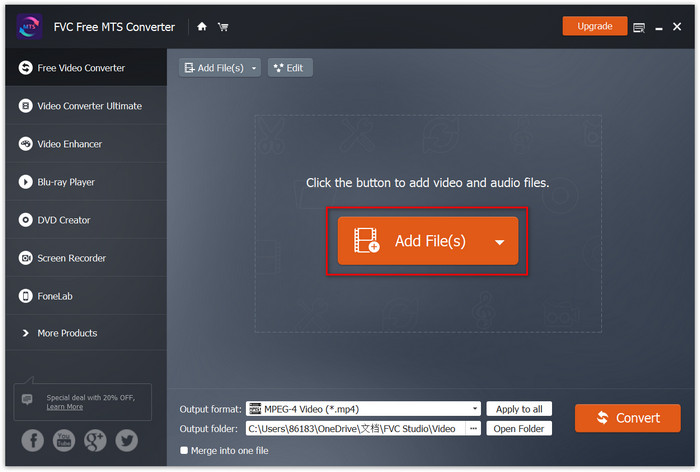
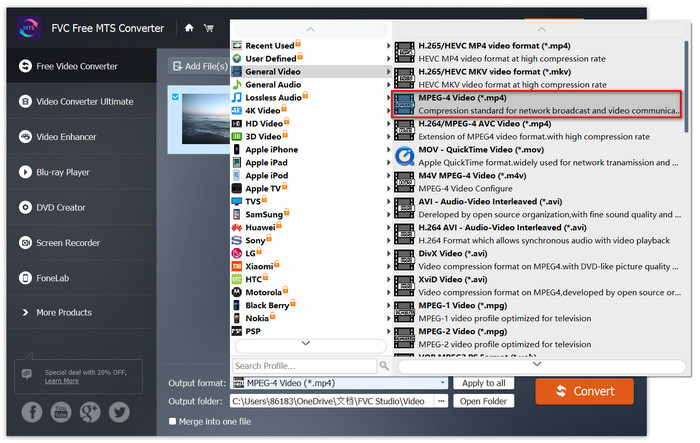
Korak 2. Kliknite Profile i odaberite MP4 kao ciljni izlazni format. Zatim odaberite Browse pored Destination kako biste postavili novu odredišnu mapu. Na kraju kliknite gumb Convert da biste izvršili pretvorbu iz MTS u MP4.
Dio 2. Kako pretvoriti MTS datoteku u MP4 s online pretvaračima
Kada pretražujete besplatne mrežne MTS pretvarače, pronaći ćete mnogo besplatnih mrežnih pretvarača koji podržavaju pretvorbu iz MTS-a u MP4. Pitanje je, koji mrežni pretvarač MTS u MP4 biste trebali odabrati? Ovaj dio prikazuje 3 izvrsna mrežna pretvarača za vas, a vi možete odabrati onaj koji vam najviše odgovara.
Besplatni mrežni video pretvarač
FVC Free Online Video Converter izvrstan je besplatan program koji može pretvoriti vaše MTS datoteke u MP4 i druge video formate velikom brzinom. Kompatibilan je s bilo kojim operativnim sustavom. Trebaju vam samo preglednik i internetska veza da biste pokrenuli ovaj online pretvarač.
Korak 1. Otvorite https://www.free-videoconverter.net/free-online-video-converter/.
Korak 2. Kliknite gumb Add Files to Convert kako biste preuzeli i instalirali pokretač. Kada se pokretač aktivira, učitajte svoje MTS datoteke u FVC Free Online Video Converter.
Korak 3. Odaberite MP4 kao ciljni izlazni format.
Korak 4. Kliknite gumb Convert kako biste besplatno online pretvorili MTS datoteke u MP4.

Convertio
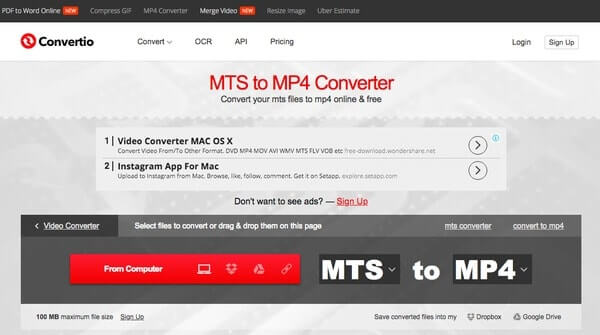
Convertio je besplatni mrežni pretvarač MTS u MP4 koji korisnicima omogućuje pretvorbu MTS videozapisa u MP4 ne više od 100 MB.
Korak 1. Uvezite MTS datoteku s računala, URL-a, Dropboxa ili Google Drivea
Korak 2. Odaberite MP4, WMV ili AVI kao izlazni format
Korak 3. Kliknite Convert za besplatnu online pretvorbu MTS datoteke u MP4
Pretvori.Datoteke
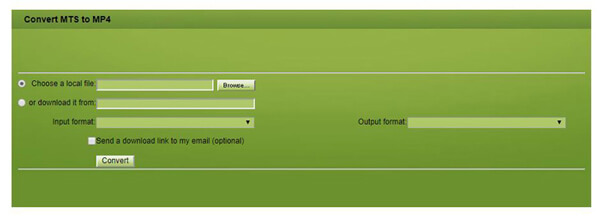
Convert.Files je mrežna platforma koja ima sposobnost pretvaranja s MTS-a u MP4 s lakoćom i praktičnošću. S druge strane, Convert.Files obrađuje datoteke veličine do samo 250 MB.
Korak 1. Odaberite Browse da biste odabrali MTS video za Convert.Files
Korak 3. Kliknite Convert za besplatnu online pretvorbu MTS datoteke u MP4
Dio 3. Kako pretvoriti MTS u MP4 na Macu s besplatnim pretvaračima MTS u MP4
Osim gore navedenog besplatnog MTS pretvarača, želimo vam predstaviti i sljedeća dva dobro poznata video pretvarača, HandBrake i VLC. Prije pretvorbe MTS datoteka, morate preuzeti jednu od njih na Mac.
Ručna kočnica
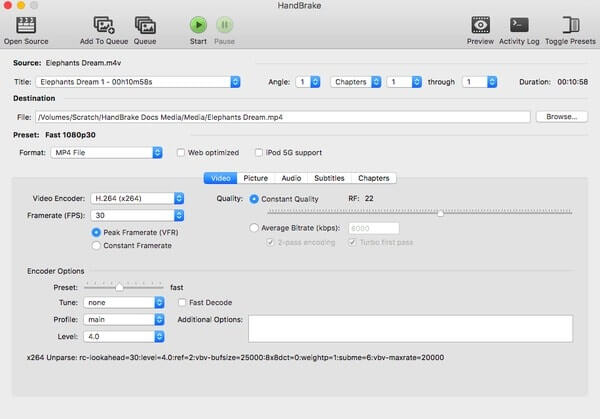
HandBrake je besplatni, otvoreni izvor i moćan video pretvarač. Dostupan je za Windows, macOS i Linux. Omogućuje korisnicima pretvaranje MTS video formata u MP4 ili MKV. Možete izvršiti pretvorbu u slijedećim detaljnim uputama.
Korak1. Besplatno preuzmite i instalirajte HandBrake na svoj Mac. Pokrenite ovaj program i kliknite Open Source u gornjem lijevom kutu. Zatim možete odabrati koji MTS video želite uvesti iz svoje lokalne mape.
Korak 2. Odaberite MP4 datoteku iz padajućeg izbornika Format. Nalazi se pod kategorijom Preset. Zatim možete podesiti izlaznu kvalitetu videa, broj sličica u sekundi i druge opcije. Odaberite Start kako biste besplatno pretvorili MTS video u MP4.
VLC Media Player
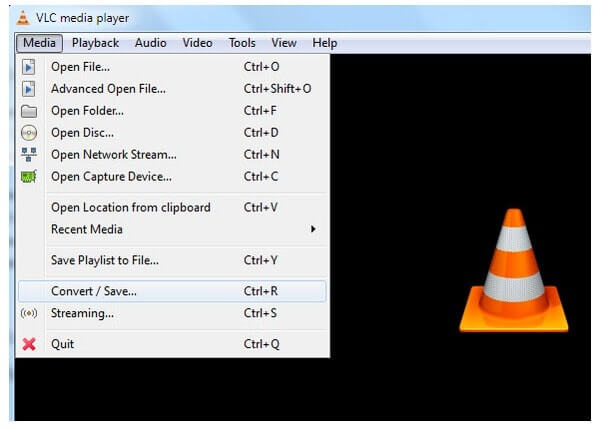
VLC Media Player je sveobuhvatan softver za reprodukciju medijskih datoteka koji vam omogućuje reprodukciju različitih video i audio datoteka, poput MP4, MP3 itd. Štoviše, VLC Media Player može raditi kao izvrstan video pretvarač koji vam pomaže da okrenete MTS video na MP4, MOV, AVI i više s lakoćom. Evo što trebate učiniti.
Korak1. Pokrenite VLC Media Player na svom računalu. Odaberite Media u gornjem lijevom kutu. Odaberite Convert/Save… s padajućeg popisa. Zatim kliknite Add… za uvoz MTS videa.
Korak 2. Odaberite Convert/Save na dnu tog prozora. Idite na stranicu Convert i pronađite odjeljak Profile. Zatim odaberite unaprijed zadanu postavku Video – H.264 + MP3 (MP4). Kliknite opciju Settings sa strane kako biste dovršili uređivanje profila ako je potrebno. Zatim kliknite Start za besplatnu pretvorbu MTS datoteke u MP4.

Video Converter Ultimate
2,999,368+ preuzimanja- Najbolji video konverter za pretvaranje MTS-a u MP4 na Mac/Windows.
- Pretvorite MTS u MP4 30 puta bržom brzinom.
- Uredite MTS, MP4, MOV, AVI, itd. kao profesionalac.
- Napravite video kolaž i 3D video sa savršenim efektom.
Besplatno preuzimanjeZa Windows 7 ili novijiSigurno preuzimanje
Besplatno preuzimanjeZa MacOS 10.7 ili novijiSigurno preuzimanje
Zaključak
Pomoću gornjih metoda možete jednostavno promijeniti MTS u MP4. No mogli biste primijetiti da, bilo da koristite HandBrake, VLC Player ili mrežne pretvarače MTS u MP4, nije lako imati dobro iskustvo pretvorbe. Ali Free MTS Converter definitivno je profesionalni video pretvarač koji će vam pomoći pretvoriti MTS u MP4 visoke kvalitete i brze brzine. Možete ga besplatno preuzeti i slijediti gornji vodič za pretvorbu MTS datoteka.
-
 Kako pretvoriti M2TS u MP4 bez smanjenja kvalitete
 Želite li pretvoriti videozapis s HD kamkordera u uobičajeni MP4? Evo pet jednostavnih i besplatnih načina za promjenu datoteke M2TS u MP4 na sustavima Windows i Mac.
-
 2 jednostavna načina za besplatno pretvaranje MTS-a u MP3
 Imate potrebu za izdvajanjem MP3 zvuka iz MTS datoteke, ali ne znate kako? Koji je najbolji pretvarač MTS u MP3? Ovaj post dijeli 2 jednostavna načina koja će vam pomoći pretvoriti MTS / M2TS u MP3 s visokom kvalitetom zvuka.
-
 Što je MTS datoteka i kako pretvoriti / reproducirati MTS datoteku
 Što je MTS datoteka i kako je mogu reproducirati? Ovaj vam post daje osnovne upute o MTS datoteci. Štoviše, možete dobiti 3 jednostavna načina za pretvorbu MTS datoteke u MP4, MOV, AVI, MPEG, MTS, MKV ili druge formate visoke kvalitete.
