


 Video Converter Ultimate
 Snimač zaslona
 Video popravak
2 preporučena pretvarača koji se koriste za promjenu F4V u FLV pomoću vodiča
Adobe Flash Player podržava F4V i FLV kao spremnik za reprodukciju medija pri strujanju sadržaja s interneta. Iako je format temeljen na Adobeu, ova dva se ipak u mnogočemu razlikuju. Na primjer, podaci kodirani u FLV‑u nisu isti kao u F4V‑u jer FLV ima sličnosti sa SWF‑om. Štoviše, ako želite pretvoriti F4V u FLV i imati koder sličan SWF‑u, pročitajte ovaj članak kako biste saznali više.

Dio 1. 2 najizbirljivijeg pretvarača za pretvaranje F4V u FLV
1. Pick. FVC Video Converter Ultimate
FVC Video Converter Ultimate je vrlo preporučeni pretvarač iz F4V u FLV koji možete preuzeti na svoj Windows ili Mac. Ovaj alat ima najbrži i najpouzdaniji proces pretvaranja s kojim ćete se ikada susresti, a već je zadovoljio milijune korisnika. Nadalje, pretvaranje formata nije jedina jaka strana ovog alata. Znate što još? Ovdje također možete uređivati, primjerice rezati video, spajati, pojačavati zvuk, krojiti (crop) i još mnogo toga. Ako želite imati jedinstven pretvarač koji će zadovoljiti vaše potrebe, ovo je pravi izbor. Slijede koraci u nastavku za pretvaranje vaših F4V datoteka u FLV format u samo nekoliko minuta.
Kako pretvoriti F4V u FLV uz pomoć FVC Video Converter Ultimatea:
Korak 1. Da biste preuzeli softver na svoj disk računala, kliknite gumb za preuzimanje.
Besplatno preuzimanjeZa Windows 7 ili novijiSigurno preuzimanje
Besplatno preuzimanjeZa MacOS 10.7 ili novijiSigurno preuzimanje
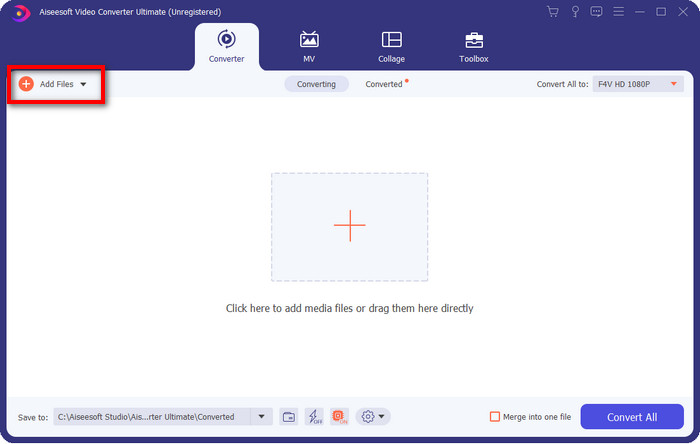
Korak 2. Kliknite na softver da biste ga otvorili, umetnite datoteku klikom na Add Files u gornjem desnom dijelu sučelja i kliknite Open nakon što odaberete F4V datoteku koju želite pretvoriti.
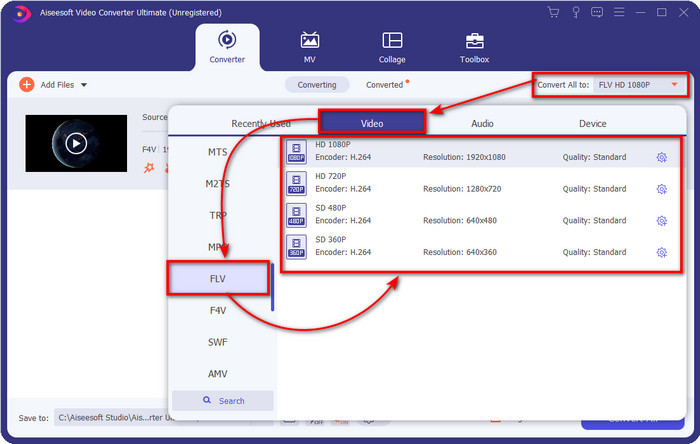
Korak 3. Pritisnite gumb Convert All to i promijenite format u FLV.
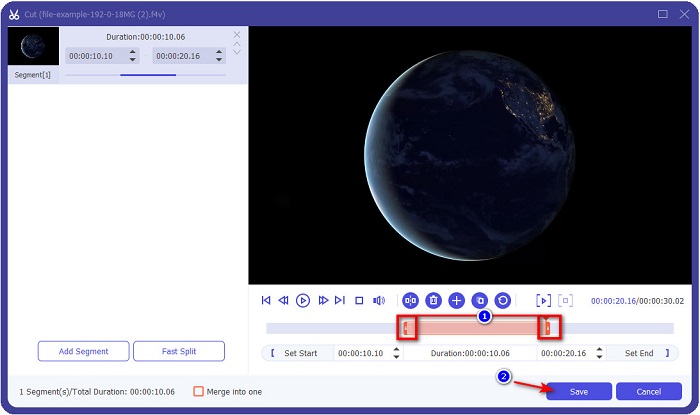
Želite li skratiti video? Ako da, kliknite ikonu scissors. Podesite handlebar prema duljini koju želite, zatim kliknite Save kako biste spremili promjene.
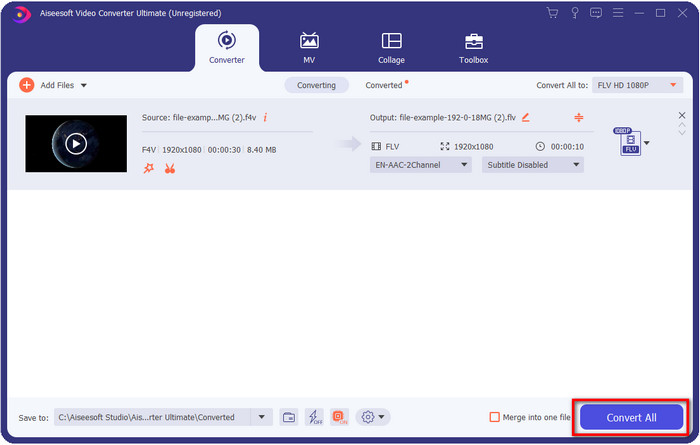
Korak 4. Da biste promijenili F4V u FLV, kliknite Convert All i proces će brzo započeti. Otvorit će se mapa računala u kojoj se nalazi vaša datoteka.
Pros
- Bez napora pretvara više F4V u FLV, AVI, MOV, MKV i još 200+ formata.
- Ovdje su dostupni hardversko ubrzanje i brza konverzija kako bi pretvorba bila brža.
- Dostupan je u svim sustavima Windows i macOS.
- Izuzetne značajke za uređivanje videozapisa kako bi vaš video izgledao fenomenalno nalaze se pod Toolbox.
Protiv
- Potrebno je kupiti prije nego što ga možete koristiti.
- Potrebno je preuzeti konverter na radnu površinu.
2. Pick. FVC besplatni video pretvarač na mreži
FVC Free Video Converter Online pomaže vam da proces pretvaranja obavite online. Ovaj alat je dostupan u svim preglednicima za online pretvorbu F4V u FLV bez ograničenja. Međutim, ovdje ne možete raditi skupnu (batch) konverziju jer nije podržana. Ipak, s ovim online pretvaračem možete postići format u koji želite pretvoriti. Želite znati kako? Zatim slijedite korake u nastavku.
Kako pretvoriti F4V u FLV uz pomoć FVC Free Video Converter Online:
Korak 1. Da biste otvorili web‑alat, morate kliknuti ovu poveznicu.
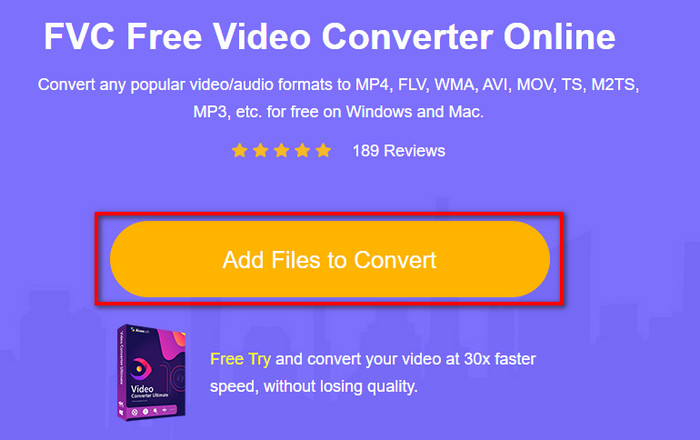
Korak 2. Na glavnom sučelju web‑pretvarača kliknite gumb Add Files to Convert. Pronađite F4V datoteku u mapi koja će se prikazati i pritisnite Open.
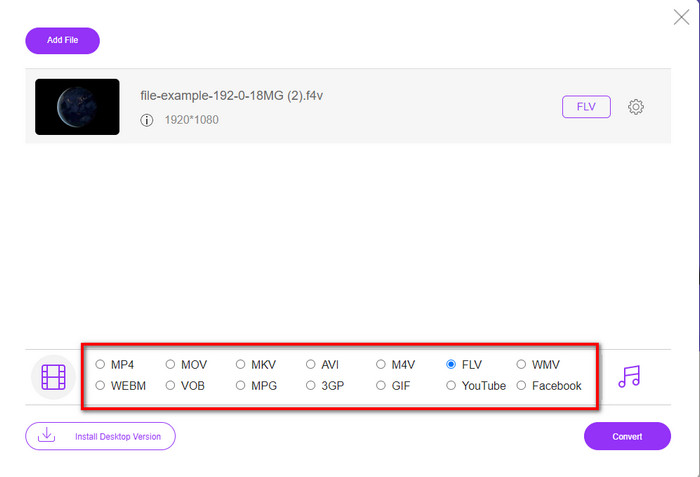
Korak 3. Na donjem dijelu nalazi se mnogo formata među kojima možete birati; kliknite FLV.
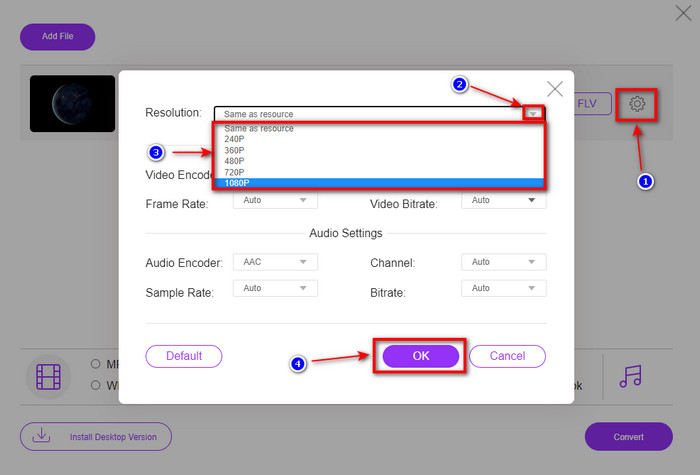
Želite li promijeniti rezoluciju videa? Zatim kliknite ikonu cog, pritisnite drop-down i odaberite kvalitetu videa.
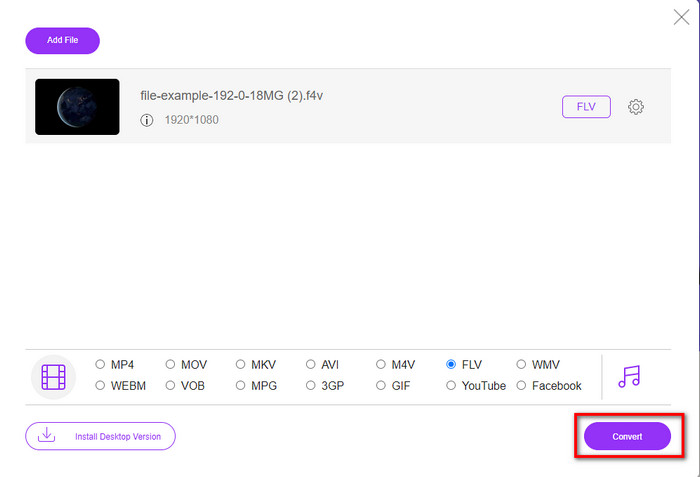
Korak 4. Započnite proces pretvaranja F4V u FLV klikom na Convert.
Pros
- Dostupno u svim web preglednicima koje imate.
- Besplatan i jednostavan za korištenje online pretvarač.
- Bez zlonamjernog softvera i bez oglasa na glavnoj web stranici.
Protiv
- Internet veza je obavezna.
- Ne podržava značajke za uređivanje videa kao što je FVC Video Converter Ultimate.
Dio 2. F4V vs. FLV: Koji je od formata najbolji
Kao što je rečeno na početku, ova dva formata su Adobe spremnici koje možete koristiti za njihovu distribuciju na webu. Ali sada, usporedimo razlike između ta dva formata čitajući detalje u nastavku.
F4V format je Quicktime spremnik poput MP4 formata. To je ISO osnovni format medijske datoteke za streaming videa putem interneta. Također, ovaj format je nadograđena verzija FLV-a. Ipak, postoji mnogo problema u kodiranju videa i zvuka koji se nalaze na FLV-u. Osim toga, ne možete generirati HTML web stranicu kao što FLV može učiniti za vas.
FLV su datoteke koje imaju gotovo istu strukturu kao i SWF. Ovaj format je više podržan u Adobe Flash Playeru i većini HTML-a 5. Podržava video i audio kompresiju poput kodeka Sorenson Spark ili VP6. Štoviše, ako razmišljate o preuzimanju videa na webu, ovaj format je najbolji izbor. Za razliku od F4V, ako želite generirati HTML na svojoj web stranici, ovo je format za vas.
Bilo bi najbolje pretvoriti F4V u FLV jer prednosti koje ćete dobiti na FLV-u nisu dostupne na F4V. Iako se kaže da je F4V nova verzija FLV-a, ipak je jedinstvenost FLV-a jedinstvena koju F4V ne može kopirati u mnogim aspektima.
Dio 3. Često postavljana pitanja o pretvorbi F4V u FLV
Kako mogu reproducirati F4V videozapise?
Uz pomoć moćnog medijskog reproduktora možete to učiniti bez ikakvog napora, a najbolji primjer je Aiseesoft Blu-ray Player. Slijedite ove jednostavne korake kako biste naučili kako reproducirati F4V datoteke. Prvo preuzmite softver na svoj desktop i pokrenite ga. Učitajte datoteku u alat klikom na Open File. Nakon učitavanja, datoteka će se automatski reproducirati.
Koje je bolje? F4V ili MOV?
Pa, ovisi o tome u koju svrhu ga želite koristiti. Na primjer, F4V je odličan za distribuciju medijskih datoteka na webu bez gubitka kvalitete. Međutim, ako želite uređivati videozapise na Macu, odaberite MOV. Dakle, ako želite uređivati svoje F4V videozapise na Macu, morate naučiti kako pretvoriti F4V u MOV.
Sadrži li F4V visokokvalitetni izlaz?
F4V datoteke mogu sadržavati 1080 ili 720 video kvalitete, ali će veličina datoteke ostati minimalna.
Zaključak
Sada kada smo naučili kako promijeniti F4V u FLV uz pomoć pretvarača, vrijeme je da odaberete svoj pouzdani pretvarač na temelju recenzija. Ako želite iskusiti besplatan online proces pretvaranja, trebate koristiti FVC Free Video Converter Online. No ovaj web‑alat ne može nadmašiti ultimativni pretvarač na vrhu. Bez dodatnog predstavljanja, radije koristimo FVC Video Converter Ultimate jer vam posao pretvaranja obavlja jednostavno i brzo. Ovaj izvanredni pretvarač jedinstven je i impresionira mnoge korisnike svojim posebnim značajkama. Dakle, sada možemo reći da smo korak bliže uspjehu uz pomoć ovih alata.
-
 4 najnovija mrežna i izvanmrežna pretvarača za pretvaranje F4V u AVI format
 Zar'nemate pojma koji pretvarač trebate koristiti za pretvaranje F4V u AVI ili bilo koji drugi video format? Zatim pročitajte ovaj članak dok učimo kako pretvoriti pomoću dostupnog alata.
-
 Kako pretvoriti F4V u MOV bez gubitka kvalitete [riješeno]
 Ako se trudite prihvatiti neke video formate kao što je F4V. Pročitajte ovaj članak da biste saznali više o F4V i MOV video formatu i naučili kako pretvoriti F4V u MOV koristeći različite metode.
-
 Pretvorite TRP u FLV uz najlakše offline i online metode
 Želite li brzo i bez muke pretvoriti svoju TRP video datoteku u FLV? Pročitajte ovaj članak kako biste dobili najbolji softver i online uslugu koja najbolje odgovara situaciji.
