


 Video Converter Ultimate
 Snimač zaslona
 Video popravak
Detaljne metode o tome kako pretvoriti DIVX u MP4
DIVX je jedan od popularnih video formata, ali nažalost ovaj format ne podržavaju drugi uobičajeni programi, poput Windows Media Playera, Apple QuickTime Playera i drugih. Najbolji način za reprodukciju DIVX video datoteka jest pretvoriti ih u format koji podržava gotovo sav softver, kao što je MP4. Ako dakle želite pretvoriti svoju datoteku iz formata DIVX u MP4, pročitajte ovaj članak. Iako je pretvaranje datoteka ponekad zahtjevno, pokazat ćemo vam najjednostavnije metode kojima možete pretvoriti svoj DIVX u MP4 format.

Dio 1: Najbolji način za pretvaranje DIVX u MP4 na Macu
Najdjelotvorniji način za pretvaranje DIVX-a u MP4 na Macu jest korištenje programa Video Converter Ultimate. Ova je aplikacija vrijedna pažnje zbog svojih izvanrednih funkcija. Možete neprekidno pretvarati brojne datoteke jednu za drugom jer podržava skupnu (batch) konverziju. Osim toga, pretvaranje DIVX-a u MP4 vrlo je jednostavno zahvaljujući intuitivnom sučelju i osnovnim uputama za konverziju. Štoviše, možete pretvarati i mnoge druge video formate. Podržava više od 100 formata, uključujući AVI, FLV, MOV, AVI, M4V, MKV, WMV, VOB i druge. Video Converter Ultimate također nudi vrlo brz proces konverzije, do 30x brži od mnogih drugih pretvarača. Zahvaljujući tako brzoj konverziji, možete biti sigurni da će pretvaranje većeg broja datoteka trajati vrlo kratko.
Štoviše, ovaj pretvarač nije pristran u pogledu korisnika. Svatko može njime upravljati, čak i ako ste napredni korisnik ili početnik. Nadalje, ova aplikacija može poboljšati vaš DIVX video jer ima mnogo alata za uređivanje videa, kao što su pojačivač videozapisa, obrezivanje, korekcija boja i još mnogo toga. Također, ako želite stvoriti prekrasan glazbeni video s kombinacijom slika i videa, možete to učiniti. Ovaj alat za izradu glazbenih videozapisa nudi brojne teme koje možete koristiti, poput Sretno, Uredno, Romantično, Snježna noć, Pruge i valovi, Vjenčanje, Sport, stara vremena i još mnogo toga.
Značajke
◆ Pretvorite video zapise u različite datoteke, kao što su MP4, DIVX, M4V, AVI, MOV, FLV, MKV, VOB i još mnogo toga.
◆ Dostupna je skupna konverzija.
◆ Uređujte videozapise pomoću pojačivača videozapisa, kompresora, sredstva za uklanjanje vodenog žiga, trimera, uređaja za rezanje itd.
◆ Pretvorite slikovne formate, kao što su BMP, JPG, PNG, TIF i drugi.
Slijedite jednostavne upute u nastavku za pretvaranje DIVX-a u MP4 na Macu koristeći FVC Video Converter Ultimate.
Korak 1: Preuzmite FVC Video Converter Ultimate na svoj Mac klikom na gumb Download u nastavku. Zatim pokrenite aplikaciju nakon završetka instalacije.
Besplatno preuzimanjeZa Windows 7 ili novijiSigurno preuzimanje
Besplatno preuzimanjeZa MacOS 10.7 ili novijiSigurno preuzimanje
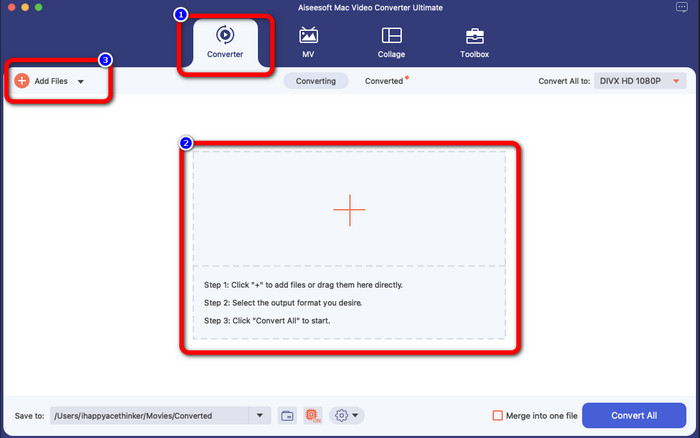
Korak 2: Nakon pokretanja aplikacije, njezino će se glavno sučelje pojaviti na zaslonu. Idite na karticu Converter i kliknite ikonu Plus ili gumb Add File kako biste umetnuli DIVX video datoteku. Datoteku također možete povući unutar zadanog okvira.
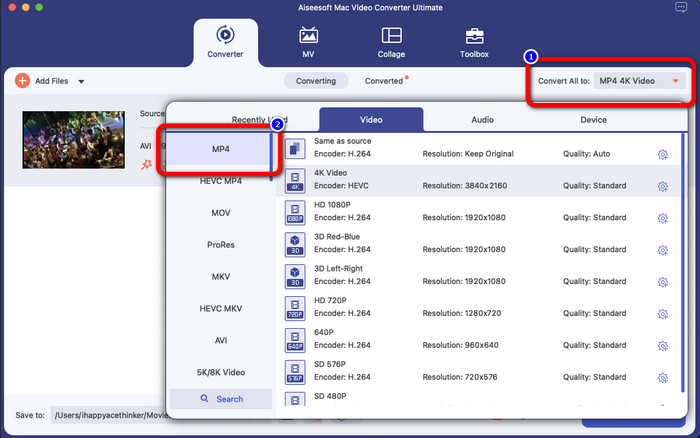
Korak 3: Zatim promijenite izlazni format klikom na gumb Convert All to. Na zaslonu će se pojaviti popis formata, a vi odaberite format MP4 file. Možete odabrati i željenu razlučivost, do 4K Video.
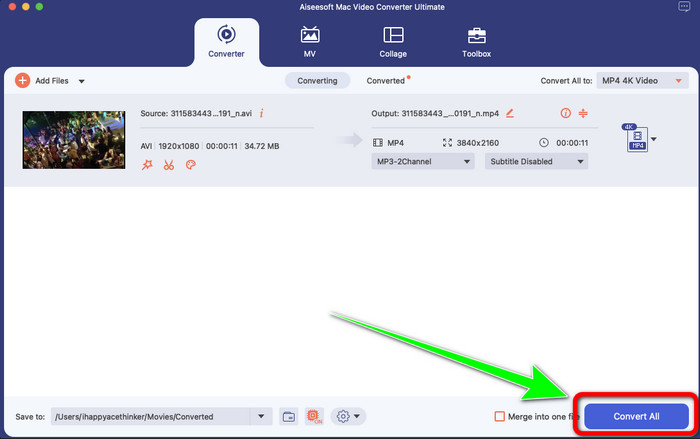
Korak 4: Nakon što promijenite izlazni format, kliknite gumb Convert All kako biste započeli. Zatim će krenuti proces konverzije. Nakon toga, vaš će video biti pretvoren iz DIVX datoteke u MP4 format.
Dio 2: Jednostavan način Pretvorite DIVX u MP4 na ručnoj kočnici
Želite li koristiti ručnu kočnicu za pretvaranje DIVX-a u MP4? Onda, ne brinite više. U ovom ćemo vas dijelu naučiti kako pretvoriti svoje datoteke koristeći ručnu kočnicu kao pretvarač na računalu. Ovaj je alat pouzdan u pretvaranju mnogih datoteka u druge formate, kao što su M4V, MP4, MKV, WEBM i drugi. Međutim, korištenje ovog alata treba pojasniti jer ima mnogo opcija koje možete pronaći na sučelju. U ovom slučaju možemo reći da ovaj pretvarač nije prikladan za početnike. Također, ponekad čak i ako želite pretvoriti datoteke u MP4, video se sprema kao M4V datoteka. Možda iz nekog razloga kvari. Ipak, slijedite jednostavne korake u nastavku za pretvaranje DIVX-a u MP4 pomoću ručne kočnice.
Korak 1: Preuzmite program Handbrake na svoje računalo. Kada završite s instalacijom, otvorite aplikaciju.
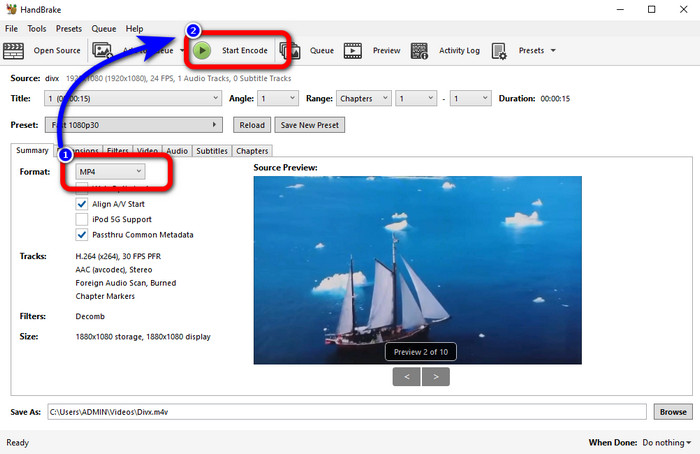
Korak 2: Kliknite opciju File kako biste dodali DIVX video datoteku.
Korak 3: Odaberite opciju Format i izaberite MP4 format. Nakon toga kliknite gumb Start Encode kako biste nastavili s procesom pretvaranja. I to je to – sada svoj video možete reproducirati u MP4 formatu. Ovaj softver također vam omogućuje pretvaranje formata DIVX u 3GP.
Dio 3: Jednostavan korak za pretvaranje DIVX-a u MP4 putem VLC-a
Još jedan izvanmrežni pretvarač koji možete koristiti je VLC Media Player. Ova aplikacija može jednostavno pretvoriti DIVX u MP4. Ovo nije dobro samo za reprodukciju videa, već i za pretvaranje. Uz pomoć ovog izvanmrežnog alata možete pretvoriti datoteke u druge formate datoteka, kao što su MPEG, AVI, ASF, WMV i drugi. Međutim, ovaj pretvarač nije prikladan za nove korisnike jer ima komplicirane postupke pretvorbe datoteka. Također, preuzimanje aplikacije je teško i dugotrajno. Upotrijebite donje korake za pretvaranje DIVX-a u MP4 pomoću VLC-a.
Korak 1: Preuzmite i instalirajte VLC na svoje računalo.
Korak 2: Otvorite izbornik Media i odaberite gumb Convert/Save kako biste dodali DIVX video datoteku koju želite pretvoriti.
Korak 3: U donjem dijelu sučelja ponovno kliknite gumb Convert/Save.
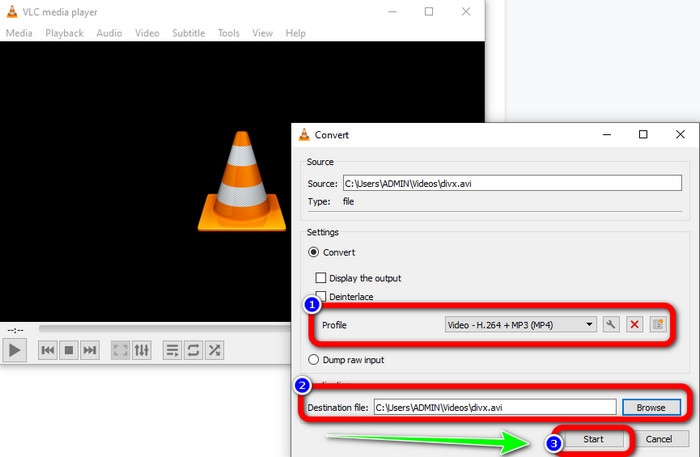
Korak 4: Idite na opciju Profile i odaberite MP4 format datoteke. Zatim kliknite gumb Destination file kako biste postavili željenu lokaciju spremanja. Na kraju kliknite gumb Start kako biste pretvorili DIVX datotekeku u MP4 format. Ovaj alat možete koristiti i za pretvaranje formata MP4 u DIVX.
Dio 4: Učinkovit način za pretvaranje DIVX u MP4 na mreži
Nakon što ste upoznali sve pretvarače koje možete koristiti izvan mreže, u ovom ćemo vam dijelu pokazati najbolji internetski pretvarač za DIVX u MP4. Taj izvanredni pretvarač je FVC Free Video Converter Online. Lako može pretvoriti vašu DIVX datoteku u MP4 format zahvaljujući jednostavnom sučelju i jasnim koracima. Ovaj alat podržava razne video formate, poput FLV, WMA, AVI, MOV i drugih. Također, možete pretvoriti DIVX datoteku bez gubitka kvalitete videa, što je izvrsno za korisnike. Slijedite detaljne upute u nastavku kako biste na jednostavan način pretvorili svoje datoteke pomoću alata FVC Free Video Converter Online.
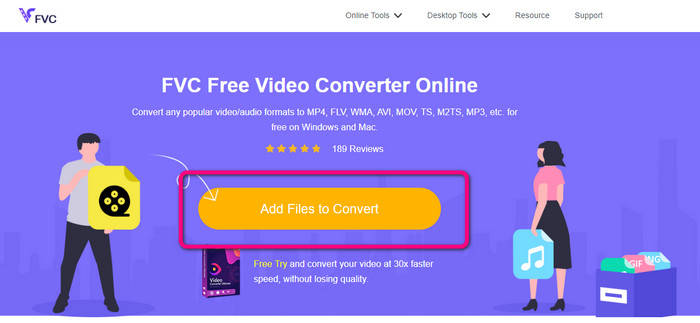
Korak 1: Idite na svoj preglednik i posjetite FVC besplatni video pretvarač na mreži web stranica. Zatim kliknite na Dodaj datoteku za pretvorbu gumb za učitavanje DIVX datoteke.
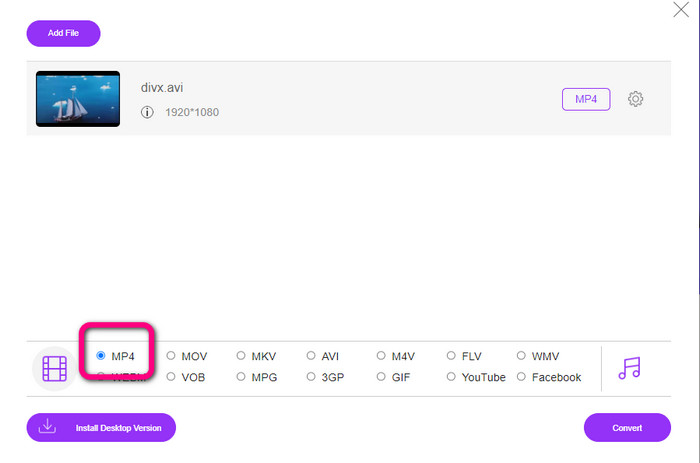
Korak 2: U donjem dijelu sučelja odaberite format datoteke MP4 s popisa formata.
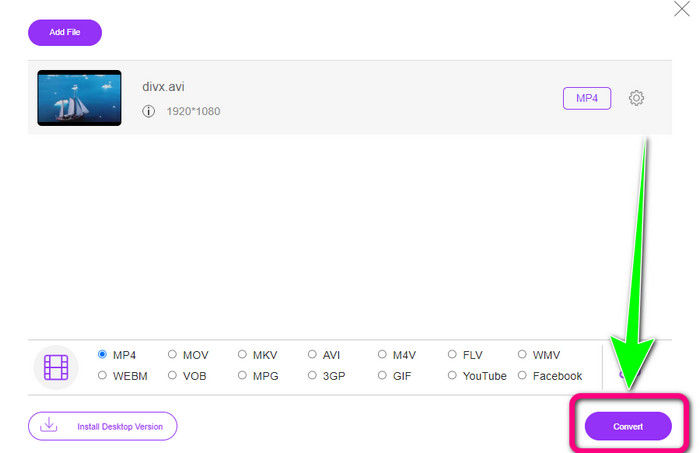
Korak 3: Za završni korak kliknite gumb Convert kako biste pokrenuli proces pretvaranja. Zatim spremite svoj MP4 video na uređaj.
Dio 5: DIVX protiv MP4
| DIVX | MP4 | |
| Ekstenzija datoteke | .divx/.avi | .mp4 |
| Opis | DivX, LLC je razvio DIVX video kodek. Ovaj kodek je kompatibilan sa Windows programima. Također se može koristiti na igraćim konzolama, stereou u automobilu itd. Također, postoje tri DIVX kodeka, HEVC Ultra HD, H.264/MPEG-4 AVC DivX Plus video kodek visoke razlučivosti i MPEG-4 Part 2. | To je video spremnik temeljen na QuickTime MOV. Ali MP4 podržava MPEG značajke. Također, MP4 podržava audio, video i titlove. Ove kombinacije kodeka čine MP4 fleksibilnim. |
| Razvijen od | DivX Network Inc. | Međunarodna organizacija za standardizaciju |
| Vrsta MIME | video/divx | video/mp4 |
| Pridruženi programi | Xbox 360 Stereo za auto DVD/BLU-ray uređaji Budilice | VLC Media Player Apple QuickTime Player 5KPlayer Windows Media Player |
Dio 6: Često postavljana pitanja o pretvaranju DIVX u MP4
1. Tko koristi DIVX?
Oni koji koriste DIVX su DIVX certificirani potrošački elektronički uređaji, uključujući prijenosne video playere, DVD i Blu-ray playere.
2. Je li MP4 bolji od DIVX-a?
Da. DIVX je već zastario u usporedbi s trenutno popularnom datotekom, a to je MP4. Format MP4 je jedan od najčešće korištenih formata, stoga se preporučuje korištenje MP4 formata.
3. Zašto je MP4 toliko popularan?
MP4 format je popularan jer ga podržavaju gotovo svi uređaji, kao što su Mac, Linux, Windows i različiti mobilni uređaji. Na ovaj način svi korisnici pretvaraju svoje videozapise u MP4 format, čineći ih pristupačnijim i dostupnijim svima.
Zaključak
Čitanjem ovog članka dobili ste važne informacije o pretvaranju formata DIVX u MP4. Na raspolaganju su vam četiri pretvarača koja možete isprobati. Međutim, neki su pretvarači složeni za upotrebu, što nije pogodno za početnike. Stoga, ako želite jednostavnije pretvarati datoteke, možete koristiti dva preporučena pretvarača: FVC Video Converter Online i Video Converter Ultimate.
-
 3 najbolja načina za brzo pretvaranje MPG u MP4
 Želite pretvoriti svoj MPG u MP4 format datoteke? U ovom članku navodimo najbolje i najbrže MPG pretvarače za vas!
-
 AMV Converter - 3 najbolje metode za pretvaranje MP4 u AMV na Win / Mac
 Koji su najbolji pretvarači MP4 u AMV za pretvaranje videozapisa u Amine Music Video, iz članka možete saznati više o 3 najučinkovitije metode za lako postizanje željenih videozapisa.
-
 WebM u MP4 | Besplatno pretvori WebM u MP4 (na mreži i na radnoj površini)
 Kako gledati WebM datoteke bez web preglednika? Morate pretvoriti WebM u MP4. Evo 10 najboljih besplatnih pretvarača WebM u MP4 za promjenu WebM u MP4 na mreži i na Mac i Windows računalu
