


 Video Converter Ultimate
 Snimač zaslona
 Video popravak
MP4 u MXF bez problema s reprodukcijom MXF datoteka na različitim uređajima
Ponekad određeni softver za uređivanje videozapisa ili sustavi za emitiranje preferiraju MXF datoteke. Ako imate posla s time, pretvaranje vaših MP4 videozapisa u MXF postaje neophodno za glatku reprodukciju i uređivanje. Postoje neki praktični alati koji ovu pretvorbu mogu učiniti jednostavnom. Dakle, ako ste znatiželjni kako se uhvatiti u koštac s ovim zadatkom bez da se oznojite, nastavite čitati!
Upoznajmo ove fantastične pretvarače MP4 u MXF i jednostavne korake koje nude kako biste svoje MP4 datoteke pretvorili u MXF kao pravi profesionalac.

Dio 1. 5 najboljih načina za pretvaranje MP4 u MXF
1. Video Converter Ultimate
Video Converter Ultimate vrhunski je alat koji nudi izvrsno rješenje za pretvaranje MP4 datoteka u razne video formate i uređaje, poput iPhonea, iPada, Galaxy S6 i mnogih drugih. Njegovo korisničko sučelje iznimno je jednostavno, pa se u njemu bez problema mogu snaći i osobe koje nisu posebno tehnički potkovane. Brzina pretvaranja je impresivna i ostavlja drugo programsko rješenje daleko iza sebe. Osim toga, način rada za skupno pretvaranje više datoteka odjednom jednostavno je sjajan. Pogledajte vodič u nastavku i saznajte kako pretvoriti MP4 u MXF pomoću ovog moćnog alata.
Korak 1. Preuzmite i instalirajte pretvarač putem gumba Besplatno preuzimanje u nastavku. Nakon instalacije pokrenite aplikaciju na svom računalu.
Besplatno preuzimanjeZa Windows 7 ili novijiSigurno preuzimanje
Besplatno preuzimanjeZa macOS 10.7 ili novijiSigurno preuzimanje
Korak 2. Učitajte MP4 video koji želite pretvoriti tako da kliknete gumb sa znakom Plus ili pomoću razmaknice otvorite mapu na računalu. Potražite i odaberite željeni videozapis.
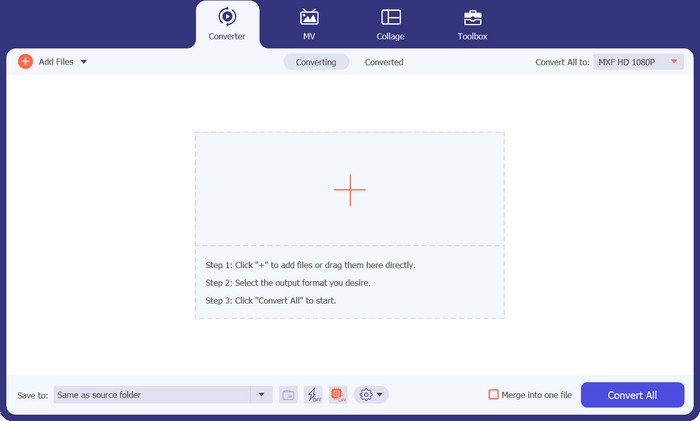
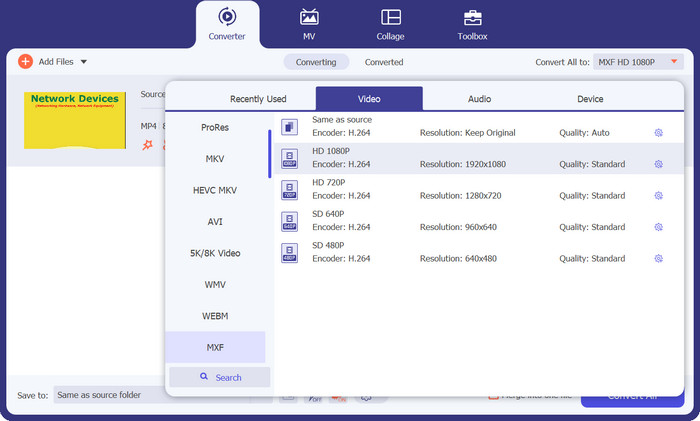
Korak 3. Odaberite MXF kao izlazni format. Jednostavno otvorite padajući izbornik Profile u gornjem desnom kutu, prijeđite na karticu Video i pronađite MXF. Možete se poslužiti i trakom za pretraživanje kako biste ga brzo locirali. Zatim odaberite željenu kvalitetu izlazne datoteke.
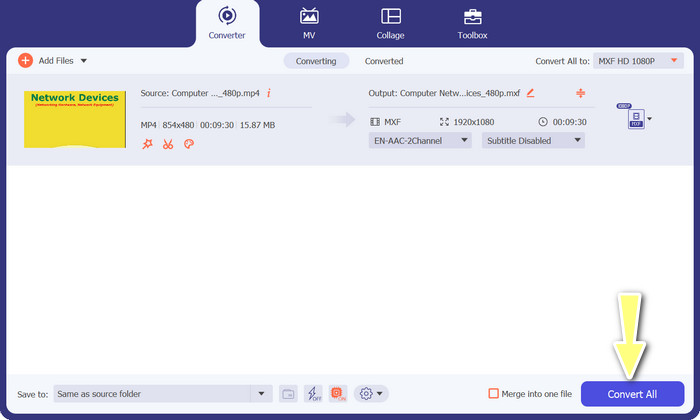
Korak 4. Spremni za pretvaranje! Kliknite gumb Convert All u donjem desnom kutu i voilà! Vaša pretvorena datoteka automatski će se spremiti u mapu na vašem računalu.
2. Besplatni MP4 pretvarač na mreži
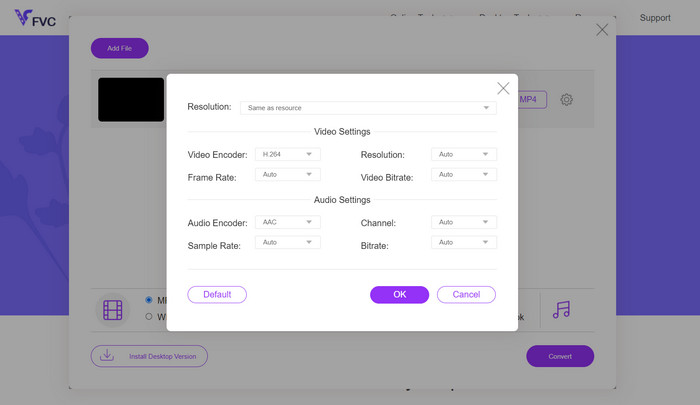
Ako tražite pouzdan mrežni MP4 pretvarač za pretvaranje MP4 u MXF online, isprobajte Free MP4 Converter Online. Ova stranica pruža sigurnu i pouzdanu platformu za prijenos vaših MP4 datoteka i njihovo pretvaranje u MXF ili razne druge formate. Možete biti sigurni da pretvorbe svaki put zadržavaju dosljedno visoku kvalitetu. Osim toga, imate mogućnost prilagoditi proces pretvaranja uređivanjem video kodeka i predloška. Isprobajte i moći ćete prilagoditi svoje pretvorbe točno onako kako želite.
Korak 1. Otvorite njihov web-mjesto u svom pregledniku. Ne trebate ništa preuzimati; samo ga otvorite kao i bilo koju drugu web-stranicu.
Korak 2. Kliknite gumb Add Files to Convert ili povucite i ispustite svoj MP4 video na web-stranicu. Započet će obrada vaše datoteke i vidjet ćete traku napretka.
Korak 3. Kada je prijenos dovršen, pronađite opciju i odaberite MXF s popisa. Ako postoji postavka kvalitete, odaberite onu koju preferirate. Zatim kliknite gumb Convert i neka magija počne!
3. FreeFileConvert
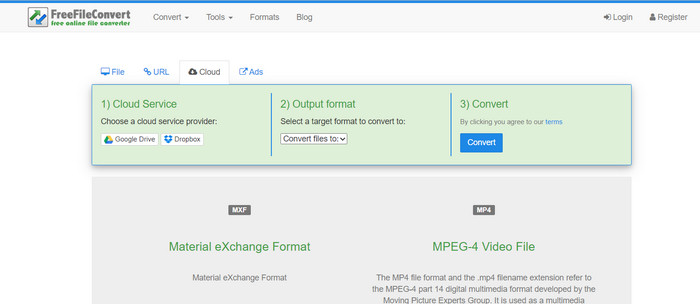
Tražite još jedan besplatni pretvarač MXF-u-MP4? Isprobajte FreeFileConvert! Ova korisniku prilagođena platforma slijedi jednostavan postupak u tri koraka i nudi sučelje koje je jednostavno za navigaciju kako bi vam pomoglo da svoje videozapise pretvorite bez muke. Samo posjetite njihovu web stranicu, prenesite svoju datoteku sa svog računala, odaberite željeni izlazni format i pritisnite Pretvori. Ne samo da možete učitavati datoteke sa svog računala, već također imate opciju učitavanja sa svog Dropbox ili Google Drive računa.
Korak 1. Otvorite svoj web-preglednik i posjetite web-stranicu FreeFileConvert. Nema potrebe ništa instalirati, isto je kao i odlazak na bilo koju običnu web-stranicu.
Korak 2. Kliknite gumb Choose File. Možete učitati i datoteku s Dropboxa ili Google Drivea, ako vam je to praktičnije.
Korak 3. U padajućem izborniku Output Format pronađite MXF i odaberite ga kao željeni format. Zatim kliknite gumb Convert i prepustite FreeFileConvertu da odradi svoje!
4. AnyConv
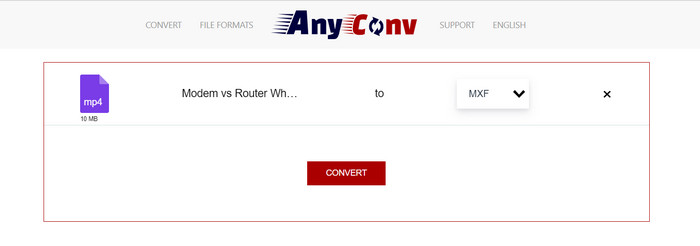
Tražite online alat za pretvaranje MP4 u MXF? Ne tražite dalje od AnyConv! Kao i ostali, ne zahtijeva nikakvu instalaciju. Osim toga, nije ograničen samo na MP4 u MXF; može podnijeti i razne druge pretvorbe formata! Najbolji dio? Ne morate se registrirati za potpunu uslugu – to je bez ikakvih problema. Jednostavno slijedite korake u nastavku i bit ćete u trenu obaviti konverziju MP4 u MXF. Lagano.
Korak 1. Otvorite AnyConv web-stranicu pomoću bilo kojeg web-preglednika.
Korak 2. Kliknite gumb CHOOSE FILES za učitavanje svog MP4 videa. Zatim proširite izbornik Profile i pronađite format MXF.
Korak 3. Spremni za pretvaranje? Kliknite plavi gumb Convert i proces pretvaranja će započeti.
5. Convertio
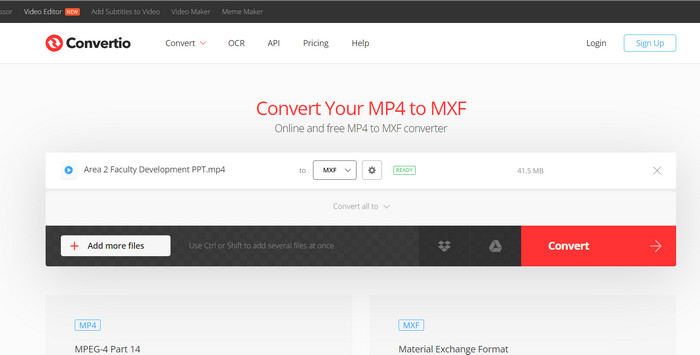
Poziv svim korisnicima koji žele pretvarač datoteka bez potrebe za preuzimanjem dodatnih aplikacija! Convertio vas pokriva. Pomoću ovog alata pretvaranje MP4 u MXF online jednostavno je bez gnjavaže ugađanja kompliciranih postavki. Najbolji dio? Podržava različite formate medijskih datoteka, uključujući dokumente, arhive, proračunske tablice, prezentacije i još mnogo toga.
Korak 1. Odaberite preglednik na svom računalu i posjetite službenu stranicu alata.
Korak 2. U glavnom sučelju programa kliknite gumb Choose Files kako biste učitali svoje MP4 datoteke. Alternativno, za još veću praktičnost, videozapis možete jednostavno povući i ispustiti.
Korak 3. Pronađite izbornik Profile i odaberite format MXF u odjeljku Video. Zatim kliknite gumb Convert kako biste pokrenuli proces pretvaranja.
Daljnje čitanje:
4 besplatna načina za pretvaranje kamkorderskih MXF datoteka u MP4 za univerzalnu reprodukciju
[Vodič] 2 konačne metode za spajanje MXF videozapisa sa Sony X70
Dio 2. Često postavljana pitanja o MP4 u MXF
Što je MXF datoteka?
MXF datoteka je ekstenzija datoteke koja predstavlja Format za razmjenu materijala, koji služi kao spremnik za standardni profesionalni audio i video sadržaj. Obično se koristi u televizijskom i kazališnom emitiranju zbog svoje sposobnosti održavanja video zapisa visoke kvalitete. U biti, MXF djeluje kao alternativa pohranjivanju stvarnih videozapisa u digitalnom formatu, što ga čini preferiranim izborom za rukovanje profesionalnim video sadržajem.
Mogu li pretvoriti MXF u MP4?
Apsolutno! S alatima kao što je Video Converter Ultimate, pretvaranje MP4 u MXF ili obrnuto je povjetarac. Imate fleksibilnost da isprobate obje opcije i vidite koja vam najbolje odgovara.
Kako mogu otvoriti MXF datoteku?
Kada je riječ o otvaranju MXF datoteka, VLC Media Player je vrhunski izbor. Ovaj lagani medijski uslužni program za više platformi izvrstan je u pregledavanju medijskih datoteka svih vrsta.
Koji su mogući nedostaci pretvaranja MP4 u MXF?
Pretvaranje MP4 u MXF može rezultirati većim veličinama datoteka zbog različitih metoda kompresije koje se koriste u MXF. Osim toga, neki alati mogu zahtijevati stabilnu internetsku vezu za mrežnu konverziju.
Mogu li uređivati MXF datoteke nakon konverzije?
Da, nakon pretvaranja MP4 u MXF, možete uređivati MXF datoteke pomoću kompatibilnog softvera za uređivanje videa. MXF datoteke dobro podržavaju profesionalni alati za uređivanje videa i sustavi za nelinearno uređivanje.
Zaključak
Bilo da trebate pretvoriti MP4 u MXF, otvoriti MXF datoteke ili raditi s bilo kojim video formatom, dostupni su jednostavni alati koji cijeli postupak čine besprijekornim. Pomoću ovih snažnih i svestranih alata bez napora ćete se snaći u svijetu video pretvorbi i uživati u reprodukciji multimedije bez poteškoća.
-
 Kako komprimirati MXF pomoću Premiere Pro i Free Online
 Kako komprimirati MXF s manjom veličinom datoteke? Kako komprimirati MXF datoteke u programu Adobe Premiere Pro? Ovaj post dijeli 2 načina komprimiranja MXF datoteka.
-
 Top 4 najbolja rješenja za pretvaranje MXF u MKV [Riješeno]
 Upoznajte ove četiri izvrsne metode za jednostavno pretvaranje MXF u MKV online i offline. Aplikacije uključene u ovaj post mogu vam pomoći pretvoriti datoteke bez muke.
-
 Kako jednostavno pretvoriti MP4 u MPG na stolnom računalu i na mreži
 Naučite kako pretvoriti svoj omiljeni MP4 u MPG jednostavnim koracima. Bez tehničkih glavobolja, samo glatki prijelazi za vaše medijske datoteke.
