


 Video Converter Ultimate
 Snimač zaslona
 Video popravak
Kako pretvoriti MP4 u WMV za Mac / Windows
Before introducing a suggested list of MP4 to WMV converters, let me ask you something about video formats.
To save digital video data on a computer system, we need to use a file format designed for video. So what kind of video formats do you know? MP4? WMV? FLV? AVI? Well, these truly are commonly used video formats while storing digital video data. But have you ever wondered why are there so many video file formats? What’s the difference between MP4 and WMV?
Općenito, MP4 je kompatibilan sa gotovo svim vrstama uređaja na tržištu, što znači da možete reproducirati MP4 svugdje, čak i na zadanom video uređaju vašeg računala ili telefona. Međutim, ako koristite Windows uređaje, vjerujem da vam WMV može poslužiti bolje. Ne samo zato što ga je razvio Microsoft, već i zato što može spremiti HQ videozapis na mali prostor na disku.
So today you’re gonna learn how to change a MP4 file to WMV with the best video converters that we recommend.

Dio 1. Kako besplatno pretvoriti MP4 u WMV Online
Osim instaliranja klasičnog softvera za stolna računala, u današnje je vrijeme i mogućnost korištenja web-pretvarača. Iako jednostavni, mnogi mrežni pretvarači malo su spori tijekom pretvorbe. Neki čak ograničavaju veličinu i količinu datoteka koje prenosite i ne mogu jamčiti kvalitetu izlaznih videozapisa.
Thus, we here introduce you FVC Free Online Video Converter, a free, fast and efficient video converter which can assist you in converting a bunch of videos or audio losslessly.
As a multifunctional free online MP4 to WMV converter, FVC Video Converter supports almost every type of video formats. You can convert large MP4 files to/from MKV, MOV, WMV, AVI, TS, etc. You can also edit your video according to your need. It is a breeze to adjust video bitrate, sample rate, frame rate, resolution and volume on FVC. And there’s no watermark on your video after converting.
Sada se možete brinuti da će sa svim ovim značajkama možda biti teško razumjeti kako upravljati ovim pretvaračem. Zapravo je istina sasvim suprotna. Potrebno je samo nekoliko koraka da svladate ovaj MP4 u WMV pretvarač.
Step 1. Click here to navigate to FVC Free Online Video Converter. Then Click Add Files to Convert to download FVC Launcher first.
Preuzmite desktop verziju za skupno pretvaranje datoteka.
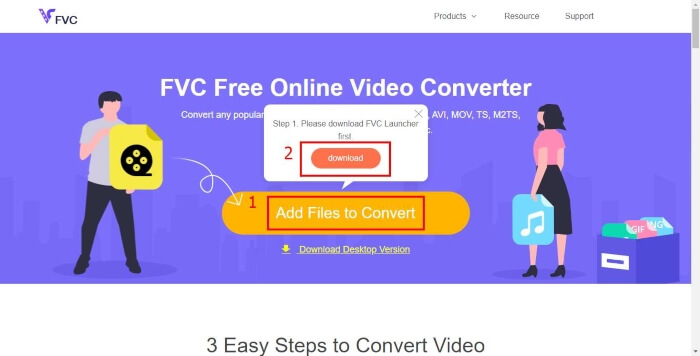
Step 2. After installing the launcher, the Open File window will pop up. Just find the MP4 file you want to change.
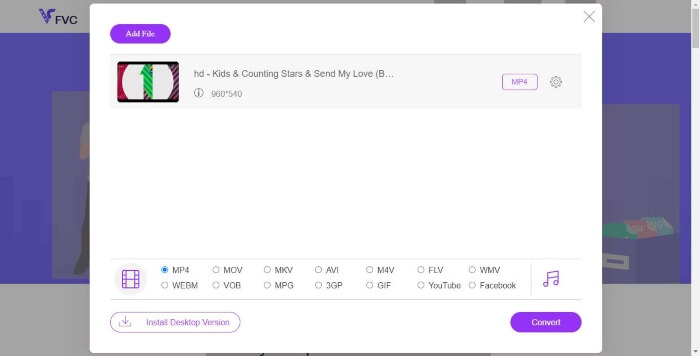
Step 3. Then in the converting page, choose output format WMV. By the way, if you want to change the video parameters, just open the Settings window by clicking the Setting icon. Click the Convert button and pick a destination to store the converted video.
Dio 2. Pretvorite MP4 u WMV pomoću stolnog softvera
1. RealPlayer
RealPlayer has become one of the most popular media player since 1995. It can not only help you easily manage your videos, music and pictures, but convert videos into multiple formats and transfer them to other mobile devices.
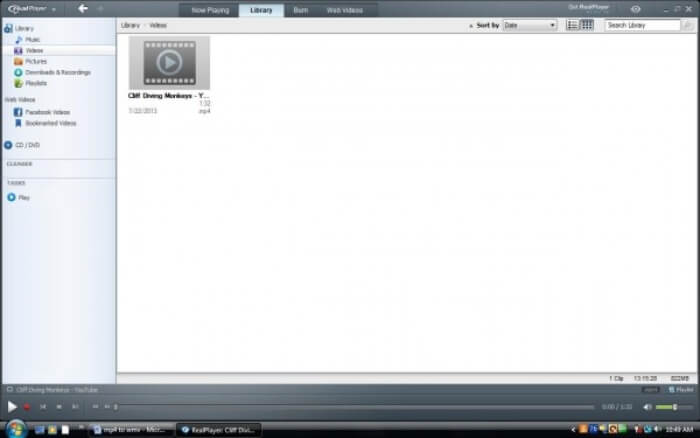
Step 1. If RealPlayer has been installed to your computer, save the MP4 file into the RealPlayer library. Select Library after launching RealPlayer. Find your file in the Video list.
Step 2. Click the file and select the More option from the popup menu. Then select the Convert option.
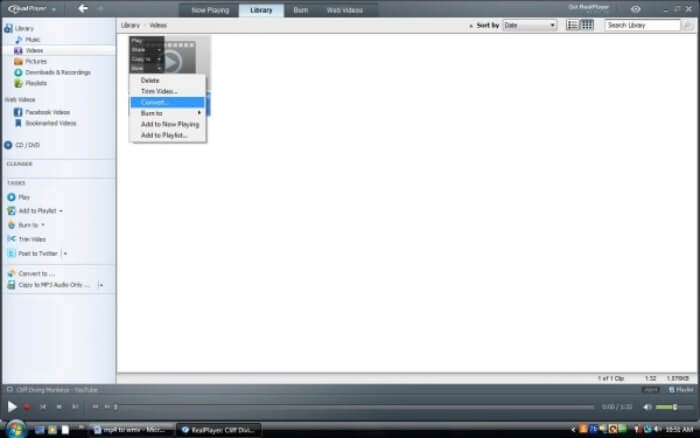
Step 3. Choose WMV from the Select a Device menu and click OK. Now click the Start button. In a few seconds, your video will be in the RealPlayer library.
2. VLC Media Player
VLC is an open source, cross-platform player that can play videos in different formats. It also supports file conversion to many popular formats. Follow these steps below to export WMV file from MP4.
Step 1. Open VLC Media Player and click Convert / Save in the menu of Media.
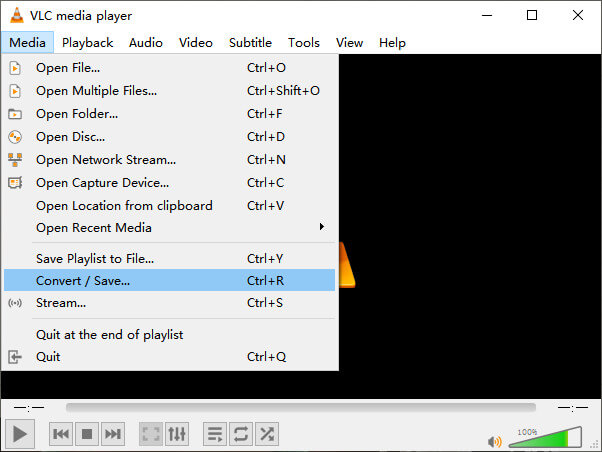
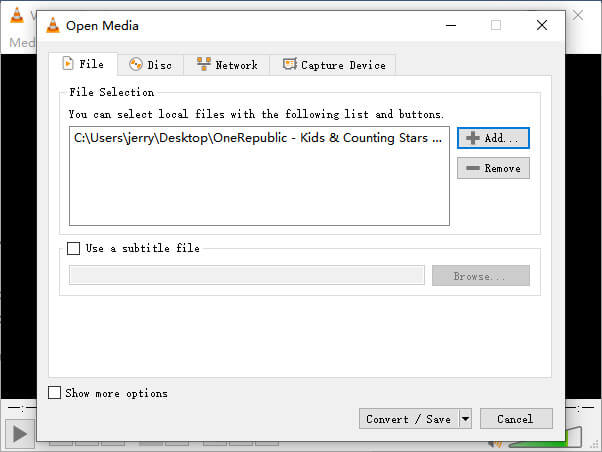
Step 2. Add the file to VLC. Then click the Convert / Save button.
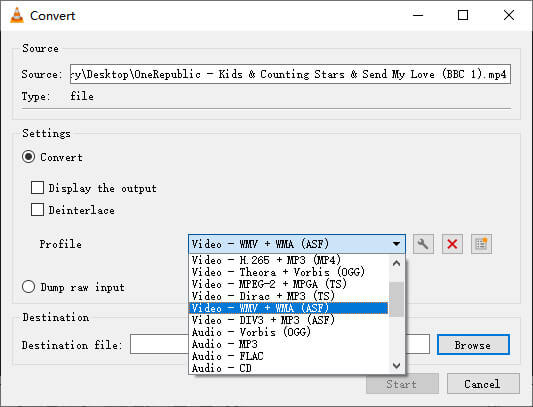
Step 3. Find WMV from Profile and select a folder as the saving destination of the output file. Then click Start.
MP4 u odnosu na WMV
Format MP4, koji je izdala Grupa stručnjaka za pokretne slike (MPEG) 2001., može vam pomoći u spremanju video, audio, titlova i slikovnih podataka u zasebne zapise. To je skraćenica od MPEG-4 Part 14. Osim toga, to je jedan od najpopularnijih formata koji se koristi za streaming i dijeljenje videozapisa.
Proizveden od strane Microsofta, WMV je bio jedan od najčešćih video formata 2000-ih. Može se vidjeti na webu i reproducirati na raznim medijskim playerima u sustavu Windows. Također je zadani format videodatoteke programa Windows Media Player. Ali nedavno su ga preuzeli drugi formati.
Dio 3. Česta pitanja o pretvorbi MP4 u WMV
1. Može li ručna kočnica pretvoriti MP4 u WMV?
After doing a research, unfortunately the latest Handbrake cannot convert MP4 to WMV.It is true that Handbrake supports most common multimedia files. But that’s for input sources. The options for output formats are MP4(.M4V) and MKV.
2. Mogu li besplatno pretvoriti MP4 datoteku koja ima više od 100 MB u WMV?
It depends. Different free online video converters have different limitations. Some converters like FVC Free Online Video Converter allow you to change over 100MB. But some other converters may charge you for that.
3. Može li Windows Media Player pretvoriti MP4 u WMV?
You can’t convert MP4 file to WMV with Windows Media Player. That’s because it is just a player, not a converter. If you want to convert MP4 to WMV, you should use an efficient video converter.
4. Mogu li reproducirati WMV datoteku na Macu?
The built-in video tools on Mac cannot play WMV files. But you have other ways to play WMV videos on MacOS. You can convert WMV to other format that is supported by Mac. Or install Windows Media Player for Mac to play WMV files.
Zaključak
Even though MP4 and WMV both have their similarities, they also have their own characteristics. So you should make decisions in accordance with specific conditions.Hope that after reading this post, the issues of converting MP4 to WMV will no longer be your problem. Next time when you need a WMV file, just follow the guide above and convert the file with ease.
-
 Kako pretvoriti vaše MP4 video datoteke u animirane GIF slike bez gubitka kvalitete
 Tražite li najbolji način za pretvaranje MP4 videozapisa u animirane GIF-ove? Evo detaljnog vodiča za to u Photoshopu, programu Windows Movie Maker, mrežnom video pretvaraču i mnogim drugim.
-
 Kako pretvoriti svoje FLV video datoteke u MP4, a da ne platite ni lipe
 Ovaj vodič dijeli četiri besplatne metode za pretvorbu FLV video datoteka u MP4 format na Windowsima 10/8/7 / XP i Mac OS X, tako da možete uživati u videozapisima na bilo kojem uređaju.
-
 Kako pretvoriti MOV u MP4 bez gubitka kvalitete
 Želite pretvoriti MOV (Apple QuickTime Movie) datoteke u MP4? Ovaj post dijeli 4 besplatne metode za pretvorbu MOV video datoteka u MP4 format na Windowsima 10/8/7 / XP i Mac OS X.

