


 Video Converter Ultimate
 Snimač zaslona
 Video popravak
3 Mrežni i izvanmrežni pretvarači MPG u MP4 koje morate pokušati pretvoriti MPG datoteke
MP4 je jedan od najčešćih formata datoteka koje ćete danas vidjeti na internetu. Iako MPG i MP4 imaju mnogo sličnosti, postoje i razlike među njima. A ako želite pretvoriti svoju MPG datoteku u MP4 format, testirali smo video pretvarače koji su danas popularni. Štoviše, odabrali smo najbolje pretvarače za MPG u MP4 koje možete isprobati!

Dio 1. Zašto trebate pretvoriti MPG u MP4
Koja je važnost pretvaranja MPG u MP4? Formati MPG i MP4 često se koriste za internetske videozapise. Ali po čemu se razlikuju? MPG ili MPEG izvorni je format koji koristi MPEG kodek. To je koder koji pruža videozapise visoke kvalitete.
S druge strane, MP4 je jedan od najčešćih formata video datoteka i koristi modernu video kompresiju. Dakle, koji je bolji? Visoka sposobnost kompresije MP4 omogućuje kompresiju datoteka u manjim veličinama od bilo kojeg drugog formata video datoteke kao što je MPG.
Dio 2. 3 načina za pretvaranje MPG u MP4
Ovdje su izvrsni video pretvarači koje možete koristiti online i offline i naučiti kako promijeniti MPG u MP4.
1. Koristite Video Converter Ultimate
Video Converter Ultimate je pretvarač medijskih datoteka koji vam omogućuje da lako pretvorite svoju MPG datoteku u MP4 format. Ovaj pretvarač ima jednostavno sučelje, ali daje impresivne rezultate. Sadrži značajke koje vam omogućuju uređivanje, poboljšavanje i komprimiranje MPG datoteka. Osim toga, u ovom pretvaraču možete skupno pretvarati MPG u MP4.
Video Converter Ultimate također ima opciju gdje možete kolažirati slike i videozapise. Također, ako želite stvoriti GIF, ovaj pretvarač ima tu značajku. Uz to, korištenjem ovog pretvarača možete pretvoriti velike datoteke bez narušavanja njihove kvalitete. Iako se njegove značajke čine profesionalnim, možete ih koristiti brzo jer su jednostavne za korištenje.
Korak 1. Da biste preuzeli ovaj pretvarač, kliknite gumb za preuzimanje u nastavku. Slijedite postupak instalacije, a zatim otvorite aplikaciju.
Besplatno preuzimanjeZa Windows 7 ili novijiSigurno preuzimanje
Besplatno preuzimanjeZa MacOS 10.7 ili novijiSigurno preuzimanje
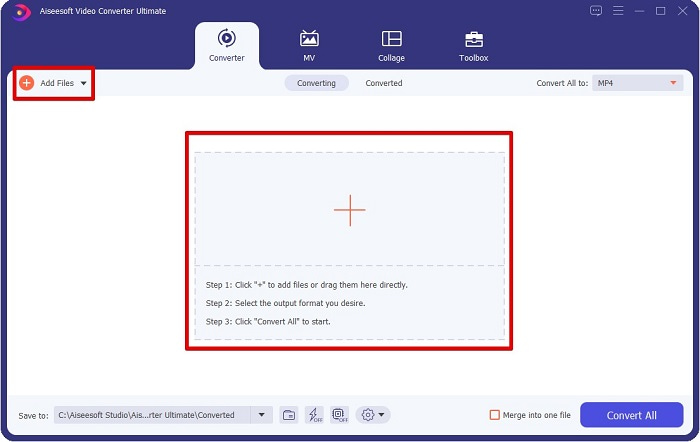
Korak 2. Nakon pokretanja pretvarača kliknite gumb Add Files ili gumb + da biste učitali MPG datoteku. Otvorit će se datoteke na vašem računalu, gdje ćete pronaći svoju datoteku u mapama. Zatim kliknite Open kako biste dodali datoteku u red za obradu.
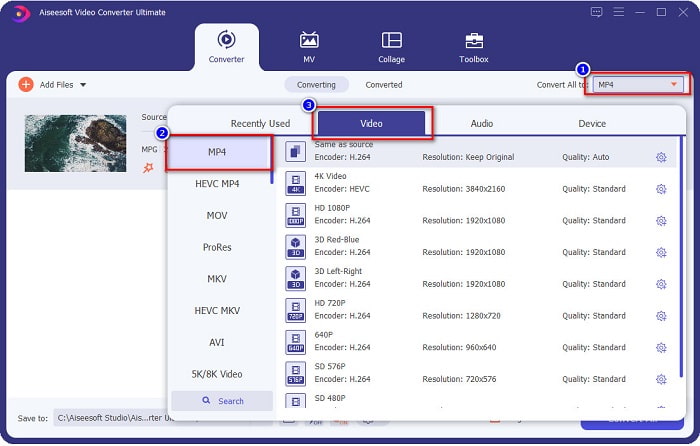
Korak 3. Da biste promijenili format svoje MPG datoteke, kliknite Convert All to u gornjem desnom kutu zaslona. Nakon što vidite popis formata datoteka, odaberite format MP4.
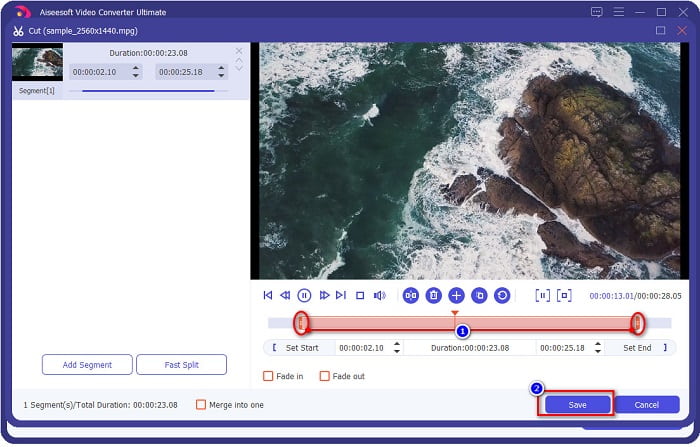
Ako želite skratiti duljinu svojeg videozapisa, kliknite gumb scissor kako biste ga obrezali. Povlačenjem gumba play head možete prilagoditi duljinu videozapisa. Za završetak kliknite Save.
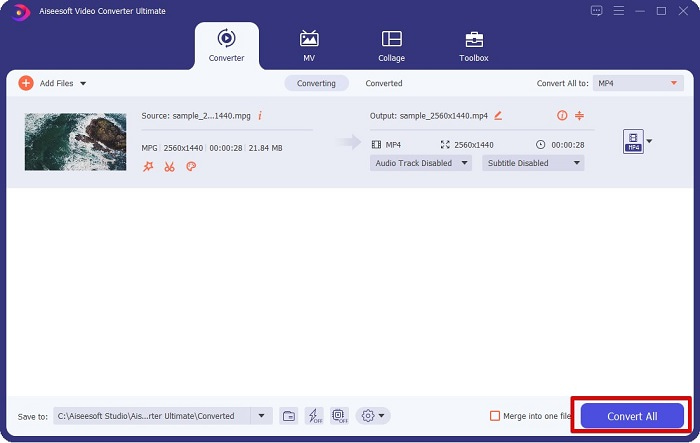
Korak 4. Kada ste odabrali format datoteke koji želite, kliknite Convert All da biste pretvorili MPG datoteku u MP4. Samo malo pričekajte i vaša MPG datoteka bit će pretvorena u MP4. Uz te jednostavne korake lako ste pretvorili svoju MPG datoteku u MP4.
2. Koristite besplatni Online Converter
FVC Free Online Video Converter omogućuje vam besplatno pretvaranje MPG datoteke u MP4 format bez registracije. To je besplatni mrežni video pretvarač koji vam omogućuje neograničeno pretvaranje. Štoviše, ovim pretvaračem možete mrežno pretvarati i velike datoteke. Također ne morate ništa preuzimati jer mu možete pristupiti putem interneta. Međutim, nedostatak je to što ovisi o internetskoj vezi, što znači da brzina pretvaranja ovisi o brzini interneta. Ipak, mnogi korisnici upotrebljavaju ovaj pretvarač i pokazao se kao izvrstan video pretvarač.
Evo popisa koraka za pretvaranje u FVC Free Online Video Converter:
Korak 1. Otvorite preglednik i potražite FVC Free Online Video Converter.
Korak 2. Kada ste već na web-stranici, kliknite Add Files to Convert. Pojavit će se tekstni okvir u kojem najprije trebate preuzeti pokretač. Kada se pokretač preuzme, bit ćete preusmjereni na svoje datoteke; odaberite MPG datoteku koju želite pretvoriti.
Preuzmite desktop verziju za skupno pretvaranje datoteka.
Korak 3. Nakon što odaberete MPG datoteku, vidjet ćete prvo sučelje s unaprijed postavljenim popisom video formata. Odaberite MP4 prije nego što mrežno pretvorite MPG datoteku u MP4.
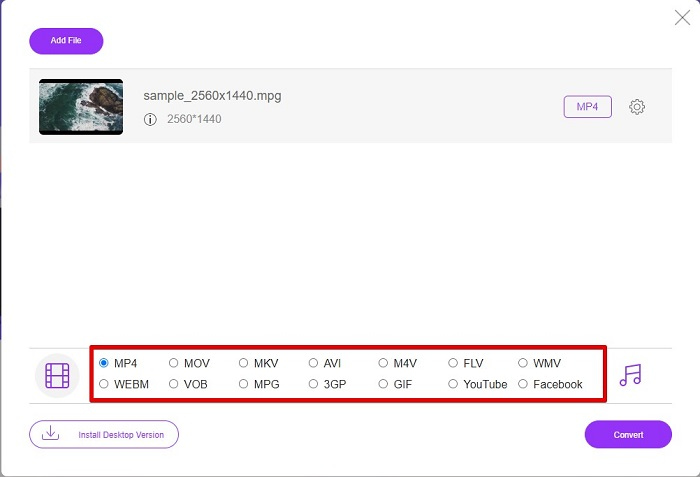
Korak 4. Kliknite gumb Convert kako biste započeli pretvaranje. Otvorit će se nova kartica u kojoj ćete odabrati gdje želite spremiti pretvorenu datoteku na računalu, a zatim kliknite select folder.
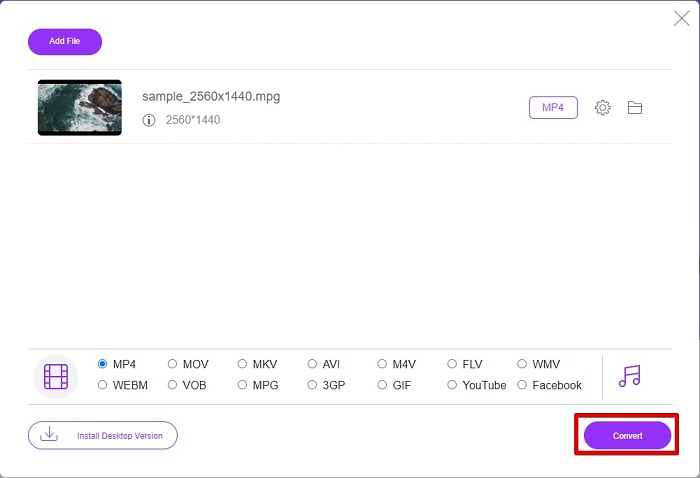
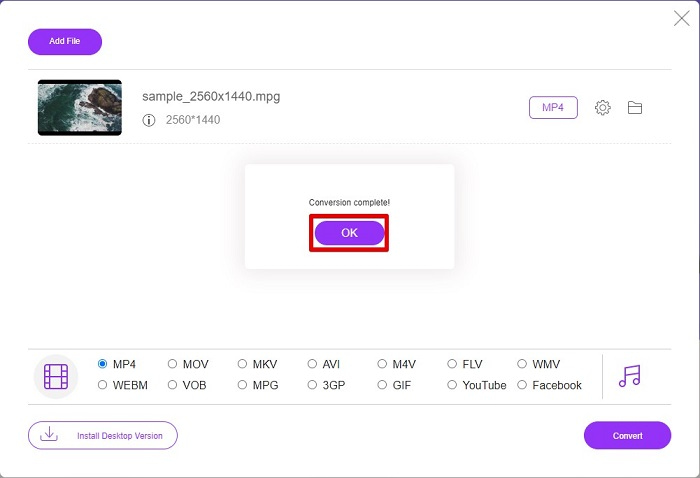
Korak 5. Na kraju, vaša će se datoteka početi pretvarati; kada završi s pretvaranjem, kliknite OK za završetak. I to je to! Završili ste pretvaranje lako kao 1-2-3!
3. Koristite ConvertFiles.com
ConvertFiles.com besplatna je online aplikacija za pretvaranje vaše MPG datoteke u MP4. Omogućuje vam pretvaranje formata datoteka, do 300 vrsta formata datoteka. A ako tražite MPG u MP4 konverter online koji će vam omogućiti pretvaranje dokumenata, crteža, videa, prezentacija i još mnogo toga. Međutim, korištenjem ovog mrežnog pretvarača naići ćete na mnogo uznemirujućih oglasa. Ipak, ovaj online pretvarač još uvijek vrijedi isprobati i pokazao se obećavajućim.
Evo kako ćete pretvoriti svoju MPG datoteku u MP4 format:
Korak 1. U pregledniku potražite ConvertFiles.com kako biste izravno otvorili web-stranicu.
Korak 2. Odaberite svoju MPG datoteku klikom na pravokutni gumb ili gumb Browse pokraj Choose a local file. Pronađite svoju MPG datoteku i odaberite je.
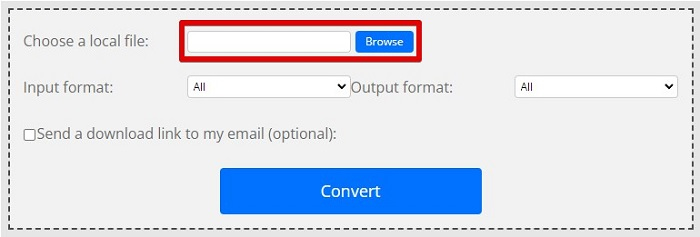
Korak 3. Nakon što odaberete MPG datoteku koju želite pretvoriti, u odjeljku izlaznog formata odaberite format .mp4 klikom na drop-down gumb.
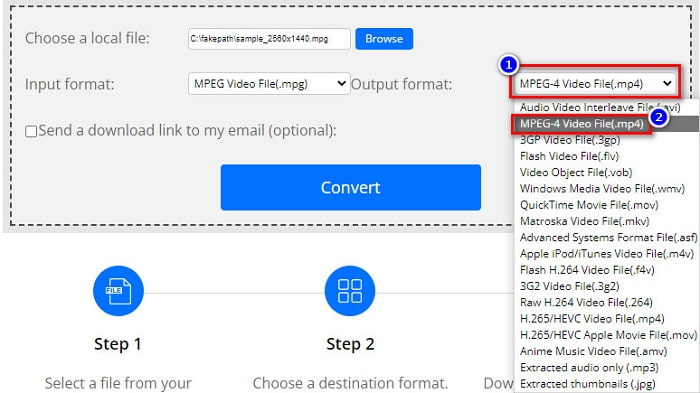
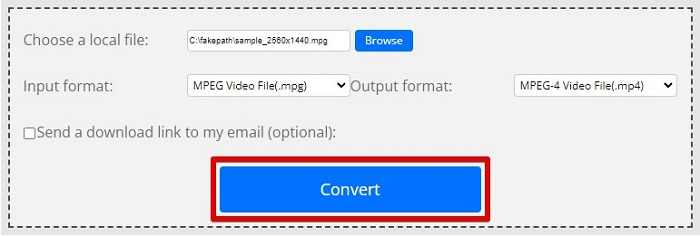
Korak 4. Kada ste odabrali željeni format datoteke, možete pretvoriti svoju datoteku klikom na Convert.
MPG u odnosu na MP4
Izradila ga je Moving Picture Experts Group (MPEG), MPG je uobičajeni digitalni video format za pohranjivanje video, audio i metapodataka. Vrlo je koristan pri stvaranju filmova za dijeljenje na internetu. Te datoteke u MPG-u obično sadrže MPEG-1 ili MPEG-2 video/audio kompresiju.
Format MP4, koji je izdala Grupa stručnjaka za pokretne slike (MPEG) 2001., može vam pomoći u spremanju video, audio, titlova i slikovnih podataka u zasebne zapise. To je skraćenica od MPEG-4 Part 14. Osim toga, to je jedan od najpopularnijih formata koji se koristi za streaming i dijeljenje videozapisa.
Dio 3. Često postavljana pitanja o MPG i MP4 formatu
Mogu li pretvoriti MPG datoteke u MP4 bez gubitka kvalitete?
Da. Video Converter Ultimate omogućuje vam da pretvorite vaš MPG u MP4 format, bez gubitka kvalitete, unatoč veličini datoteke.
Gdje mogu reproducirati MPG datoteke?
MPG datoteke su široko podržane. Stoga ih mogu otvoriti mnogi medijski reproduktori, uključujući Microsoft Windows Media Player i VideoLAN VLC Media Player. Za više informacija možete pogledati ovaj članak: Best 4 MPG/MPEG Players for Windows/Mac/Android/iPhone [2021]
Mogu li pretvoriti MP4 u MPG?
Da. Možete pretvoriti MPG u MP4 format datoteke pomoću pretvarača datoteka koje smo naveli gore.
Zaključak
Pretvarači koje smo naveli iznad pokazali su se pouzdanim. Jednostavni su za korištenje i besplatni! No ako želite pretvarač datoteka koji može pretvoriti vašu MPG datoteku u MP4 format i ima fantastične značajke za poboljšavanje datoteka, tada je Video Converter Ultimate najbolji izbor. Štoviše, ako želite mrežni pretvarač bez oglasa koji također može s lakoćom pretvarati velike datoteke, isprobajte FVC Free Online Converter.
-
 3 jednostavna načina kako pretvoriti MPG u MOV na vašem Macu/Windows/Online
 Želite pretvoriti svoje MPG datoteke i kasnije ih prenijeti na svoj iOS, iPod, iPad ili Mac? Ovaj će vam članak pomoći da shvatite kako pretvoriti MPG u MOV s koracima.
-
 Kako pretvoriti MPG u FLV bez gubitka kvalitete [Dokazano]
 Morate gledati svoj omiljeni film na ovom media playeru, ali on ne podržava MPG. Pokušajte pretvoriti svoju MPG datoteku u FLV pomoću ovih pretvarača koje vam ovaj članak predstavlja.
-
 2 Ultimate MPG pretvarača za pretvaranje MPG u WMV besplatno
 Želite li besplatno pretvoriti MPG u WMV? U tom slučaju imate sreće jer smo otkrili da postoje dva alata pomoću kojih možete pretvoriti svoje MPG datoteke.

