


 Video Converter Ultimate
 Snimač zaslona
 Video popravak
WTV u MP4 Converter: Kako pretvoriti WTV u MP4
WTV, kao nasljednika DVR-MS formata, razvio je Microsoft za pohranu TV sadržaja koji je snimio Windows Media Center. Kodiran s MPEG-2 i MPEG-4 standardom i MPEG-1 Layer II ili Dolby Digital AC-3, WTV podržava nekoliko softvera poput FFMPEG, Windows Media Center, CyberLink PowerDVD 12, Nero 12, HandBrake, CCextractor itd.

Ako želite praktično gledati ili dijeliti WTV datoteke, najbolje je da ih pretvorite iz WTV u MP4, najpopularniji format za gotovo svaki uređaj.
Pretražili smo internet u potrazi za pretvaračem WTV u MP4 i pronašli 2 najbolja besplatna pretvarača WTV u MP4 za pretvaranje WTV u MP4.
Dio 1. Besplatni video pretvarač - Pretvorite WTV u MP4 Online
Vrlo je lako pretvoriti WTV u MP4. Najlakši način za promjenu WTV u MP4 jest završiti postupak online. Free Online Video Converter je besplatan program za pretvaranje WTV u MP4 i druge glavne video i audio formate. Ovaj besplatni online alat kompatibilan je s Windows 10/8/7 i Mac OS X 10.7 ili novijim, i možete jednostavno transkodirati WTV u MP4 u nekoliko koraka.
Da biste pojednostavili postupak, možete slijediti vodič:
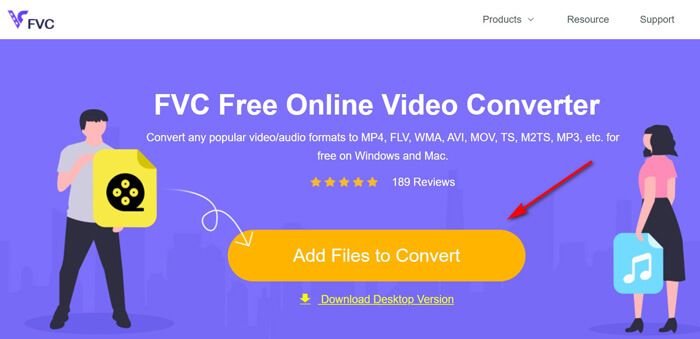
1. Kliknite gumb Add Files to Convert da biste učitali WTV datoteke s računala.
2. Odaberite MP4 u okviru za potvrdu (checkbox).
3. Kliknite Convert da biste automatski pretvorili i preuzeli WTV datoteke.
Sada smo ovdje kako bismo vas detaljno proveli kako pretvoriti WTV u MP4.
Korak 1. Dodajte WTV datoteke
Otvorite ovaj besplatni online pretvarač WTV u MP4 putem preglednika. Kliknite gumb Add Files to Convert, a skočni prozor će vas uputiti da preuzmete i instalirate pokretač (launcher). Samo ga preuzmite i nakon uspješne instalacije pojavit će se prozor otvorenog koda. Zatim možete odabrati WTV snimke na računalu za učitavanje. Ovaj besplatni program podržava skupnu konverziju i možete online dodati više od jedne WTV datoteke.
Korak 2. Odaberite MP4
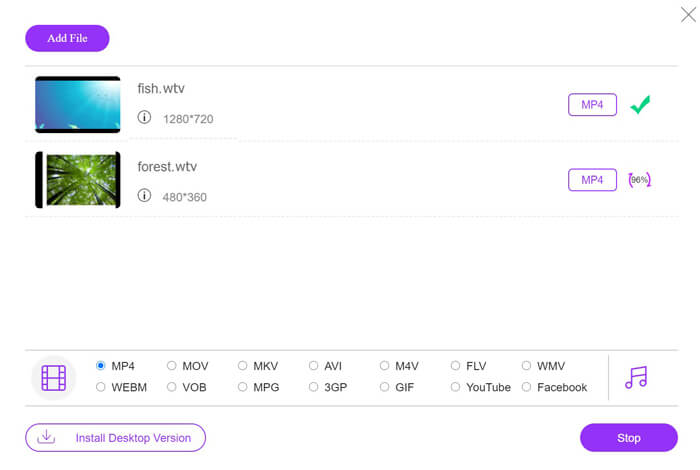
Označite kućicu MP4 na dnu, gdje možete pronaći razne izlazne opcije poput MKV, AVI, M4V, FLV, VOB, GIF, YouTube, Facebook, MP3, AAC, WMA, WAV, FLAC itd.
Osim toga, možete kliknuti ikonu Settings pokraj izlaznog MP4 okvira kako biste podesili koder (encoder), broj sličica u sekundi (frame rate), razlučivost, bitrate i druge parametre.

Korak 3. Pretvorite WTV u MP4
Nakon što je sve gotovo, kliknite gumb Convert i pojavit će se prozor koji od vas traži da odaberete odredište za spremanje pretvorenih MP4 datoteka. Odaberite odredište i vratite se u ovaj besplatni online pretvarač, ponovno kliknite Convert kako biste započeli pretvaranje i automatsko preuzimanje MP4 datoteka. Postotak napretka pretvorbe možete vidjeti izravno.
Dio 2. Ručna kočnica - Pretvorite WTV u MP4 na PC / Mac
Još jedan besplatan način pretvorbe WTV-a u MP4 je upotreba HandBrake-a. HandBrake je rijetki softver koji može čitati WTV datoteke. Osim toga, također može pretvoriti WTV u MP4 / MKV na vašem Windows i Mac računalu.
HandBrake je softver za radnu površinu otvorenog koda, pa biste trebali preuzeti ovaj besplatni pretvarač prvo na svoje računalo.
Ponovno, jednostavni koraci pretvorbe WTV-a u MP4 u HandBrakeu su sljedeći:
1. Dodajte WTF datoteke ili cijelu mapu u HandBrake.
2. Prilagođeni MP4 profil u HandBrakeu.
2. Pregledajte i pretvorite WTV u MP4.
Evo opsežnog vodiča za promjenu WTV-a u MP4 u HandBrakeu.
Korak 1. Dodajte WTV datoteke u HandBrake
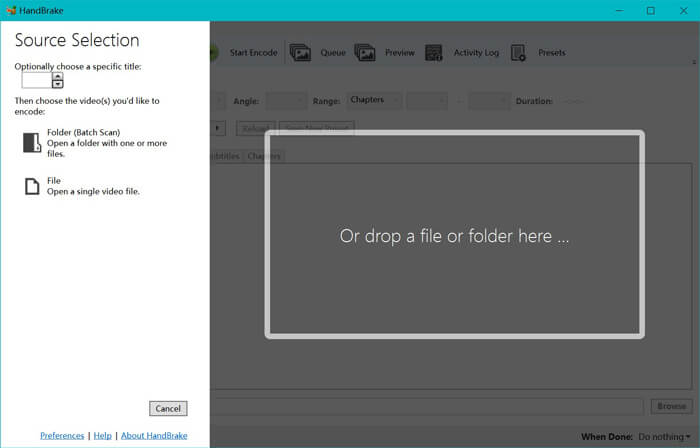
Nakon što instalirate HandBrake na svoje računalo, HandBrake će po zadanim postavkama prikazati dijaloški prozor za otvaranje izvora. Ovdje možete kliknuti Folder ili File kako biste odabrali WTV datoteke ili mapu u glavni prozor. Alternativno, možete i povući i ispustiti WTV datoteke u ovaj softver.
Korak 2. Odaberite MP4 format
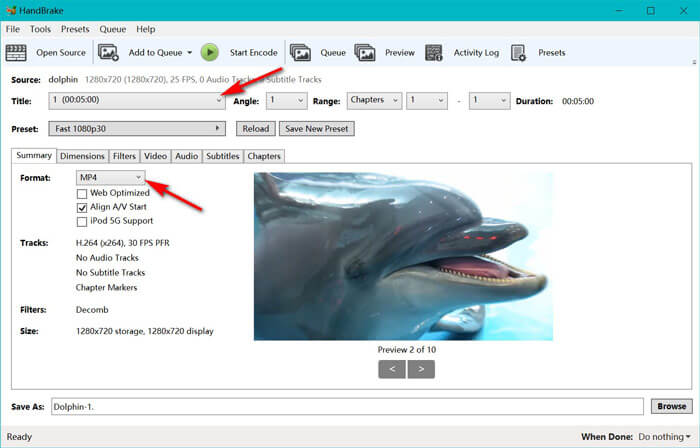
Nakon što učitate WTV datoteke, možete odabrati točnu WTF datoteku iz padajuće opcije Title. Zatim u kartici Summary odaberite MP4 kao izlaz za odabranu WTV datoteku. Osim toga, HandBrake vam omogućuje podešavanje dimenzija, filtera, kodeka/kvalitete videa, audio zapisa itd. Ne samo MP4, on može pretvarati i druge formate poput AVI, MOV, M2TS itd. u MKV.
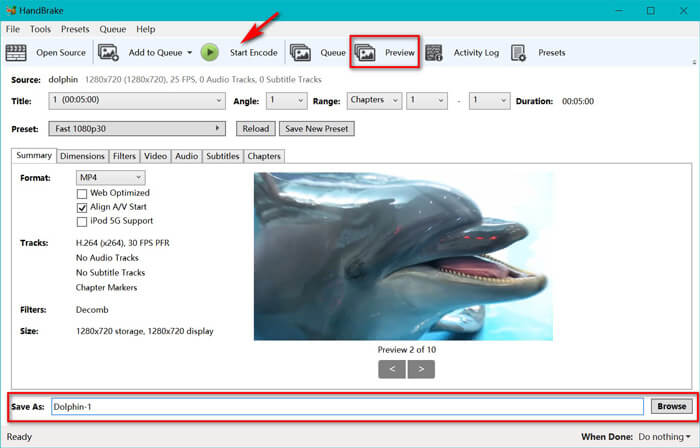
Korak 3. Pregledajte i pretvorite WTV u MP4
Funkcija Preview na alatnoj traci u programu HandBrake omogućuje vam da vidite kako će vaš novi MP4 videozapis izgledati prije kodiranja. Nakon što su sve postavke točno podešene, dodijelite naziv pretvorenim MP4 datotekama i odaberite lokaciju za svoje nove videozapise klikom na gumb Browse na dnu. Na kraju, samo kliknite gumb Start Encode na alatnoj traci kako biste pretvorili WTV u MP4.
Dio 3. Česta pitanja o WTV-u u MP4
Zašto HandBrake sprema MP4 kao M4V?
Za MP4 datoteke, HandBrake će MP4 datoteke automatski koristiti ekstenziju M4V, kada odaberete AC3 audio i SRT titlove ili imate oznake poglavlja za prilagodbu MP4 datoteke. Ali proširenje .m4v možete izravno promijeniti u .mp4.
Može li VLC player reproducirati WTV datoteke?
VLC ne može izravno reproducirati WTV datoteke. Trebali biste instalirati K-Lite Code Pack da biste instalirali WTV kodni paket, a zatim reproducirali WTV datoteke na VLC-u.
Mogu li pretvoriti zaštićene WTV datoteke?
Da, možeš. Međutim, samo MCEBuddy podržava uređivanje i pretvaranje zaštićenih komercijalnih WTF datoteka. Ovaj softver morate koristiti za kopiranje i pretvaranje zaštićenih WTV datoteka.
Zaključak
Da biste prikladno koristili WTV Media Center snimljene WTV datoteke, prvo trebate pretvoriti WTV u MP4. Ovaj post dijeli 2 besplatna načina pretvorbe WTV-a u MP4 putem interneta putem Free Online Video Convertera i HandBrake-a. Besplatni internetski video pretvarač omogućuje vam pretvaranje WTV-a u MP4 i druge popularne formate, dok HandBrake daje više kontrola uređivanja s ograničenim mogućnostima izlaznog formata.
Koji vam je način najdraži?
Ili možda imate bolji WTV u MP4 pretvarač?
U svakom slučaju, volio bih čuti vaše mišljenje. Dakle, samo naprijed i ostavite komentar ispod.
-
 Kako pretvoriti MXF u MP4 putem besplatnog pretvarača
 Ovaj je post detaljan vodič za pretvaranje MXF u MP4 na računalu. Jednostavnim koracima možete dobiti 4 besplatna pretvarača MXF u MP4 za pretkodiranje videokamere MXF u MP4.
-
 Tri najbolja načina za besplatno pretvaranje MP4 u MOV
 Kako pretvoriti MP4 u MOV na Macu? Postoji li neki besplatan način pretvorbe MP4 u MOV bez gubitka kvalitete? Ovaj post dijeli 3 jednostavna načina koja će vam pomoći da napravite video konverziju iz MP4 u MOV na Macu, Windows PC-u i na mreži.
-
 Kako pretvoriti M2TS u WMV na sustavu Windows / Mac / Online (potpuno besplatno za upotrebu)
 Evo 3 jednostavna načina za pretvaranje M2TS u WMV videozapise. Možete brzo promijeniti format video zapisa s M2TS na WMV na sustavima Windows, Mac i online. Podržana je paketna konverzija.
