


 Video Converter Ultimate
 Snimač zaslona
 Video popravak
Otkrijte načine kako igrati MKV datoteke na PS4
Ne samo da Xbox One S podržava reprodukciju filmova. Sada i PS4 pokušava pratiti taj trend. Uz korištenje USB kabela i putem DLNA, PS4 sada može reproducirati MKV, MP4, AVI i još mnogo toga. To znači da je MKV među datotekama koje možete reproducirati. Kako biste vidjeli potpuni popis podržanih formata, posjetite službenu web-stranicu PS4. Nadalje, ne biste ni nastavili čitati ovaj članak da niste zainteresirani za reprodukciju MKV datoteka na PS4. Nastavite čitati, jer ćete u nastavku otkriti načine kako možete reproducirati MKV na PS4.

Dio 1. Mogu li se sve MKV datoteke reproducirati na PS4?
Mogu li igrati MKV datoteke na PS4? Sigurno možete. PS4 podržava format MKV datoteke. Ali ne mogu se sve MKV datoteke pravilno reproducirati. Možda ćete doživjeti neuspjeh u igranju. To je zato što morate zadovoljiti standarde koje postavlja PS4. Uglavnom su podržani H.264/MPEG-4 AVC. Ista pravila vrijede ako ćete reproducirati MKV datoteke s USB pogona. U međuvremenu za audio su podržani MP3, AAC LC, AC-3. Većina tih formata su Dolby Digital formati. Ako mislite da ste ispunili standard, možete nastaviti s koracima kako izravno igrati MKV na PS4.
Korak 1. Preuzmite i instalirajte DivX Media Server i pokrenite player. Zatim omogućite dijeljenje na svom računalu.
Korak 2. Učitajte ili uvezite MKV datoteku na server.
Korak 3. Prije nego što prijeđete na sljedeći korak, provjerite jesu li računalo i PS4 spojeni na istu Wi‑Fi mrežu. Zatim preuzmite i instalirajte DivX media player na svoj PS4. Nakon toga otvorite aplikaciju Media Player na PS4 i odaberite DivX Media Server s popisa uređaja koji će se pojaviti.
Korak 4. Na kraju potražite Video, zatim označite videozapis koji želite reproducirati i započnite streaming.
Dio 2. Vodič korak po korak o tome kako igrati MKV na PS4 s USB-a
U međuvremenu, ako koristite USB pohranu, provjerite je li formatiran ili FAT ili exFAT, inače neće biti otkriven. Ako mislite da ste spremni i da je flash pogon kompatibilan, pogledajte donji vodič korak po korak.
Korak 1. Uključite PS4 i umetnite USB. Idite u glavni Izbornik. Sada odaberite Video i potražite naziv svog USB pogona.
Korak 2. Kada vidite popis naziva datoteka, kliknite na Prikaži sve kako biste vidjeli čitav popis datoteka koje ste spremili na USB. Kopirajte datoteku i prenesite je na PS4.
Korak 3. Na kraju provjerite imate li još dovoljno prostora za dovršetak prijenosa.
Dio 3. Alternativni način igranja MKV-a na PS4 putem Plex poslužitelja
Osim DivX‑a, postoji i alternativni player koji možete koristiti za reprodukciju MKV datoteka na PS4. To je streaming medijski server nazvan Plex. Ovaj medijski server omogućuje vam strujanje videozapisa visoke kvalitete, glazbe, TV emisija i podcasta s vašeg računala. Iako neki korisnici imaju problema s reprodukcijom pojedinih MKV datoteka, i dalje ga možete koristiti kao alternativu. U međuvremenu, ako zaista želite koristiti Plex i reproducirati nepodržanu datoteku, trebali biste razmisliti o konverziji videa. Neki konverteri mogu pretvoriti vaše MKV datoteke u format koji Plex podržava. Podešavanjem video kodeka, frame ratea, bitratea i drugih parametara to je moguće. Postoji li alat koji to može učiniti? Da, postoji – možete isprobati Video Converter Ultimate. Da, ovaj alat je sposoban za to. Pokušajte ga koristiti kako biste riješili ovaj problem.
Korak 1. Preuzmite i instalirajte Video Converter Ultimate na svoje računalo.
Besplatno preuzimanjeZa Windows 7 ili novijiSigurno preuzimanje
Besplatno preuzimanjeZa MacOS 10.7 ili novijiSigurno preuzimanje
Korak 2. Dodajte datoteke koje želite konvertirati klikom na Dodaj datoteke ili jednostavno povucite i ispustite datoteku u sučelje.
Korak 3. Zatim odaberite format koji podržava Plex klikom na padajući izbornik Konvertiraj sve u.
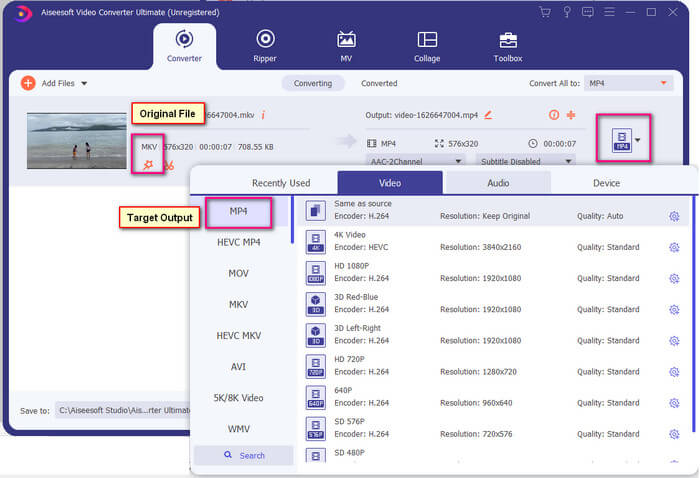
Korak 4. Kada je format postavljen, kliknite gumb Konvertiraj sve da biste pokrenuli proces konverzije. Kada je konverzija dovršena, prikazat će se mapa u kojoj je datoteka spremljena.
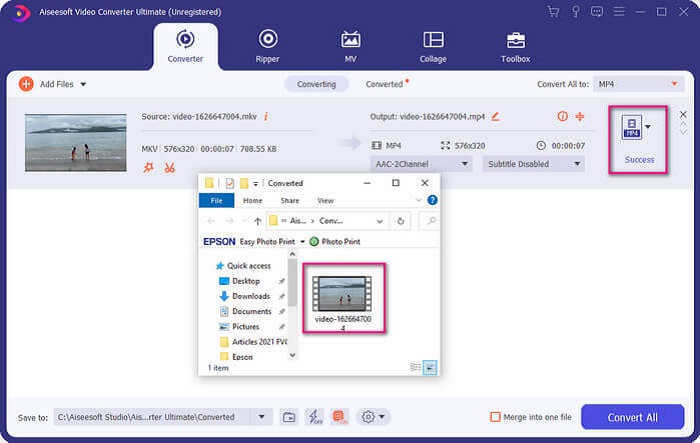
Ima više s Ultimate video converterom. U nastavku možete provjeriti popis prednosti i nedostataka kako biste upoznali druge dobre značajke koje nudi.
● Ovaj alat pretvara samo tri sekunde.
● Ima tehnologiju ubrzanja koja može poboljšati konvertiranu datoteku.
● Podržava HD kvalitetu.
● Ima značajke za uređivanje poput dodavanja filtara i osnovnih efekata.
● Možete podesiti titlove i audio zapis.
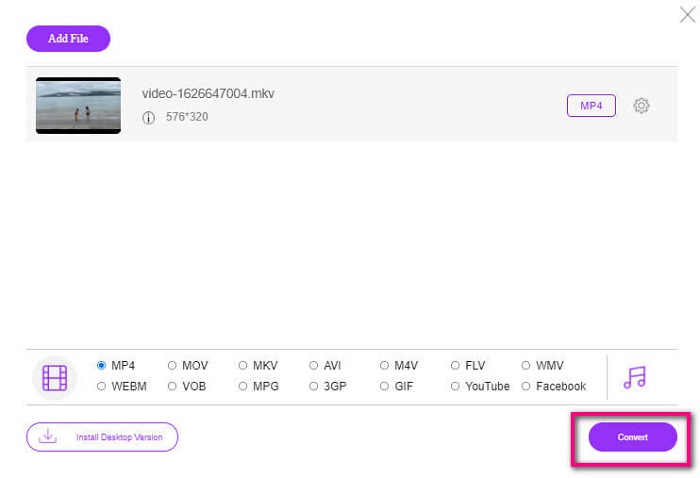
Ako u svakom slučaju tražite besplatan konverter, možete razmotriti i FVC Free Online Video Converter. Možda nije tako dobar kao Ultimate Video Converter, ali može donekle parirati. Svakako može konvertirati datoteku i učiniti je kompatibilnom s Plexom ili DivX‑om. Sve što trebate učiniti je…
Korak 1. Pokrenite alat posjetom službenoj stranici navednoj u opisu.
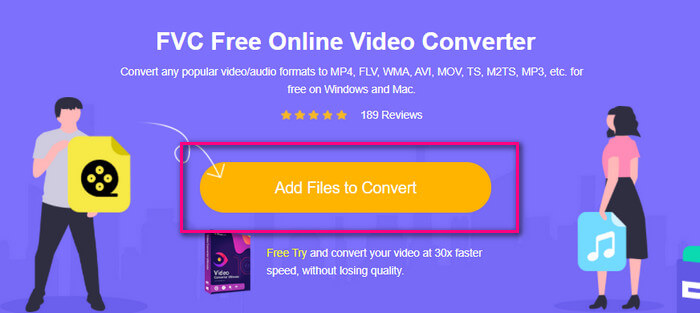
Korak 2. Učitajte video klikom na Dodaj datoteke za konverziju.
Korak 3. Promijenite format označavanjem kruga ispod.
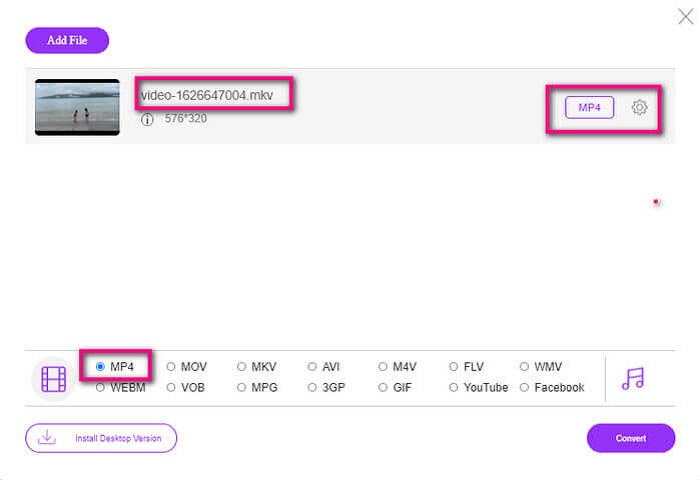
Korak 4. Na kraju kliknite gumb Konvertiraj i odaberite lokaciju na koju želite spremiti datoteku. Zatim kliknite U redu. Možete kliknuti ikonu Mapa da biste vidjeli konvertiranu datoteku.
Daljnje čitanje
Reproduciraj MKV u Windows Media Playeru
Dio 4. Više informacija o igranju MKV datoteka na PS4
Koliko košta PS4?
Tržišna maloprodajna cijena je 399,99 USD u Sjedinjenim Državama, au Kanadi je 399,99 CAD. Cijene se mogu razlikovati ovisno o maloprodajnoj cijeni u vašoj zemlji.
Postoji li mogućnost igranja CC ili Close Caption MKV na PS4?
Da, postoji. Nalazi se u Postavkama pristupačnosti. Putanja je: idite u Postavke na svom PS4, zatim Pristupačnost i odaberite Prikaži titlove. Ondje kliknite Mogućnosti da biste aktivirali titlove.
Ako PS4 podržava MKV, zašto se moje datoteke ne reproduciraju?
Kao što je gore spomenuto, morate biti sigurni da MKV datoteka zadovoljava standard playera koji koristite. Morate samo provjeriti zahtjeve PS4 ili drugog poslužitelja za streaming medija. Većina medijskih poslužitelja također ima klasifikaciju za reprodukciju MKV datoteka.
Koje formate podržava PS4?
Postoji nekoliko formata datoteka koje PS4 podržava. Ali primijetit ćete da je većina formata nekomprimirana i sadrži veliku datoteku. Iako podržava i nekomprimirane kao što je Mp4. U međuvremenu, evo popisa formata o kojima govorimo: MKV, AVI, MPEG-2 PS, MPEG-2 TS, AVCHD, te XAVC i MP4.
Zaključak
Da zaključimo, postoji mnogo načina na koje možete izravno ili neizravno reproducirati MKV datoteke na PS4. Navedeni su najčešće korišteni mediji. DivX Stream Server i Plex samo su neke od alternativa koje možete koristiti. Preporučljivo je umjesto toga pretvoriti datoteku kako biste izbjegli gnjavažu i previše procesa.
-
 [Riješeno] VLC Player neće reproducirati MKV, kako to popraviti
 Podržava li VLC player MKV datoteke? Zašto VLC neće igrati MKV? Ovaj post dijeli 4 korisna savjeta kako popraviti da VLC player neće reproducirati MKV datoteke.
-
 Kako reproducirati MKV datoteke na iPadu 2025
 Kako reproducirati MKV datoteke na iPadu 2? Mogu li pretvoriti MKV u MP4 za igranje na iPad Pro / Air / 2? Ovaj post dijeli 2 jednostavna načina za reprodukciju MKV-a na iPadu.
-
 Kako preuzeti MKV kodek u Windows Media Playeru za glatku reprodukciju
 Ne možete reproducirati MKV videozapis u programu Windows Media Player? Možete besplatno preuzeti MKV kodek za Windows Media Player. Suprotno tome, pretvorite MKV da bi se mogao reproducirati u Windows Media Playeru.
