


 Video Converter Ultimate
 Snimač zaslona
 Video popravak
Razumjeti što su metapodaci: vrste, primjeri, važnost i kako ih pregledati
Metapodaci su ključni za svaku datoteku jer objašnjavaju mnoge stvari o medijskoj datoteci. No pitanja su: što su metapodaci? Čemu služe? Koji su primjeri metapodataka? Jesu li metapodaci nužni? Odgovore na sva ta pitanja saznat ćete kasnije u ovom članku. Osim toga, predstavit ćemo i savršen uređivač metapodataka koji možete koristiti za dodavanje ili uređivanje metapodataka svoje medijske datoteke. Pročitajte cijeli tekst u nastavku i doznajte više o metapodacima.

Dio 1. Što su metapodaci
Definicija
Metapodaci su podaci o podacima skrivenim iz medijske datoteke. Što su metapodaci? Pretpostavimo da želite prepoznati sadržaj datoteke i druge karakteristike, tada su metapodaci šifra za varanje. Svaka medijska datoteka ima metapodatke, a ako ćete imati organiziranu medijsku datoteku, metapodaci će vam pomoći da uredite datoteku ako imate posla s bibliotekama medijskih datoteka. Sada kada imamo ideju o metapodacima, pogledajmo sljedeće vrste metapodataka.
Koje su različite vrste metapodataka
Jeste li znali da metapodaci imaju različite vrste? Ako ne, dolje će vam pomoći razumjeti šest drugih struktura metapodataka i njihovu svrhu u pohranjivanju podataka. Dakle, sada, da biste saznali koji su primjeri metapodataka, pročitajte grafikon u nastavku.
| Vrste metapodataka | Opis |
| Opisni metapodaci | Identificira resurse određenog objekta, uključujući nekoliko elemenata kao što su naslov, sažetak, autor i ključna riječ. |
| Administrativni metapodaci | Koristi se za upravljanje informacijama kao što je vrsta izvora, stvaranje ili prikupljanje podataka, dopuštenje i raspolaganje. |
| Referentni metapodaci ili metapodaci objašnjenja | Unutarnji podaci opisuju sadržaj i kvalitetne statističke podatke iz nečije perspektive. |
| Statistički metapodaci | Opisuje proces statističkih podataka prikupljanjem, obradom i proizvodnjom. |
| Pravni metapodaci | Informacije uključuju podatke o vlasniku autorskih prava, javnoj licenci i vlasništvu. |
| Strukturni metapodaci | Podaci opisuju njihovu vrstu, verziju, odnose i druge karakteristike digitalnog materijala. |
Koja je važnost metapodataka?
Što su metapodaci i njihovi tipovi već su objašnjeni gore; Sada moramo odrediti njegovu važnost. S metapodacima možete saznati druge informacije o medijskoj datoteci, kao što su autor, datum i vrijeme, različiti digitalni materijali i još mnogo toga. Također, ako želite zaštititi svoju medijsku datoteku, ovo je jedan od najboljih načina da je koristite umjesto vodenog žiga. Dakle, ako vaša medijska datoteka ima metapodatke, možete učiniti mnoge stvari za koje ne možete vjerovati da možete, poput organiziranja u svoju mapu ili biblioteku.
Dio 2. Kako pregledati metapodatke na različitim platformama
Jeste li znali da svoje metapodatke u svojoj medijskoj datoteci možete provjeriti putem svojih uređaja bez instaliranja posebnog alata? Želite li znati kako to učiniti? U tom slučaju morate pročitati sljedeće pojedinosti da biste saznali više o tome koji su metapodaci u vašoj medijskoj datoteci.
Za korisnike Windowsa
Korak 1. Pronađite datoteku na radnoj površini i kliknite gumb desni klik na mišu.
Korak 2. Zatim kliknite Svojstva i pronađite Pojedinosti; ispod toga ćete vidjeti metapodatke svog videozapisa.
Za korisnike Maca
Korak 1. Potražite medijsku datoteku u Finderu, kliknite desnu tipku miša i odaberite Alati.
Korak 2. Ispod toga kliknite Prikaži inspektor.
Korak 3. Pojavit će se novi prozor, zatim kliknite Izlaz i vidjet ćete metapodatke svoje datoteke.
Za korisnike iPhonea
Korak 1. Otvorite aplikaciju Fotografije.
Korak 2. Kliknite videozapis ili sliku kojoj želite provjeriti metapodatke.
Korak 3. Označite ikonu i, i metapodaci će se prikazati na vašem zaslonu.
Za korisnike Androida
Korak 1. Pokrenite Google Photos na svom uređaju – ako ga još niste preuzeli na telefon, najprije ga morate preuzeti iz Trgovine Play.
Korak 2. Otvorite datoteku i kliknite ikonu i kako biste provjerili metapodatke.
Dio 3. Kako urediti ili dodati metapodatke s najboljim uređivačem metapodataka na radnoj površini
Uz najbolji uređivač metapodataka možete lako dodati metapodatke medijskoj datoteci koja ih nema ili ih urediti. FVC Video Converter Ultimate savršen je alat koji biste trebali koristiti za jednostavnu promjenu ili dodavanje metapodataka svakoj medijskoj datoteci. Dakle, kako biste znali čemu služe metapodaci, možete slijediti korake i lako naučiti što još možete dodati u metapodatke.
Korak 1. Dodirnite gumb za preuzimanje u nastavku kako biste preuzeli alat na svoj Windows ili macOS, kliknite preuzetu datoteku, slijedite postupak instalacije i otvorite ga.
Besplatno preuzimanjeZa Windows 7 ili novijiSigurno preuzimanje
Besplatno preuzimanjeZa MacOS 10.7 ili novijiSigurno preuzimanje
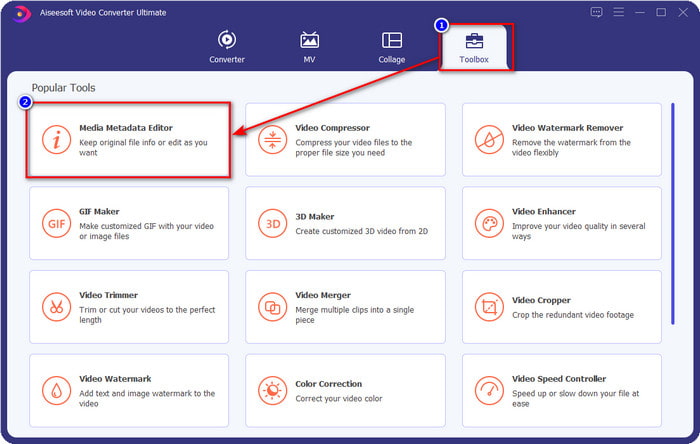
Korak 2. Idite na odjeljak Kutija s alatima i pronađite Uređivač medijskih metapodataka; kliknite ga za otvaranje.
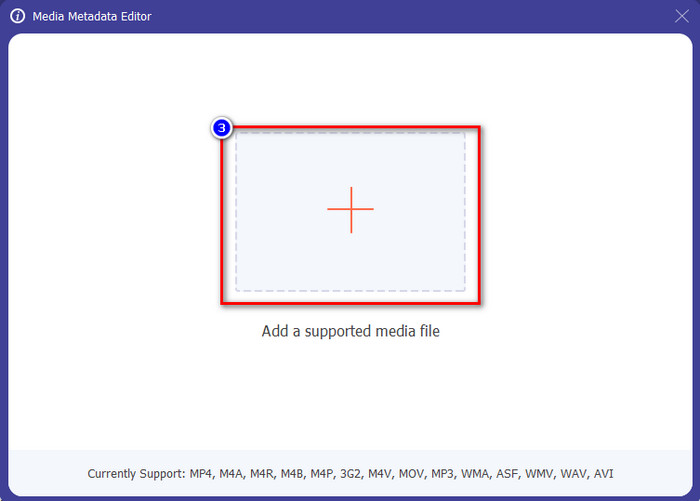
Korak 3. Novi prozor pojavit će se na vašem zaslonu; dodirnite gumb + kako biste dodali videozapis kojem želite dodati ili urediti metapodatke. Pronađite videozapis u mapi na računalu i kliknite Otvori za nastavak.
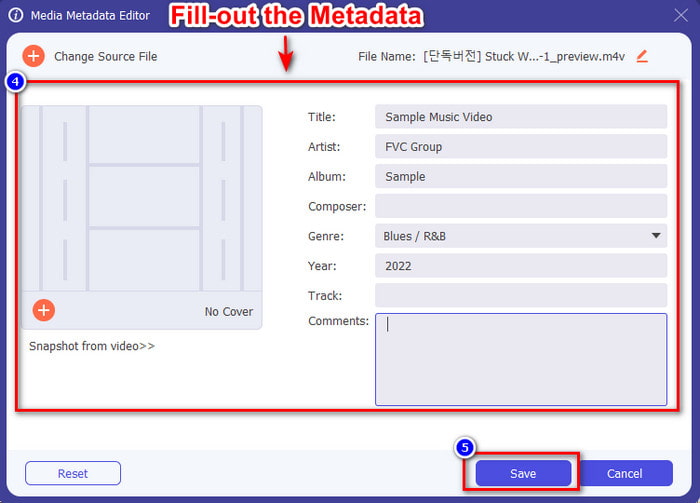
Korak 4. Pričekajte da se alat učita i pojavit će se uređivač metapodataka; u ovom području možete dodati svoje personalizirane metapodatke ispunjavanjem tekstualnog polja. Nakon dodavanja bitnih podataka kliknite Spremi kako biste preuzeli medij s dodanim metapodacima. Bez imalo muke dodali ste ili uredili metapodatke svoje datoteke.
Povezano:
Kako dodati vodeni žig u iMovieju
Dio 4. Često postavljana pitanja o metapodacima
Zašto veličina datoteke postaje veća nakon dodavanja metapodataka?
Ne biste se trebali iznenaditi ako veličina medijske datoteke postane veća zbog metapodataka jer hoće. Razlog za to je taj što su metapodaci element pohranjen u svakoj medijskoj datoteci; metapodaci pridonose veličini videozapisa.
Utječu li metapodaci na kvalitetu videozapisa?
Kvaliteta videozapisa se neće promijeniti čak ni ako dodate, uredite ili preuzmete videozapis s metapodacima.
Koje važne metapodatke treba dodati?
Pretpostavimo da želite dodati metapodatke u datoteku bez meta podataka. Morat ćete ispuniti važne stvari: ime autora, naslov, datum i vrijeme. Sve su stvari važne, ali to su bitni dio metapodataka.
Zaključak
Na kraju sada imamo opsežno znanje o metapodacima; sva pitanja koja su vas mučila već su odgovorena u ovom tekstu. Sada kada znate što su metapodaci, trebate ih dodati svojoj datoteci kako biste joj pružili dodatni sloj zaštite uz pomoć najboljeg uređivača metapodataka na računalu. Bez sumnje, FVC Video Converter Ultimate savršen je alat koji svatko može koristiti za jednostavnu primjenu metapodataka na svoju datoteku ili njihovo uređivanje ako već postoje. Uz pomoć ovog softvera možete učiniti mnogo toga; želite znati što točno? Pa, klikom na gumb za preuzimanje vidjet ćete ostale nevjerojatne funkcije koje nudi.
-
 3 učinkovita načina za zajedničko dodavanje videa i slika na Tiktok
 Želite znati kako dodati slike na Tiktok videozapise? U tom slučaju kliknite i pročitajte ovaj članak da biste naučili kako jednostavno dodati slike u svoj Tiktok video.
-
 Dodajte tekst u video s 3 najbolja videouređivača [bez napora]
 Dodavanje teksta u videozapis jednostavan je zadatak uz pravi alat. Dakle, danas ćemo vam predstaviti različite alate koje možete koristiti za dodavanje teksta u svoj video prije nego što ga podijelite.
-
 Bona Fide recenzija o 6 tekstualnih video aplikacija [2022.]
 Želite li znati koje su tekstualne video aplikacije koje možete koristiti na cijeloj platformi? Ovaj će članak pružiti bona fide pregled šest tekstualnih video aplikacija na tržištu.
