


 Video Converter Ultimate
 Snimač zaslona
 Video popravak
Kako smanjiti veličinu SWF datoteke na mreži bez Flash playera
SWF je format Adobe Flash datoteke koji se koristi za streaming putem Interneta. Bez obzira preuzimate li SWF datoteke ili želite SWF videozapise prenijeti putem interneta, velika veličina SWF-a povlači tvrdu liniju.
Ali dobra strana je u tome da možete komprimirati SWF datoteke kako biste riješili ovaj problem.

U početku službeni SWF uređaj, Adobe Flash Player, može komprimirati SWF datoteke promjenom brzine prijenosa i razlučivosti, ali više nije podržan nakon 31. prosinca 2020.
Ne brinite, imate mogućnosti!
Ovaj članak predstavlja besplatni internetski kompresor SWF datoteka koji vam pomaže da smanjite veličinu SWF videozapisa na manju, i to jednostavno na PC‑u i Macu.
Dio 1. Najbolji besplatni mrežni kompresor SWF datoteka
Dobri alati su bitne stvari. Za komprimiranje SWF datoteke alat je kompresor SWF datoteke.
Besplatni internetski kompresor videa je besplatan alat za smanjenje veličine SWF datoteka na manju putem interneta. Bez registracije možete dovršiti postupak kompresije SWF datoteka u nekoliko jednostavnih klikova. Može komprimirati Flash bannere, prezentacije, animacije, igre, filmove itd. kako bi SWF datoteke bile praktično manje. Osim toga, ovaj internetski SWF kompresor može:
- 1. Smanjite veličinu SWF datoteke do 95% s manjim ili nultim gubitkom kvalitete.
- 2. Komprimirajte više od 300 video formata poput SWF, MP4, MOV, AVI, WebM, MKV itd.
- 3. Besplatno za sažimanje i pretvaranje video formata bez vodenog žiga.
- 4. Podržavaju 1080p HD, 720p HD i druge video rezolucije.

Ovdje smo da vas vodimo kroz komprimiranje SWF datoteka u sljedećem dijelu.
Dio 2. Kako komprimirati SWF na mreži (besplatno 100%)
Proces komprimiranja SWF datoteka na mreži može se postići u nekoliko jednostavnih koraka.
Korak 1. Dodajte SWF datoteku
Otvorite ovaj besplatni internetski kompresor SWF datoteka u pregledniku na računalu sa sustavom Windows ili Mac. Kliknite gumb Add Files to Compress (Dodaj datoteke za kompresiju), nakon čega ćete biti upitani da preuzmete i instalirate pokretač kompresora.
Nakon uspješne instalacije otvorit će se prozor otvorenog koda, a vi biste trebali pronaći SWF datoteku na računalu i dodati je u ovaj alat.

Korak 2. Odaberite stopu kompresije i veličinu
Pokraj stavke Size (Veličina) možete vidjeti trenutačnu veličinu SWF datoteke. Kliknite strelicu prema dolje ili gore kako biste prilagodili izlaznu veličinu SWF datoteke. Alternativno, možete pomaknuti klizač s desne strane kako biste smanjili veličinu datoteke određivanjem stope kompresije.
Pokraj stavke Format možete odabrati druge formate poput MP4, MOV, MKV, AVI, FLV itd. kako biste pretvorili SWF u druge formate.
Izlazna opcija s nižom Resolution (rezolucijom) također će pomoći da veličina SWF datoteke bude manja.
Dok komprimirate SWF datoteku u manju veličinu, bitrate ove datoteke bit će na zaslonu zaslona odgovarajuće niži.
Korak 3. Komprimirajte SWF
Kliknite Compress (Komprimiraj) kako biste odabrali odredište za spremanje komprimirane SWF datoteke i započeli smanjenje veličine SWF datoteke.
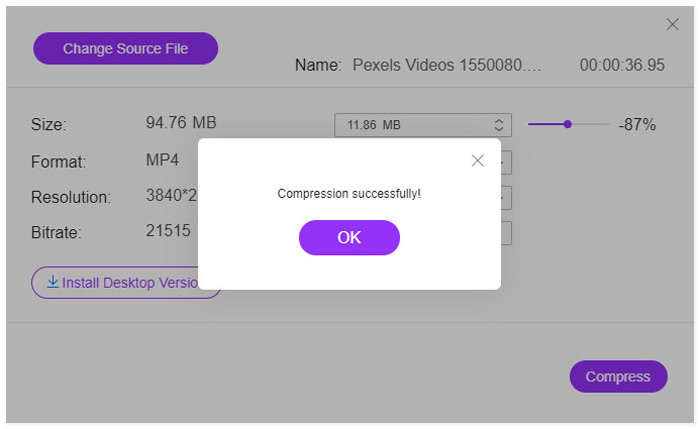
Nakon završetka postupka kompresije, vidjet ćete skočni prozor. Tada možete pronaći komprimiranu datoteku navigacijom prema mjestu na kojem ste postavili.
Da pojasnimo: ovaj besplatni internetski SWF kompresor će nakon kompresije pretvoriti SWF datoteku u druge formate. Ako želite komprimirati SWF datoteku uz zadržavanje izvornog formata ili komprimirati 4K videozapise, preporučuje se preuzimanje verzije SWF kompresora za računalo, Video Converter Ultimate.
Besplatno preuzimanjeZa Windows 7 ili novijiSigurno preuzimanje
Besplatno preuzimanjeZa MacOS 10.7 ili novijiSigurno preuzimanje
Dio 3. Česta pitanja o smanjenju veličine SWF datoteke na manju
Koji će program otvoriti SWF datoteku?
U početku su se SWF datoteke mogle otvarati putem službenog reproduktora u preglednicima, Adobe Flash Playera. Međutim, Adobe Flash Player je ukinut od siječnja 2021. Druge SWF reproduktore, poput VLC‑a, Windows Media Playera i više SWF programâ za reprodukciju, mogu otvoriti SWF datoteku.
Je li SWF komprimiran?
SWF koristi kompresiju bez gubitaka da bi održao kvalitetu slika, a to znači da videozapis pohranjen u SWF datoteci nije komprimiran, a veličina datoteke velika.
Zašto se Adobe Flash gasi?
Otvoreni standardi poput HTML5, WebGL i WebAssembly kontinuirano su sazrijevali tijekom godina i služe kao održiva alternativa Flash sadržaju. Također, glavni dobavljači preglednika integriraju ove otvorene standarde u svoje preglednike i odbacuju većinu drugih dodataka (poput Flash Player-a). Dakle, Adobe je odlučio ugasiti Adobe Flash Player.
Zaključak
SWF datoteke su bez gubitaka i zauzimaju više prostora. Bilo da želite osloboditi više prostora na računalu za SWF preuzimanja ili uspješno prenijeti SWF datoteke na internet, komprimiranje SWF datoteka postaje uobičajen zadatak. Ovaj članak prikazuje vodič za besplatno smanjivanje veličine SWF datoteka pomoću internetskog SWF kompresora u 3 koraka. Nema vodenog žiga niti registracije i možete brzo dovršiti postupak kompresije.
Sada ste na redu vi.
Jeste li shvatili metodu smanjenja SWF veličine videozapisa?
Ili imate druge prijedloge za dovršetak SWF kompresije?
Javite mi ostavljajući svoje komentare u nastavku.
-
 Kako komprimirati MP4 video u manju veličinu
 MP4 video je prevelik za prijenos? Želite smanjiti veličinu videozapisa? Evo 3 učinkovita načina za sažimanje MP4 datoteke u manju veličinu bez ograničenja.
-
 2 načina komprimiranja videozapisa za YouTube
 YouTube videozapisi su veliki i sporo se prenose? Samo komprimirajte veličinu video datoteke u manju za YouTube na dva načina na mreži i na računalu.
-
 Kako besplatno komprimirati videozapis za Facebook s GB na MB
 Ako vam je zabranjeno postavljanje velikog videozapisa na Facebook, ne brinite. Samo komprimirajte veliku veličinu videozapisa s GB na MB s besplatnim video kompresorom.
