


 Video Converter Ultimate
 Snimač zaslona
 Video popravak
Iskoristite mrežne video rotatore i recite zbogom naopakim videozapisima
U digitalnom dobu, video sadržaj je sastavni dio naših života. Videozapisi su sjajan način da prenesete svoju poruku, bilo da se želite prisjetiti posebnog trenutka ili napraviti uzbudljiv sadržaj za društvene medije ili svoju tvrtku. No možda ćete otkriti da vaši videozapisi moraju biti u ispravnom položaju jer su snimljeni na krivom mjestu ili zato što ih je potrebno okrenuti vodoravno ili okomito.
Ovaj će vam članak predstaviti najbolje dostupne online alate za rotiranje videozapisa koji će vam pomoći preokrenuti videozapise u željenu orijentaciju. Otkrijte ih više čitajući ovaj članak do kraja.

Dio 1. Najbolji video rotatori na mreži
1. RotateMyVideo
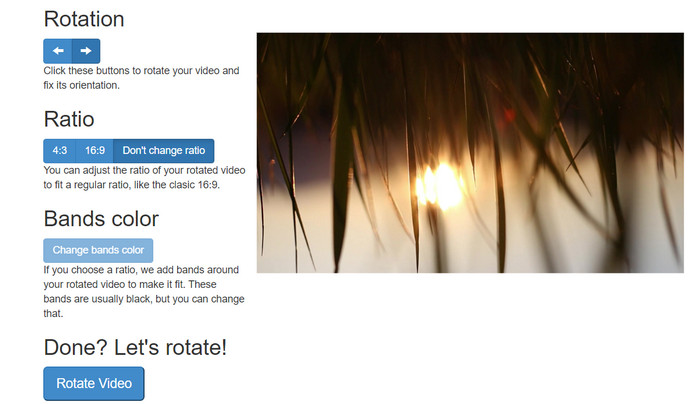
RotateMyVideo je jednostavan i besplatan mrežni alat koji vam omogućuje rotiranje i okretanje vaših videozapisa u bilo kojem smjeru bez potrebe za posebnim softverom. Alat vam omogućuje rotiranje vaših videozapisa za 90 stupnjeva odjednom i ima jednostavno sučelje koje proces čini brzim i lakim. RotateMyVideo je dobar izbor ako trebate rotirati video iz osobnih ili poslovnih razloga. Može vam uštedjeti vrijeme i trud.
Pros
- Rotirajte videozapise na mreži besplatno bez skrivenih troškova.
- Podržava rotaciju u koracima od 90 stupnjeva.
- Okrenite videozapise vodoravno ili okomito.
Protiv
- Može rotirati samo videozapise koji su manji od 500 MB.
- Proces video konverzije može potrajati neko vrijeme.
- Korisničko sučelje možda neće biti privlačno.
Koraci za rotiranje videozapisa na mreži pomoću RotateMyVideo:
Korak 1. Otvorite web‑preglednik i idite na web‑stranicu RotateMyVideo.
Korak 2. Kliknite gumb Pick Video kako biste učitali video koji želite rotirati.
Korak 3. Sada odaberite željenu orijentaciju videa klikom na odgovarajući gumb. Možete rotirati video ulijevo ili udesno, okrenuti ga vodoravno ili okomito ili ga ostaviti u izvornom položaju.
Korak 4. Ako ste zadovoljni rotiranim videom, kliknite gumb Rotate video kako biste spremili promjene.
2. Clideo
Clideo je intuitivna i svestrana online platforma za uređivanje videozapisa koja nudi niz naprednih alata za montažu videa, uključujući i rotiranje. Osim toga, Clideo nudi mogućnosti poput skraćivanja (trimming), spajanja, dodavanja zvuka i mnogo toga drugog, što ga čini sveobuhvatnim alatom za uređivanje videa. Za razliku od mnogih drugih programa za montažu, Clideo je potpuno web‑baziran, što znači da ne trebate ništa preuzimati ni instalirati.
Pros
- Prenesite videozapise iz raznih izvora.
- Kompatibilan s više video formata.
- Korisničko sučelje.
Protiv
- Nije prikladno za napredne potrebe uređivanja videozapisa.
- Besplatna verzija ima ograničenja.
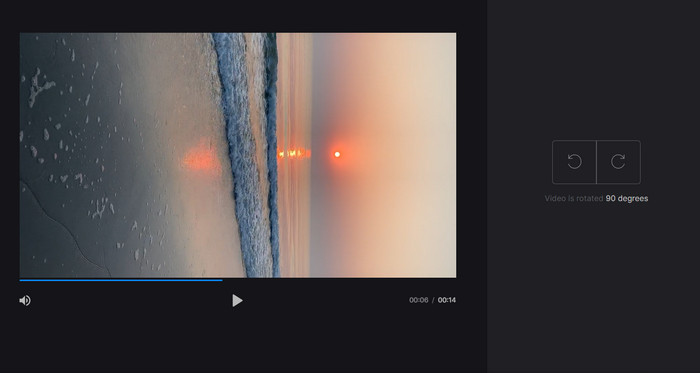
Koraci za internetski pretvarač videa iz portreta u pejzaž:
Korak 1. Pomoću web‑preglednika otvorite Clideo web‑stranicu. Zatim na početnoj stranici prikažite sve alate.
Korak 2. Sada iz izbornika odaberite opciju Rotate Video i kliknite Choose file kako biste učitali video koji želite rotirati. Videozapis možete i jednostavno povući i ispustiti na web‑stranicu.
Korak 3. Kliknite gumb Rotate na desnoj strani video‑playera. Odaberite željenu orijentaciju rotacije videa klikom na odgovarajući gumb. Video možete rotirati u smjeru kazaljke na satu ili suprotno od njega, vodoravno ili okomito.
3. Flexclip
Flexclip je impresivan mrežni alat za uređivanje videozapisa koji vam omogućuje stvaranje videozapisa profesionalnog izgleda bez muke. Jedna najbolja stvar kod Flexclip-a je njegova opsežna biblioteka predložaka koje možete koristiti za brzi početak procesa uređivanja videa. Također nudi besplatnu verziju koja vam omogućuje stvaranje videozapisa duljine do jedne minute bez ikakvih vodenih žigova.
Pros
- Opsežna biblioteka predložaka.
- Nudi niz mogućnosti prilagodbe.
Protiv
- Cijene mogu biti visoke za neke korisnike
- Ograničena kontrola nad kvalitetom videa
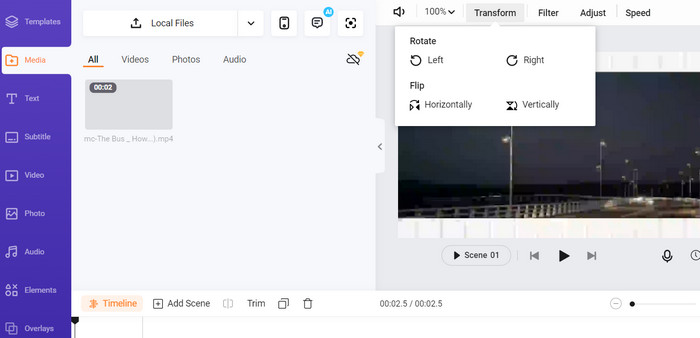
Koraci za rotiranje videozapisa na mreži bez vodenog žiga pomoću Flexclipa:
Korak 1. Idite na Flexclip web‑stranicu, registrirajte se za besplatan račun ili se prijavite ako ga već imate. Nakon prijave kliknite gumb Start from Scratch.
Korak 2. Kliknite gumb Upload da biste učitali video koji želite rotirati. Alternativno, možete povući i ispustiti video datoteku u uređivač.
Korak 3. Kada se vaš video učita, kliknite gumb Transform koji se nalazi u gornjem izborniku pregleda. Pomoću gumba rotirajte video u smjeru kazaljke na satu ili suprotno od nje dok ne postignete željenu orijentaciju.
4. Kapwing
Ovo je još jedan besplatan online alat koji vam omogućuje rotiranje videa. Također podržava rotaciju u koracima od 90 stupnjeva i omogućuje okretanje videozapisa. Iako njegove napredne funkcije, poput dodavanja teksta, glazbe i posebnih efekata, od njega čine sveobuhvatan alat za uređivanje videa, njegovo korisnički prilagođeno sučelje i bogata biblioteka alata i predložaka čine ga izvrsnim izborom za početnike.
Pros
- Svestrano uređivanje videa.
- Na mreži i u oblaku.
Protiv
- Ograničeno trajanje videozapisa.
- Ograničena veličina datoteke.
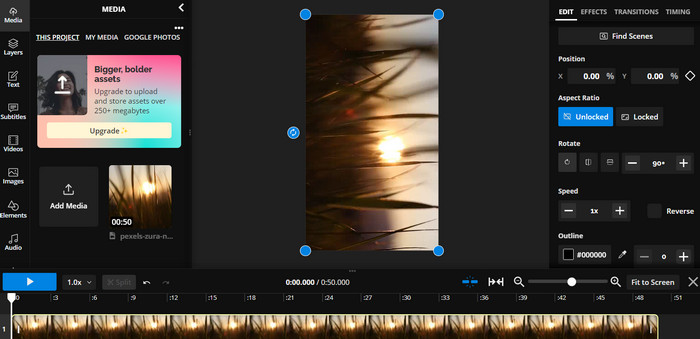
Koraci za rotiranje videozapisa na mreži pomoću Kapwinga:
Korak 1. Posjetite Kapwing web‑stranicu i registrirajte se za besplatan korisnički račun ili se prijavite ako ga već imate. Kliknite gumb Start Editing kako biste započeli novi projekt.
Korak 2. Kliknite gumb Upload kako biste učitali video koji želite rotirati.
Korak 3. Zatim označite medijsku datoteku na vremenskoj traci i opcije za uređivanje pojavit će se u izborniku s desne strane.
Korak 4. Odaberite opciju Rotate i zatim smjer u kojem želite rotirati video. Unesite broj stupnjeva da biste precizirali kut rotacije. Nakon toga ste gotovi.
5. Mrežni rezač videozapisa
Ovo je besplatni mrežni alat koji vam omogućuje rotiranje vaših videozapisa u bilo kojem smjeru. Možete prenijeti svoj videozapis, a zatim pomoću alata za rotiranje prilagoditi usmjerenje videozapisa.
Pros
- Brzo i učinkovito.
- Besplatno za upotrebu.
Protiv
- Potrebna je internetska veza.
- Gubitak kvalitete videa.
Koraci za rotiranje videozapisa na mreži s Online Video Cutterom:
Korak 1. Posjetite službenu web‑stranicu Online Video Cutter.
Korak 2. Kliknite gumb Open file kako biste učitali video koji želite urediti.
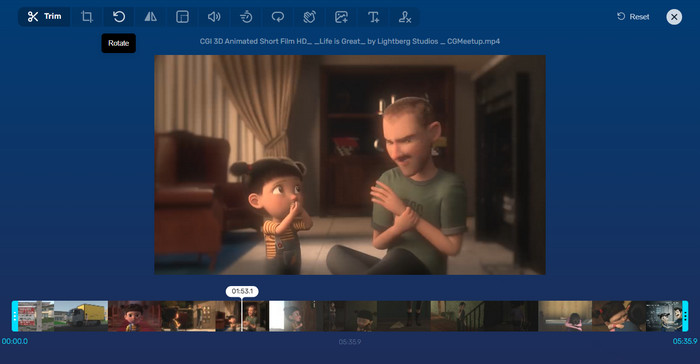
Korak 3. Kada se video učita, bit ćete preusmjereni na sučelje za uređivanje programa. Ovaj put kliknite gumb Rotate u izborniku.
Korak 4. Ako ste zadovoljni načinom na koji je vaš video rotiran, kliknite gumb Save u donjem desnom kutu.
Dio 2. Alternativni alat: Video Rotator Offline
FVC Video Converter Ultimate je desktop aplikacija kompatibilna s Windowsom i Macom. Omogućuje korisnicima da izvan mreže konvertiraju i rotiraju videozapise. Štoviše, korisnici mogu rotirati video u smjeru kazaljke na satu ili suprotno od nje za 90, 180 ili 270 stupnjeva. Uz niz alata za uređivanje videa možete i skraćivati, spajati, podešavati postavke videa i još mnogo toga. Pogledajte kako ovaj alat za rotiranje videa radi.
Korak 1. Preuzmite i instalirajte alat
Najprije preuzmite program tako da ga preuzmete i instalirate na svoje računalo. Odmah nakon toga, odmah ga pokrenite.
Besplatno preuzimanjeZa Windows 7 ili novijiSigurno preuzimanje
Free DownloadZa macOS 10.7 ili novijiSigurno preuzimanje
Korak 2. Učitajte video za rotiranje
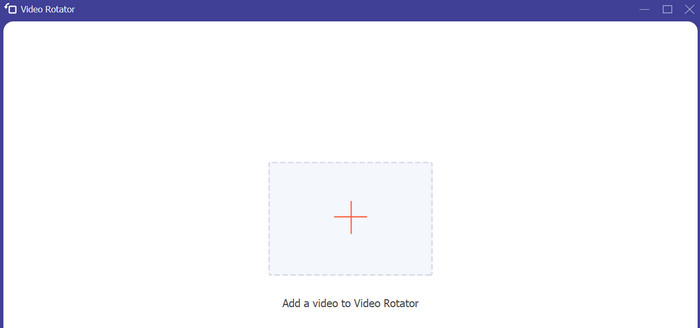
Zatim idite na karticu Toolbox i otvorite opciju programa Video Rotator. Nakon klika na ovu opciju od vas će se tražiti da učitate video. Sada kliknite gumb sa znakom Plus kako biste umetnuli željeni video.
Korak 3. Rotirajte video
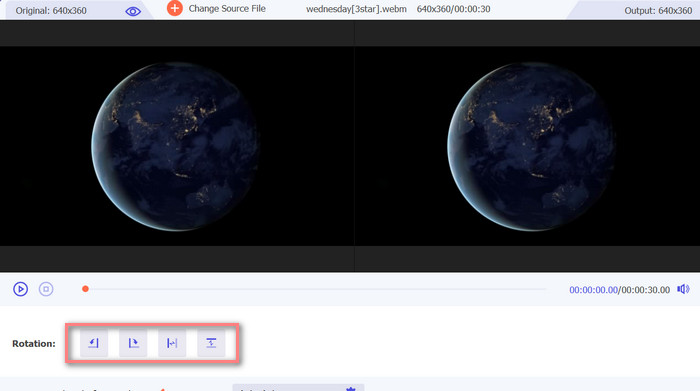
U ovom trenutku označite odgovarajući gumb za rotiranje kako biste dobili željenu orijentaciju videozapisa. Pregled je u stvarnom vremenu, tako da se možete brzo prilagoditi.
Korak 4. Spremite kopiju rotiranog videa
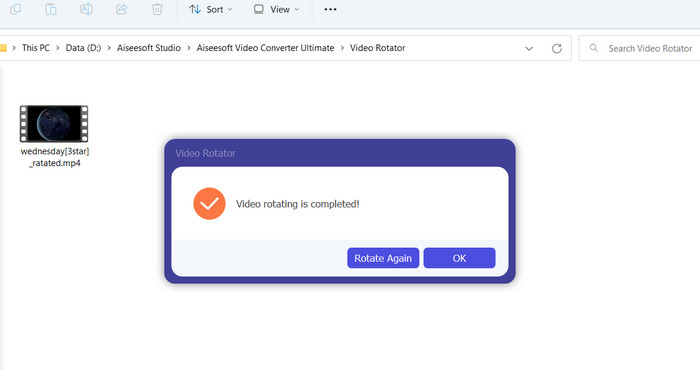
Na kraju kliknite gumb Export kako biste dobili kopiju uređenog videa. Odmah nakon toga pojavit će se obavijest i otvorit će se mapa u kojoj se video nalazi.
Dio 3. Često postavljana pitanja o video rotatorima na mreži
Jesu li mrežni video rotatori sigurni za korištenje?
Većina internetskih video rotatora sigurna je za upotrebu. Kako biste bili sigurni da su vaši podaci i privatnost zaštićeni, ključan je odabir renomiranog i pouzdanog alata.
Mogu li rotirati videozapise na svom pametnom telefonu?
Da, mnogi mrežni video rotatori prilagođeni su mobilnim uređajima i može im se pristupiti u web pregledniku vašeg pametnog telefona.
Postoje li ograničenja za korištenje mrežnog video rotatora?
Da, neki online rotatori videa mogu imati ograničenja kao što su ograničenja veličine datoteke, ograničene mogućnosti uređivanja ili smanjena kvaliteta videozapisa.
Zaključak
Online alati za rotiranje videa nude praktičan i jednostavan način za rotiranje videozapisa bez preuzimanja ili instaliranja softvera. Dostupni su na svakom uređaju s internetskom vezom i možete ih koristiti u pokretu. Ipak, mogu imati određena ograničenja, poput ograničenja veličine datoteka i smanjene kvalitete videa. Zato smo ponudili i izvanmrežnu alternativu koja pruža rješenja za ta ograničenja.
-
 [4 načina] Kako jednostavno ubrzati svoje videozapise na mreži
 Želite li ubrzati video online? Pročitajte ovaj članak kako biste saznali više o ubrzavanju videozapisa na različite načine.
-
 Izvrsni načini kako jednostavno izrezati video na mreži
 Rezanje videozapisa najbolji je način za stvaranje istaknutih dijelova videozapisa. Dakle, ovaj će vam post dati metode za jednostavno skraćivanje videozapisa na mreži. Pročitajte kako biste saznali više.
-
 Stvorite svoj najbolji animirani GIF putem Online GIF Makera [2023.]
 Informativan pregled o tome kako napraviti GIF pomoću ovih jednostavnih online GIF kreatora koje već susrećete ili ne na webu.
