


 Video Converter Ultimate
 Snimač zaslona
 Video popravak
6 najboljih kontrolera brzine videa za Windows/Mac/Android/iOS
Ubrzavanje ili usporavanje videozapisa može stvoriti nevjerojatnu iluziju ako ste se zasitili klasičnih efekata. Ova tehnika montaže videa je jednostavna, ali učinkovita. Ako pretražujete internet, vidjet ćete da na tržištu postoji mnogo različitih opcija kontrolera brzine i znamo da je teško odabrati. No ako pročitate ovaj članak, predstavit ćemo aplikacije za kontrolu brzine koje možete koristiti za promjenu brzine reprodukcije. Zanima li vas koje su najbolje aplikacije za kontrolu brzine? U tom slučaju, nastavite čitati kako biste saznali više o dostupnim kontrolerima brzine videa na vašim platformama.

Dio 1. Top 6 kontrolera brzine videa za Windows, Mac, Chrome, iOS i Android
Vrh 1. Video Converter Ultimate (Windows & Mac)
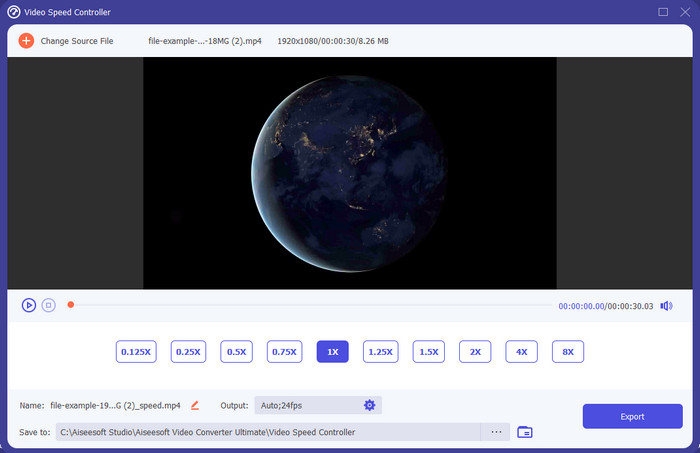
Treba li vam kontroler brzine videa koji je vrlo učinkovit i djelotvoran pri ubrzavanju i usporavanju videa? U tom slučaju je Video Converter Ultimate pravo rješenje za ovu vrstu problema. To je najjednostavniji alat koji možete koristiti za lako mijenjanje brzine videa, bilo da vam treba vrlo brza ili usporena reprodukcija. Iako mijenjate brzinu, izvorna kvaliteta videa ostat će ista, dok se pokret videa mijenja upravo zato što ste promijenili brzinu.
Osim toga, možete učiniti mnoge stvari poput pretvaranja, spajanja, rezanja i više; u osnovi, to je alat sve u jednom. Želite li znati koje druge ponude možete imati s ovom aplikacijom za ubrzavanje videa? Ako je tako, pročitajte značajke alata da biste saznali više ili možete odmah preuzeti softver na svoju radnu površinu kako biste ga isprobali.

Video Converter Ultimate
5.689.200+ preuzimanja- Može precizno mijenjati video okvire gore ili dolje brzo u bilo kojem video formatu, kao što je MP4.
- Dostupne su brojne značajke i efekti za uređivanje videozapisa.
- Fleksibilan je na svim platformama kao što su Windows ili macOS.
- Ultra-brz proces čini da proces preuzimanja ili izvoza obavljate u tren oka.
- Izvoz ili preuzimanje videozapisa koji uredite neće imati vodeni žig.
Besplatno preuzimanjeZa Windows 7 ili novijiSigurno preuzimanje
Besplatno preuzimanjeZa MacOS 10.7 ili novijiSigurno preuzimanje
Pros
- Promijenite okvir po okvir u videu, bez obzira jeste li profesionalac ili ne.
- Lako razumljive opcije reprodukcije videozapisa.
- Izvanredna mogućnost dijeljenja na društvenim mrežama.
- Besplatno ga je preuzeti, ali nudi kupnju putem aplikacije.
Protiv
- Morate kupiti ako želite imati sve mogućnosti alata.
Vrh 2. Clipchamp (Windows)
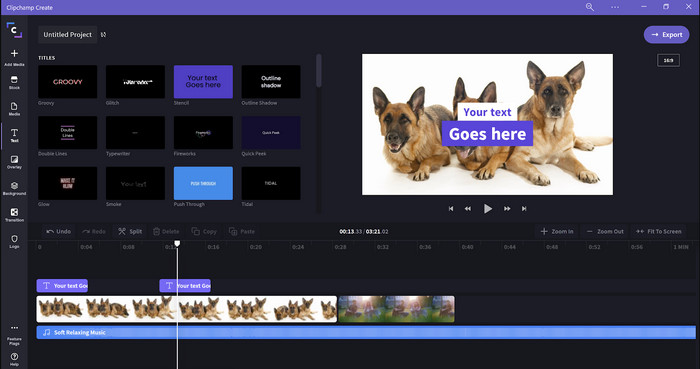
Clipchamp je uređivač brzine videa koji možete koristiti na Windowsu. Ovaj alat nudi blagu krivulju učenja, pa biste ga mogli poželjeti isprobati ako ste novi u montaži. Također podržava više značajki koje biste mogli poželjeti koristiti. Međutim, glavni je nedostatak ovog alata izlazna kvaliteta videa. Datoteku možete izvesti samo u 480p kvaliteti, što je slabo u usporedbi s drugim besplatnim alatima. Ako vam je ipak potrebno izvoziti u 720 ili 1080, možete se pretplatiti plaćanjem pretplate. Štoviše, alat je odličan, ali još uvijek nije tako dobar kao prvi uređivač.
Pros
- Jednostavan GUI i jednostavan za korištenje.
- Nudi dodatne značajke za uređivanje.
- Jednostavno upravljajte video reprodukcijom.
Protiv
- Za besplatnu verziju, konačni rezultat je 480.
- Ponekad je alat postao nefleksibilan sa zadatkom.
Vrh 3. Video kontroler brzine (Chrome)

Želite li koristiti proširenje kontrolera brzine videa na Chromeu? Tada možete upotrijebiti proširenje Video Speed Controller. Ovaj je alat dostupan u svakom Chrome pregledniku za ubrzavanje ili usporavanje videa koji gledate. Jednostavan je za korištenje za svakoga i siguran za upotrebu jer je riječ o Chrome ekstenziji. Međutim, ako izvezete video, reprodukcija će ostati ista čak i ako je mijenjate. To je zato što alat radi samo na videu koji trenutačno gledate u Chromeu, a ne izvan njega. Dodatna informacija: kada ubrzate video ovim proširenjem, svi videozapisi koje reproducirate u Chromeu bit će na istoj brzini.
Pros
- On-point regulator brzine koji možete koristiti u Chromeu.
- Mogućnost jednostavnog premotavanja unatrag ili resetiranja brzine reprodukcije videozapisa na Chromeu.
- Podržava naredbu kratkih tipki.
Protiv
- Ploča videokontrolera nije vidljiva.
- Ne možete promijeniti brzinu videa izvan Chromea.
Vrh 4. Accelerate za Safari (iOS & Mac)
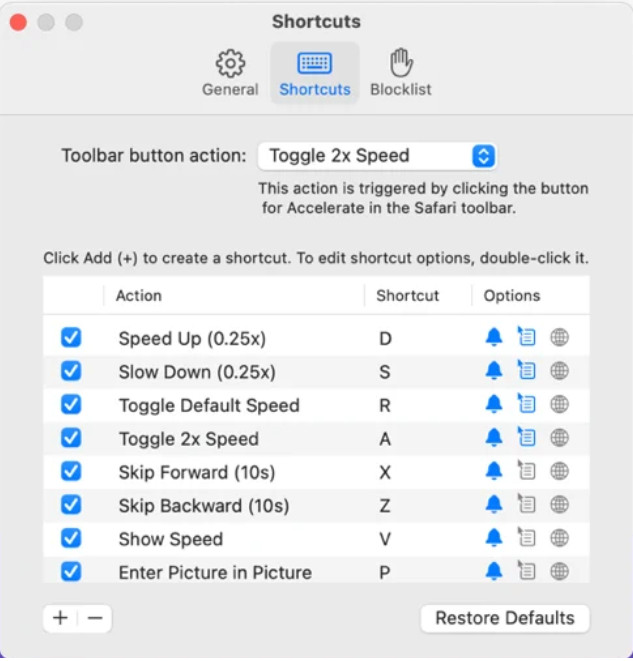
Trebate li kontroler brzine videa na Safariju? Accelerate for Safari dostupan je u svakom Safariju na Apple uređajima. Ovaj alat može mijenjati brzinu reprodukcije svakog HTML 5 videa u Safariju. Kao i Chrome proširenje gore, ograničen je na Apple uređaje. Dakle, ako ste korisnik Applea, možda će vam odgovarati ovo proširenje za kontrolu brzine kako biste ubrzali ili usporili video. Osim toga, možete koristiti tipke na tipkovnici kako biste zadavali naredbe alatu za promjenu brzine reprodukcije videa.
Pros
- Siguran je za korištenje u svim Safarijima.
- Također podržava Picture-in-Picture i AirPlay.
- Dostupne su tipke prečaca za preuzimanje kontrole nad alatom.
Protiv
- Ne podržava drugi web preglednik osim Safarija.
- Ograničeno na HTML 5 videozapise.
Top 5. Sporo Brzo Sporo - Kontrolirajte brzinu svojih videa (iOS)
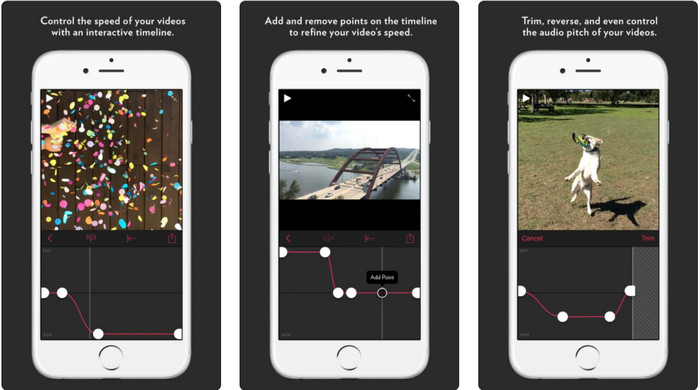
Za kontroler brzine videa na iPhoneu možete koristiti aplikaciju Slow Fast Slow. Ovaj alat pomaže iOS korisnicima da trenutno manipuliraju brzinom reprodukcije videa, a posebno dobro radi sa usporenim snimkama. Osim toga, ima vrlo interaktivan ugrađeni vremenski slijed za podešavanje brzine. Podržava i druge funkcije, poput promjene visine tona (pitch-bent) i okretanja isječka unatrag. Međutim, ovaj alat zahtijeva sustav iOS 10, pa ga ne možete koristiti ako vaš sustav nije verzija 10.
Pros
- Podržava druge značajke za vaš video.
- Prilagođen korisniku.
- Može usporiti videozapise do 1/16 brzine.
Protiv
- Ne podržava 4k izlaz i odabir FPS-a.
- Ne radi na nekim od novih iOS uređaja.
Vrh 6. Video Speed Controller Pro (Android)
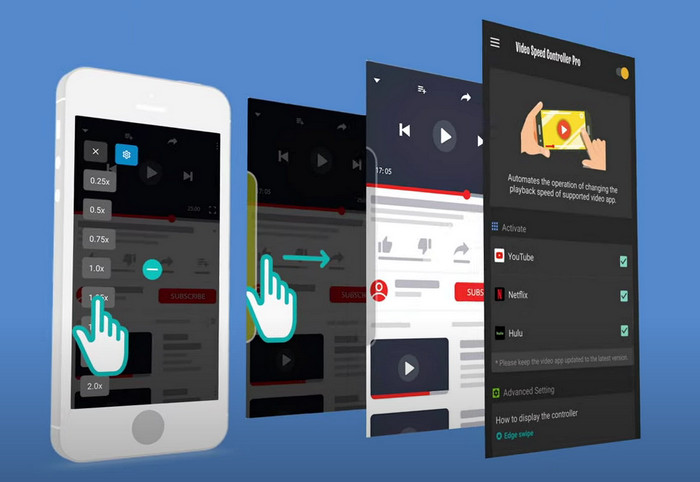
Ako vam je potreban kontroler brzine videa na Androidu, pogađate – možete koristiti Video Speed Controller Pro tako da ga instalirate iz Play Storea. Uz pomoć ovog alata možete s lakoćom ubrzati bilo koji video koji se reproducira na vašem Androidu. Štoviše, ovaj je alat poput ekstenzije za kontrolu brzine na Androidu. Iako može ubrzati vaš video, najveća moguća brzina je samo 2x. Ipak, ako trebate ubrzati gledanje videa, možete ga koristiti na YouTubeu, Netflixu i drugim video platformama na Androidu.
Pros
- Jednostavan je za korištenje.
- Sam alat je na mjestu.
- Dostupna je traka izbornika za otkrivanje opcija vaše reprodukcije.
Protiv
- Mogućnosti brzine reprodukcije su ograničene.
- Ponekad ne funkcionira dobro.
Dio 2. Usporedna tabela
| Značajka/e | Video Converter Ultimate (Windows i Mac) | Clipchamp (Windows) | Video kontroler brzine (Chrome) | Ubrzaj za Safari (iOS i Mac) | Sporo Brzo Sporo – kontrolirajte brzinu svojih videozapisa (iOS) | Video Speed Controller Pro (Android) |
| Kontrola brzine |  | | | | | |
| Video izlaz visoke kvalitete | |  | | | | |
| Značajke uređivanja | | | | | | |
| Iznimno brzi proces izvoza | | | | | | |
Dio 3. Često postavljana pitanja o Video Controlleru
Zašto trebam koristiti regulator brzine?
U nekim ćete slučajevima morati gledati videozapis velikom brzinom ili usporeno. Sjajan primjer gledanja ubrzanog videa je da odmah završite video koji gledate ili slično. Ubrzavanje videozapisa velika je pomoć ovim korisnicima. Dok je usporen, obično se koristi za trenutnu reprodukciju brzih sportova kao što su utrke, košarka, odbojka i još mnogo toga. Bez obzira na to dvoje, trebat će vam učinkovit regulator brzine da ručno nadjačate normalnu brzinu prema vašim potrebama.
Mogu li ubrzati videozapise na Tiktoku?
Da, na TikToku možete snimati videozapise koji su ubrzani. Međutim, ne možete gledati tuđe TikTok videozapise većom brzinom. Ako vam je stoga potrebna pomoć prikladnog alata za ubrzavanje, kliknite i pročitajte ovaj članak kako biste saznali kako ubrzati video na TikToku.
Kako usporiti video zapise?
Suprotno ubrzavanju videa, svoje videozapise možete pretvoriti u usporene snimke (slow‑mo) uz pomoć uređivača dostupnih na tržištu. Koji alat biste trebali koristiti? Bez brige, predstavljamo vam najbolji softver za usporene videozapise koji možete koristiti za stvaranje slow‑mo efekta. Ako trebate saznati više, možete kliknuti na ovu poveznicu.
Zaključak
Danas ste upoznali plaćene i besplatne aplikacije za ubrzavanje videa na različitim platformama. Ovi kontroleri brzine nude jedinstven skup mogućnosti koji pomažu različitim korisnicima da ubrzaju videozapise. Ako sve pažljivo pročitamo, možemo vidjeti da FVC Video Converter Ultimate pruža sve što je potrebno korisnicima kojima treba pomoć. Zato, ako želite preuzeti ovaj ultimativni alat na svoje računalo, možete kliknuti gumb za preuzimanje i uživati u potpunom iskustvu rada s njim.
-
 Kako ubrzati video s 5 najboljih dostupnih softvera [Windows/Mac/Linux]
 Želite li znati kako jednostavno ubrzati video? Zatim pročitajte ovaj tekst dok objašnjavamo kako učinkovito ubrzati na Windows, Mac i Linux.
-
 Najlakši načini kako ubrzati video na svojim Android uređajima [2021.]
 Jeste li znali da možete ubrzati video na svom Androidu? Dakle, ako želite znati kako ubrzati video na svom Android telefonu, pročitajte ovaj tekst.
-
 Izvrsni savjeti za 2021.: Kako ubrzati video na iMovieu
 Vaš prijatelj predlaže iMovie da vam pomogne s vašim problemom kako ubrzati video pomoću operacijskog sustava iOS, ali ne znate što učiniti? Vidite više o tome dok čitate više kroz ovaj članak.
