


 Video Converter Ultimate
 Screen Recorder
 Videó javítás
Hogyan lehet az MTV-t AVI-vá konvertálni kiváló minőségben: a legjobb megközelítések, amelyeket tudnia kell
A AVI (Audio Video Interleave) egy olyan videokonténer, amely egyszerre tárolja és kódolja a hang‑ és videóadatokat. Bár tömörítési hatékonysága kisebb, mint néhány versenytársáé, a legtöbb DVD‑lejátszó képes lejátszani az ebben a konténerben lévő fájlokat. A multimédiás lejátszóknak AVI kodekre van szükségük az AVI‑adatok dekódolásához. Ez a videófájl‑típus gyakorlatilag minden videólejátszóban és videoszerkesztőben támogatott. Az MTV videóformátum viszont nem túl elterjedt sem lejátszásra, sem más formátumokba való átalakításra. Ha azon gondolkodik, hogyan tudja majd az MTV‑t AVI‑vá konvertálni, olvasson tovább, hogy többet tudjon meg erről a két formátumról.

1. rész Az MTV konvertálása AVI-vé Windows és Mac rendszeren
Számos különböző módszer létezik az MTV AVI‑vá alakítására, és ez a céltól is függ. Letölthet egy alkalmazást, használhat online webes eszközt, vagy telepíthet egy programot. De gondolt már olyan szoftverre, amely a lehető leggyorsabban képes többféle videoformátumot is átkonvertálni? A Video Converter Ultimate az a program, amelyet ebben a cikkben javaslunk, nemcsak azért, mert ez a leggyorsabb, ingyenesen letölthető konverter. Számos hasznos eszközt kínál a videók szerkesztéséhez. Az egyik fő funkciója, amelyet más alkalmazásokban vagy webes eszközökben nem talál meg, hogy rengeteg formátumot támogat, köztük az MTV‑ből AVI‑vá való átalakítást is. Ha még mindig nem keltette fel az érdeklődését, olvassa el az alábbi részleteket, hogy többet tudjon meg a szoftverről:
1. lépés. Először kattintson az alábbi Ingyenes letöltés gombra a letöltési folyamat elindításához. A letöltés befejeztével választhat, hogy a Windows vagy a Mac verziót tölti le. Mielőtt egyszerűen futtatná a programot, telepítse a számítógép asztalára, majd a kezdéshez kattintson a Start Now gombra.
Ingyenes letöltés Windows 7 vagy újabb rendszerre Biztonságos letöltés
Ingyenes letöltés macOS 10.7 vagy újabb rendszerre Biztonságos letöltés
2. lépés. Indítsa el a letöltött alkalmazást. Amikor először elindítja a programot, megjelenik egy ablak a Converter felülettel. Itt fogja betölteni a videófájlt és itt kezdődik az átalakítás.
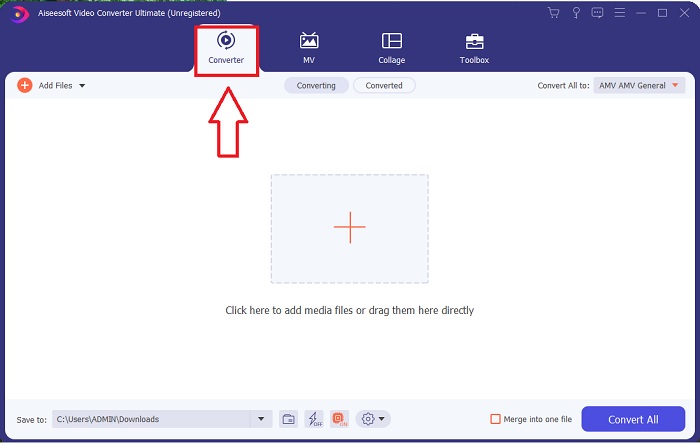
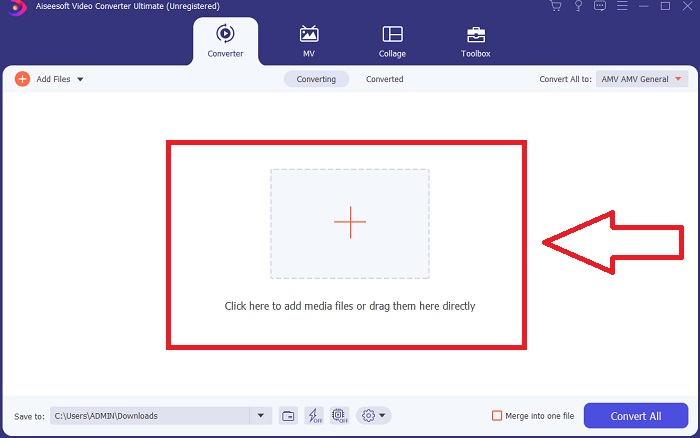
3. lépés. Importálja a fájlokat a konverterbe az átalakítási folyamat elindításához. Húzza át és ejtse rá a konvertálni kívánt videófájlt a + ikonra.
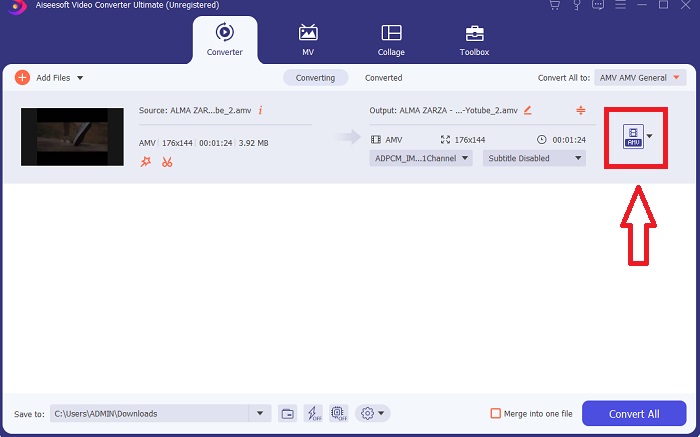
4. lépés. Válasszon ki egy videóformátumot a képernyő jobb felső sarkában található listából. Keresse meg és nyissa le a Convert All to menüt, majd válassza ki az AVI formátumot a videókategóriák listájából. Ha azonban a kívánt videokimenet nem szerepel a listán, a minőségi beállításokat igényei szerint módosíthatja. A fogaskerék ikonra kattintva megváltoztathatja a megjelenítés felbontását, a képkockasebességet, sőt a hangminőséget is. A módosítások mentéséhez kattintson a Create New gombra.
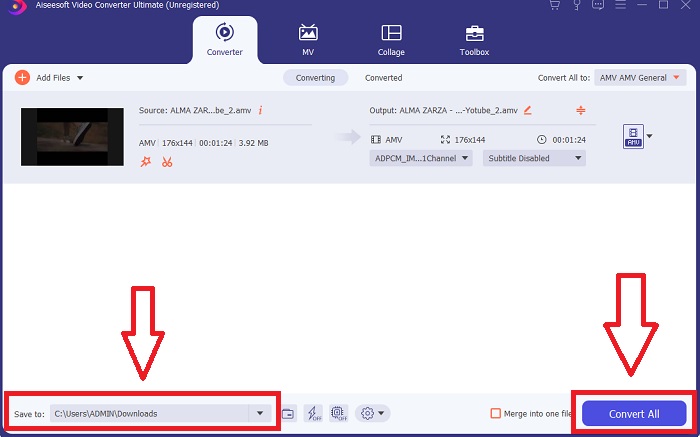
5. lépés. Miután befejezte a videó szerkesztését, és az készen áll az átalakításra, kattintson a Convert All gombra, hogy elindítsa a folyamatot, és a fájlt átvigye a számítógépére.
2. rész Az MTV konvertálása AVI Online-ra
1. módszer: Online-Convert.com
Ezzel az ingyenes online fájl konverterrel egyszerűen és gyorsan átalakíthatja médiáját egyik formátumból a másikba. Számos formátum konvertálható ezzel a webes eszközzel, valamint számos célhelyet. További magyarázatokért az alábbi lépéseket találja:
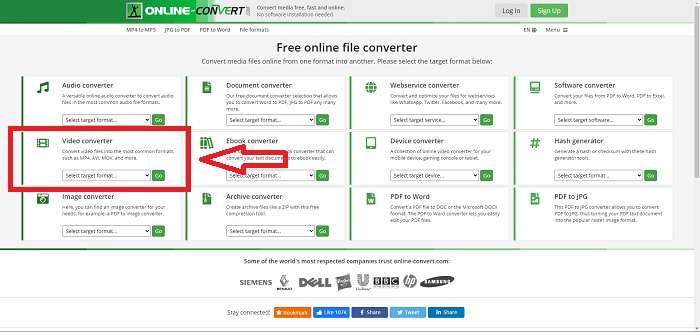
1. lépés. Keressen rá az „online-convert” kifejezésre bármely keresőben, majd kattintson a webes eszközre. Miután rákattintott, megjelenik a felülete. A különböző fájlkonvertálási folyamatok közül választhat. Ha MTV‑t szeretne AVI‑vá alakítani, válassza a Video Converter lehetőséget, majd kattintson a Convert to AVI opcióra, végül folytatáshoz kattintson a Go gombra.
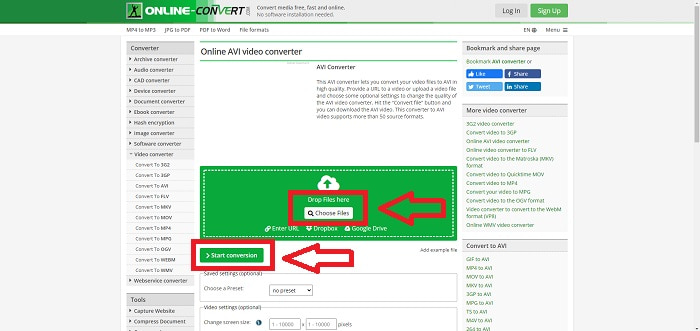
2. lépés. A folytatás után egy másik felület fog megjelenni. Kattintson a Choose Files gombra a konvertálni kívánt fájl feltöltéséhez. Várjon egy kis ideig – a fájl méretétől függően –, amíg a videófájl feldolgozása megtörténik. Ezután kattintson a Start Conversion gombra, hogy AVI‑vá alakítsa a fájlt.
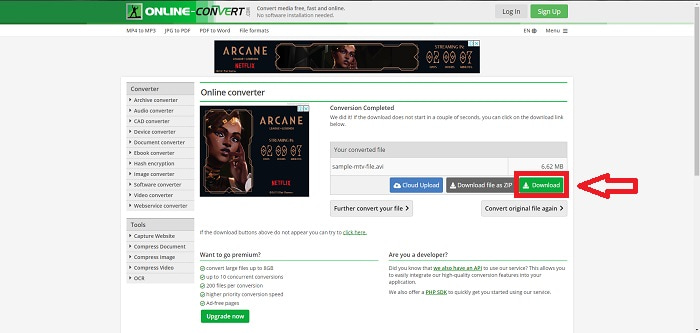
3. lépés. A konvertált fájl letöltésének megkezdéséhez kattintson a Download gombra.
2. módszer: Video-Converter.com
Ezzel az ingyenes online videokonvertálóval módosíthatja a videóbeállításokat, például a videó formátumát, felbontását és méretét a böngészőben. Ha többet szeretne megtudni erről az online internetes eszközről, az alábbi eljárásokat kell ismernie:
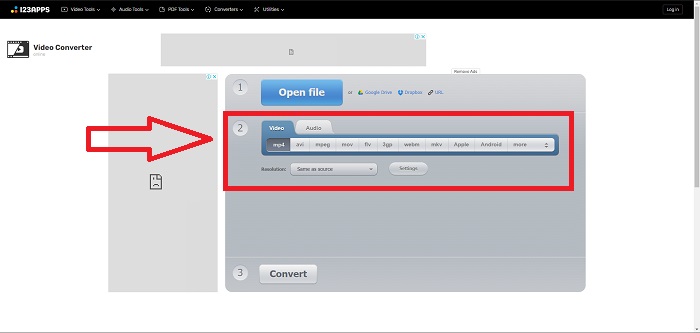
1. lépés. Nyissa meg a videokonvertert bármely keresőből. Kattintson az elsődleges webes eszközre, ekkor egy új ablak ugrik fel. A főfelületen már látni fogja a teljes átalakítási folyamatot. A kezdéshez kattintson az Open File gombra, és importálja a konvertálni kívánt videófájlt.
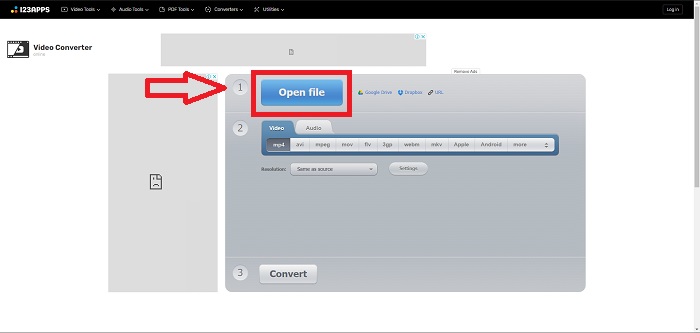
2. lépés. Válassza ki a formátumot, amelyre a videót konvertálni szeretné, az összes megadott videoformátum közül. Mivel MTV‑t fog AVI‑vá alakítani, válassza az AVI‑t. A felbontást és a videokimenetet a Same as Source vagy a Settings gombra kattintva módosíthatja.
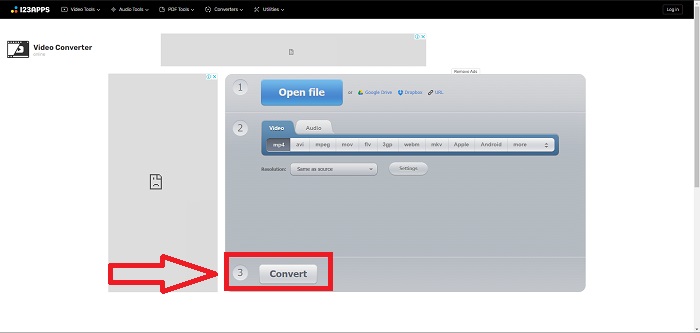
3. lépés. Alakítsa át a fájlt a Convert gombra kattintva. Miután a fájl konvertálása befejeződött, a Download gombra kattintva letöltheti azt.
3. rész Érdekes tények az MTV-ről és az AVI-ról
Mi az AVI?
Ez a fájlformátum, amelyet Audio Video Interleavednek (AVI) is neveznek, egyetlen fájlban egyesíti a hang‑ és videóadatokat, hogy azokat egyszerre lehessen lejátszani. Elsősorban elektronikus médiatartalmak – például televíziós műsorok, filmek és egyéb videofelvételek – tárolására szolgál. A Windows 3.1 megjelenése után terjedt el széles körben az AVI. A videó és a hang erőteljes tömörítési algoritmussal kerül összefűzésre, amely jelenleg a Windows PC‑ken történő filmtárolás hagyományos szabványa. Bár az AVI videó nem veszteségmentes, a képek és a hang magas minőségben megőrizhetők. Ugyanakkor az AVI sok memóriát igényel, néha annyit, mint egy DVD a tároláshoz. Valószínűleg ezért jelent meg utána az MPEG‑1, egészen a ma használt MPEG‑4‑ig.
Mi az az MTV?
Az MTV-fájlok túlnyomó többsége az MTV tulajdona. Az MTV fájlformátumot azért hozták létre, hogy lehetővé tegye a videolejátszást olcsó, kínai gyártmányú hordozható MP4-lejátszókon anélkül, hogy ezeknek az eszközöknek az ára emelkedne, licencdíjak és nagyobb processzorteljesítmény mellett. Az MP4 Watch egy olyan termék, amely ezt a fájlformátumot használja.
4. rész. GYIK az MTV-ről és az AVI-ról
Az AVI jó minőségű?
Az AVI a Microsoft által kifejlesztett nagyfelbontású videóformátum. A YouTube támogatja, és kiválóan teszi lehetővé, hogy tévét nézhess a számítógépen. A nagyfelbontású videóhoz speciális videókódolási formátumra van szükség, az Advanced Video Coding HD néven.
Hol használják általánosan az AVI-t?
A Microsoft 1992. novemberi létrehozása óta az AVI fájlformátumot széles körben használják video- és hangadatok továbbítására és tárolására. Az AVI-fájlok nagy fokú kompatibilitásuknak köszönhetően számos operációs rendszeren lejátszhatók, beleértve a Windows, Mac OS X, Linux és Unix rendszereket.
Hogyan konvertálhatok egy videót MTV formátumba?
Az AVS Video Converter használatával lépjen a Fő eszköztárra, lépjen a Formátumok fülre, és kattintson az MTV-hez gombra. Bemeneti fájlt tallózhat, ha rákattint a Tallózás gombra a felső eszköztáron. Kattintson az alsó Tallózás gombra, és írja be a létrehozni kívánt kimeneti fájl nevét. Döntse el az MTV megjelenését és hangulatát úgy, hogy létrehoz egy fiókot az MTV-nél.
Következtetés
Összefoglalva, mindig van különbség az online és a szoftver között, amelyet először le kell töltenie, mielőtt használná. A különböző oldalakon vannak előnyei és hátrányai, de javasoljuk a Video Converter Ultimate használatát a kényelem és a minőségi kimeneti alaphelyzet érdekében. Ezzel egy szoftverben egyszerre tapasztalhatja meg a professzionális átalakítót és szerkesztőt.
-
 Hogyan lehet konvertálni a TS-t AVI / MKV / MOV / WMV online és ingyenes formátumba Win / Mac rendszeren
 Szeretné gyorsan átalakítani a TS fájlokat AVI / MKV / MOV / WMV fájlokká? Ez a cikk online és offline videokonvertereket mutat be teljes útmutatóval. Talán itt kaphatja meg a legjobb ingyenes TS átalakítót.
-
 4 hatékony módszer a MOV AVI-vé konvertálására PC-n és Mac-en [2021]
 Szeretné tudni, melyik a legjobb MOV-AVI konverter a weben? És miért lehet az FVC Ultimate Video Converter a megfelelő az Ön számára.
-
 Kiváló választás az MKV AVI formátumba konvertálásához
 Sajátítsa el az MKV-videók konvertálását a kizárólag az Ön számára biztosított egyszerű lépésekkel. Szeretné tudni, hogyan? Ezután kattintson erre a linkre további információkért.
