


 Video Converter Ultimate
 Screen Recorder
 Videó javítás
Ismerje meg a VOB online és offline AVI formátumba konvertálásának 3 módját
A VOB fájlokat privát adatfolyamok tárolására használják, és veszteséges videótömörítést használnak, mint az MPEG-2. Ezenkívül szinte ugyanaz a szerkezetük, ha összehasonlítjuk a kettőt. A .vob fájloknak azonban vannak korlátozásai és specifikációi, mielőtt még használhatná őket. Emiatt nem lehet könnyen lejátszani egy VOB-fájlt a helyi médialejátszón. Tehát most, hogy időt takarítson meg a megnyitás keresésére, javasoljuk, hogy konvertálja az alábbi konverter kiválasztásával. Ebben az esetben bemutatjuk Önnek az általunk kitalált legjobb konvertert, és megtanuljuk, hogyan konvertálhat VOB-t AVI-vá online vagy offline a listán szereplő eszközökkel.
1. rész: VOB konvertálása AVI Online-ba
Ha szűkös a költségvetése, akkor azt javasoljuk, hogy használjon egy ingyenes, Ön által használható eszközt. Az interneten keresgélve rátaláltunk egy eszközre, amelyet a legjobb online átalakítóként tartanak számon, ez pedig az FVC Free Video Converter. Ezen felül ez az eszköz egyszerűséget és könnyű kezelhetőséget nyújt minden felhasználónak, aki már kipróbálta, és mindannyian lenyűgözőnek találták, milyen jól működik. Ha Ön is szeretne meggyőződni arról, milyen hatékony ez az átalakító, akkor próbálja meg a VOB-fájlt AVI formátumba konvertálni az alábbi lépések követésével.
1. lépés. A konverter weboldalára való azonnali továbblépéshez kattintson erre a linkre.
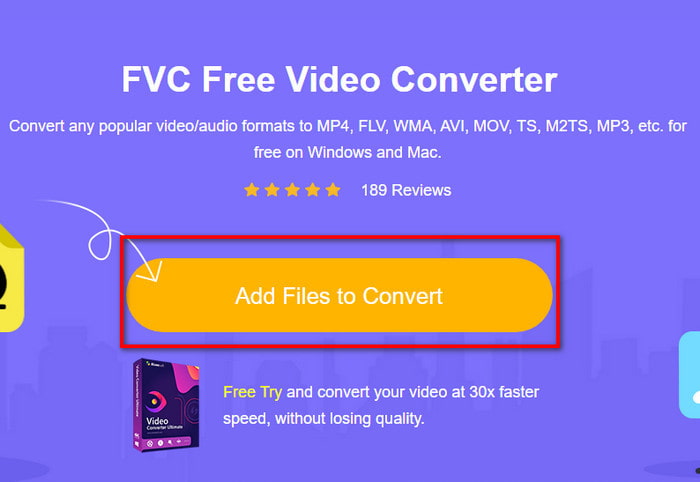
2. lépés. A weboldalon kattintson az Add Files to Convert gombra az installer letöltéséhez. Nem kell aggódnia, csak néhány kilobájtos. Ezután kattintson rá ismét az eszköz elindításához, majd keresse meg a fájlt a mappában, és ha már megtalálta, kattintson a Open gombra.
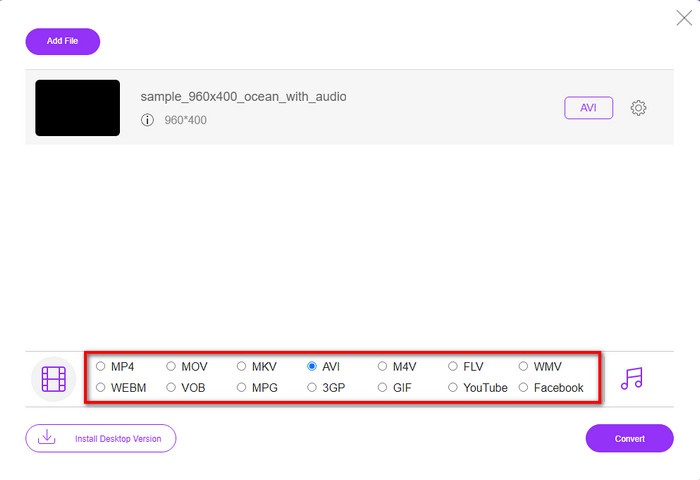
3. lépés. Megjelenik az FVC új felülete a képernyőn. Az alul található listában válassza ki az AVI formátumot, vagy bármely más formátumot, amelybe át szeretné alakítani a fájlt.
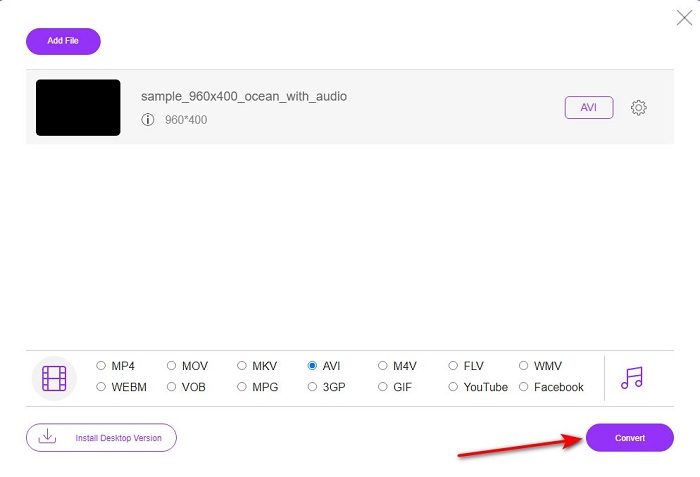
4. lépés. Miután kiválasztotta a formátumot, indítsa el a fájl konvertálását a Convert gombra kattintva.
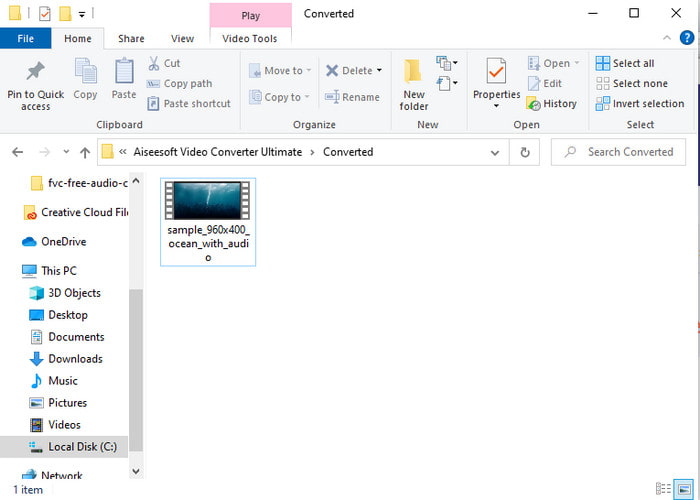
5. lépés. Ez várhatóan kevesebb mint egy percet vesz igénybe, és amikor a konvertálás befejeződött, megnyílik egy mappa az újonnan átalakított fájllal.
2. rész: VOB konvertálása AVI-vé Windows és Mac rendszeren
Használja a Phenomenal Convertert: FVC Video Converter Ultimate
Ha a VOB-ból AVI konvertert szeretne letölteni, akkor ez a legjobb választás, amelyet szívesen megtenne. Az FVC Video Converter Ultimate mindig megfelel a nevének, mint a végső eszköz, amely minden lehetséges végső helyzetet megold, különösen a konvertálásnál. Ez a szoftver nagyban különbözik a két említett eszköztől. Talán azon gondolkodik, hogy miért, és ez csak azért van így, mert bárkinek tökéletesen megfelel, akár profi, akár kezdő. Az eszköz kipróbálása során tapasztalt általános teljesítmény már elképesztő, és le vagyunk nyűgözve, milyen gyorsan lehet végrehajtani az átalakítást. És most, ha szeretné megtapasztalni a fenomenális átalakulást, amiről beszélünk, kövesse az alábbi lépéseket.
1. lépés. Mielőtt használhatná, először le kell töltenie. A letöltés befejezése után telepítse, végezze el a beállításokat, majd kattintson a Start Now gombra.
Ingyenes letöltés Windows 7 vagy újabb rendszerre Biztonságos letöltés
Ingyenes letöltés macOS 10.7 vagy újabb rendszerre Biztonságos letöltés
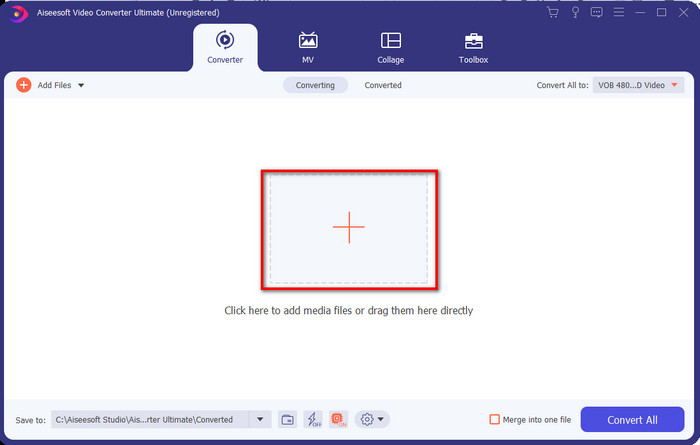
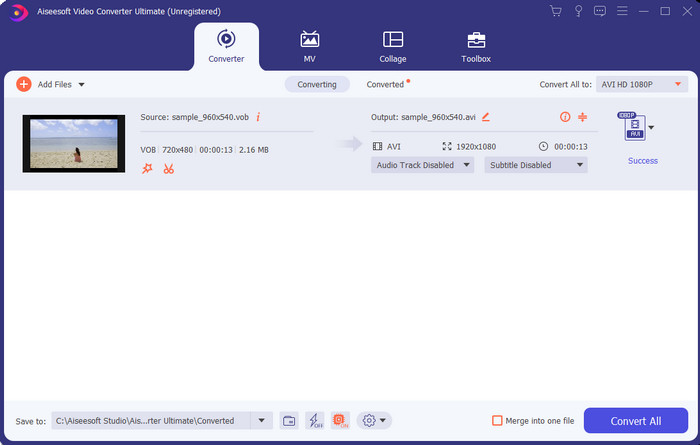
2. lépés. Miután a telepítés befejeződött, nyissa meg a szoftvert. A képernyőn egy ehhez hasonló felület jelenik meg. A felület középső részén kattintson a + gombra, ekkor egy mappaablak jelenik meg. Kattintson az Open gombra a folyamat következő lépéséhez.
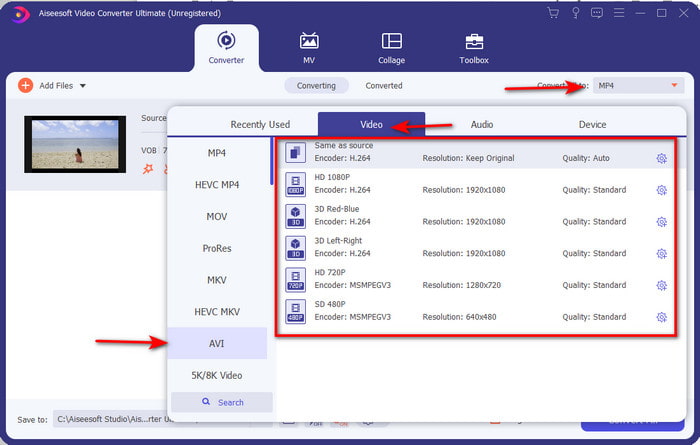
3. lépés. Kattintson a felület bal felső részén található Convert All to gombra, majd válassza ki az AVI formátumot a videókategóriák listájából.
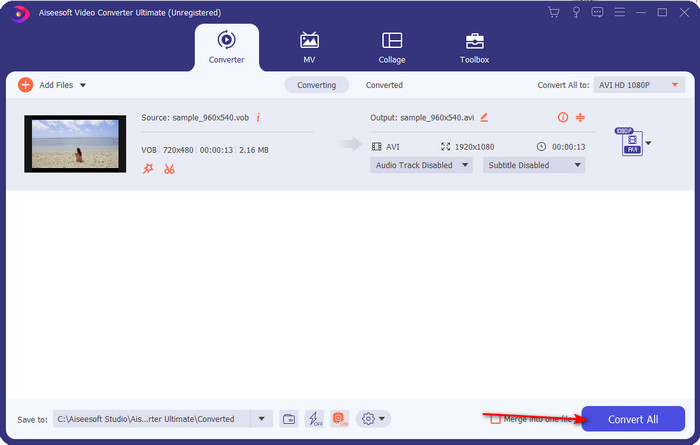
4. lépés. Miután kiválasztotta a kívánt formátumot, kattintson a Convert All gombra az átalakítás elindításához.
5. lépés. Nem kell attól tartania, hogy sokáig kell várnia, mert a folyamat néhány másodperc alatt elkészülhet. Ezután a képernyőn automatikusan megnyílik egy mappa az imént létrehozott konvertált médiafájllal. Kattintson rá, és nézze meg, élvezze a .vob fájl új verzióját.
Használja az ingyenes eszközt: HandBrake
Ha ingyenes eszközt keres, akkor a HandBrake ebben segíteni fog Önnek, és az internetkapcsolat sem szükséges a működéséhez, akárcsak a FVC Video Converter Ultimate esetében. Emellett bárki szabadon letöltheti és használhatja, akinek van asztali gépe otthon, a munkahelyén vagy bárhol máshol. Azonban, ha letölti az eszközt, használat előtt külön le kell töltenie egy .NET 5.0 nevű fájlt is. Néhány felhasználó ezt kissé bosszantónak találja, mert a program letöltése után ismét egy másik fájlt is le kell tölteni. De ha hatékony és ingyenes konvertálási folyamatot szeretne, akkor próbálja ki a HandBrake VOB to AVI átalakítást, és kövesse az alábbi lépéseket.
1. lépés. Először telepítse az eszközt a számítógép merevlemezére.
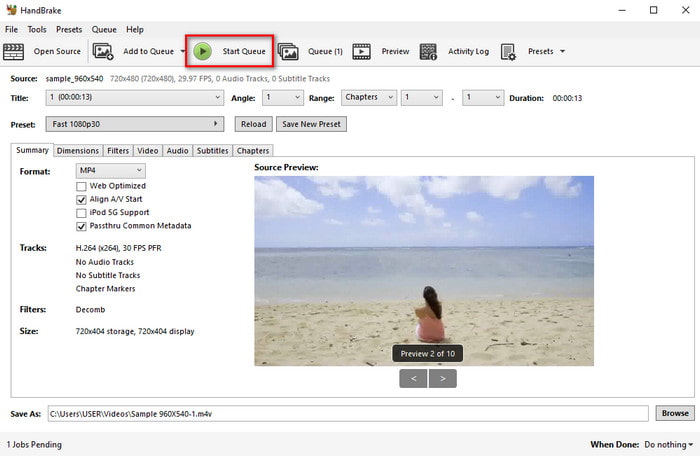
2. lépés. Kattintson a File menüpontra, és keresse meg a .vob fájlt a mappájában.
3. lépés. Kattintson a Format menüpontra, válasszon a rendelkezésre álló formátumok listájából, majd kattintson a Start Queue gombra.
3. rész. Melyik a legjobb konverter a VOB fájlok AVI formátumba konvertálásához
| Jellemzők | FVC Free Video Converter | FVC Video Converter Ultimate | Kézifék |
| Formátum konvertálása |  | | |
| Hardveres és konverziós gyorsítás |  | | |
| Internetkapcsolat | | | |
| Videójavító vagy szerkesztés | | | |
| Támogatott program | Web alapú eszköz | Asztali alapú eszköz | Asztali alapú eszköz |
4. rész. GYIK a VOB-ról és az AVI-ról
Milyen egyéb fájlokat tartalmazhat a VOB?
A VOB egy multiplex DVD formátum, ezért nem csak videókat és hangokat, hanem feliratokat, navigációs tartalmat és menüt is tartalmazhat.
Miért nem tudok VOB fájlokat lejátszani a médialejátszómon?
Az egyik ok, amiért a VOB nem játszható le a médialejátszóján, az, hogy ez a formátum csak korlátozott mértékben támogatott a médialejátszók körében. Itt kattinthat a rendelkezésre álló VOB-lejátszók eléréséhez. Ha a probléma ezután is fennáll, akkor egy lehetséges megoldás az, hogy a fenti konverterek egyikével átalakítja a fájlt.
Miért túl nagyok a VOB fájlok?
Az egyetlen ok, amiért ez a formátum olyan nagy, az az, hogy más adatokat tartalmaz, mint egy DVD-n. Nem hagyhatjuk ki a videó hosszának lehetőségét sem. Vagy kattintson ide a VOB-fájlok tömörítésének megismeréséhez.
Következtetés
Tehát most, ha konvertálni szeretné a VOB fájlt, akkor azt egyszerűen megteheti a fent elérhető eszközök segítségével. Ettől eltekintve az FVC Video Converter Ultimate az a konverter, amely igazán kiemelkedik a többi említett online és offline eszköz közül. Mert egyszerűen konvertálhatja a VOB-t AVI-ba Windowson és akár Macen is. Ha még mindig nincs ötlete, hogy mit használjon, akkor határozottan javasoljuk, hogy töltse le a fenomenális eszközt, hogy megtapasztalhassa az explicit kimenetet, és elképedjen.
-
 VOB to MP4 - 3 módszer a VOB fájlok MP4 formátumba konvertálására ingyen, ömlesztve
 Ez a cikk 3 ingyenes VOB to MP4 átalakítót és a kapcsolódó oktatóanyagokat ismerteti. Könnyedén ingyen konvertálhatja a VOB-ot MP4 fájlokká a Windows / Mac / online rendszeren.
-
 A VOB FLV-vé konvertálásának legjobb módjai [ingyenes és online]
 Szeretne konvertálni egy VOB fájlt FLV fájlba? Könnyedén elvégezheti a feladatot asztali vagy online konverterekkel. Olvassa el ezt az útmutatót, és tanulja meg, hogyan lehet a VOB-t könnyen és gyorsan átalakítani FLV-vé.
-
 Mi a VOB fájl és hogyan lehet ingyenesen VOB fájlt GIF -re alakítani
 Szeretne többet megtudni a VOB-fájlokról és arról, hogyan oszthatja meg azokat a bemásolás után? vagy Miért kell a VOB-t GIF-be konvertálni? Ezután figyelmesen olvassa el ezt a cikket.
