


 Video Converter Ultimate
 Screen Recorder
 Videó javítás
Sajátítsa el az OGV-fájlok AVI formátumba konvertálásának művészetét online és offline módban
Az OGV-fájlok egy, a Xiph.org által készített nyílt forráskódú formátumot jelentenek, amelynek felépítése megegyezik az OGG Vorbiséval. Ez a formátum egy vagy több kodeket is tartalmazhat a videófolyamok tömörítéséhez. A .ogv fájlok lejátszása azonban Windows Media Playerben vagy QuickTime-ban nem támogatja az olyan kodekeket, mint a Theora, a Daala vagy a Dirac. Ilyen esetben kompatibilitási okok miatt nem tudja lejátszani a videót. A probléma megoldásának módja, ha a fájlt egy sokkal elterjedtebben támogatott formátumba, például AVI-ba konvertálja. Ez a cikk bemutatja azokat a konvertereket, amelyeket használhat, és azt is, hogy hogyan lehet az OGV-fájlokat AVI-ba konvertálni.
1. rész. OGV és AVI – Áttekintés
Amint a korábbi információkban szerepel, az OGV nyílt forráskódú fájlok, amelyek kiváló minőségű videofolyamokat tárolnak. De ha szinkronizálni szeretné a médiafájlok lejátszását, akkor az AVI-t kell választania. Bár ez a két tartály továbbra is nagyszerűen használható, megvan a céljuk. Határozzuk meg céljukat úgy, hogy további információkat keresünk a két formátumról.
OGV
Az OGV másik célja a videók lejátszása HTML 5-ön, mivel ez az egyik legjobb szabadalmazatlan formátum, amelyet beilleszthet az internetre. A frissített HTML 5 elkészítésével nincs szükség plug-inre a videók internetes lejátszásához. Ez a formátum emellett a multimédiát és a kényelmet is támogatja a webdesigner számára. Bár az OGV fájlok támogatják a HTML 5 formátumú videók streamelését, a formátum továbbra sem támogatja más médialejátszókat ennek a formátumnak a lejátszásához.
AVI
Eközben az AVI formátum már széles körű támogatást kap az összes médialejátszótól és szerkesztőtől az OGV-hez képest. Tömörítetlen formátuma miatt pedig az ebben a formátumban mentett fájlméret sokkal nagyobb, mint a többi médiaformátumé. Bár a fájlok kiterjedtebbek, továbbra is használhat különböző kodektípusokat ennek a formátumnak a tömörítésére és kisebbre mentésére. Ha azonban összenyomja a fájlt ebben a formátumban, akkor számíthat arra, hogy a videó minősége megváltozik.
És most, hogy megvan a háttér a két formátumról, itt az ideje, hogy az OGV-t AVI-vá alakítsuk Linuxon, PC-n és Macen. A helyi médialejátszón való lejátszáshoz vagy a videó szerkesztéséhez a fájlt AVI formátumba kell konvertálni.
2. rész. A legjobb választás offline konverter az OGV AVI-vé konvertálásához
FVC Video Converter Ultimate
Szeretné megtudni, melyik a legjobb OGV–AVI konverter, amely a leggyorsabb és legbiztonságosabb konvertálási folyamatot kínálja? Ha igen, a FVC Video Converter Ultimate jó választás. Az összes, az interneten átnézett és kipróbált konverter közül ez az eszköz páratlan, és kivételes minőségű kimenetet biztosít. A szoftver számos speciális funkciót kínál az eszköztárban, például szerkesztőt, egyesítést, tömörítést és még sok mást. A konvertálási folyamat akár 30-szor gyorsabb, mivel a program hardveres gyorsítást használ, és gyorsabban alakít, mint a többi, online vagy offline elérhető konverter.
Sőt, ha kötegelt konvertálást szeretne végezni, itt könnyedén megteheti, anélkül, hogy izzadna. Ezenkívül az interfész és a speciális funkciók Windows és Mac felhasználók számára is elérhetők. Tehát most folytassuk az OGV-fájl néhány másodpercen belüli új AVI formátumba konvertálásához szükséges lépéseket az alábbi lépések követésével.
1. lépés. Mielőtt Windows vagy Mac rendszeren OGV-t AVI-vá konvertálna, először le kell töltenie a szoftvert. Telepítse a programot a számítógépére, majd kattintson a Start Now gombra, hogy elindítsa a rendszeren.
Ingyenes letöltés Windows 7 vagy újabb rendszerre Biztonságos letöltés
Ingyenes letöltés macOS 10.7 vagy újabb rendszerre Biztonságos letöltés
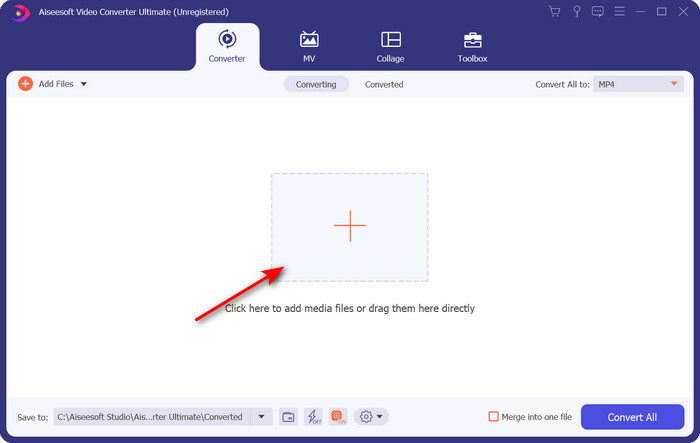
2. lépés. Töltse fel az .ogv fájlt a + gombra kattintva; ekkor megnyílik egy mappaablak, ahol megkeresheti a fájlt, majd kattintson az Open gombra.
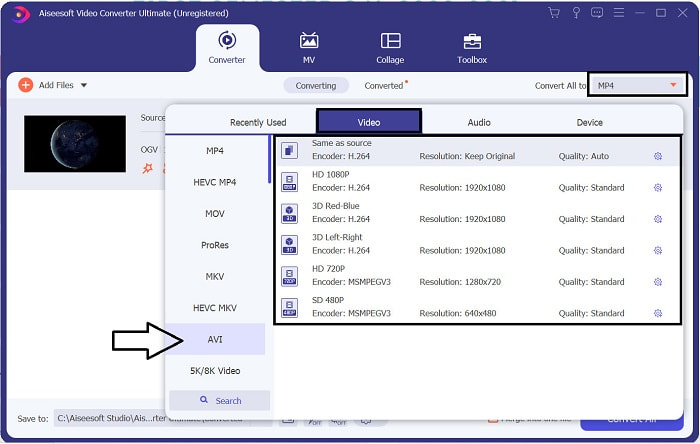
3. lépés. Miután a fájl betöltődött, kattintson a Convert All to menüre, válassza az AVI formátumot, vagy egyéb formátumot, amelybe a végső kimenetet szeretné átalakítani.
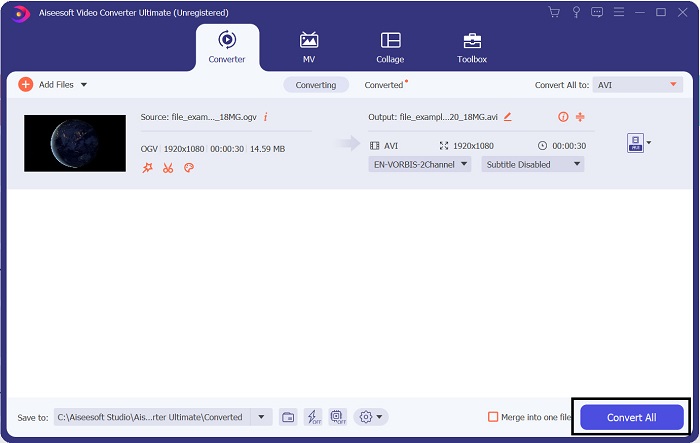
4. lépés. Kattintson a Convert All gombra a konvertálási folyamat elindításához; ez a folyamat csak néhány másodpercet vesz igénybe a program által támogatott gyors átalakításnak köszönhetően.
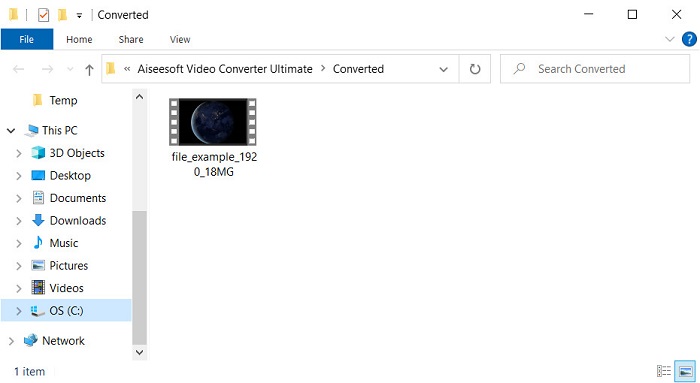
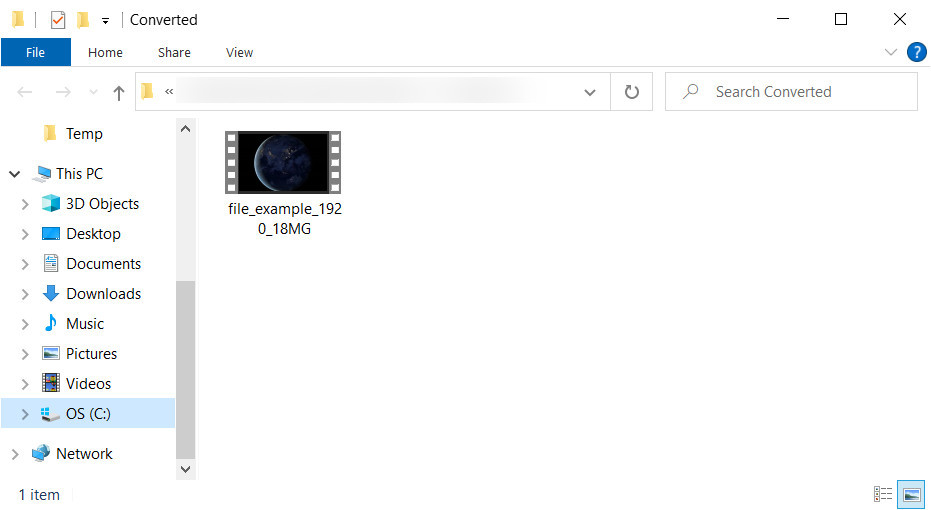
5. lépés. A konvertálás befejezése után egy mappaablak jelenik meg a képernyőn, benne az .avi fájllal; kattintson a fájlra, hogy lejátszhassa a médiaplayerén.
3. rész. Az online elérhető legjobb ingyenes OGV-AVI konverter
FVC ingyenes online videokonverter
Nem szeretne konvertert letölteni a meghajtóra, inkább ingyen, online szeretné az OGV-t AVI-vá alakítani? Akkor a FVC Free Video Converter Online a legjobb választás. Manapság a konvertálás online is elvégezhető, ha keres egy megfelelő webes eszközt. Azonban nem minden ilyen eszköz támogat olyan formátumokat, mint az .ogv fájl. Bár léteznek megbízható konverterek, ez az online átalakító a legbiztonságosabb, nem tartalmaz hirdetéseket, és sokak kedvence. Ha tehát úgy szeretné az OGV-fájlokat konvertálni, hogy ne kelljen programot letöltenie, és ne legyenek korlátozások, kövesse az alábbi lépéseket.
1. lépés. Látogasson el az FVC Free Video Converter Online hivatalos weboldalára ezen a linken keresztül.
2. lépés. Miután megnyílt a weboldal, kattintson az Add Files to Convert gombra a launcher letöltéséhez. Nyomja meg újra, hogy megnyíljon egy mappa az .ogv fájlokkal, majd kattintson az Open gombra a feltöltéshez. További információként: bár itt nincs konvertálási limit, kötegelt (batch) konvertálást továbbra sem lehet végezni.
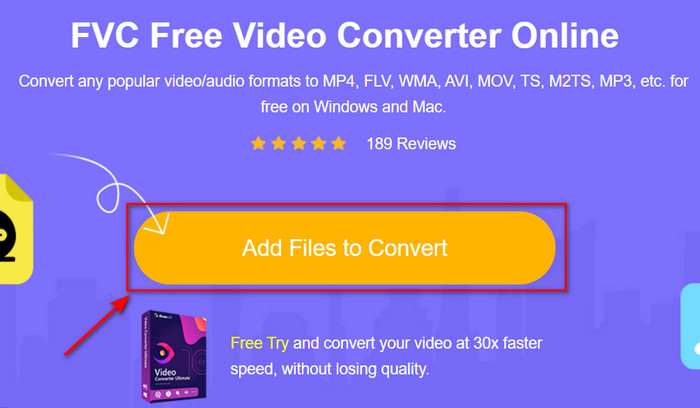
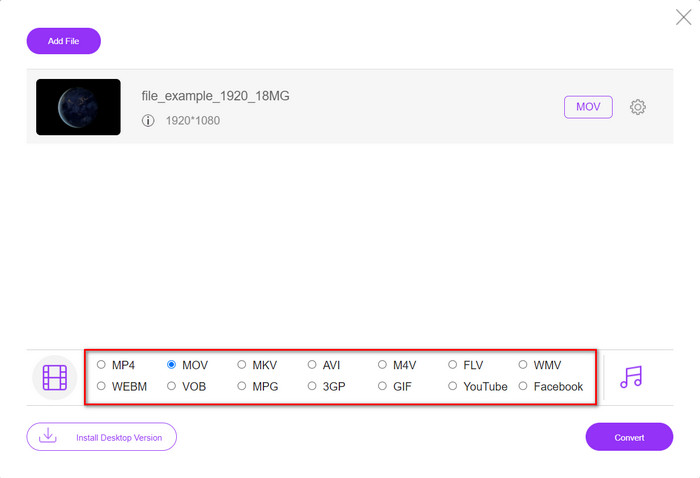
3. lépés. Válassza ki az AVI formátumot az almenüben, majd kattintson rá.
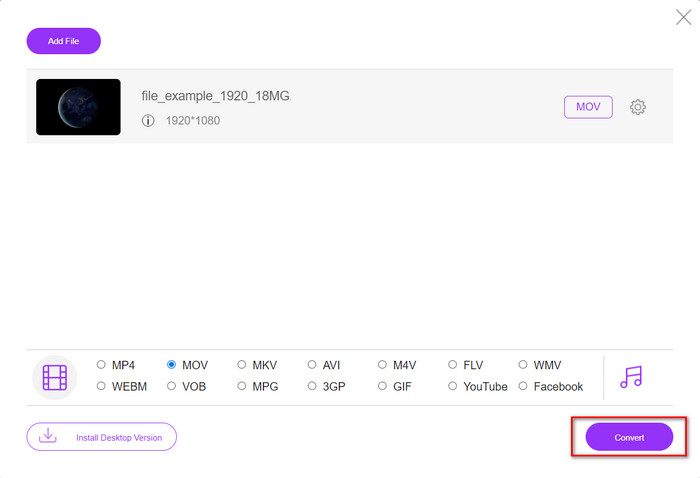
4. lépés. Kezdjük el az OGV formátum AVI-vá alakítását a Convert gombra kattintva.
5. lépés. A fájl konvertálása rövidesen befejeződik; egy mappa jelenik meg az .avi fájllal.
4. rész. GYIK az OGV-ből AVI-ba konvertálással kapcsolatban
Lejátszhatom az .ogv-t VLC-n?
Igen, az .ogv videófájlt gond nélkül lejátszhatja VLC Playerrel, amely az egyik legismertebb, ingyenesen letölthető médialejátszó. Ha azonban szeretné megismerni a 5 legjobb alternatívát a VLC helyett, kattintson erre a linkre, és tájékozódhat a további, PC-n és Macen használható médialejátszókról.
Az OGG és az OGV ugyanaz?
A Xiph.org megalapította az OGG-t és az OGV-t, hogy az egyik legjobb formátum legyen, amely olyan kodekeket használ, mint a Vorbis és a Theora. Bár az .ogg tartalmazhat videót és hangot is, a videóhoz képest mégis a legjobban illeszkedik a hanghoz. Ezzel szemben az .ogv a legjobb formátum video- és hangfájlok számára.
Az .ogv konvertálása után csökken a minőség?
Ez attól függ, milyen konvertert használ, mivel egyes OGV-konverterek nem biztosítanak jó minőségű kimenetet. A FVC Video Converter Ultimate ezzel szemben lehetővé teszi, hogy a minőséget alacsonyra, közepesre vagy magasra állítsa, így jobb képminőségű és kisebb méretű kimenetet érhet el.
Következtetés
A cikkben említett összes konverter képes az OGV-t AVI formátummá alakítani minőségromlás nélkül. Érdemes olyan tökéletes konvertert választani, amely a leghatékonyabb módon végzi az átalakítást. Ha egyetlen fájlt szeretne átkonvertálni anélkül, hogy fizetnie kellene, használja a FVC Free Video Converter Online eszközt. Ha viszont egyszerre több fájlt akar könnyedén, internetkapcsolat keresgélése nélkül kötegelt módban konvertálni, akkor le kell töltenie a FVC Video Converter Ultimate programot.
-
 Az RMVB fájlból AVI-ba konvertáló 2 legjobb választása [Online és offline]
 Nem tudja, hogyan lehet az RMVB-t AVI-vé konvertálni? Ez a cikk azokra az átalakítókra összpontosít, amelyek segítségével az RMVB-t AVI-vé alakíthatja, akár online, akár offline.
-
 Az XviD konvertálása AVI-vé a videó minőségének elvesztése nélkül [2025]
 Szeretné konvertálni az XviD fájlt AVI formátumba? Ha ez így van, olvassa el ezt a cikket, mivel többet beszélünk az XviD-ről és az XviD fájl AVI formátumba konvertálásáról.
-
 A legjobb stratégia a DV fájl AVI formátumba konvertálására részletes lépésekkel
 Szeretné konvertálni a DV fájlt AVI formátumba? Ezután olvassa el ezt a cikket, hogy megtudja, milyen egyedülálló eszközzel konvertálhat, valamint egy médialejátszót, amellyel lejátszhatja DV-jét PC-n vagy Mac-en.
