


 Video Converter Ultimate
 Screen Recorder
 Videó javítás
Offline és online konverziós folyamat: A legjobb módszer az OGV FLV-vé konvertálására
Amikor OGV-videókat használ, ez a veszteséges tömörítésű videóformátum zavaró lehet, mert a felvételek az utólagos módosítások után elmosódhatnak. A helyzet azonban sokat javulhat, ha az OGV-t előbb FLV formátumba konvertálja, mielőtt online megosztaná; az egyetlen kihívás egy könnyen kezelhető, mégis erős videokonvertáló program megtalálása lesz. Szerencsére van egy olyan megoldásunk, amely offline és online használatra egyaránt ideális, és amellyel egyszerűen tudja OGV-ből FLV-be konvertálni a videókat. Csak kövesse az ebben a cikkben ismertetett lépéseket a lehető legnagyobb kényelem érdekében.

1. rész: Az OGV egyszerű konvertálása FLV-vé [Offline]
Őszintén szólva rengeteg videokonvertáló érhető el online, de csak néhányuk támogatja az OGV formátum átalakítását. Mivel ez a formátum a legtöbb videófogyasztó számára nem elterjedt, a konverterek nem tartják fontosnak, hogy felvegyék a támogatott formátumok listájára. Itt jön jól a Video Converter Ultimate. Teljes mértékben támogatja az OGV bemenetet, és lehetővé teszi, hogy az OGV-videófájlokat gyorsan FLV-formátumba alakítsa. Érdemes megemlíteni azt is, hogy nemcsak átalakítja az OGV-videókat, hanem gyakorlati szerkesztőeszközöket is kínál hozzájuk. Minden, amire szüksége lehet, megtalálható a Video Converter Ultimate programban. Ezért az alábbiakban a legegyszerűbb követhető lépéseket adjuk meg önnek:
1. lépés: Mielőtt használhatná a szoftvert, először telepítenie kell az asztali gépére. Ezt úgy teheti meg, hogy az alábbi Ingyenes letöltés gombok egyikére kattint, attól függően, milyen operációs rendszert használ. Várja meg, amíg az .exe vagy .dmg fájl letöltése befejeződik, majd nyissa meg, hogy elindítsa a telepítési folyamatot. Végül a telepítés befejezése után azonnal elindíthatja a programot a Start Now gombra kattintva.
Ingyenes letöltés Windows 7 vagy újabb rendszerre Biztonságos letöltés
Ingyenes letöltés macOS 10.7 vagy újabb rendszerre Biztonságos letöltés
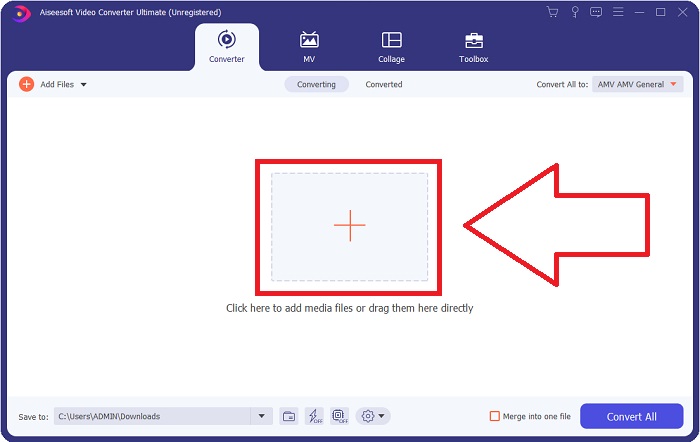
2. lépés: Amint felugrik az ablak, egy olyan felületen találja magát, amelynek közepén egy + gomb látható. A konvertálni kívánt videófájl importálásához kattintson erre a gombra, vagy húzza egyszerűen a fájlt a program ablakába.
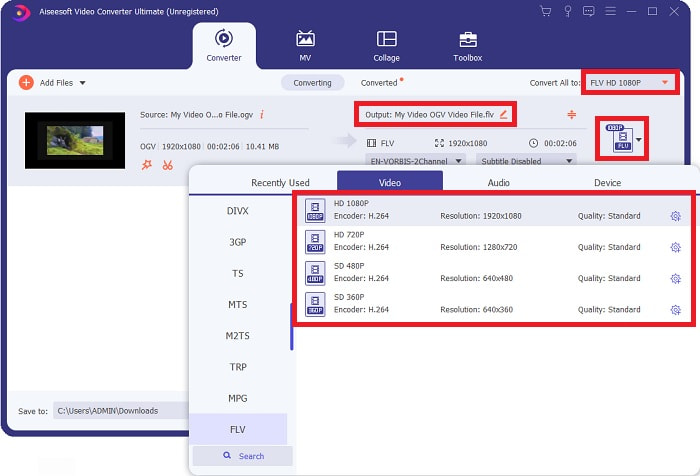
3. lépés: A jobb oldalon láthatja az aktuális videó fájlformátumát. Kattintson rá, és megjelenik az összes választható formátum. Ebben az esetben görgessen le, és válassza az FLV-t, vagy egyszerűen keresse meg az alul található keresőmezőben. A fül jobb oldalán ki is választhatja, milyen videóminőséget szeretne az átalakított fájlhoz.
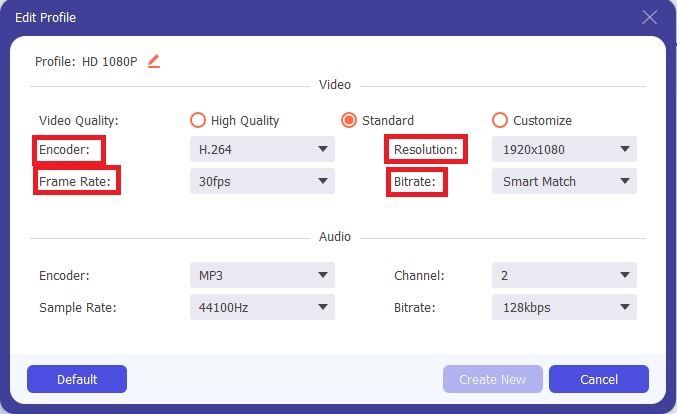
4. lépés: Ha további beállításokat keres, azokat a kiválasztott videóminőség melletti fogaskerék ikonra kattintva találja meg. Itt tovább finomíthatja a videó felbontását, illetve egyéb paramétereket, például a képkockasebességet, a mintavételezési frekvenciát, a bitrátát és a kódolót. Ha elégedett a módosításokkal, kattintson a jobb alsó sarokban található Új létrehozása gombra a változtatások mentéséhez.
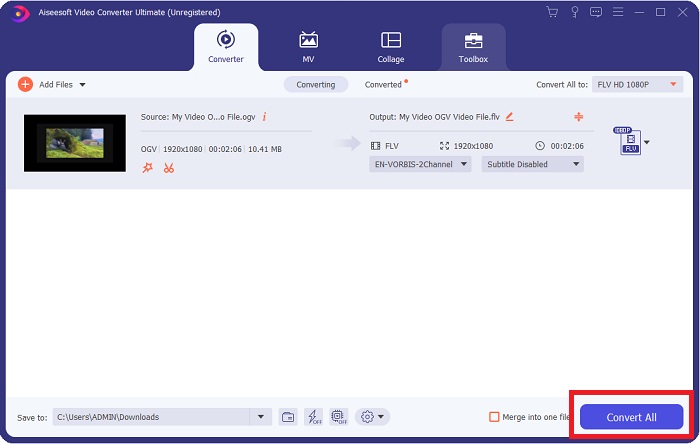
5. lépés: Miután minden beállítást elvégzett, a tényleges konvertálást a jobb alsó sarokban található Összes konvertálása gombra kattintva indíthatja el, majd várja meg, amíg a folyamat befejeződik.
2. rész. Egy másik módszer az OGV FLV-vé konvertálására [Online]
Ha szorít az idő, és az OGV-fájlt a lehető leggyorsabban kell FLV-vé alakítania, akkor sem kell aggódnia, mert erre is kínálunk megoldást. Használhatja a szoftver online megfelelőjét, amely szintén kényelmes, és zökkenőmentes konvertálási folyamatot biztosít. Az FVC Free Video Converter Online egy webböngészőben futó eszköz, amely könnyedén alakítja át az OGV-fájlokat FLV-vé, miközben ugyanazokat a felbontási és hangminőségi beállításokat kínálja. Használatához kövesse az alábbi lépéseket:
1. lépés: Kattintson erre a linkre, amely közvetlenül az online konverter oldalára irányítja. Az oldal közepén talál egy Add Files to Convert feliratú gombot. Erre kell kattintania, hogy letöltse azt az indítómodult, amelyre a konvertálni kívánt videófájl importálásához szükség van.
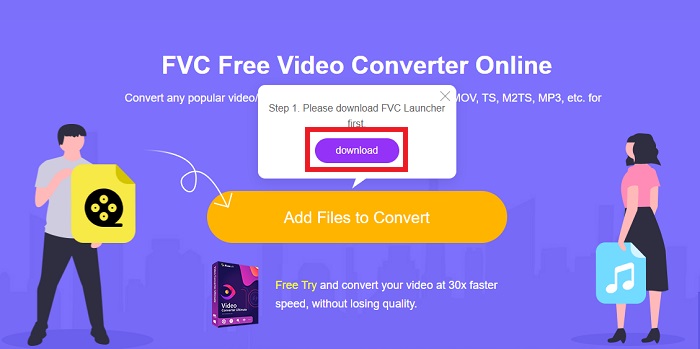
2. lépés: Ha ez megtörtént, ismét kattintson ugyanarra a gombra, hogy feltöltse a fájlt. Sikeres feltöltés esetén egy új felület jelenik meg. Itt az ablak alján elérhető formátumok közül választhatja ki az FLV-t.
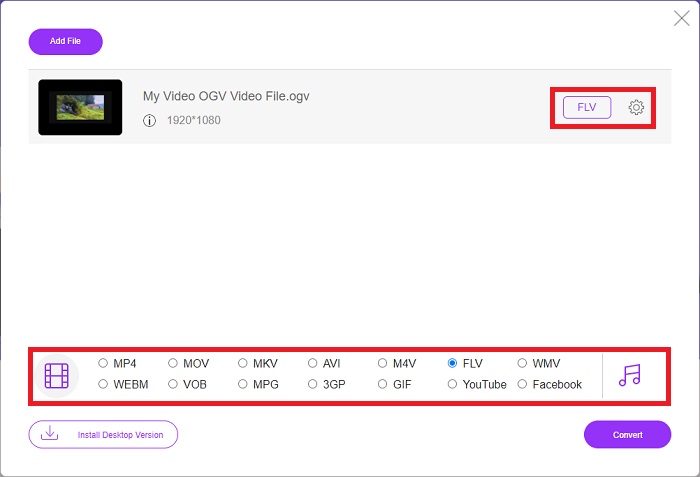
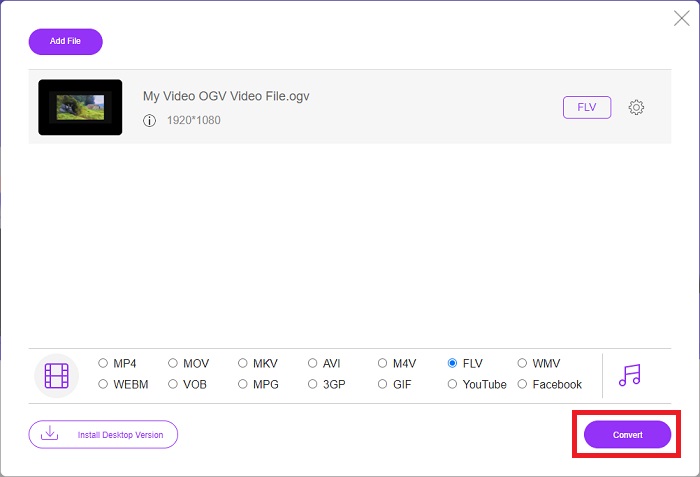
3. lépés: Hasonlóan az asztali verzióhoz, itt is talál egy fogaskerék ikont a jobb szélen, amelyre kattintva tovább szerkesztheti a videót. Itt érhetőek el a videó- és hangbeállítások, ahol módosíthatja a kódolót, a felbontást, a képkockasebességet és egyebeket. Kattintson az OK gombra, majd az ablak jobb alsó sarkában lévő Convert gombra a konvertálási folyamat elindításához.
3. rész. Kibővített ismeretek az OGV-ről és az FLV-ről
Ha többet szeretne megtudni a két összehasonlított fájlról, itt megadunk minden szükséges információt, amelyet érdemes elolvasni:
Az Ogg Vorbis videókódolási módszer általában .ogv kiterjesztésű fájlokhoz tud hivatkozni. Az Ogg Vorbis egy nyílt forráskódú, nem szabadalmaztatott hangtömörítési formátum. Az audio-, video- és információs fájlok konténerformátumát Ogg néven ismerik, míg a Vorbis hangtömörítési technológiát nevezték el. Az OGV fájlformátum a videofájlok tárolója. Az egy vagy több videokodekkel, mint például a Theora és a DivX összekapcsolt videofolyamok megtalálhatók az OGV-fájlokban. A felhasználók a tartalomfájlon belüli rögzített anyagot több médiaeszközön is lejátszhatják ezekkel a fájlokkal.
Másrészt az Adobe Flash Video (FLV) tárolóformátumban tárolt videofájl FLV-fájl. Az Adobe Flash Player főként online videotartalmak, például filmek és TV-epizódok kínálására használja. Fontos megjegyezni, hogy ez egy nyílt formátum, amelyet számos nem Adobe/Macromedia alkalmazás támogat. A kettő pontosabb összehasonlításához készítettünk egy táblázatot az Ön számára.
| Ogg Vorbis (OGV) | Adobe Flash Video (FLV) | |
| Fájlkiterjesztés | .ogv | .flv |
| Fejlesztő | Xiph.Org Alapítvány | Adobe Systems Incorporated |
| Támogató programok | MPlayer Classic, VLC Media Player, Jriver Media Center, MPUI | RealPlayer, Apple QuickTime Player, Mplayer, VLC Media Player |
| Előnyök | Az OGG előnye, hogy szabadalommentes, általánosan elismert, és a legtöbb böngésző natívan támogatja. Ennek eredményeként, ha filmet szeretne feltölteni a webhelyére, ez a formátum jó választás. | A Flash szépsége abban rejlik, hogy segítheti azokat a webhelyeket, amelyek mozgást és interaktív tartalmat szeretnének beépíteni. Az eljárás egyszerű, és végső soron jelentős hatással lehet. Mindenki a Flash-t kezdetleges játékokhoz is használta a legjobb korában. |
| Hátrányok | Széles körben elterjedt használata ellenére az OGG videóformátumnak van néhány hátránya. A Safari és az Internet Explorer például csak részben támogatja; így előfordulhat, hogy a felhasználók nem nézik meg megfelelően a videót ezekben a böngészőkben. | Hátránya persze, hogy az elmúlt években egyre népszerűtlenebb lett az FLV formátum. Az FLV tartalom létrehozása sokáig tarthat és költséges lehet. További hátránya, hogy a Flash-anyagok nem játszhatók le iOS-eszközökön, ami erősen korlátozza új követők vonzását. |
4. rész. GYIK az OGV és FLV konverzióról
Az OGG és az OGV ugyanaz?
Ez egy megfelelő részhalmaza az Ogg video médiatípusnak, a video/Ogg fájlkiterjesztéssel. ogv. Más Ogg-alkalmazások a fájlkiterjesztést használják. ogv a médiatípus alkalmazás/ogg óta. Az ogx a video/ogg szuperkészlete.
Az FLV minősége jobb, mint az MP4?
Az MP4-ről azt tartják, hogy kiváló minőségű videó- és hangkódolást tartalmaz. A nyilvánosság véleménye az FLV-ről kevésbé egyértelmű, bár az FLV előnyei és hátrányai ritkán a fájlformátum minősége körül forognak. Az MP4 nagyobb tömörítés mellett is kevesebb minőségromlást szenved. Itt találja a módokat arra, hogyan tudja FLV-fájljait MP4 formátumba konvertálni.
Az FLV veszteségmentes vagy veszteséges, mint az OGV?
A Flash Video FLV-fájlformátuma a képernyőmegosztási (Screen video) kodek két verzióját támogatja, amely egy screencast kódolási módszer. Ezek a formátumok bittérképes csempéken alapulnak, és veszteségesek, ha a színmélységeket csökkentik és tömörítik a Zlib használatával.
Következtetés
Függetlenül attól, hogy mennyi ideje van a videofájlok konvertálására, mind a szoftver, mind az online eszköztár a legkényelmesebb megoldást nyújtja Önnek. Tehát röviden a Video Convert Ultimate és a Free Video Converter azok, amelyekre először gondolni kell, ha videokonverzióról van szó, hogy időt takarítson meg az internet böngészésével és a legjobb megoldás megtalálásával. Itt a legjobbat adjuk át Önnek.
-
 A VOB FLV-vé konvertálásának legjobb módjai [ingyenes és online]
 Szeretne konvertálni egy VOB fájlt FLV fájlba? Könnyedén elvégezheti a feladatot asztali vagy online konverterekkel. Olvassa el ezt az útmutatót, és tanulja meg, hogyan lehet a VOB-t könnyen és gyorsan átalakítani FLV-vé.
-
 A legnépszerűbb 4 ingyenes RMVB-FLV átalakító alkalmazás asztali vagy online
 Ez a cikk elmondja a legjobb RMVB – FLV átalakító szoftvert és webalkalmazásokat, amelyek képesek RMVB (RealMedia Variable Bitrate) fájlokat FLV videofájlokká konvertálni.
-
 Hogyan tömörítsünk egy OGV fájlt a minőség romlása nélkül
 Nem tud nagy OGV fájlokat küldeni másoknak? Nos, ez a cikk 2 egyszerű módszert mutat be az OGV-fájlok egyszerű tömörítésére.
