


 Video Converter Ultimate
 Screen Recorder
 Videó javítás
Ismerje meg az MPEG FLV-vé konvertálására használható konvertáló szoftvert
Az MPEG a szabványos formátum az adatok interneten vagy DVD-terjesztésben történő átvitelére. Nos, ez azért van így, mert ez a formátum már 1988 óta létezik. De tudta, hogy ez a fájl egy aszimmetrikus rendszer? Mert egy videó tömörítése több időt vesz igénybe, mint a kitömörítése. Ráadásul a fájl „összenyomása” közben egyes képkockák eldobásra kerülnek. Így ennek a formátumnak a minősége alacsonyabb, mint más formátumoké, például az FLV-é. Szeretné tudni, hogyan alakíthatja át MPEG fájlját FLV-re, és hogyan tömörítheti úgy, hogy közben ne veszítse el a videó képkockáinak minőségét? Akkor olvassa el ezt a cikket, hogy képet kapjon arról, milyen MPEG‑átalakítókat használhat.

1. rész. MPEG konvertálása MOV-vé Mac és Windows rendszeren az FVC Video Converter Ultimate használatával
A FVC Video Converter Ultimate sokkal inkább képes kezelni ezt az átalakítási problémát. Több, mint egy egyszerű MPEG–FLV konverter, mert ez az eszköz önmagában több mint 200 formátumot képes azonnal átalakítani. Nem lenyűgöző? Továbbá, ha sok fájlt szeretne betölteni, és itt különböző formátumokra konvertálni, akkor ezt könnyedén megteheti a rendkívül hatékony kötegelt konvertálással. Szeretné tudni, mi mindent tud még ez az eszköz? Olvassa el az alábbi fő funkciókat.

FVC Video Converter Ultimate
Több mint 5 689 200 letöltés- Támogatja az összes formátumot és kódolót az MP4, MOV, MPEG, FLV, AVI és még sok más formátumban.
- Ez a leggyorsabb és a legbiztonságosabb konverter, amelyet letölthet asztalára.
- Kötegelt átalakítás hardveres gyorsítással és gyors konverzióval.
- Ez a konverter nagy kiterjedt funkciókat támogat, például videójavítót, videokompresszort stb.
- Mindkét operációs rendszert támogatja ugyanazokkal a funkciókkal Windows és Mac rendszeren.
Ingyenes letöltés Windows 7 vagy újabb rendszerre Biztonságos letöltés
Ingyenes letöltés macOS 10.7 vagy újabb rendszerre Biztonságos letöltés
Tehát most, hogy van egy ötlete az eszköz funkciójáról, itt az ideje, hogy megtanulja, hogyan konvertálhat MPEG fájlt FLV-vé az alábbi részletes lépésekkel.
1. lépés. Hogy hozzáférjen az eszközhöz, először le kell töltenie PC-re vagy Macre. Ezután telepítse, végezze el a gyors beállítást; a program azután automatikusan elindul.
Ingyenes letöltés Windows 7 vagy újabb rendszerre Biztonságos letöltés
Ingyenes letöltés macOS 10.7 vagy újabb rendszerre Biztonságos letöltés
2. lépés. Illessze be ide .mpeg fájlját a középen található + jelre kattintva. A kattintás után megjelenik egy mappa az asztalon, válassza ki a fájlt, majd kattintson az Open gombra.
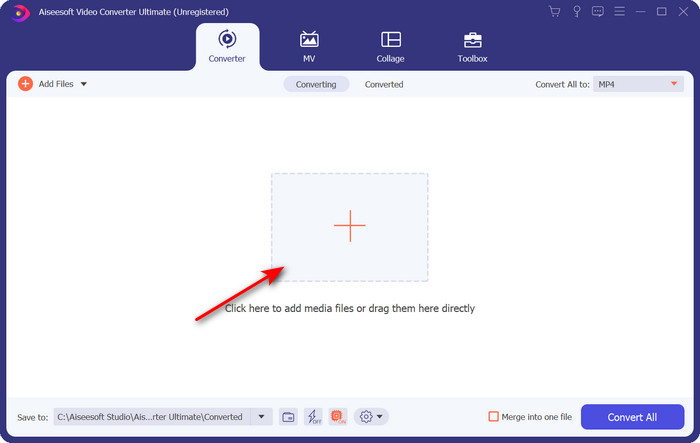
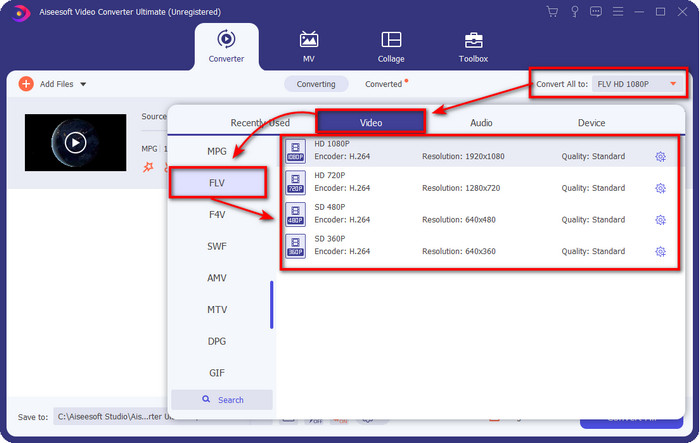
3. lépés. Változtassa meg a formátumot FLV-re a konverter felületének jobb felső sarkában található Convert All menü lenyitásával.
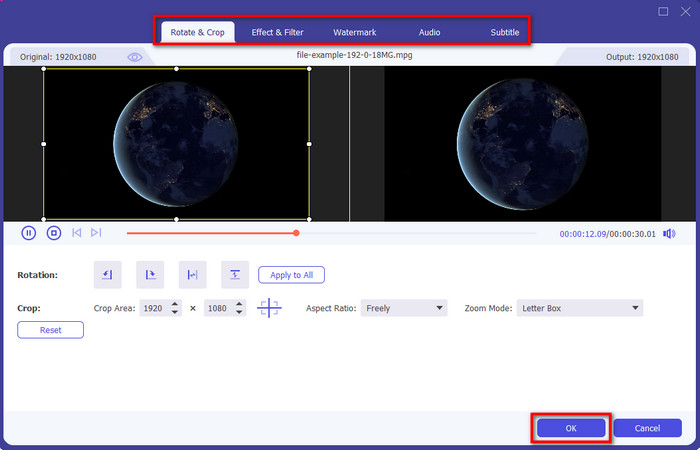
4. lépés. Mielőtt konvertálnánk a fájlt, itt szerkesztheti is a videót a varázspálca ikonra kattintva. A szerkesztőben forgathatja és vághatja a videót, effekteket és szűrőket adhat hozzá, vízjelet alkalmazhat, módosíthatja a hangot és feliratokat adhat hozzá. Ha végzett a szerkesztéssel és menteni szeretne, kattintson az OK gombra.
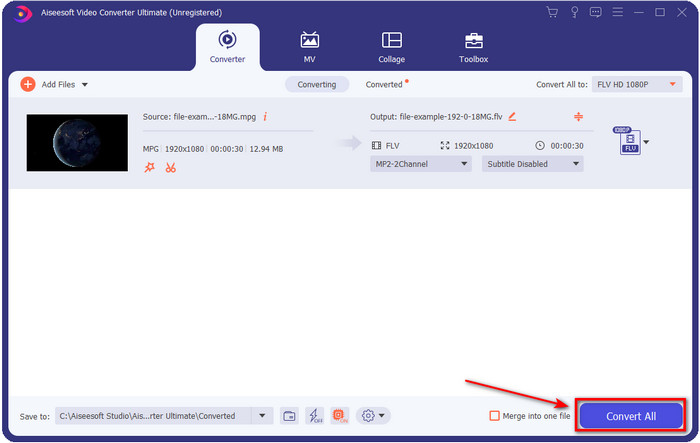
5. lépés. Nyomja meg a Convert All gombot az MPEG–FLV átalakítás indításához. A folyamat kevesebb mint egy percet vesz igénybe a bekapcsolt Hardveres gyorsításnak és a Gyors konvertálásnak köszönhetően. A konvertálás után a mappa megjelenik a képernyőn.
2. rész. MPG konvertálása MOV-ba az FFmpeg segítségével
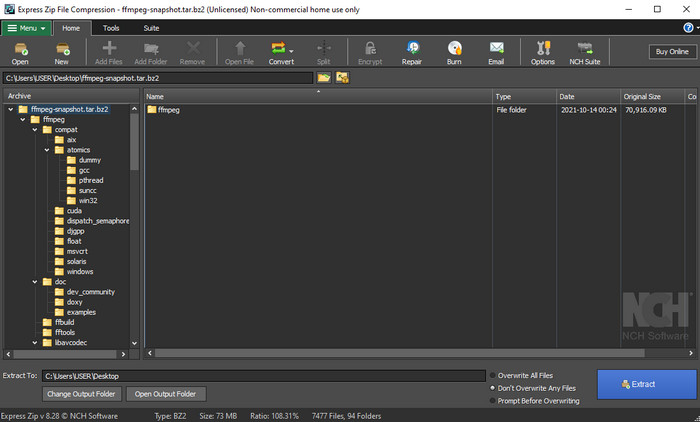
Az egyik legismertebb szerkesztő, amellyel talán már találkozott, az FFmpeg. Ha ez az átalakító újnak hangzik, akkor nézzünk egy rövid bevezetőt a programról. Ezt az átalakítót az egyik legbonyolultabb konverterként tartják számon. Mert mielőtt itt konvertálhatna, a parancssorban (CMD) szöveges parancsokkal kell dolgoznia. Bár az eszköz összetett, a teljesítménye kiemelkedő, különösen az átalakítás terén. Ahelyett, hogy az interneten keresgélne, hogyan kell FFmpeg‑gel MPEG‑et FLV-re alakítani, az alábbi lépések segítenek a program használatában.
1. lépés. Töltse le az FFmpeg-et az asztalára.
2. lépés. Nyissa meg a CMD-t az asztalon a parancssor megnyitásához.
3. lépés. Keresse meg .mpeg fájljának helyét a CMD segítségével. Ezután írja be a parancssorba a következőt: ffmpeg -i input.mpeg -vn -ar 44100 -ac 2 -b:a 192k output.flv, majd nyomja meg az Enter billentyűt a folyamat elindításához.
Előnyök
- Ingyenesen letölthető.
- Jól teljesít a formátum új verzióvá alakításában.
- Elérhető Windows és Mac rendszeren.
Hátrányok
- Nem felhasználóbarát.
- Nem a tipikus átalakító.
3. rész. MPG konvertálása MOV formátumba az ingyenes online MPEG-ből MOV konverter segítségével
Ha ingyen szeretné MPEG fájlját FLV-re konvertálni, használja a FVC Free Video Converter Online eszközt. Ez az online program minden keresőmotorból elérhető, hogy segítsen az átalakítási problémák megoldásában. Bár az online konverter ingyenes, a funkciói és lehetőségei nem olyan széleskörűek, mint a FVC Video Converter Ultimate esetében. Viszont .mpeg vagy .mpg fájlokat itt könnyebben és egyszerűbben alakíthat át, mint FFmpeg-gel. Egy másik előnye ennek a webes eszköznek, hogy nem kell letöltenie a számítógépére. Így tárhelyet takaríthat meg, ha ezt használja. Szeretné tudni, hogyan kell használni? Ha igen, térjünk rá a lépésekre.
1. lépés. Az online MPEG–FLV konverter megnyitásához kattintson erre a linkre.
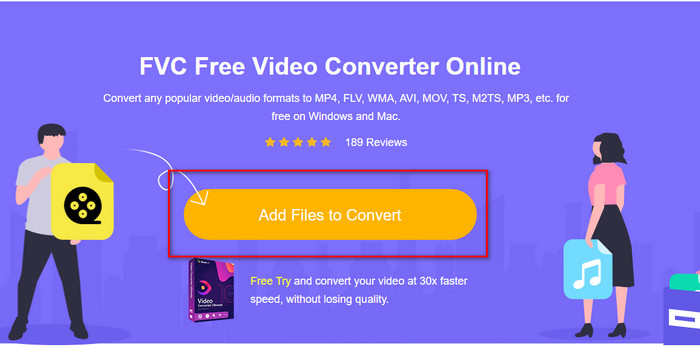
2. lépés. Miután megnyílt a weboldal, kattintson az Add Files to Convert gombra a webes eszköz megnyitásához. Egy mappa jelenik meg a képernyőn; itt keresse meg az átalakítani kívánt .mpeg fájlt, majd nyomja meg az Open gombot.
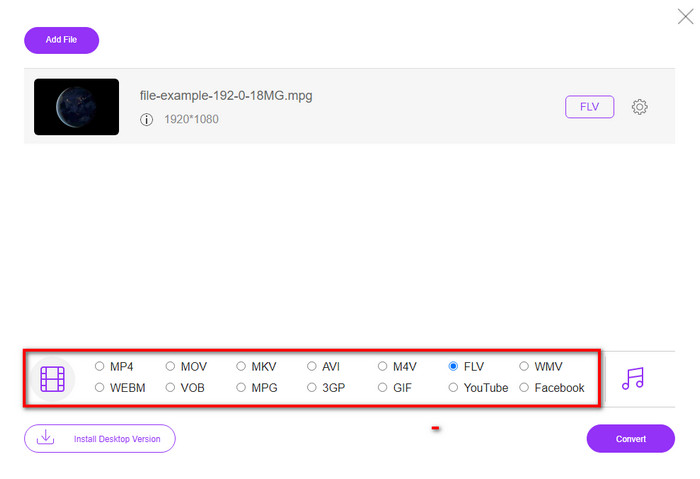
3. lépés. Egy új felület jelenik meg; alul válassza ki az FLV formátumot.
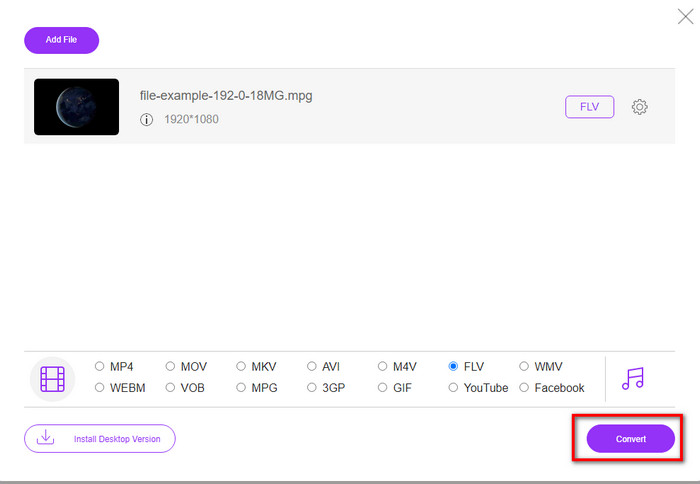
4. lépés. Ha kiválasztotta a formátumot, kattintson a Convert gombra a folyamat elindításához.
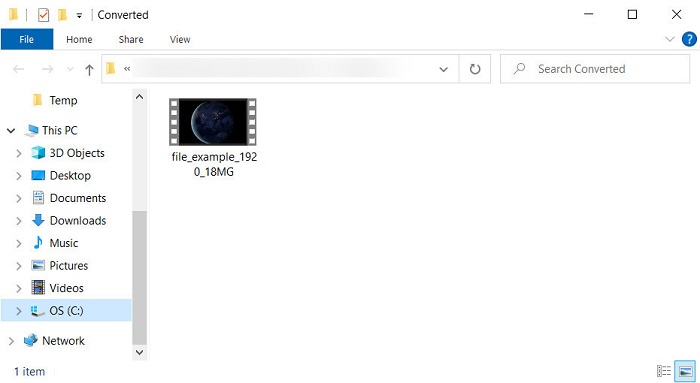
5. lépés. A konvertálás után megjelenik a fájlokat tartalmazó mappa.
4. rész. Az MPEG és a MOV kiterjesztett ismerete
A Moving Pictures Experts Group vagy az MPEG az 1988 végén megjelent szabványos formátumok egyike. Ez a formátum jelentősen tömöríti a fájlt MPEG-1 vagy MPEG-2 formátumba, majd terjeszti az interneten vagy DVD-n. Bár az MPEG bizonyos tömörítést használ, ennek a formátumnak a kiterjesztése továbbra is lehet .mpg vagy az eredeti .mpeg, de a tárolt fájlokat és minőséget ez nem érinti. Annak ellenére, hogy a minőség nem változik, továbbra sem tud nagy felbontású videókat és metaadatokat tárolni.
A fent említett Flash Video vagy FLV olyan, mint az MPEG, de más szemszögből. Ez a két formátum a legjobb a videofájl interneten keresztüli átviteléhez. Az FLV fájlok azonban sokkal tömörítettek, és sokkal jobb minőségűek az MPEG-hez képest. Mostantól ez a szabványos videoformátum a HTML 5 tartalomban a világhálón a streaminghez.
Mivel az MPEG formátum gyengébb minőséggel és kisebb tömörítéssel rendelkezik, át kell gondolnia a fájl FLV formátumba való konvertálását, ha jobb minőséget és tömörítést szeretne. Tehát a megfelelő MPEG–FLV online vagy offline konverter kiválasztása elengedhetetlen a jobb FLV-verzió eléréséhez.
5. rész. GYIK az MPEG-ből FLV-vé konvertálással
Hogyan lehet több MPEG fájlt egyesíteni?
Két vagy több fájl egyesítése egyetlen fájlba egyszerű, ha a megfelelő eszközt használja. Nincs ötlete, mivel egyesítse a videófájlokat egybe? Vagy hogyan kapcsolja össze a fájlokat? Ha igen, olvassa el ezt a cikket, hogy megtudja, mivel és hogyan kombinálhatja az MPEG fájlokat egyetlen fájlba.
Hol tudok MPEG fájlokat lejátszani?
Bár az MPEG formátum a legismertebb filmformátum, és óriási támogatottságot élvez, mégis vannak olyan médialejátszók, amelyek nem játsszák le zökkenőmentesen az .mpeg kiterjesztésű fájlokat. Ha hatékony médialejátszót keres, kattintson azonnal erre a linkre, és olvassa el részletesen az MPEG lejátszókról szóló információkat.
Tömöríthetek MPEG fájlokat?
Igen, tömörítheti MPEG fájljait, ha a méret túl nagy a betöltéshez. Valójában elolvashatja ezt a cikket, és megtudhatja, hogyan tömörítheti MPEG fájljait kisebb méretre a videó minőségének rontása nélkül.
Következtetés
Végül szilárd ismereteket szereztünk arról, hogyan lehet MPEG-et FLV-re konvertálni a fenti hasznos eszközök segítségével. Ha ingyen szeretné átalakítani MPEG fájlját, akkor használja az FVC Free Video Converter Online eszközt. De ha már rendelkezik FFmpeg-gel, és azt szeretné használni, olvassa el a fenti részletes leírást. Akár ezt, akár azt választja, a kiemelkedő teljesítményű konverter továbbra is a FVC Video Converter Ultimate. Most tehát válassza ki azt az eszközt, amelyik leginkább megfelel az Ön átalakítási igényeinek, és érjen el hatékony konvertálást.
-
 [2021] A legjobb eszközök és egyszerű módszerek az MPEG MP3-má konvertálásához
 Ez a cikk elsősorban arról szól, hogyan konvertálhatja MPEG-videóit MP3-ra a listán szereplő legmegbízhatóbb eszközök használatával.
-
 Az 5 legjobb választás az MPEG AVI formátumba konvertálására [online és offline]
 Nehezen találja az MPEG konvertert? Ezután próbálja meg elolvasni ezt a cikket, miközben megtudjuk, hogyan lehet az MPEG-t AVI formátumra módosítani részletes lépésekkel.
-
 3 hatékony módszer az MPEG-ből MOV-vé konvertálására [Offline és online]
 Eleged van abból, hogy médialejátszót keresel az MPEG videó formátum lejátszásához? Próbálja meg konvertálni más formátumokba, amelyek valószínűleg lejátszhatók, különösen Macen, például MOV videoformátumra. Olvassa el ezt a cikket, ha többet szeretne megtudni.
