


 Video Converter Ultimate
 Screen Recorder
 Videó javítás
Előnyös módszerek a DV egyszerű konvertálására FLV-vé
A DV-fájl egy digitális videót tartalmazó fájl. A DV-fájlok elemzése során megállapítottuk, hogy a Digital Video a formátum egyik felhasználási módja. Még nem fejtettük ki teljesen, hogy pontosan mit tartalmaznak ezek a fájlok, illetve a felhasználók hogyan használják őket, de csapatunk több ezer fájltípussal foglalkozik. Ha bármilyen információja van erről a formátumról, szívesen vesszük. A .flv fájlkiterjesztés azonban az FLV (Flash Video) fájlokat jelöli. A felhasználók az Adobe Flash Player vagy az Adobe Air segítségével tudnak FLV formátumban hangot és videót streamelni az interneten. Az FLV-fájlok ugyanúgy kódolják az adatokat, mint az SWF-fájlok. A DV videóformátum problémájára megoldásként a felhasználók gyakran FLV formátumba konvertálják azt, mivel ez széles körben kompatibilis a különböző médialejátszókkal. Tehát ha olyan eszközöket keres, amelyek képesek DV-t FLV-vé konvertálni, olvasson tovább.

1. rész. A legjobb módja a DV-nek FLV-vé konvertálásának offline módban
A Video Converter Ultimate egy kiváló szoftver, amely segíthet a DV videóformátum FLV-vé alakításában. Ultra gyorsítási rendszerének köszönhetően a DV-ből FLV-be történő átalakítás akár egy másodperc alatt megtörténhet, amit más eszközök nem tudnak felülmúlni. Ennek a szoftvernek köszönhetően nem kell aggódnia amiatt sem, ha a DV-t más formátumokra szeretné konvertálni, mivel ez a program számos olyan formátumot is támogat, amire talán nem is gondolna, például MP4, MOV, 3GP, FLV, WMV, WEBM, MPEG stb. A fájlkonvertáláson túl a szoftver egyéb kiemelt eszközöket is kínál: tud vágni, javítani, egyesíteni, gyorsítani a videót, és még sok más hasznos funkcióval rendelkezik, amelyek a videóját a következő szintre emelhetik.

Video Converter Ultimate
6 357 200+ letöltés- Több mint 1000 különböző videó- és hangformátumot támogat.
- 30-szor gyorsabb konvertálás, mint más konverterek.
- Akár 4K HD minőségre képes konvertálni a videót.
- Számos egyéb kiemelt eszközt kínál, amelyek segítenek a videó javításában.
- Működéséhez nincs szükség nagy karbantartási hardverre.
Ingyenes letöltés Windows 7 vagy újabb rendszerre Biztonságos letöltés
Ingyenes letöltés macOS 10.7 vagy újabb rendszerre Biztonságos letöltés
1. lépés: Töltse le a szoftvert a fent található Free Download gomb megnyomásával. Ezután telepítse a programot a számítógépére, és az Start Now gombra kattintva indítsa el a telepítés befejezése után.
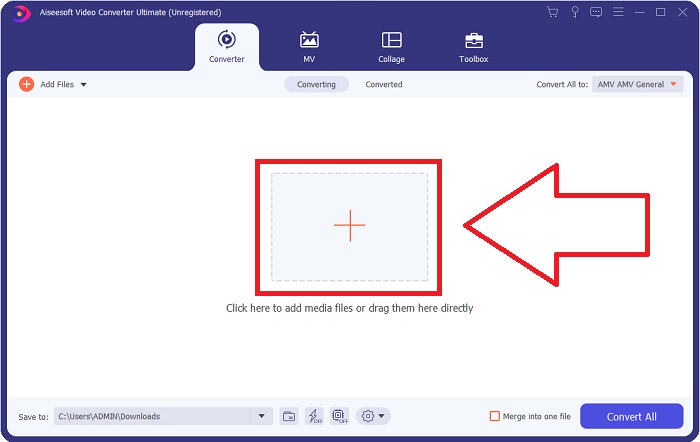
2. lépés: Ezután egy ablak fog felugrani a képernyőn. A szoftver a Converter funkciót fogja megjeleníteni. A számítógépéről fájl importálásához kattintson a középen található + gombra, vagy egyszerűen húzza be a közepére bármelyik DV videófájlt.
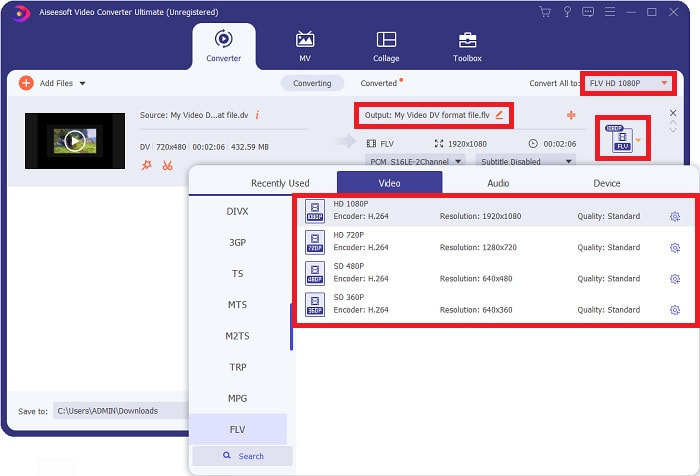
3. lépés: Már félúton van a folyamatban. Kattintson a kimeneti videója mellett található formátumválasztó ikonra, és válassza az FLV videóformátumot. Ezután kiválaszthatja a szoftver által kínált különböző videóminőségeket is.
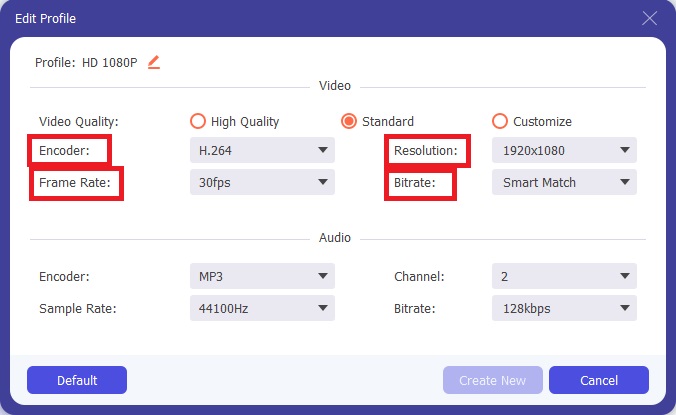
4. lépés: Már csak egy kis lépés van hátra. Ha a felkínált videóminőségek nem felelnek meg az igényeinek, a fogaskerék ikonra kattintva, a videóminőség-választó mellett, személyre szabhatja a videó kimeneti minőségét.
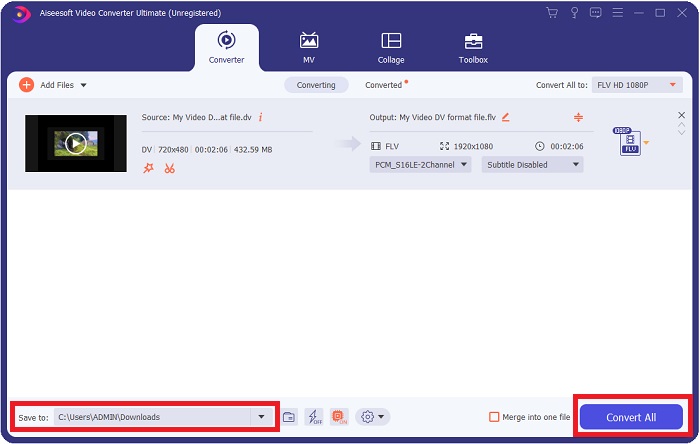
5. lépés: Már a befejezéshez közeledik. Menjen a másik sarokban található Save to mezőhöz, hogy kiválassza azt a helyet, ahová a konvertált fájlt menteni szeretné. Ezután a képernyő jobb alsó sarkában található Convert All gombra kattintva elindíthatja a fájl konvertálását.
2. rész: DV konvertálása FLV Online formátumba
Az internet számos különböző online eszközt kínál, amelyek segíthetnek a DV-ből FLV-be történő konvertálásban. Azonban ez az online eszköz, a Free Video Converter Online, a gyors konvertálási folyamata miatt különbözik a többitől, mivel akár egy másodperc alatt képes fájlokat átalakítani. Olyan formátumokat is támogat, mint az MP4, FLV, MOV, M4A, TS, WMV, ASF, VOB, AAC, WMA és még sok más. Emellett a videókat HD minőségűre konvertálja minőségromlás nélkül. Ez az ingyenes videókonvertáló eszköz kifejezetten népszerű, mert lehetővé teszi a felhasználók számára, hogy gond nélkül finomhangolják videóikat. Most nézzük végig az összes lépést, amelyek segítenek az online konverter használatában.
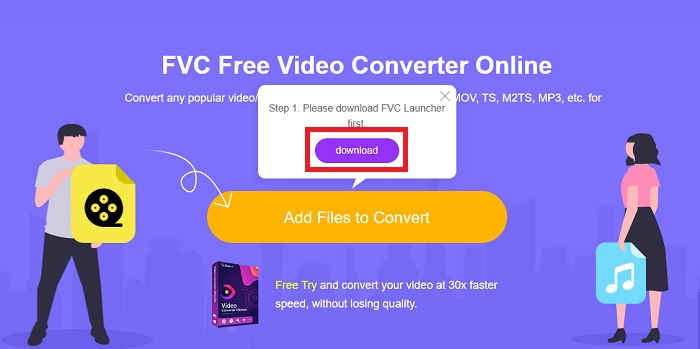
1. lépés: Az online eszköz fő weboldalának eléréséhez kattintson erre a linkre, és folytassa. Ezután kattintson a számítógépe főképernyőjén az Add Files to Convert gombra, hogy letöltse azt az indítóprogramot, amely lehetővé teszi az online eszköz használatát. Ezt követően kattintson újra rá, hogy feltöltse a fájlt.
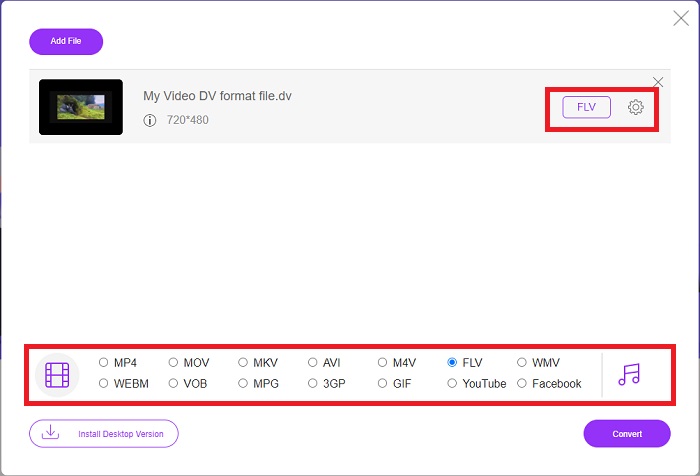
2. lépés: Most, hogy már kiválasztotta a konvertálni kívánt fájlt, a képernyő alján található videóformátum-választó mezőben válassza ki az FLV videóformátumot. A fogaskerék ikonra kattintva a videó bizonyos beállításain – például felbontás, képkockasebesség stb. – módosítva tovább finomíthatja a videó jellemzőit.
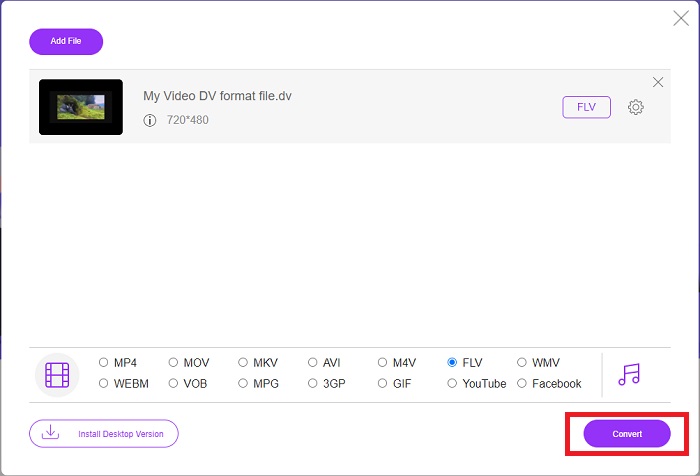
3. lépés: Ezt követően a fájl konvertálását az ablak bal alsó sarkában található Convert gombra kattintva indíthatja el.
3. rész. Összehasonlító táblázat: DV vs. FLV
A digitális videó (DV) fájlt digitális fényképezőgép hozza létre, és a felhasználók által mindig használt nyers formátumban menti. A Digital Video (DV) fájl digitális interfész blokkokat (DIF) tartalmaz, amelyek mindegyike 80 bájtot tartalmaz. Hang, videó és metaadatok egyaránt szerepelhetnek a DIF blokkokban. A DIF blokkok számítógépes fájlokként tárolhatók nyers formájukban, vagy köréjük burkolt fájlformátumokként – a blokkokat 150 blokkos sorozatokká multiplexelve. Egy videokocka legfeljebb tíz vagy tizenkét sorozatot tartalmazhat.
Az online videotartalmakhoz használt streaming szolgáltatások – például a YouTube, a Hulu és a Vevo – az Adobe Systems Flash Video formátumát használják. Az Adobe Flash Player (beleértve a böngészőbe épülő bővítményeket) és más gyártók szoftverei szinte minden operációs rendszer alatt (iOS kivételével) képesek FLV-fájlok olvasására és lejátszására. iPhone-on és Androidon nyílt forráskódú programokkal és bizonyos böngészőkkel lehet FLV-fájlokat lejátszani. A Flash továbbra is problémát jelent iOS-en. Az FLV-fájlok kizárólag FLV-lejátszó szoftverben nézhetők meg, a felhasználók pedig képernyőfelvételi és rögzítő szoftverekkel vehetik fel az FLV-videókat.
| Fájlkiterjesztés | DV (.dv) | FLV (.flv) |
| Fájl név | Digitális Videó | Flash videó fájl |
| Által kifejlesztett | Több videokamera gyártó | Adobe System Incorporated |
| Előnyök | ◆ Egy szabványos Mini DV 19,5 GB kapacitással rendelkezik, ami körülbelül 0,25 cent/GB tárhelyet jelent. ◆ Intuitív HD-szabványos konvertálás ◆ A szalagok könnyen felcímkézhetők, és ideálisak a hosszú távú tároláshoz. | Amikor dinamikus és interaktív weboldalak létrehozásáról van szó, az Adobe Flash hatalmas előnyt jelenthet. A folyamat egyszerű, de az eredmények jelentősek lehetnek. Fénykorában a Flash-t széles körben használták egyszerű videojátékokhoz is. |
| Hátrányok | ◆ Firewire kapcsolat szükséges (a legtöbb készlet PC-n nincs ilyen). ◆ A felvétel minősége minden következő lépéssel romlik. ◆ Egyszerre csak 60-90 percet rögzít. | Hátránya, hogy az FLV népszerűsége az évek során csökkent. Az FLV-tartalom létrehozása sok időt vehet igénybe, és sok pénzbe kerülhet. Ezenkívül a felhasználók nem tekinthetik meg a Flash-tartalmakat iOS-eszközökön, ami súlyosan korlátozza annak képességét, hogy új követőket vonzzon. |
| A fájlt támogató programok | ◆ VLC Media Player | ◆ RealPlayer ◆ Apple QuickTime Player ◆ VLC Media Player ◆ MPlayer |
4. rész. GYIK a DV-ből FLV-vé konvertálással kapcsolatban
Milyen felbontású a DV?
A DV esetében a szabványos felbontás 720 vízszintes képpontot és 480 váltott soros sort rögzít a 60 Hz-es elektromos áramot használó országokban és 576 sort 50 Hz-es elektromos árammal. A digitális videó (HDV) nagyfelbontású változata hivatalos HDV-szabvány, a Panasonic DVCPRO HD pedig egy példa erre a formátumra (lásd HDV és DVCPRO).
Váltott soros a DV videó?
Mindig alul van sok DV-felvétel. Más felvételek jelenhetnek meg először. Értelmezze újra az importált klipet úgy, hogy a mezők elválasztása be van kapcsolva, először engedje le (fájl > felvétel értelmezése > középső), hogy megnézze, váltott soros-e. Ezután a projekt ablakában használja az Alt dupla kattintással elérhetõ parancsikont. Használja a Page Up/Dn billentyűket a videóban való navigáláshoz. Váltottsoros akkor fordul elő, ha a videó minden alkalommal megváltozik, amikor megnyomja a lejátszás gombot. A rángatózó mozgás azt jelzi, hogy a mezők sorrendje hibás, és a felvételt újra kell értelmezni a másik mezősorrend szerint.
Az FLV megfelelő videóformátum?
Az Adobe Flash Player FLV formátumban menti a videofájlokat. Minden videoplatform és böngésző elfogadja a támogatott videoformátumok egyikeként. Az olyan online videostreaming platformok, mint a YouTube, előnyösek az FLV formátum használatából. Kis fájlméretüknek köszönhetően gyorsan és egyszerűen letölthetők.
Következtetés
Összefoglalva a fentieket, észreveheti, hogy a cikk által ajánlott legjobb konverter a Video Converter Ultimate nevű szoftver, illetve az online Free Video Converter Online eszköz. Mivel ez a két konverter felülmúlja a többi megoldást, szakmai szempontból fejlett kiegészítő eszköztárral rendelkeznek, és felhasználóbarát a kezelőfelületük.
-
 A legjobb stratégia a DV fájl AVI formátumba konvertálására részletes lépésekkel
 Szeretné konvertálni a DV fájlt AVI formátumba? Ezután olvassa el ezt a cikket, hogy megtudja, milyen egyedülálló eszközzel konvertálhat, valamint egy médialejátszót, amellyel lejátszhatja DV-jét PC-n vagy Mac-en.
-
 A 2 legjobb módszer a DV-fájlok ingyenes MOV-formátumba konvertálására asztali számítógépen és online
 Problémái vannak a DV-fájlok MOV-formátumba konvertálásakor a Mac számítógépen? Ha ez az Ön problémája, akkor ezt a cikket elolvasva együtt meg tudjuk oldani.
-
 MP4 - FLV | A legjobb 3 ingyenes átalakító (Online / Mac / Windows)
 Ez a bejegyzés az MP4-FLV átalakítás részletes útmutatója. Felveheti a legjobb 3 ingyenes konvertert, hogy az MP4-et FLV-re változtassa online, Windows vagy Mac számítógépen.
