


 Video Converter Ultimate
 Screen Recorder
 Videó javítás
A 3GP konvertálása WMV-vé professzionális módon [Online és offline]
A 3GP egy népszerű mobilformátum, amely lehetővé teszi az adatok átvitelét mobiltelefonon úgy, hogy kevés sávszélességet használ, miközben helyet is spórol. Emellett ez a formátum a harmadik generációs mobiltelefonokon történő videófelvétel szabványos formátuma, de biztos lehet benne, hogy a videót le tudja játszani második és negyedik generációs készülékeken is. Bár telefonokon kiválóan működik, alapvetően csak okostelefonokra korlátozódik. Így nem meglepő, ha a .3gp fájl nem teljesít jól asztali számítógépen. Ennek ellenére megtanulhatja, hogyan alakítsa át a 3GP-t olyan formátummá, amelyet a számítógépek sokkal szélesebb körben támogatnak, például WMV-vé. Szeretné megtanulni, hogyan lehet professzionális módon 3GP-t WMV-vé konvertálni? Ebben az esetben vessünk rá egy pillantást, és ne vesztegessük az időt.

1. rész: Mi az a 3GP
Ez egy ISO-alapú formátum, amely olyan médiafolyamokat tárol, mint a H.263 vagy H.264 videóhoz, illetve AMR vagy AAC hanghoz, tökéletes a veszteséges tömörítéshez. Sőt, ez a 3. generációs formátum tárhelybarát, így telefonjaink hordozható meghajtóin tároljuk az adatokat, akár IOS rendszeren is. Annak ellenére, hogy a 3GP továbbra is elérhető, ennek a formátumnak a hatékonysága csökkenni kezdett, és ezért a 3GPP csatlakozott a színtérhez, és ennek jobb verziója lett.
2. rész: Mi az a WMV
Ez egy szabadalmaztatott multimédiás formátum, amelyet a Windows fejlesztett ki videók online streamelésére. Minden más formátumtól eltérően, például a 3GP-től, a WMV többszörös kódolót használ, hogy még jobban tömörítse a fájlt. A sok kódoló használatának lehetősége miatt könnyebben elérhető a videók hatékony megosztása ebben a formátumban. A sok kódoló használatának azonban van egy hátránya is, különösen a szerkesztés és a lejátszás során, mivel nem minden médialejátszó és szerkesztő támogatja a kodek széles skáláját. Bár a formátum tömörítőt használ, a média minősége nem változik vagy csökken.
3. rész. Professzionális módszer a 3GP konvertálására WMV-vé a Video Converter Ultimate segítségével
Szeretne egy professzionális, ingyenesen letölthető 3GP–WMV átalakítót beszerezni a saját rendszerére? A FVC Video Converter Ultimate szakértő szintű konvertálási folyamatot kínál, anélkül hogy túl nagy erőfeszítést igényelne. Ez az átalakító egy másik szintre emeli az átkódolást, amelyet semmilyen online vagy offline konverter nem tud nyújtani. Ráadásul ez a végső eszköz több mint 200 médiaformátumot támogat, jóval többet, mint a legtöbb más eszköz.
Amíg ez a konverter megvan, mindig számítson professzionális kimenetre az átalakított médiaformátumon. A professzionális konvertert szeretné használni a 3GP-fájlok konvertálásához? Ha ez a helyzet, kövesse az alábbi lépéseket a végső eszközzel való sikeres konvertáláshoz.
Lépések a 3GP fájl WMV formátummá alakításához az FVC Video Converter Ultimate segítségével
1. lépés. Az alábbiakban találja a letöltő gombokat; ennek megfelelően válassza ki azt a platformot, amelyet használ. Például, ha Windows-felhasználó, kattintson a Windows letöltés gombra. Ha pedig Mac-et használ, kattintson a másikra. A letöltés befejeztével telepítse a konvertert, majd a Start Now gombra kattintva indítsa el. Még fontosabb, hogy az indítás után ismerkedjen meg a felülettel, mielőtt továbblépne a következő lépésekre.
Ingyenes letöltés Windows 7 vagy újabb rendszerre Biztonságos letöltés
Ingyenes letöltés macOS 10.7 vagy újabb rendszerre Biztonságos letöltés
2. lépés. A felület bal felső részén látni fogja az Add Files (Fájlok hozzáadása) opciót; kattintson rá, és megnyílik egy mappaablak. Keresse meg a számítógépén a .3gp fájlt, majd töltse fel az Open (Megnyitás) gombra kattintva.
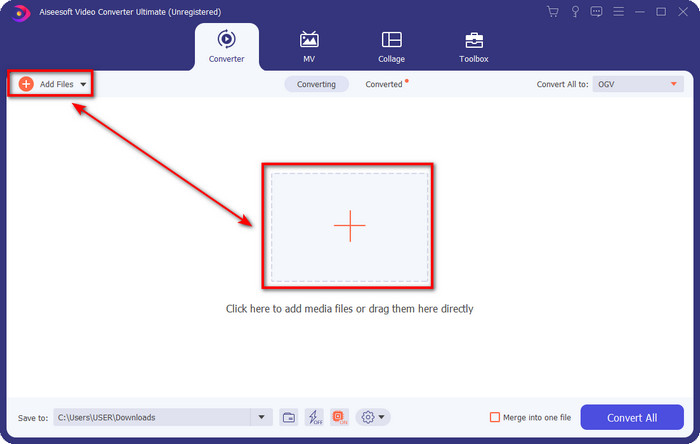
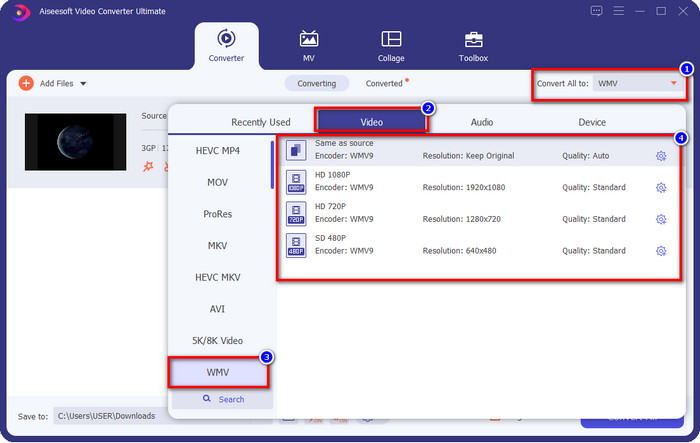
3. lépés. Kattintson a Convert All to (Mind konvertálása erre) menüpontra, és válassza ki a kívánt WMV formátumot, vagy a WMV-t a végső kimeneti formátumként.
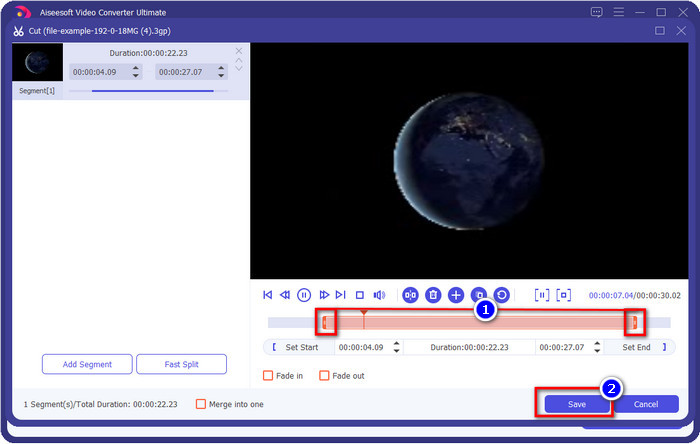
Opcionális. Mielőtt 3GP fájlt WMV-vé konvertálunk, röviden beszéljünk a program további funkcióiról. Szeretne vágni a videóból? Semmi gond. Kattintson az olló ikonra, húzza a csúszkát mindkét oldalon igény szerint, majd nyomja meg a Save (Mentés) gombot, hogy alkalmazza az elvégzett vágást.
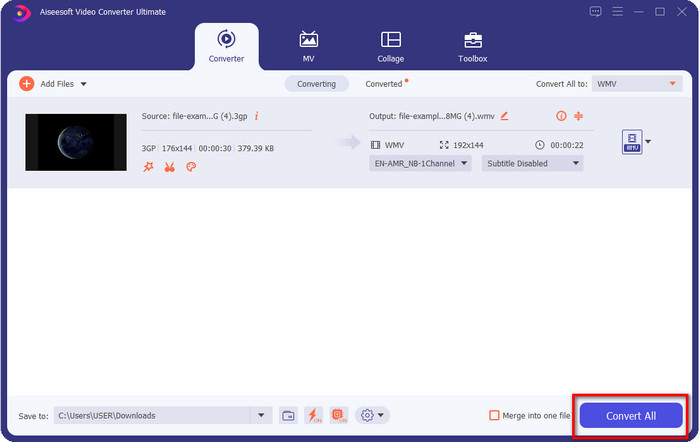
4. lépés. Indítsa el az átalakítási folyamatot a Convert All (Mind konvertálása) gombra kattintva. A konvertálás rövid időn belül befejeződik, és voilá, a WMV-fájl elmentésre kerül a számítógépére.
4. rész. Online mód az MXF WMV-vé konvertálására az ingyenes online videokonverterrel
Egy másik FVC-termék, ezúttal online megoldásként, az FVC Free Video Converter Online. Ez az online, professzionális átalakító letisztultabb és átláthatóbb felületet nyújt, mint sok más webes konverter. Továbbá nem szükséges letöltenie a programot az eszközére a használat előtt; ehelyett elég megnyitni a böngészőt és betölteni a konvertert. Bár a webes konverter remek, sok olyan speciális funkció van, amit ez az eszköz nem tud nyújtani. Ha azonban online szeretné a 3GP-t WMV-vé alakítani, akkor ez a megfelelő választás; a használatához másolja az alábbi lépéseket.
Lépések a 3GP WMV-vé alakításához ingyen, online az FVC Free Video Converter Online segítségével
1. lépés. Kattintson erre a linkre az online konverter megnyitásához.
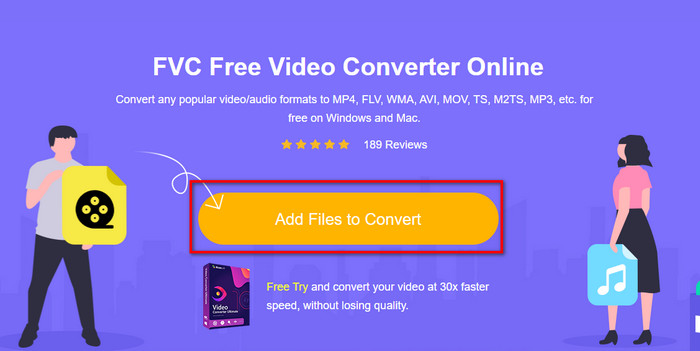
2. lépés. A kattintás után nyomja meg az Add Files to Convert (Fájlok hozzáadása konvertáláshoz) gombot a konverter indításához. Ha először használja ezt az átalakítót, akkor egy kis indítóprogramot kell telepítenie az Add Files to Convert gombra kattintva, de ez jóval kisebb, mint az Ultimate eszköz. Keresse meg a konvertálni kívánt 3gp fájlt, és kattintson az Open (Megnyitás) gombra.
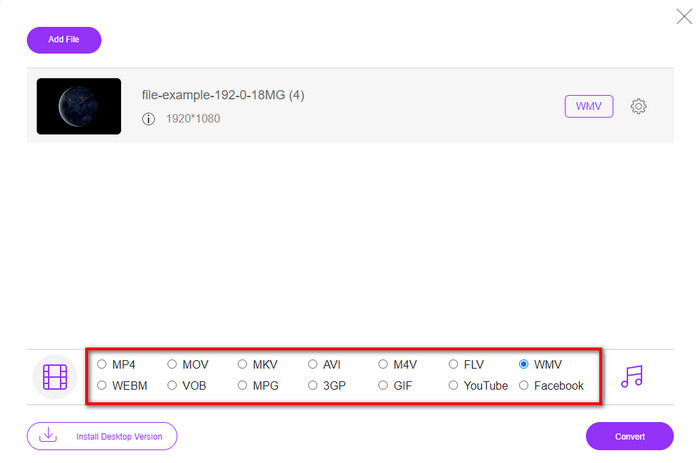
3. lépés. A 3GP fájl feltöltése után itt az ideje, hogy kiválassza az alul megjelenő formátumok közül a megfelelőt, vagy kattintson a WMV opcióra.
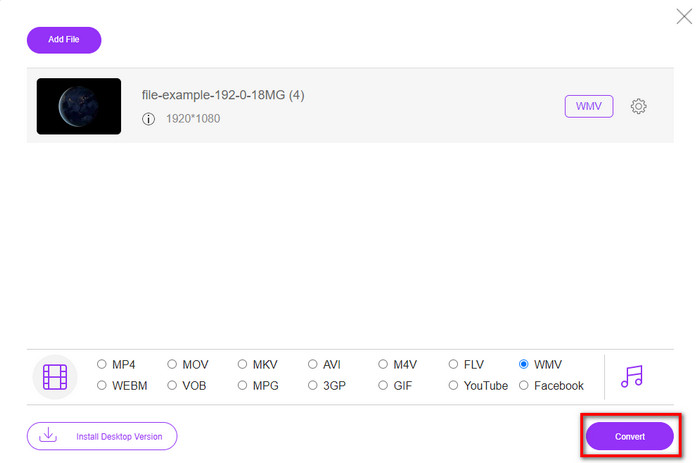
4. lépés. Már kiválasztotta a formátumot? Ha igen, kattintson a Convert (Konvertálás) gombra a fájl átalakítási folyamatának elindításához.
5. rész. GYIK a 3GP-ről WMV konvertálásra
Nagyszerű ötlet 3GP–WMV konvertert online használni?
Ha nem szeretne konvertert letölteni a készülékére, akkor ideális egy online konverter használata. De ne feledje, nem minden online vagy offline konverter biztonságosan használható. Legtöbbször vírusok vannak bennük, ha telepíti őket, vagy ha nem végzik el hatékonyan a feladatot. Ha azonban bizonyosságot szeretne a konvertálásról, javasoljuk az FVC konverter termékek használatát, mivel ez 101% malware-mentes, és garantálja a konvertálási folyamat sikerességét.
Lehetséges több 3GP videót egyesíteni?
Igen, az FVC egyesítő eszközei segítségével több, 3GP formátumú videót is össze tud fűzni. Ha tehát szeretné megtudni, hogyan egyesítheti a több 3GP-videóját, olvassa el ezt a cikket, hogy megtanulja a folyamatot.
A 3GP videók jó minőségűek?
A 3GP minősége jó, de nem tud nagy felbontású minőséget tárolni, ezért számítson arra, hogy a 3GP videó minősége alacsony.
Következtetés
Összegzésként: az ebben a cikkben felsorolt konvertereket gondosan válogattuk ki, miközben egy bizonyos, professzionális kimeneti szintnek kellett megfelelniük. Emellett magunk is használtuk ezeket az eszközeket, hogy csakis tényeket közöljünk a jellemzőikről. Továbbá, ha nem szeretne konvertert letölteni az asztali gépére, hogy helyet takarítson meg, és mégis professzionális kimenetet szeretne, akkor erősen ajánljuk a FVC Free Video Converter Online használatát. Ha viszont a 3GP fájljait még professzionálisabb módon szeretné átkódolni, akkor határozottan javasoljuk a FVC Video Converter Ultimate használatát. Még mindig nem elég meggyőzőek az általunk leírtak? Akkor próbálja ki saját maga, hogy megtapasztalja azt a szakértői szintű konvertálást, amelyet ez az eszköz nyújt, és megtanulja, hogyan alakítsa át a 3GP-t WMV-vé.
-
 A 4 leghatékonyabb módszer a 3GP AVI formátummá konvertálására [2025]
 Átalakíthatom a 3GP fájljaimat AVI formátumba? Nos, könnyen konvertálhatja, ha kipróbálja ezeket a rendelkezésre álló eszközöket, mivel összegyűjtöttük az összes lehetséges megoldást a 3GP-AVI átalakítási problémájára.
-
 A legjobb 3GP-FLV konverter a 3GP-ből FLV-vé konvertáláshoz [2025]
 Próbálta már a 3GP-t FLV-vé konvertálni, de nem tudja, milyen konvertert fog használni? Olvassa el ezt a cikket, hogy megtudja a 3GP FLV-vé konvertálásával kapcsolatos összes részletet.
-
 A 2 legjobb módszer a nem támogatott 3GP DivX-vé konvertálására [2025]
 Sok felhasználó kérdezi, hogyan lehet a 3GP-t DivX-re konvertálni. Ezért most adunk egy cikket, amely segít Önnek a .3gp fájl problémamentes konvertálásában.
