


 Video Converter Ultimate
 Screen Recorder
 Videó javítás
3 Online és offline MPG-MP4 konverter Meg kell próbálnia MPG-fájlok konvertálását
Az MP4 napjaink egyik leggyakoribb fájlformátuma az interneten. Noha az MPG és az MP4 sok hasonlóságot mutat, vannak köztük különbségek is. Ha pedig át szeretné konvertálni MPG-fájlját MP4 formátumba, leteszteltük a manapság népszerű videókonvertereket. Emellett kiválasztottuk a legjobb MPG–MP4 konvertereket, amelyeket érdemes kipróbálnia!

1. rész Miért kell MPG-t MP4-re konvertálni?
Mi a jelentősége az MPG MP4 formátumba konvertálásának? Az MPG és az MP4 olyan formátumok, amelyeket gyakran használnak internetes videókhoz. De mi a különbség köztük? Az MPG vagy MPEG az eredeti formátum, amely MPEG kodeket használ. Ez egy kódoló, amely nagyfelbontású, jó minőségű videókimenetet biztosít.
Másrészt az MP4 az egyik legelterjedtebb videofájlformátum, és modern videótömörítést használ. Szóval melyik a jobb? Az MP4 magas tömörítési képessége lehetővé teszi a fájlok kisebb méretű tömörítését, mint bármely más videofájlformátum, például az MPG.
2. rész. 3 módszer az MPG MP4-re konvertálására
Itt vannak a kiváló videokonverterek, amelyeket online és offline is használhat, és megtanulhatja, hogyan változtassa meg az MPG-t MP4-re.
1. Használja a Video Converter Ultimate programot
A Video Converter Ultimate egy médiafájl‑konverter, amellyel könnyedén átalakíthatja MPG-fájlját MP4 formátumba. Ez a konverter egyszerűen kezelhető felülettel rendelkezik, mégis lenyűgöző eredményt nyújt. Olyan funkciói vannak, amelyekkel szerkesztheti, javíthatja és tömörítheti MPG-fájlját. Sőt, ebben a programban kötegelt átalakítással több MPG-fájlt is át tud konvertálni MP4-be.
A Video Converter Ultimate egy olyan lehetőséget is kínál, ahol képeket és videókat kollázsozhat. Továbbá, ha GIF-et szeretne létrehozni, ez a konverter rendelkezik ezzel a funkcióval. Ezenkívül a konverter használatával nagy fájlokat konvertálhat anélkül, hogy rontaná azok minőségét. Annak ellenére, hogy funkciói professzionálisnak tűnnek, gyorsan használhatóak, mert csak egyszerűen használhatók.
1. lépés. A program letöltéséhez kattintson az alábbi letöltés gombra. Kövesse a telepítési folyamatot, majd nyissa meg az alkalmazást.
Ingyenes letöltés Windows 7 vagy újabb rendszerre Biztonságos letöltés
Ingyenes letöltés macOS 10.7 vagy újabb rendszerre Biztonságos letöltés
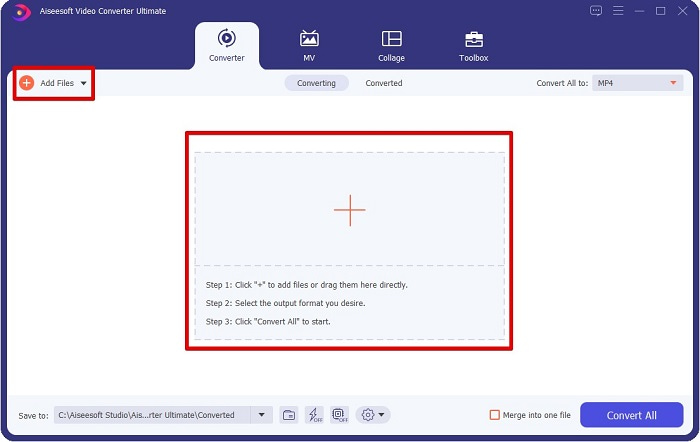
2. lépés. A konverter elindítása után kattintson az Add Files gombra vagy a + jelre az MPG-fájl feltöltéséhez. Megjelennek a számítógépen lévő fájlok, ahol a mappák között megkeresheti a fájlt. Ezután kattintson az Open gombra a fájl sorba állításához.
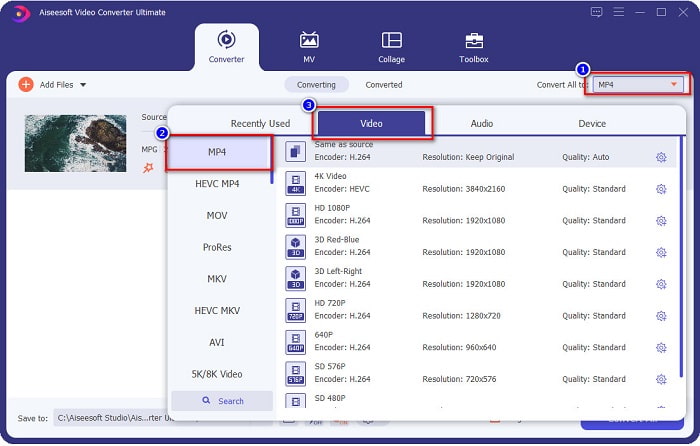
3. lépés. MPG-fájljának formátumát a képernyő jobb felső sarkában található Convert All to opcióra kattintva tudja megváltoztatni. Miután megjelenik a fájlformátumok listája, válassza ki az MP4 formátumot.
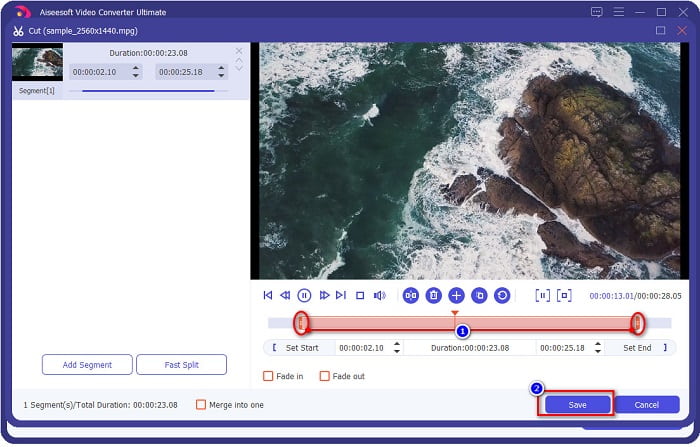
Ha le szeretné vágni a videó hosszát, kattintson az olló ikonra a videó megvágásához. A lejátszófej csúszkák húzásával beállíthatja a videó hosszát. A művelet befejezéséhez kattintson a Save gombra.
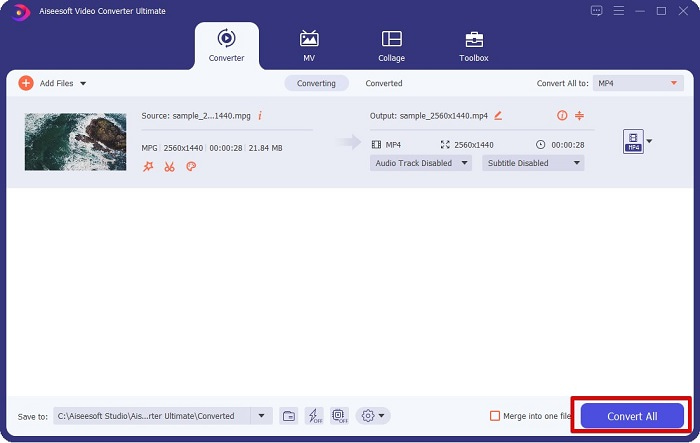
4. lépés. Miután kiválasztotta a kívánt fájlformátumot, kattintson a Convert All gombra, hogy az MPG-fájlt MP4-fájllá alakítsa. Várjon egy kicsit, és az MPG-fájl MP4 formátumba konvertálódik. E néhány egyszerű lépéssel könnyedén átalakította MPG-fájlját MP4-be.
2. Használja az ingyenes online konvertert
Az FVC Free Online Video Converter lehetővé teszi, hogy MPG-fájlját ingyen, regisztráció nélkül alakítsa át MP4 formátumba. Ez egy ingyenes online videókonverter, amely korlátozások nélkül enged konvertálni. Emellett nagy méretű fájlokat is konvertálhat vele online. Nem kell semmit letöltenie, mert böngészőből érhető el. Hátránya viszont, hogy internetfüggő, vagyis az átalakítás sebessége az internetkapcsolatától függ. Ennek ellenére sok felhasználó kipróbálta már, és bizonyítottan nagyszerű videókonverter.
Íme az FVC Free Online Video Converterben való konvertálás lépéseinek listája:
1. lépés. Nyissa meg a böngészőjét, és keressen rá az FVC Free Online Video Converter oldalra.
2. lépés. Amikor már a weboldalon van, kattintson az Add Files to Convert gombra. Megjelenik egy szövegdoboz, ahol először le kell töltenie az indítót (launchert). Miután a launcher letöltődött, a rendszer a fájlaihoz irányítja; válassza ki az átalakítani kívánt MPG-fájlt.
Töltse le az asztali verziót a fájlok kötegelt konvertálásához.
3. lépés. Az MPG-fájl kiválasztása után megjelenik az első felület, ahol láthatja az elérhető videoformátumok listáját. Válassza az MP4 formátumot, mielőtt online konvertálná MPG-fájlját MP4-be.
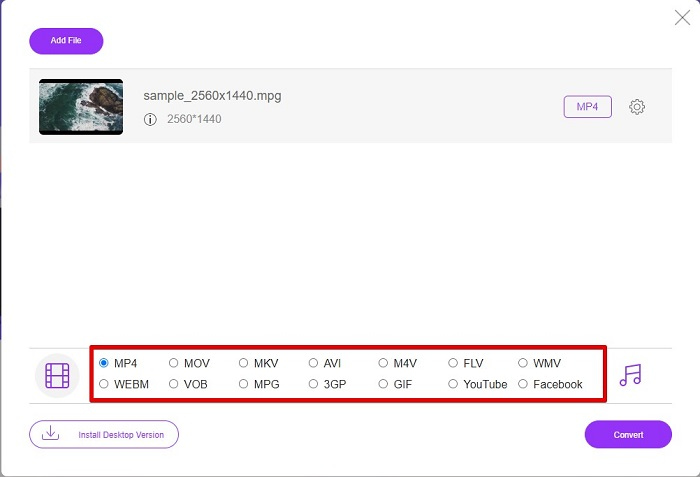
4. lépés. Kattintson a Convert gombra az átalakítás elindításához. Egy új lap nyílik meg, ahol kiválaszthatja, hová mentse a konvertált fájlt a számítógépén, majd kattintson a select folder gombra.
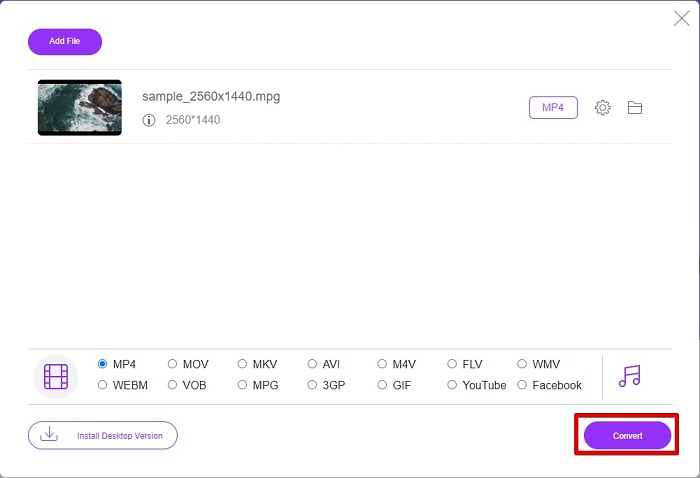
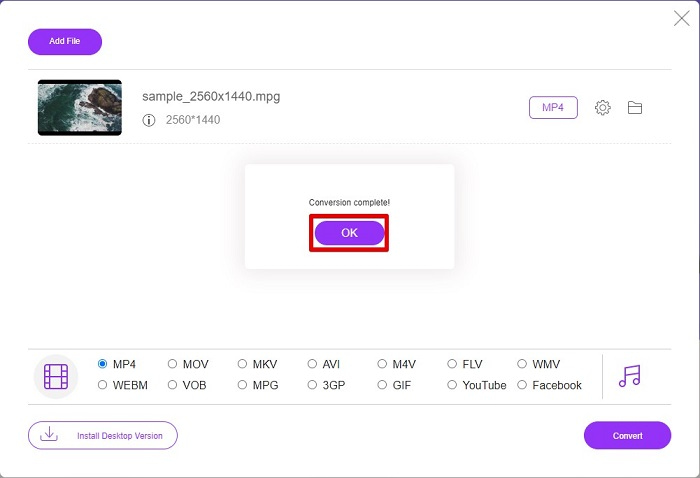
5. lépés. Végül a fájl konvertálása megkezdődik, és amikor befejeződött, kattintson az OK gombra a folyamat lezárásához. És ennyi! Kész is van az átalakítás, olyan egyszerű, mint az 1-2-3!
3. Használja a ConvertFiles.com webhelyet
A ConvertFiles.com egy ingyenes online konvertáló alkalmazás, amellyel MPG fájljait MP4-re konvertálhatja. Lehetővé teszi a fájlformátumok konvertálását, akár 300 fajta fájlformátumot. És ha olyan MPG-MP4 konvertert keres online, amely lehetővé teszi dokumentumok, rajzok, videók, prezentációk és egyebek konvertálását. Ennek az online konverternek a használata során azonban sok zavaró hirdetéssel találkozhat. Ennek ellenére ezt az online konvertert továbbra is érdemes kipróbálni, és ígéretesnek bizonyult.
Így konvertálhatja MPG fájlját MP4 fájlformátumba:
1. lépés. A böngészőben keressen rá a ConvertFiles.com oldalra, hogy közvetlenül elérje a weboldalt.
2. lépés. Válassza ki MPG-fájlját a téglalap alakú gombra vagy a Browse gombra kattintva a Choose a local file mellett. Keresse meg az MPG-fájlt, majd válassza ki.
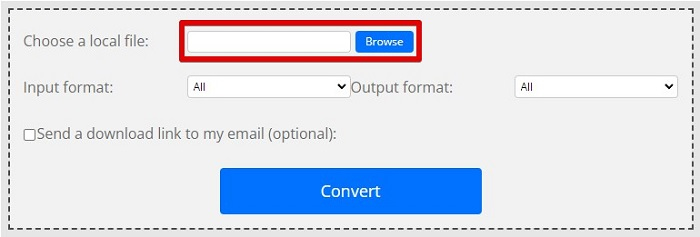
3. lépés. Miután kiválasztotta az átalakítani kívánt MPG-fájlt, az output formátumnál a .mp4 formátumot válassza a lenyíló menüre kattintva.
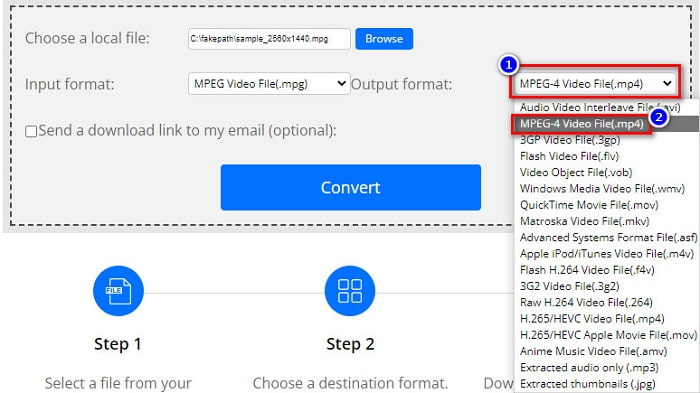
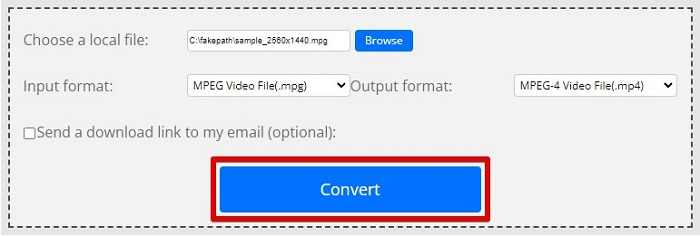
4. lépés. Ha kiválasztotta a kívánt fájlformátumot, a Convert gombra kattintva indíthatja el az átalakítást.
MPG vs. MP4
A Moving Picture Experts Group (MPEG) által készített MPG egy elterjedt digitális videóformátum a video-, hang- és metaadatok tárolására. Nagyon hasznos filmek készítésekor az interneten való megosztáshoz. Az MPG-ben lévő fájlok általában MPEG-1 vagy MPEG-2 videó/audió tömörítést tartalmaznak.
A Moving Picture Experts Group (MPEG) által 2001-ben kiadott MP4 formátum segíthet a videó-, hang-, felirat- és képadatok külön-külön sávokba mentésében. Az MPEG-4 Part 14 rövidítése. Ráadásul ez az egyik legnépszerűbb formátum a streaming és a videók megosztására.
3. rész. GYIK az MPG és MP4 formátumról
Átalakíthatok MPG fájlokat MP4-re anélkül, hogy elveszítené a minőségét?
Igen. A Video Converter Ultimate lehetővé teszi, hogy MPG-jét MP4 formátumba konvertálja anélkül, hogy minősége romlik, a fájlméret ellenére.
Hol tudok MPG fájlokat lejátszani?
Az MPG-fájlok széles körben támogatottak. Ezért számos médialejátszó képes megnyitni ezt a formátumot, többek között a Microsoft Windows Media Player és a VideoLAN VLC Media Player. További információért olvassa el ezt a cikket: A 4 legjobb MPG/MPEG lejátszó Windowsra/Machez/Androidra/iPhone-ra [2021]
Átalakíthatom az MP4-et MPG-vé?
Igen. Az MPG-t MP4 fájlformátumba konvertálhatja a fent felsorolt fájlkonverterek segítségével.
Következtetés
A fent felsorolt konverterek megbízhatónak bizonyultak. Könnyen használhatók és ingyenesek! Ha azonban olyan fájlkonverterre van szüksége, amely MPG-fájlját MP4 formátumba tudja alakítani, és egyben olyan fantasztikus funkciókkal rendelkezik, amelyekkel javíthatja a fájlt, akkor a Video Converter Ultimate a legjobb választás. Továbbá, ha hirdetésmentes online konvertert keres, amely nagy fájlokat is könnyedén kezel, próbálja ki az FVC Free Online Converter szolgáltatást.
-
 3 egyszerű módszer az MPG konvertálására MOV-má Mac/Windows/Online számítógépen
 Konvertálni szeretné MPG fájljait, és később át szeretné vinni őket iOS, iPod, iPad vagy Mac készülékére? Ez a cikk segít kitalálni, hogyan lehet az MPG-t MOV-vá konvertálni lépésekkel.
-
 MPG konvertálása FLV-vé a minőség elvesztése nélkül [Bizonyított]
 Meg kell néznie kedvenc filmjét ezen a médialejátszón, de az nem támogatja az MPG-t. Próbálja meg MPG-fájlját FLV-vé konvertálni a cikkben bemutatott konverterekkel.
-
 2 végső MPG konverter az MPG ingyenes WMV formátumba konvertálásához
 Ingyenesen szeretné konvertálni az MPG-t WMV-vé? Ebben az esetben szerencsés vagy, mert rájöttünk, hogy két eszközzel konvertálhatja MPG fájljait.

