


 Video Converter Ultimate
 Screen Recorder
 Videó javítás
Tekintse át az FLV-metaadat-szerkesztőket az FLV-metaadatok szerkesztéséhez [könnyen]
Az FLV egy népszerű formátum, amelyet digitális tartalmak továbbítására használnak az SWF‑be ágyazott Adobe Flash Player segítségével. Noha a fájlok .flv kiterjesztéssel történő átvitele az ideális, bizonyos tartalmak elveszhetnek, különösen megszakítás esetén. Ha ez történik, mit érdemes tenni? Szerencsére léteznek a piacon elérhető metaadat‑megoldások. Szeretné tudni, milyen Windows, Mac és online eszközöket használhat? Olvasson tovább, és ismerje meg a legjobb módszereket a FLV metaadat‑formátum egyszerű módosítására.

A Windows/Mac/Online rendszeren elérhető legjobb videometaadat-szerkesztő 1. 3. része
Video Converter Ultimate
A Video Converter Ultimate az egyik legerősebb FLV‑metaadat‑szerkesztő, amellyel könnyedén frissítheti és módosíthatja az FLV tageket. Ez az eszköz Windows és Mac OS rendszeren egyaránt elérhető. Az ultimate eszköz használata közben nemcsak FLV‑nél, hanem több mint 1000 formátumnál is gyorsan adhat hozzá, távolíthat el vagy frissíthet metaadatokat a program segítségével. Más metaadat‑szerkesztőktől eltérően ez az eszköz számos olyan lehetőséget kínál, amelyek bármilyen videotípusú problémára ideálisak, például konvertálást, gyorsítást vagy lassítást, visszaforgatást, illetve egyéb lenyűgöző szűrőkészletet, amelyekkel videója igazán egyedivé tehető – olyan funkciók, amelyeket más tag‑szerkesztők nem kínálnak.
Ezenkívül tervezze meg az FLV-videó szerkesztését, például effektusok, szűrők hozzáadását, kivágását, egyesítését, szöveg vagy vízjel hozzáadását. Ezzel az eszközzel bármely felhasználó könnyen elvégezheti a feladatot. Mindezek a dolgok lehetségesek a végső eszköz segítségével. Semmit sem kell keresnie a legjobb grafikus felhasználói felülettel és funkciókkal. Ha kíváncsi, és szeretné kipróbálni ezt az eszközt, kövesse az alábbi lépéseket az eszköz használatának megismeréséhez.
1. lépés. Nyomja meg a letöltés gombot, hogy az FLV metaadat‑injektort letöltse az asztalára, és válasszon Windows vagy Mac verziót. Telepítse az eszközt a fájlra kattintva, a lépéseket követve, majd futtassa a programot.
Ingyenes letöltés Windows 7 vagy újabb rendszerre Biztonságos letöltés
Ingyenes letöltés macOS 10.7 vagy újabb rendszerre Biztonságos letöltés
2. lépés. Miután megnyitotta a szoftvert, lépjen a Toolbox menübe, és válassza a Media Metadata Editor opciót, hogy szerkeszthesse az FLV tageket.
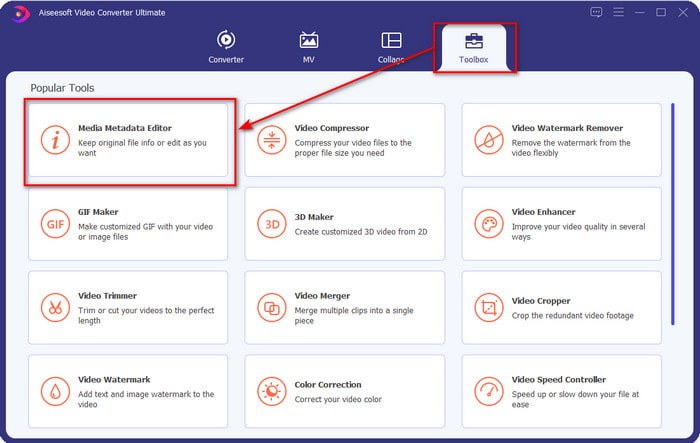
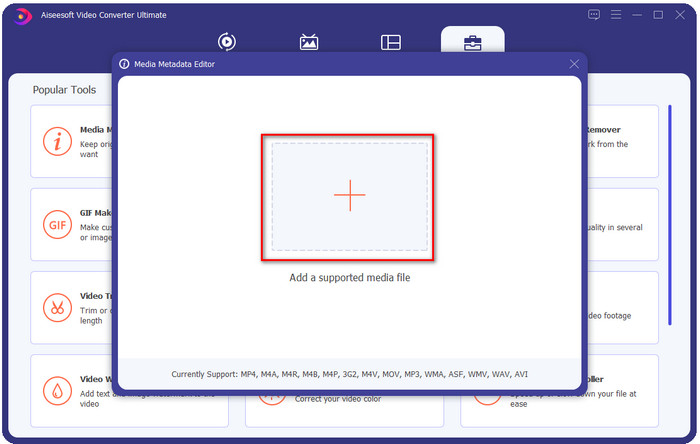
3. lépés. Adja hozzá az FLV fájlokat a + ikonra kattintva, keresse meg a fájlt a megjelenő fájlkezelő ablakban, majd kattintson a Open gombra.
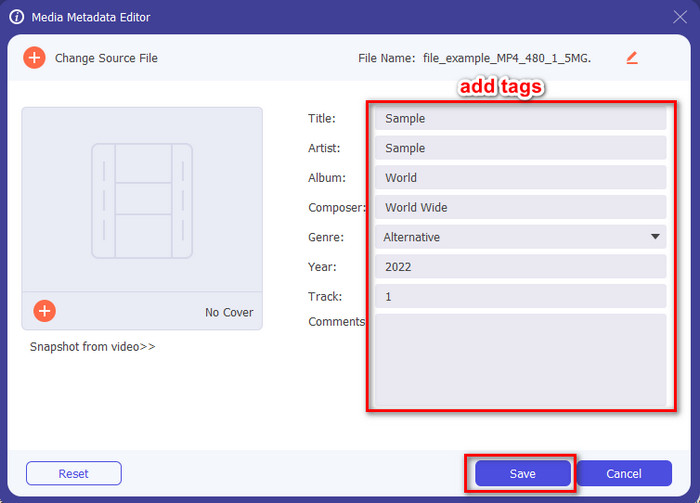
4. lépés. Adja hozzá, módosítsa vagy távolítsa el az információkat a szövegmezőben, majd nyomja meg a Save gombot. Ezzel ilyen egyszerűen tageket adott az FLV fájljához.
FLVMeta – FLV metaadatszerkesztő
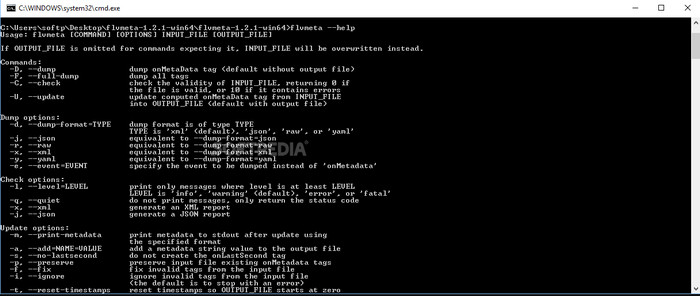
Ha profi felhasználó, és szeretne kipróbálni egy letölthető, kifejezetten FLV‑metaadat‑szerkesztésre szánt eszközt, akkor bemutatjuk a FLVMeta – FLV Metadata Editor programot. Ez az eszköz nem az a tipikus szerkesztő, amellyel már találkozott, mivel parancssori program. Ez azt jelenti, hogy a használatához konkrét parancsokat, kódokat kell megadnia. Hasonlóan az FFmpeghez, meg kell adnia a helyet, a fájlnevet, az adatokat és sok más összetett paramétert. Bár ez nem a legjobb választás kezdőknek, akik FLV metaadatokat szeretnének szerkeszteni, mégis érdemes megemlíteni, mert a feladatot tökéletesen végzi.
Ezenkívül a szoftver nem működik a többi formátummal; csak akkor használhatod az FLV-n, ha használni akarod az eszközt. Ha sok FLV-fájlja van, és módosítani szeretné a címkéit, és rendelkezik alapvető ismeretekkel a parancssori eszköz kezelésével kapcsolatban, javasoljuk, hogy használja ezt. Ha nem, akkor időre lesz szüksége az eszköz tanulmányozására egy egyszerű feladat elvégzéséhez, például metaadatok hozzáadásához.
Online FLV metaadatszerkesztő
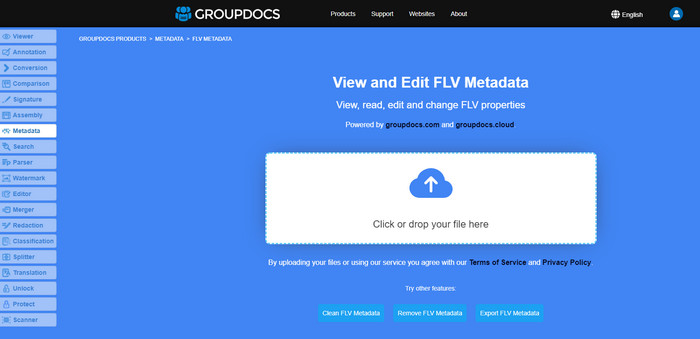
Nem szeretne programot letölteni az FLV metaadat‑formátum szerkesztéséhez? Ebben az esetben használhatja az Online FLV Metadata Editor eszközt. Ezzel az eszközzel anélkül szerkesztheti FLV fájljai metaadatait, hogy szoftvert kellene telepítenie, mivel egy webalapú, ingyenes eszközről van szó. Noha az eszköz ingyenesen elérhető a weben, nem fog működni internetkapcsolat nélkül, és a folyamat megszakadhat, ha lassú az internet.
Az FLVMetával ellentétben ez az eszköz több formátumot is támogat, nem csak az FLV-t; nem támogatja olyan széles körben, mint a végső eszköz. Tehát, ha a feladat szerkesztését a szoftver letöltése nélkül szeretné befejezni, javasoljuk, hogy használja ezt, mivel ez is biztonságos. De ne felejtse el elkerülni a váratlan problémákat, és győződjön meg arról, hogy stabil internetkapcsolattal rendelkezik.
2. rész. Összehasonlító táblázat a Top 3 FLV metaadat-szerkesztőről
| Jellemzők | Video Converter Ultimate | FLVMeta – FLV metaadatszerkesztő | Online FLV metaadatszerkesztő |
| Biztonságos használat |  | | |
| Felhasználóbarát | |  | |
| Internet-függő | | | |
| Szerkesztési funkciók, például vágás, vágás, vágás, összevonás stb. | | | |
| A legjobb grafikus felhasználói felület | | | |
3. rész. GYIK az FLV metaadatszerkesztővel kapcsolatban
Az FLV és az F4V ugyanaz?
Bár mindkettő az Adobe Flash‑hez kapcsolódik, a céljuk eltérő. Például az FLV ugyanazt a kódolót használja, mint az SWF fájlok, és ideálisan adatátvitelre szolgál az interneten keresztül. Ezzel szemben az F4V egy ISO‑alapú formátum, amely az MP4‑hez hasonlít. Noha mindkettő jó fájlátvitelre az interneten, felépítésük és tulajdonságaik különböznek. Ha szeretné F4V fájlját FLV‑vé konvertálni, kattintson ide, és tudja meg, hogyan alakíthatja át a formátumot FLV‑re.
Hol tudok FLV-vel játszani?
Nem minden médialejátszó tudja lejátszani az FLV formátumot a korlátozott támogatottsága miatt. Ön azonban szerencsés, mert összegyűjtöttük a legjobb FLV lejátszókat, amelyeket használhat eszközén, hogy FLV fájljait anélkül játszhassa le, hogy azon kellene aggódnia, támogatott‑e a formátum. Ezeket az eszközöket leteszteltük, hogy biztosan le tudják játszani az FLV fájlokat Windows, Mac, Android és iPhone rendszeren; ha többet szeretne tudni, kattintson erre a linkre.
Az FLV a szabványos videómegosztó formátum?
Mielőtt azt gondoltuk volna, hogy ez a legjobb videómegosztó formátum, amellyel az interneten kiváló minőségű videókat játszhat le; azonban ebben az új korszakban vannak még jobb formátumok, például az MP4. Mivel jobban kompatibilis a felhasználók különböző eszközeivel, ezt szabványos videóformátumnak nevezik. Bár továbbra is megoszthatja az FLV fájlokat az interneten, még mindig át kell gondolnia a fájl vevőjének eszközét. Ha pedig Ön a vevő, akkor le kell töltenie egy harmadik féltől származó eszközt a lejátszáshoz vagy lejátszható formátumba konvertálásához.
Következtetés
Noha korlátozottak az FLV-t támogató eszközök, még mindig szerencsénk van; mert a fenti eszközök miatt továbbra is szerkeszthetjük az FLV metaadatokat. De elszomorítja a szívünket, hogy ki kell választanunk egyet, még akkor is, ha segíthetnek nekünk. Ha még nem döntötte el, hogy mit használjon, inkább a legjobb eszközt kell választania. Ez a legbiztonságosabb választás, mert egyszerű, mégis könnyen segíthet a feladat kezelésében. Még mindig nem hiszi el, mik ennek az eszköznek a képességei? Ebben az esetben a használatához le kell töltenie az asztalra, és saját maga tesztelnie kell, hogy végrehajtja-e a feladatot. Nagyra értékelnénk, ha üzenetet küldene nekünk az alkalmazással kapcsolatos javaslatairól, ajánlásairól stb.
-
 Mi a metaadat: Ismerje meg a metaadatokkal kapcsolatos alapvető információkat
 Mi az a metaadat? Ez fontos? Melyek a metaadatok részei? Ugyanez a kérdés? Ebből a cikkből megismerheti a metaadatokkal kapcsolatos alapvető információkat.
-
 A 4. legjobb online és offline metaadat-megtekintő [Frissítve 2025]
 Ellenőrizhetem a fájlom metaadatait? Igen, megteheti, ennek a bejegyzésnek a segítségével bemutatjuk a különböző metaadatmegjelenítőket, amelyeket használhat.
-
 6 kedvenc Snapchat animált Snapchat szűrő a Snapchatben
 Szeretné tudni, hogyan lehet szűrőket hozzáadni a Snapchat videókhoz? Nos, rákattinthat erre, és megismerheti a különböző szűrőket, amelyeket a Snapchat-videókra használhat.
