


 Video Converter Ultimate
 Screen Recorder
 Videó javítás
 Biztonságos letöltés
Lépésről lépésre, hogyan adjunk albumborítót MP3-hoz a legjobb asztali szoftver használatával
Az albumborító hozzáadása nagyon hasznos lehet, különösen akkor, ha segíteni szeretnél a hallgatónak, hogy jobban kötődjön ahhoz a zenéhez, amit éppen hallgat. Az albumborító alapján a felhasználók képet kaphatnak arról, miről is szól a zene, főleg a digitális kiadások esetében. Előfordulhat, hogy egy MP3‑fájlnak nincs rendes albumborítója, vagy egyáltalán nincs borító csatolva a fájlhoz. Ha te is ezt tapasztalod, fontos megtanulnod, hogyan lehet albumborítót hozzáadni MP3 zenéhez az asztali gépeden. Ha többet szeretnél tudni erről a témáról, olvasd tovább ezt a cikket, mert tömör, lényegre törő tudnivalókat adunk a problémáról.

1. rész: Albumborító hozzáadása MP3-hoz a Video Converter Ultimate segítségével [Ajánlott címkeszerkesztő]
A legjobb szoftvert keresed, amellyel albumborítót adhatsz MP3‑hoz? A FVC Video Converter Ultimate az ajánlott tag‑szerkesztő ehhez a feladathoz. Ez a szoftver nem véletlenül ajánlott. Más programokkal ellentétben csak korlátozott számú albumborító‑formátumot tudsz feltölteni és MP3‑zenéid borítójaként használni, de ezzel az eszközzel nem így van. Ezzel az ultimate szoftverrel MP3, WAV, WMA, AAC, FLAC és több mint 1000 videó‑ és hangformátum fájljaihoz adhatsz albumborítót. Elég lenyűgöző, igaz? Ez az eszköz az első számú választás, ha képet szeretnél borítóként adni az albumodhoz. Szeretnéd tudni, hogyan kell használni ezt az ultimate szoftvert? Ebben az esetben olvasd el figyelmesen, és kövesd az alábbi bemutatót.
1. lépés. Kattints az alábbi letöltés gombra, majd válaszd ki, hogy melyik operációs rendszert használod. A szoftver letöltése után telepítsd az eszközt. Ha mindennel elkészültél, kattints a Start Now gombra, hogy elindítsd a programot az asztali gépeden.
Ingyenes letöltés Windows 7 vagy újabb rendszerre Biztonságos letöltés
Ingyenes letöltés macOS 10.7 vagy újabb rendszerre Biztonságos letöltés
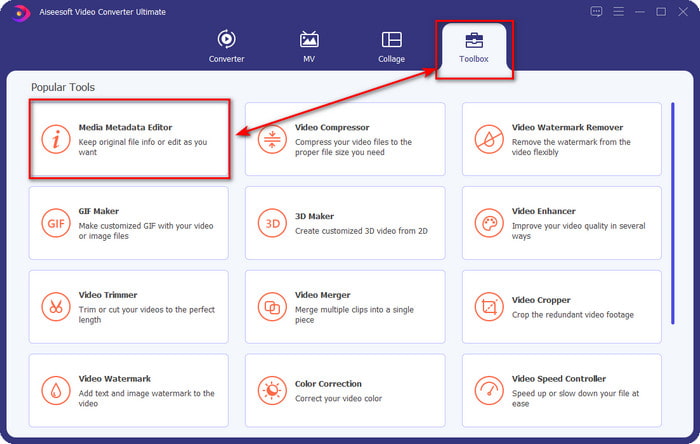
2. lépés. Lépj a Toolbox (Eszköztár) részre, és kattints alatta a Media Metadata Editor (Média metaadat‑szerkesztő) lehetőségre.
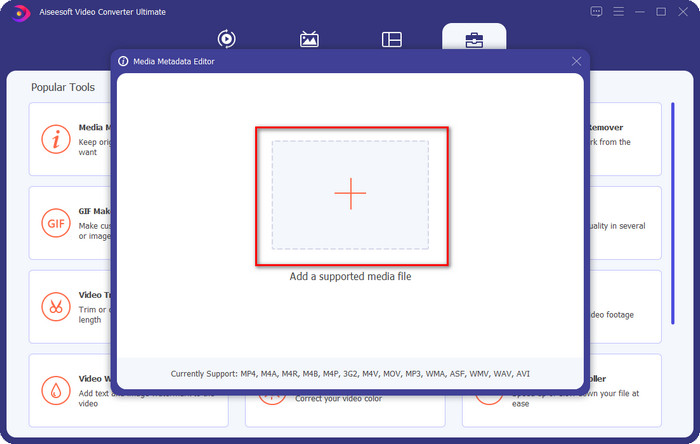
3. lépés. Válaszd ki azt a zenei fájlt, amelyhez albumborítót szeretnél hozzáadni, a + gombra kattintva. A kiválasztott zenei fájl beillesztéséhez kattints az Open (Megnyitás) gombra.
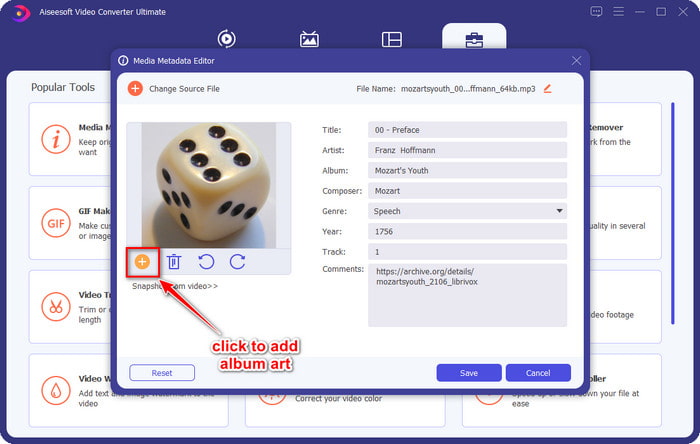
4. lépés. Ezután kattints a felület bal alsó részén lévő + gombra, keresd meg azt az albumborítót, amelyet használni szeretnél, majd kattints az Open (Megnyitás) gombra. Ha szükséges, a további metaadatokat is hozzáadhatod a szövegmezőben.
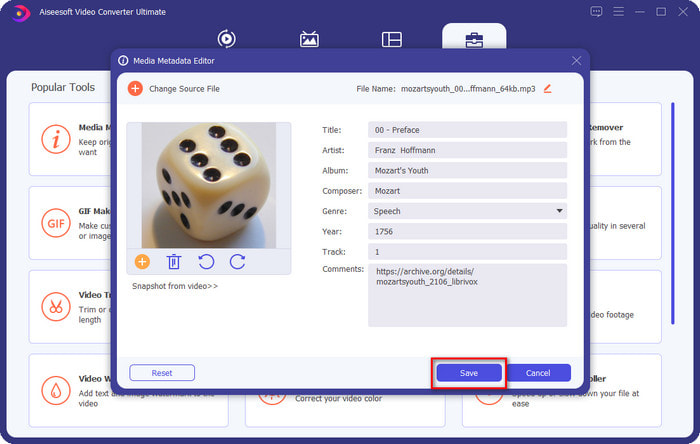
5. lépés. Ha befejezted az albumborító és a metaadatok hozzáadását az MP3‑fájlhoz, kattints a Save (Mentés) gombra, hogy a borítót a feltöltött MP3‑hoz csatold. Egyszerű, nem igaz? Minden lehetségessé és könnyűvé válik, ha ezt az ultimate eszközt használod a probléma megoldására.
2. rész: Albumborító hozzáadása MP3-hoz a VLC Media Player ingyenes metaadatszerkesztővel]
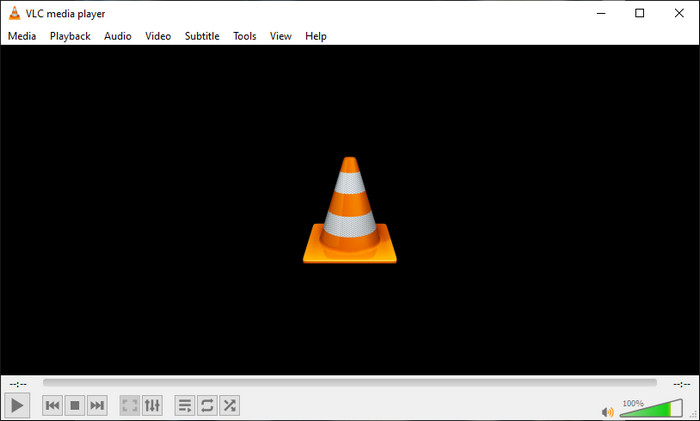
A VLC Media Player a legtöbbünk által használt, egyik legjobb médialejátszó. Ez az eszköz bármilyen videófájlt le tud játszani, és képes metaadatok szerkesztésére is, például albumborító hozzáadására zenei fájlokhoz. Ezzel a médialejátszóval szabadon módosíthatod vagy bővítheted a metaadatokat. Ha útmutatót szeretnél arról, hogyan adj albumborítót MP3‑hoz Windows 10/11‑en vagy Macen ezzel az eszközzel, az alábbi lépések neked szólnak.
1. lépés. Töltsd le a médialejátszót az asztali gépedre, és nyisd meg.
2. lépés. A főfelületen kattints az Eszközök menüre, majd alatta az Information (Információ) menüpontra.
3. lépés. Kattints a jobb gombbal a jobb alsó sarokban lévő VLC ikonra, add hozzá az albumborítót, majd kattints a Save (Mentés) gombra.
3. rész: Albumborító hozzáadása MP3-hoz az iTunes alkalmazásban [Beépített metaadatszerkesztő Mac-en]
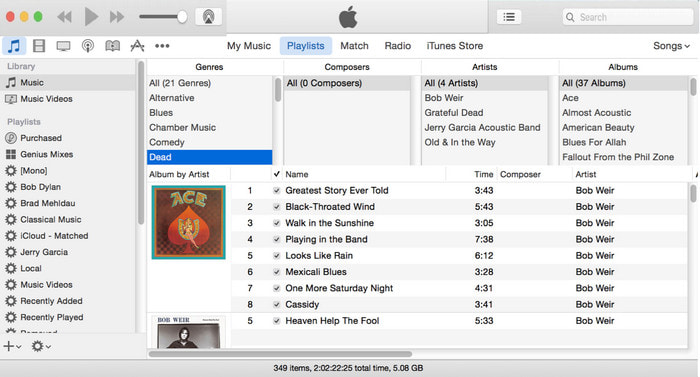
Mac‑felhasználók számára az iTunes az alapértelmezett metaadat‑szerkesztő, amellyel képet adhatunk MP3‑fájljaink borítójaként. Ez a beépített alkalmazás segít a Macen lévő fájlok metaadatainak szerkesztésében. A szoftver azonban néhány Mac‑verzión már nem érhető el, mert három külön appra bontották, amelyek ugyanazokat a feladatokat látják el, mint korábban az iTunes. Régebbi verziójú Mac gépeken azonban még elérhető. Ha azon Mac‑felhasználók közé tartozol, akik szeretnék tudni, hogyan lehet albumborítót hozzáadni MP3‑hoz iTunesban, kövesd az alábbi lépéseket.
1. lépés. Nyisd meg az iTunes alkalmazást a Maceden.
2. lépés. Kattints a Music (Zene), majd a Library (Médiatár) opcióra, és kattints a jobb gombbal arra a zenefájlra, amelynek nincs albumborítója.
3. lépés. A fenti opciók közül kattints az Artwork (Borító), majd az Add Artwork (Borító hozzáadása) gombra, válaszd ki a feltölteni kívánt képet, és a módosítás alkalmazásához kattints az OK gombra.
4. rész. GYIK az albumborítók MP3-on való hozzáadásával kapcsolatban
Hozzáadhatok albumborítót az MP3-hoz az Audacityn?
Sajnos az Audacity segítségével nem tudja hozzáadni a képet az MP3 fájlhoz. Ez az eszköz nem támogat semmilyen kép- vagy videóformátumot, mert zeneszerkesztőként használható. De továbbra is használhatja az Audacity-t metaadat-szerkesztőként, ha szerkeszteni szeretné MP3-metaadatait.
Miért hiányzik az albumborítóm az audiofájlomból?
Három oka lehet annak, hogy az albumborítója hiányzik a hangfájlból. Az első ok az, hogy a letöltendő fájl nem tartalmaz albumborítót, különösen, ha ez kalózkodás. Az internetről letöltött zenefájlok többsége nem tartalmaz lemezborítót, hogy elkerüljük a szövegírási problémákat. Ezután a fájl eltűnt, mert a kép nem volt megfelelően csatolva. Egyes felhasználók szembesülnek ezzel a problémával, és nehéz kezelni, ezért elengedhetetlen egy professzionális albumborító használata. Végül a kép sérült; Ha a feltöltött fájl nem érhető el albumborítóként, vagy a zenefájl sérült, ez lehet az oka.
Melyik a legjobb metaadat, amelyet használhatok?
Ha az általunk felsorolt metaadat‑szerkesztők számodra nem elegendők, kattints erre a linkre, hogy egy új cikkben megismerhesd az összes legjobb metaadat‑szerkesztőt, amelyet használhatsz.
Következtetés
Most, hogy megvan az ötlet, hogy albumborítót adjunk hozzá MP3-hoz, ideje kiválasztani, hogy szerintünk melyik eszköz a legmegfelelőbb számunkra. Ha Ön Mac-felhasználó, és nem szeretne szoftvert letölteni az asztalára, válassza az iTunes alkalmazást. Az iTunes azonban fokozatosan megszűnik a Mac frissített verziójában. Ha szeretne letölteni egy ingyenes eszközt, amely segíthet hozzá a borítót a zenéhez, akkor a VLC nagyszerű választás. Az eszköz azonban nem professzionális eszköz. Tehát, ha olyan szakértő szoftvert szeretne, amely mindkét operációs rendszeren, Windowson és Macen is elérhetővé teszi ezt a feladatot, használja a tökéletes szoftvert. Töltse le a szoftvert az asztali számítógépére, hogy a professzionális eszköz elérhető legyen a fent bemutatott letöltés gombra kattintva.
-
 A fényképek és videók metaadatainak egyszerű megtekintése iOS rendszeren
 Szeretné tudni, hogyan tekintheti meg a metaadatokat iPhone-on és iPaden? Akkor ennek a cikknek a elolvasása segíthet a probléma könnyed megoldásában.
-
 A legjobb technikák az iD3 címkék szerkesztéséhez az iTunes alkalmazásban [Hatékony tippek]
 Tudnia kell, hogyan kell szerkeszteni a címkéket az iTunes alkalmazásban? Akkor jó helyen jársz. Ahogy megbeszéltük a módszereket, követheti a címkék szerkesztését az iTunes használatával.
-
 A WAV-fájlok tulajdonságainak szerkesztése Windows 10/11 és Mac rendszeren [Megoldva]
 Módot keres a WAV-fájlok tulajdonságainak szerkesztésére Windows 10/11 rendszeren? Erre a kérdésre választ kap, ha tovább olvassa ezt a cikket.
