


 Video Converter Ultimate
 Screen Recorder
 Videó javítás
 Biztonságos letöltés
A Coub vízjel eltávolításának egyszerű módjai online és offline módban
A Coub egy olyan weboldal, amelyet online videók megosztására használnak. Népszerű oldal, ahol a felhasználók akár tíz másodperces videókat készíthetnek és oszthatnak meg. A GIF-ekkel ellentétben a Coub‑videók magas minőségű hanggal rendelkeznek, ezért sokak körében kedveltek. Amikor azonban elmented vagy letöltöd a Coubról a videókat, a videó vízjelet fog tartalmazni. Tehát ha el akarod távolítani a Coub vízjelét, olyan eszközt kell használnod, amely képes vízjelek eltávolítására. Ez a cikk a legjobb eszközöket mutatja be, amelyekkel könnyedén eltávolíthatod a Coub vízjeleit a videóidról.

1. rész. 4 módszer a Coub-vízjel eltávolítására
Sokan érdeklődnek a Coub-videók online megtekintése és letöltése iránt. De amikor letölti a videókat a coubról, vízjelet tartalmaz. Ezzel a négy egyszerű módszerrel tudni fogja, hogyan távolítsa el a Coub vízjelet.
FVC Video Converter Ultimate
A FVC Video Converter Ultimate egy asztali alkalmazás, amellyel bármilyen vízjelet el lehet távolítani a videókról. Ez az eszköz felhasználóbarát, mert egyszerű a felülete és könnyű letölteni. Emellett a fájlformátumokkal sem lesz gondod, mivel rengeteg formátumot támogat, például MP4, MKV, AVI, MOV, M4V, WEBM, FLV és több mint 1000 további formátumot.
Speciális szerkesztési funkciókkal is rendelkezik, beleértve a média metaadat-szerkesztőt, a videó-egyesítést, a videótömörítőt és még sok minden mást az eszköztárból. És amikor eltávolítja a vízjelet a videóból, akkor lehetővé teszi az eltávolítandó terület méretének beállítását. Látni fog egy előnézeti videót is a fájlról, így ellenőrizheti a videó kimenetét. Ha ezzel az átalakítóval szeretné eltávolítani a Coub vízjelet, kövesse az alábbi lépéseket.
1. lépés. Töltsd le a FVC Video Converter Ultimate programot az asztali gépedre az alábbi Download gombra kattintva. Kövesd a telepítési folyamatot, majd indítsd el az alkalmazást.
Ingyenes letöltés Windows 7 vagy újabb rendszerre Biztonságos letöltés
Ingyenes letöltés macOS 10.7 vagy újabb rendszerre Biztonságos letöltés
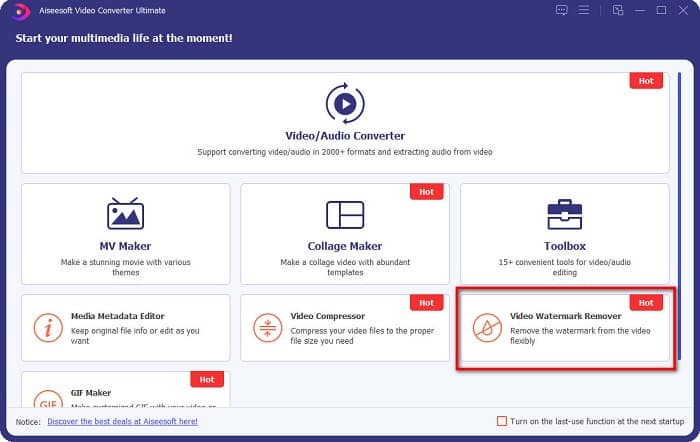
2. lépés. Ezután a szoftver első felületén menj a Video Watermark Remover részhez. Ha nem találod az első felületen, kattints a Toolbox menüpontra.
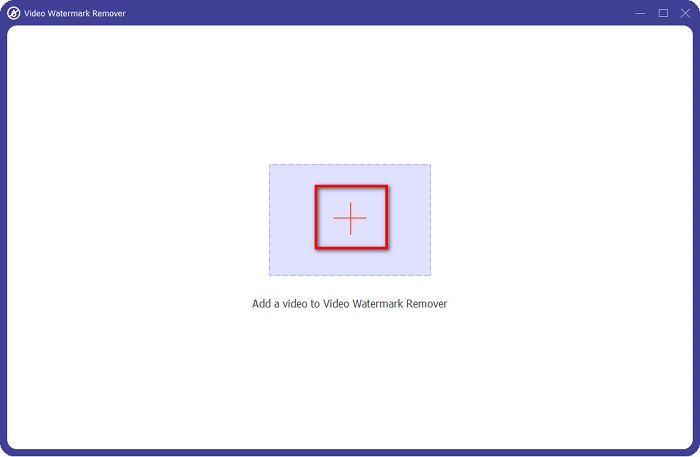
3. lépés. Kattints a + jelű gombra, hogy feltöltsd a coub videót a következő felületen. Megnyílnak a számítógéped fájljai, ahol válaszd ki a videót, majd kattints az Open gombra.
4. lépés. Ezután kattints az Add watermark removing area gombra, hogy megjelenjen az eltávolítási terület. Majd húzd a kijelölt területet a coub vízjel fölé. Látni fogod, hogy az általad kijelölt rész elmosódik.
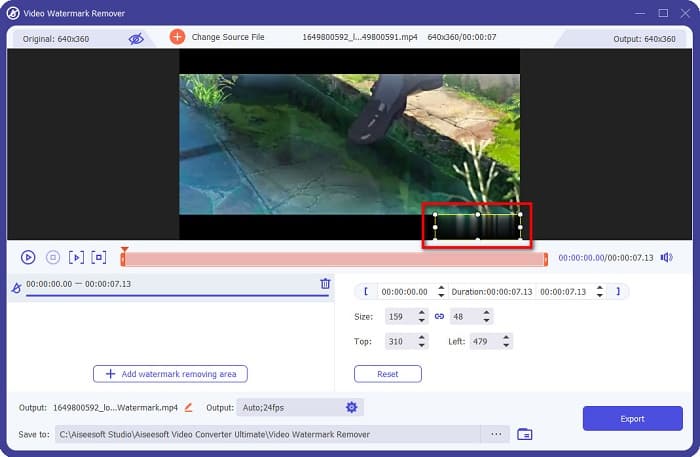
5. lépés. Végül kattints az Export gombra a Coub vízjel eltávolításához, ezután a kimeneti fájl automatikusan elmentődik a számítógéped megfelelő mappájába.

Egyszerű, ugye? A fenti lépések segítségével könnyedén eltávolíthatod a coub vízjelet a videódról. Kattints ide, ha meg szeretnéd tudni, hogyan lehet eltávolítani a TikTok vízjelet.
Hitpaw vízjel eltávolító
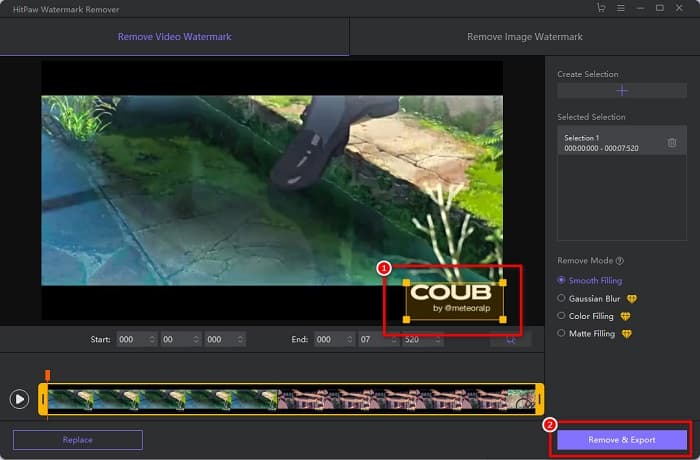
A Hitpaw Watermark Remover egy népszerű, letölthető vízjel‑eltávolító program, amellyel könnyedén eltávolíthatod a coub vízjelet a videódról. Ha Coub‑videót szeretnél vízjel nélkül, ezzel az eszközzel megszabadulhatsz tőle. Továbbá az eszköz felhasználóbarát, mivel egyszerű a kezelőfelülete.
A csúszkák mozgatásával könnyen eltávolíthatja a vízjelet a videó bizonyos részeiről. Sőt, a vízjel eltávolításakor sima töltetet tesz lehetővé. Szinte minden médiaeszközre ingyenesen letölthető.
1. lépés. Először töltsd le a Hitpaw Watermark Remover programot, kövesd a telepítési folyamatot, majd indítsd el az alkalmazást.
2. lépés. Ezután kattints a Choose File gombra a szoftver fő felületén, hogy feltöltsd a coub videódat. Megnyílnak a számítógéped fájljai, ahol megnyithatod a coub videódat.
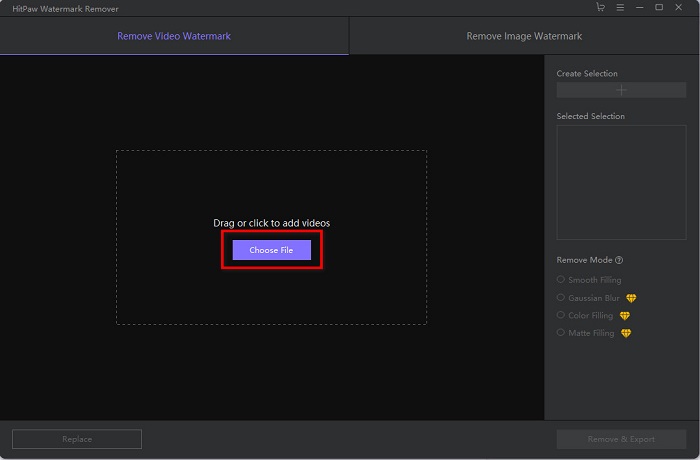
3. lépés. Húzd az eltávolítási területet a coub vízjelre, majd kattints a jobb alsó sarokban található Remove & Export gombra, hogy véglegesen eltávolítsd a vízjelet.
Media.io
A Media.io egy online vízjel‑eltávolító videókhoz. Ez az online eszköz képes olyan vízjelek eltávolítására, mint a logók, szövegek és pecsétek. Ha most használsz először vízjel‑eltávolítót, ezzel az online eszközzel nem lesz nehéz dolgod, mert könnyű használni. Emellett támogatja a leggyakoribb videóformátumokat, mint az MP4, MKV, AVI, FLV, MOV és még sok más. A videókat a Dropboxból, a Google Drive‑ból és a YouTube‑ról is kiválaszthatod. Továbbá biztonságos és ingyenes. A Media.io minden böngészőben elérhető, beleértve a Google‑t, a Firefoxot és a Safarit is.
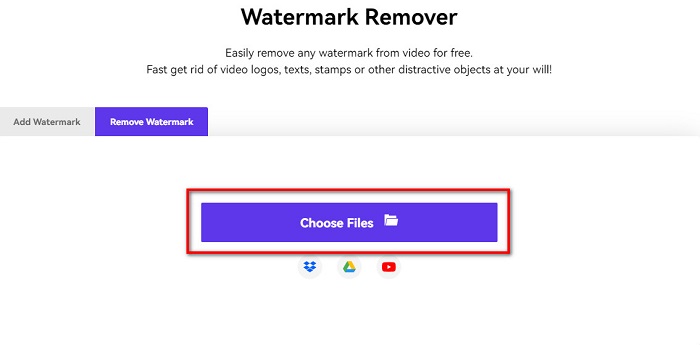
1. lépés. A használt böngészőben keresd meg a Media.io oldalt, majd lépj a weboldalukra. A szoftver fő felületén kattints a Choose Files gombra.
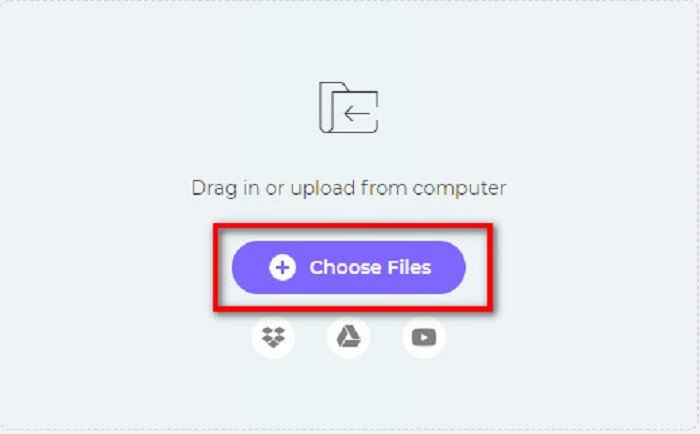
2. lépés. Egy új felület jelenik meg, ahol a Choose Files gombra kattintva vagy a coub videó szoftver felületére húzásával töltheted fel a fájlt. Várd meg, amíg a videó feltöltődik, majd lépj a következő lépésre.
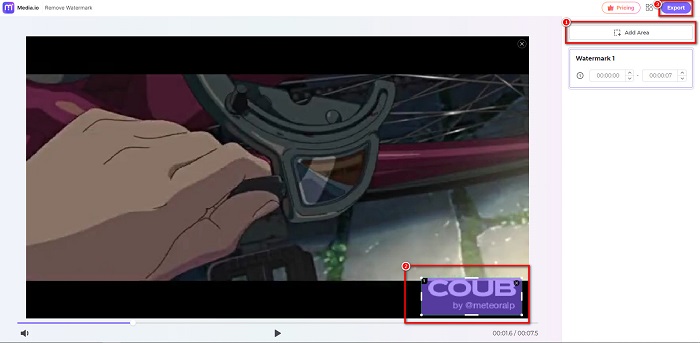
3. lépés. Ezután kattints az Add Area gombra a felület bal oldalán, majd húzd az eltávolítási területet a coub vízjelre. Kattints az Export gombra a vízjel eltávolításához; a fájl automatikusan elmentődik az eszközödre. Ezzel a módszerrel azt is megtanulhatod, hogyan lehet eltávolítani a videó vízjeleit.
BeeCut
A BeeCut egy másik online megoldás a Coub vízjelek eltávolítására. Ez az eszköz nagyon kényelmes, mert semmit sem kell letöltened az eszközödre. Emellett ingyenes és biztonságos a használata. Érdekesség, hogy ez az eszköz számos fájlformátumot támogat, többek között MP4, AVI, MKV, FLV és más gyakori formátumokat.
Továbbá kezdőbarát eszköz, mert könnyen kezelhető felhasználói felülettel rendelkezik. Azonban előfordulhat, hogy lassú működési folyamatot tapasztal, ha az internetkapcsolat lassú, mert internetfüggő. A coub vízjel BeeCut segítségével történő eltávolításához kövesse az alábbi egyszerű útmutatót.
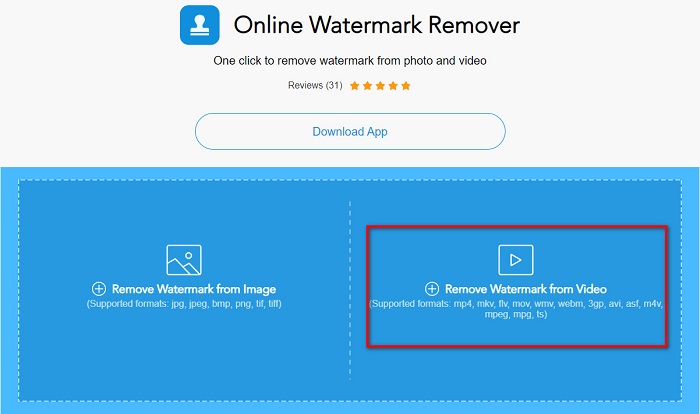
1. lépés. Keresd meg a BeeCut oldalt a böngésződben, majd kattints a Remove Watermark from Video lehetőségre a szoftver fő felületén. Töltsd fel a videódat a számítógépedről.
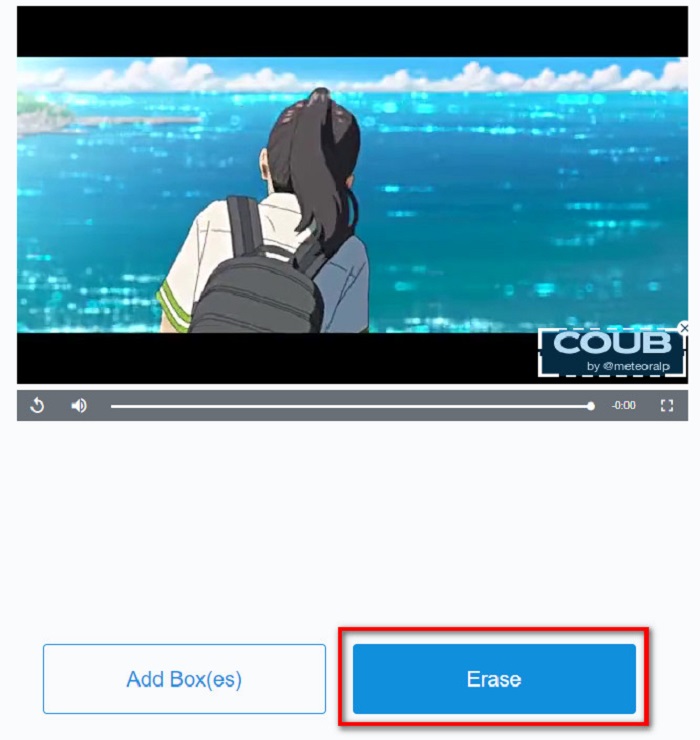
2. lépés. A következő felületen húzd az eltávolítási területet arra a coub vízjelre, amelyet el szeretnél távolítani. Ha a videódon más vízjelek, logók vagy pecsétek is vannak, további eltávolító dobozokat adhatsz hozzá az Add Box(es) gombbal.
3. lépés. Végül kattints az Erase gombra, hogy eltávolítsd a coub vízjelet a videódról. A kimeneti fájlt a számítógéped megfelelő mappáiban találod meg.
2. rész. GYIK a Coub vízjel eltávolításával kapcsolatban
Kaphatok vízjel nélküli coub-videókat?
Sajnos nincsenek konkrét módszerek vagy eszközök a vízjel nélküli coub-videók letöltésére. A vízjeleltávolítók azonban segítenek abban, hogy vízjel nélkül készítsenek kubikus videót.
A vízjel eltávolítása csökkenti a videó fájlméretét?
Nem. A vízjel eltávolítása a videóról nincs hatással a videó fájlméretére.
Miért van elmosódás a vízjel területén, miután eltávolította?
Elmosódott az eltávolított vízjelterület, mert az eszközök így távolítják el a vízjelet a képekről vagy videókról.
Következtetés
A Coub vízjel eltávolítása a videókról bonyolultnak tűnhet. Ha azonban a fent bemutatott eszközöket használod, könnyedén eltávolíthatod a Coub vízjeleit a videódról. Ha pedig gyors feldolgozású, sok funkcióval rendelkező vízjel‑eltávolítót szeretnél használni, töltsd le a FVC Video Converter Ultimate programot.
-
 4 legjobb módszer a vízjel eltávolítására a GIF-ről [Online és offline]
 El kell távolítani a vízjelet a GIF-ről? Az ebben a cikkben található eszközzel megismerheti a különböző stílusokat a platformján elérhető különböző vízjel-eltávolítókkal.
-
 Kiváló Photobucket vízjeleltávolító online és offline
 Tanulja meg, hogyan távolíthatja el a Photobucket vízjelet fotóiról ezzel a csodálatos Photobucket vízjeleltávolítóval. Olvassa el ezt a cikket, hogy megismerje a módszereket.
-
 Könnyen távolítsa el a vízjelet PDF-ből egyszerű lépésekkel
 Távolítsa el a vízjelet a PDF-ből az alábbi egyszerű lépések végrehajtásával. Tanulja meg, hogyan távolíthat el egyszerűen vízjeleket PDF-fájljaiból ezekkel a csodálatos eszközökkel.
