


 Video Converter Ultimate
 Screen Recorder
 Videó javítás
 Biztonságos letöltés
Hogyan lehet ingyen megszabadulni a Power Director vízjeltől [100% Working]
Ha egy teljes funkciós videoszerkesztőt és -készítőt keresel, a PowerDirector választásával biztosan nem lősz mellé. Számíthatsz rá, hogy fantasztikus eredményt érsz el, amikor prezentációkhoz, vlogokhoz, oktatóvideókhoz, demókhoz és még sok máshoz használod videóid szerkesztésére. Azt is tudnod kell azonban, hogy a program vízjelet tesz a szerkesztett videókra, ha éppen az ingyenes verziót használod. Néhány felhasználó frusztrálttá vált amiatt, hogy vízjel került arra a videóra, amelyen olyan sokat dolgoztak. A frusztráltság helyett miért nem próbálod inkább elolvasni ezt a cikket? Nézzük meg, hogyan lehet ingyen megszabadulni a PowerDirector vízjelétől, hogy egyszer s mindenkorra megoldjuk a problémát.

1. rész: Hogyan lehet ingyenesen megszabadulni a Power Director vízjeltől a piac legjobb megoldásaival
FVC Video Converter Ultimate
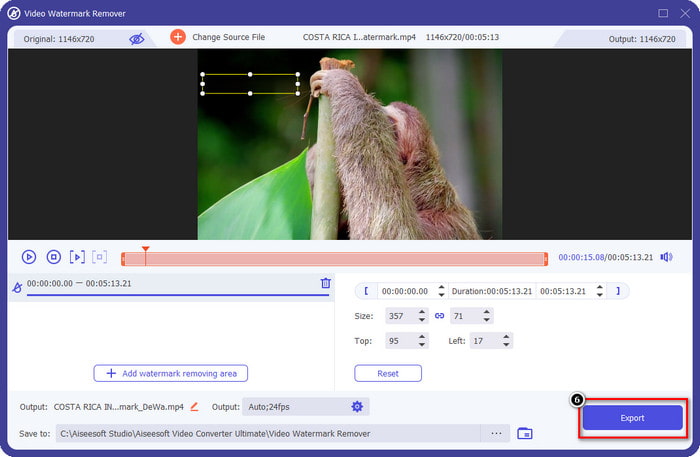
Az FVC Video Converter Ultimate frissített verziója tartalmaz egy videó vízjel-eltávolítót, amellyel a videót vízjel nélkül is megjelenítheti a PowerDirector for PC-n. Ez az eszköz lett az a komplett eszköz, amely képes egyidejűleg többcélú feladat elvégzésére, és azt professzionálisan, gyors feldolgozással. Ami lenyűgöz minket ezzel az eszközzel, az az, hogy milyen egyszerű a használata. Ha ezt használod, nem kell profinak lenned ahhoz, hogy eltávolítsd a vízjelet a videódon. Azok a felhasználók, akik a legjobb vízjel-eltávolítót keresik, nem járhatnak rosszul, ha ingyenesen letöltik ezt a szoftvert az asztalra. Még mindig nincs meggyőzve? Az egyetlen módja annak, hogy meggyőzze Önt a tökéletes teljesítményről, ha lemásolja az általunk hozzáadott oktatóanyagot, hogy kövesse.
1. lépés. A szoftvert ingyen letöltheted Windowsra vagy macOS-re az alábbi letöltés gombra kattintva. Miután kiválasztottad a letölteni kívánt verziót, azonnal telepítsd a szoftvert, majd nyisd meg.
Ingyenes letöltés Windows 7 vagy újabb rendszerre Biztonságos letöltés
Ingyenes letöltés macOS 10.7 vagy újabb rendszerre Biztonságos letöltés
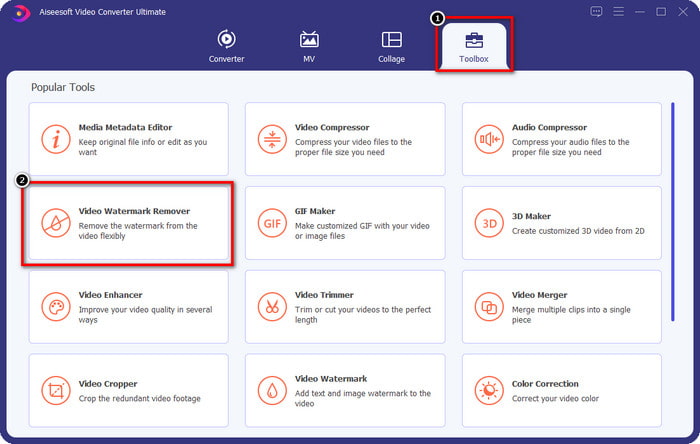
2. lépés. Miután a rendszerben fut, menj a Toolbox részhez, és keresd meg a funkciók között a Video Watermark Remover eszközt.
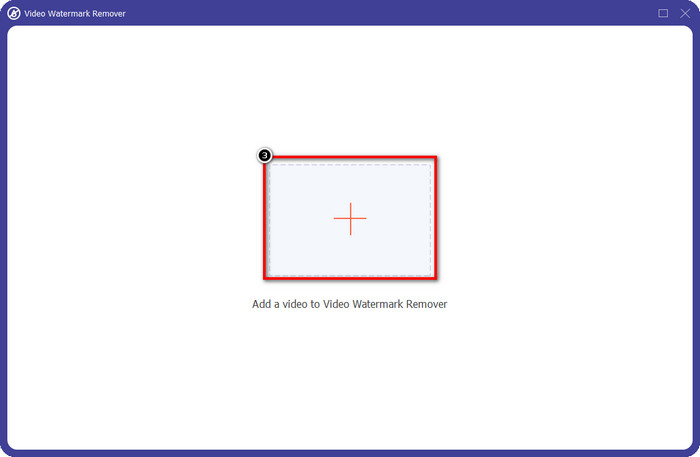
3. lépés. Ezután kattints a + ikonra, hogy feltöltsd azt a videófájlt, amellyel problémád van.
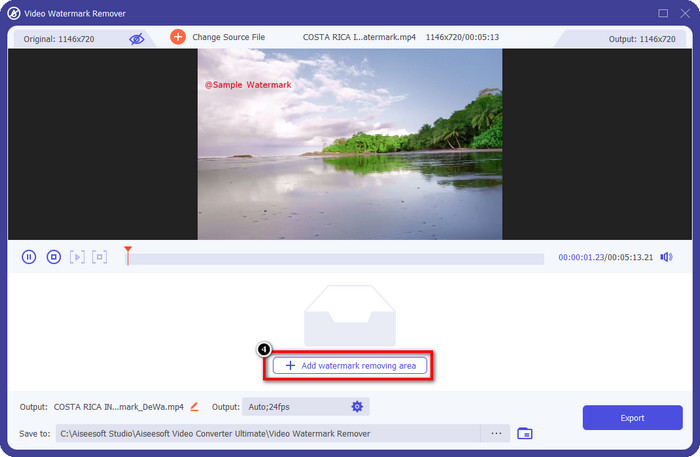
4. lépés. Nyomd meg az Add Watermark Removing Area gombot a szoftver eszközének használatbavételéhez.
5. lépés. Az egérrel húzd a téglalap alakú keretet a vízjel területére, majd engedd el. Lehetőséged van a téglalap alakját úgy módosítani, hogy pontosan kiemelje a vízjelet.
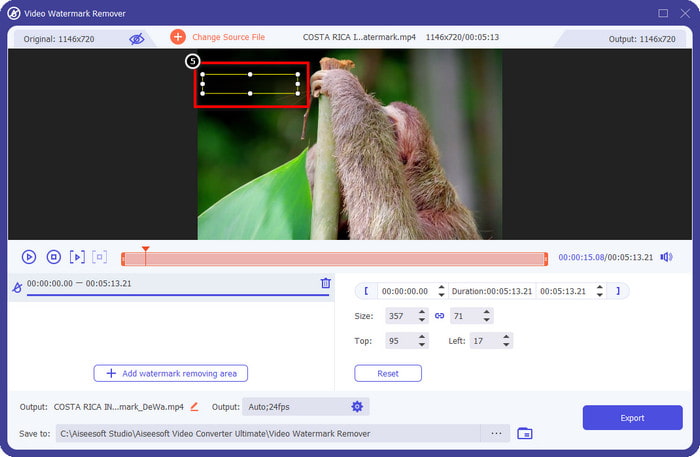
6. lépés. Kattints az Export gombra a vízjel-eltávolítási folyamat elindításához. Ha elkészült, egy felugró mappa jelenik meg a képernyőn; kattints a fájlra, hogy megnézd a vízjel nélküli videót.
VLC Media Player
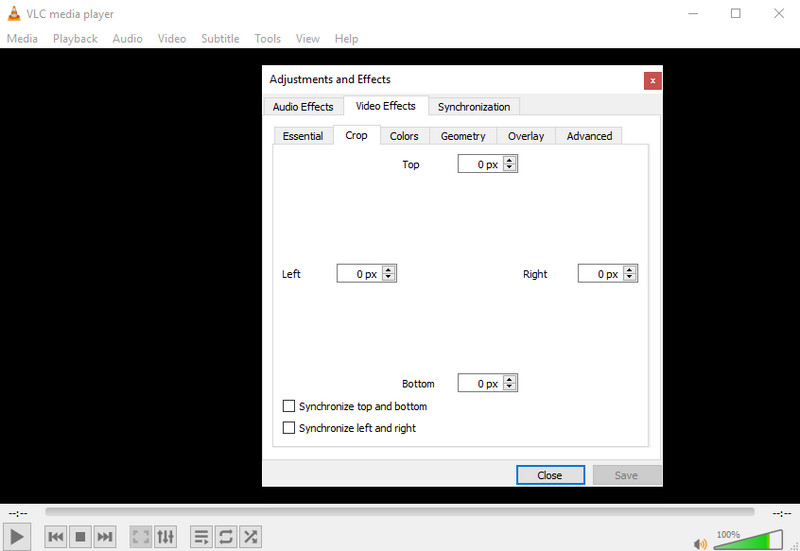
A VLC Media Player nem kifejezetten vízjel-eltávolító program, de képes elvégezni a feladatot azzal, hogy levágja a videóról a vízjelet. Ez az eszköz nemcsak videolejátszó és vágóprogram; számos más funkciót is kínál ez a népszerű médialejátszó. De ne várd tőle, hogy professzionális szerkesztésre vagy egyszerű használatra alkalmas legyen, mert nem az. A videó körbevágásához pontos méreteket kell megadnod ahhoz, hogy a vízjelet levágd a videóról. Ha tehát ismered a videó pontos x és y értékeit, akkor követheted az alábbi lépéseket arra, hogyan távolíthatod el az „edited by PowerDirector” vízjelet ezzel a médialejátszóval.
1. lépés. Miután letöltötted a szoftvert a VideoLAN.org oldalról, nyisd meg a programot. Kattints a Media menüpontra, majd az Open File lehetőségre, és keresd meg azt a videófájlt a helyi meghajtón, amelyet a PowerDirectorban szerkesztesz, és amely megjelenik a képernyőn.
2. lépés. A videó lejátszása elindul, kattints a Tools, majd az Effects and Filter menüpontra. Használhatod a billentyűzeted is: nyomd meg a Control + E billentyűket Windows, illetve a Command + E billentyűket Mac esetén.
3. lépés. Menj a Video Effects, Crop részhez, és add meg a vágási méreteket, hogy a vízjelet levágd a videóról.
4. lépés. A végrehajtott módosítások alkalmazásához kattints a Save gombra.
Kapwing
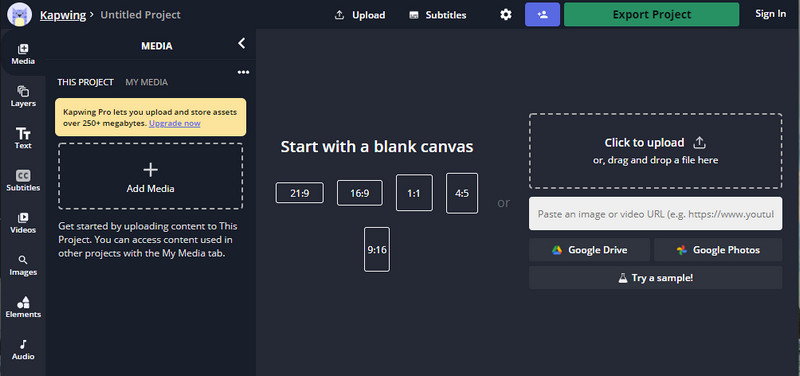
Szüksége van egy online videószerkesztőre? Próbáld meg a Kapwinget használni. Ez egy intuitív webes eszköz, amellyel videókat szerkeszthet, például a Power Directorban. Ennek ellenére nincs a Power Director parszintjén. A legtöbb videószerkesztés, amire szüksége lehet, már megvan, például a vízjel levágása. Bár az eszköz ugyanazt a feladatot végzi, mint a VLC a vízjel eltávolításakor, ennek az eszköznek van egy előnézeti ablaktáblája, ahol az exportálás előtt megtekintheti a kivágott videót. Tehát, ha el szeretné menteni a videókat, akkor a Powerdirector segítségével szerkesztheti vízjel nélkül PC-n; először itt kell kivágnia őket.
1. lépés. Nyisd meg a webes eszközt a böngésződben való rákereséssel, majd kattints az Add Media gombra a videófájl feltöltéséhez. Feltöltési folyamat következik, ezért várnod kell, mielőtt használni tudod a feltöltött videót.
2. lépés. Kattints a bal oldalon található Crop lehetőségre, hogy megnyisd a vágási funkciókat.
3. lépés. Állítsd be a keretet, és győződj meg róla, hogy a videó vízjele nem esik bele a keretbe.
Opcionális: Ha nem szeretnéd kézzel módosítani a videó méreteit, alul elérhető előre beállított opciók közül is szabadon választhatsz.
rame, és győződjön meg arról, hogy a videó vízjele nem szerepel a kereten.” /]4. lépés. Ha elkészültél, kattints a Done Cropping gombra, hogy elmentsd a Kapwinggel körbevágott videót.
Összefüggő:
Hogyan távolítsd el a vízjelet a Renderforesttel exportált videókról
Hogyan távolítsd el a Viva Video vízjelét a videókról
2. rész. GYIK a Power Director vízjel eltávolításával kapcsolatban
Biztonságos a Powerdirector no watermark apk ingyenes letöltése Androidra?
Igen, felkeresheti a Play Áruházat, és rákereshet a nevére a Power Director alkalmazás letöltéséhez. Az eszköz ingyenes próbaverziója azonban vízjelet ad hozzá. Tegyük fel, hogy megpróbálja letölteni az alkalmazást harmadik felek webhelyeiről, hogy megkapja a teljes verziót. Ebben az esetben ezt nem szabad megtennie, mert rosszindulatú vírusok lehetnek az Android-eszközre letöltött fájlban. A Powerdirector vízjelének eltávolításához licenckulcsot kell vásárolnia.
Mennyibe kerül a Power Director alkalmazás PC-n?
A Power Director 365 minden hónapban $ 4.08 kikiáltási áron megvásárolható, a terveket és az előfizetést a hivatalos honlapján érheti el. Megtekintheti azokat a funkciókat is, amelyeket akkor kaphat, ha igénybe veszi a választott tervet.
A Cyberlink PowerDirector rendelkezik vízjellel?
Igen, vízjelet ad hozzá, ha exportálja a videót az alkalmazás ingyenes verziójába, de elkerülhető. Ha megvásárolja bármely csomaghoz vagy előfizetéshez tartozó szoftvert, nem kell aggódnia a vízjel miatt, mert az exportálás után nem lesz hozzáadva a termékhez vízjel.
Következtetés
Ha exportálni szeretné a videókat, akkor a PowerDirector for PC segítségével hozza létre őket vízjel nélkül. Ehhez a programhoz licenckulcsot kell vásárolnia. Ha azonban nem szeretne legalább egy fillért sem költeni, válassza azokat az eszközöket, amelyeket ehhez a cikkhez adunk, mert ezek az eszközök hatékonyan eltávolíthatják a vízjelet a szerkesztett videóin. Még mindig nincs meggyőződve a cikkben szereplő eszközről? Akkor segítene, ha először kipróbálná őket, kezdve a végső eszközzel a Power Director vízjelének eltávolítására.
-
 Távolítsa el az Animoto vízjelet a videókról egyszerűen és hatékonyan
 Hogyan lehet eltávolítani az Animoto vízjelet a videóról? Olvassa tovább ezt a cikket, mivel teljes oktatóanyagot adtunk ennek megtételéhez.
-
 A vízjel eltávolítása a videóról a Final Cut Pro segítségével [Teljes útmutató]
 Problémája van a vízjellel a videókon? Nem szólt többet, mert bemutattunk egy oktatóanyagot a vízjel eltávolításához a videóról a Final Cut Pro segítségével.
-
 3 módszer a WeVideo vízjel azonnali hatású eltávolítására
 Gondjai vannak a WeVideo által hagyott vízjelprobléma megoldásával? Ne aggódjon tovább, mert hozzáadjuk azokat az információkat, amelyeket tudnia kell.
