


 Video Converter Ultimate
 Screen Recorder
 Videó javítás
 Biztonságos letöltés
Hogyan távolíthat el gyorsan egy képet a 3 legjobb megoldással
A képpixelezés-eltávolító megoldásra akkor van szüksége, ha fel akarja javítani azokat a képeket, amelyek elmosódottak, pixelesek, vagy apró négyzetekből álló bitképes hatást mutatnak. Sokan úgy gondolják, hogy a kép módosítása, beállítása, megváltoztatása és javítása nehézkes feladat; őszintén szólva régen az is volt. A ma már elérhető fejlett technológiának köszönhetően azonban ez a feladat könnyedén megoldható, ha a megfelelő eszközt használja.
Nincs megfelelő eszköze a kép pixelezésének eltávolítására? Szerencsére ez a cikk bemutatja az általunk talált három legjobb szoftvert, amelyek segíthetnek a fénykép pixelezésének szerkesztésében, és mindegyikhez egy oktatóanyagot a probléma megoldásához.

1. rész: Hogyan távolítsunk el egy képet online a legjobb választás fotószerkesztővel [ajánlott]
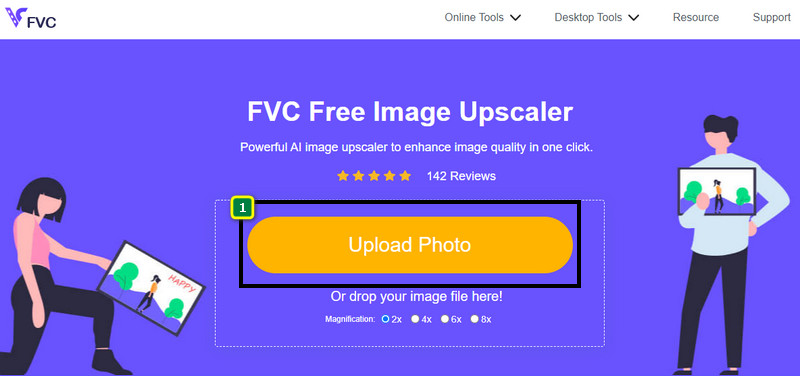
A FVC Free Image Upscaler egy teljesen automatizált online eszköz, amellyel ingyenesen tudja online eltávolítani a képpixelezést. Bármely, az Ön számára elérhető webböngészőben megnyithatja – nincs szükség külön indítóprogram letöltésére, így amint eléri a webhelyet, azonnal használatba veheti az eszközt. Noha ez a szoftver a weben érhető el, a pixelezett képek javításában nyújtott ereje és teljesítménye felér a legprofibb képszerkesztőkével, akár online, akár offline használja őket. Talán attól tart, hogy nehéz lesz kezelni ezt az eszközt, de nem így van. Még mindig kételkedik? Akkor olvassa el vagy kövesse az alábbi útmutatót, amely lépésről lépésre bemutatja, milyen egyszerűen használható ez az eszköz.
1. lépés. Bármely, az eszközén található webböngészőben elérheti ezt az online eszközt: keressen rá a nevére, vagy kattintson erre a linkre, hogy megnyissa a fő weboldalát.
2. lépés. Miután megnyílt az online eszköz, kattintson az Add Image gombra a pixeles kép feltöltéséhez. A képernyőn megjelenik egy fájlkezelő ablak; itt keresse meg a helyi meghajtón mentett képet, majd a feltöltéshez nyomja meg az Open gombot.
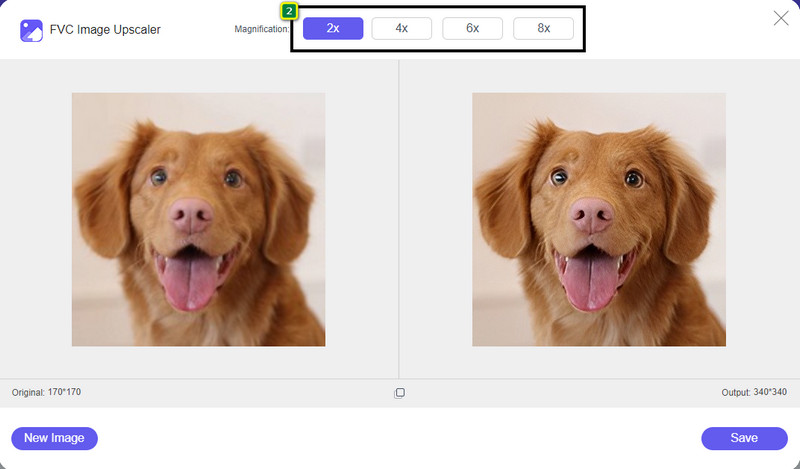
3. lépés. Ezután válassza ki azt a nagyítási beállítást, amelyet a képre alkalmazni szeretne, hogy kisimítsa a megjelenést, és a kép többé ne tűnjön apró négyzetekből álló bitképesnek.
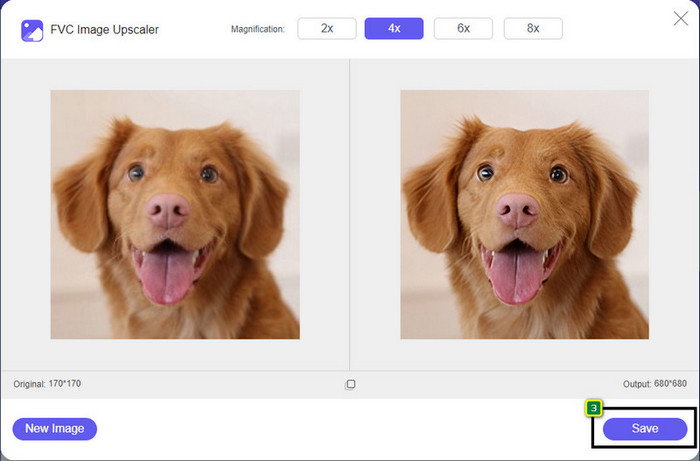
4. lépés. Ilyen egyszerű: kattintson a Save gombra, hogy letöltse a képpixelezés-mentesített változatot a helyi meghajtóra.
2. rész: Kép pixeles eltávolítása offline módban Windows és Mac rendszeren [Egyszerű]
Pixbim – Unpixelate Photos Windowson
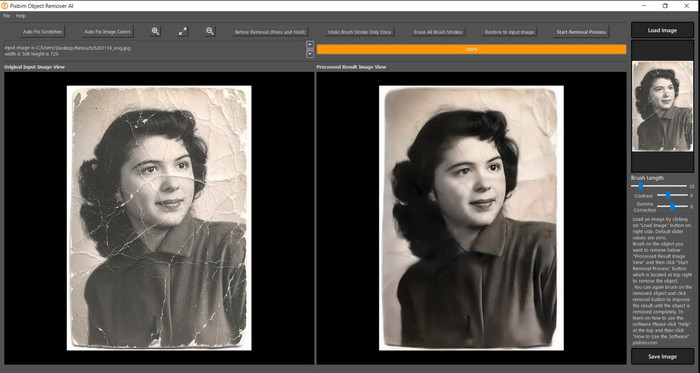
A Pixbim az egyik leghatékonyabb, MI-alapú képpixelezés-eltávolító, amelyet Windowsra letöltve használhat a probléma megoldására. Ez a szerkesztő azért érdemel említést ebben a cikkben, mert gyorsan és hatékonyan javítja a pixeles képeket. A beépített MI automatikusan beállítja a paramétereket, így Önnek nem okoz bonyodalmat a szoftver használata. Funkciói és szolgáltatásai miatt azonban licenckulcsot kell vásárolnia, ha a próbaverzió lejárta után is tovább szeretné használni. Ez sok felhasználónak drágának tűnhet, akik a saját számítógépükön szeretnék használni.
1. lépés. Miután letöltötte a szoftvert, indítsa el, hogy továbbléphessünk a következő lépésre.
2. lépés. Kattintson a Load Image gombra, hogy hozzáadja azt a pixeles képet, amelyet itt szeretne feljavítani.
3. lépés. Ezután állítsa be a paramétereket úgy, hogy a kívánt érték eléréséhez elhúzza a csúszkákat.
4. lépés. Miután befejezte a kép beállítását, mentse az eredményt, hogy exportálhassa.
Movavi Photo Editor [Windows és Mac]
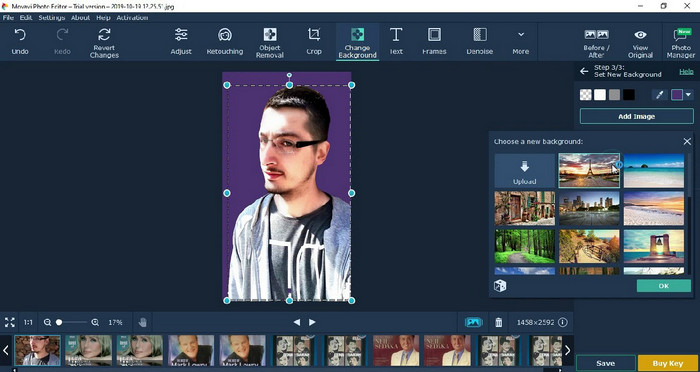
Sok felhasználó már kipróbálta a Movavi Photo Editor programot a képszerkesztésben nyújtott sokoldalúsága miatt. A Pixbimhez hasonlóan ez is képes helyreállítani a kép elveszett pixeleit a neurális hálózatokkal támogatott MI segítségével. Ezzel a szerkesztővel kéznél alap- és haladó szintű módosításokat is végezhet a megjelenésen, például vághat, forgathat, szűrőket adhat hozzá, javíthatja a pixeleket és még sok minden mást. Ezeket a funkciókat azonban nem érheti el teljes egészében, ha nem vásárolja meg az asztali gépére készült prémium verziót.
Szinte hasonló ára van, mint a Pixbimnek, ami sokaknak elég drága. De ha van költségvetése szerkesztő vásárlására, akkor erre lehet az, amire szüksége van. A lépéseket követve megtudhatja, hogyan távolíthatja el a képeket ezzel az alkalmazással.
1. lépés. Töltse le az alkalmazást Windowsra vagy Mac OS-re.
2. lépés. Indítsa el a szoftvert, majd töltse fel ide azt a fotót, amelyről el szeretné távolítani a pixelezettséget.
3. lépés. Miután feltöltötte a képet, kattintson a Magic Enhance gombra, hogy a rendszer automatikusan, MI-vel módosítsa a képet.
4. lépés. Exportálja a képet, és élvezze az eredményt.
3. rész. GYIK a kép upixelezéséről
Miért van vízjel az exportált pixel nélküli képen?
Ha az alkalmazás ingyenes próbaverzióját használja, előfordulhat, hogy az exportáláskor vízjelet hagy. Tehát, ha vízjel nélküli képet szeretne exportálni, megvásárolhatja az alkalmazás licencét, vagy használhatja az FVC Free Image Upscaler-t, mert az nem hagy vízjelet az exportált képen.
Mi a különbség az elmosódott és a pixeles között?
Sok cikk bebizonyította, hogy az elmosódott és a pixeles bizonyos tényezők miatt nem ugyanaz. Az elmosódott képek miatt kell nagy sebességű mozgást rögzíteni, vagy remegő fényképezőgéppel fényképezni. Pixelezés közben a pillanatfelvétel kinagyítása megkezdi a pixelezést, és egy kis négyzetes bittérképet fog látni.
Mi az a tényező, amely pixelessé teszi a képet?
Bizonyos okok miatt a képeket képpontokká alakítják; gyakori ok a raszteres kép nagyítása. A raszteres formátumok, mint például a PNG, JPG, GIF és egyebek, kis négyzetekből állnak, amelyek kialakítják az ezekben a tárolókban tárolt objektum megjelenését. Általában a kép nagyításakor látni fogja, hogy vannak olyan négyzetek, úgynevezett pixelek, amelyek színadatokat tartalmaznak, amelyek vizuálisan megjelennek. Ez sok szerkesztő számára problémát jelenthet, különösen, ha pixelezés történik.
Hogyan javíthatom ki a képzajt?
Ez egy másik gyakori probléma, amelybe belefuthat az elkészített képekkel kapcsolatban, és a megoldást szintén megtalálhatja ebben a cikkben. Kattintson erre a linkre, hogy könnyedén elolvassa, megoldja és elsajátítsa, hogyan távolíthatja el a képzajt.
Következtetés
Ilyen egyszerű: mostantól könnyedén eltávolíthatja a pixelezettséget a képekről a legjobb képszerkesztők segítségével, amelyeket letölthet vagy közvetlenül a weben is használhat. Az eset megoldva! Ha legközelebb pixelezettségi problémába ütközik, nyugodtan támaszkodhat erre a cikkre. A legjobb eszköz, amelyre szüksége lehet, már itt van és készen áll a segítségre, például a FVC Free Image Upscaler. A legjobb, ha a megjelenésen úgy javít, hogy kijavítja a pixelezettséget, így az vizuálisan nem zavarja a nézőket. Mondjon búcsút a pixelezettségnek, amikor ezt az online képszerkesztőt használja.
-
 7 Képfeljavító, amellyel minden képet feljavíthat és javíthat [2022]
 Szüksége van a képjavítóra? Szerencsére ez a cikk az asztalon elérhető és letölthető legjobb szoftvereket tárgyalja.
-
 5 képfelbontás-javító, amelyet használnia kell 2022-ben [legfrissebb választás]
 Nem tudja milyen képfelbontás-javítót használjon? Olvassa el ezt a cikket, miközben áttekintünk öt eszközt a képek használatához és javításához.
-
 4 alkalmazás a mobileszközök képfelbontásának növelésére [Legjobb választás]
 Ha 1080p, 4k vagy hasonlót szeretne elérni, szüksége lesz alkalmazásokra a fénykép felbontásának növeléséhez. Az alábbi listával könnyedén megteheti!
