


 Video Converter Ultimate
 Screen Recorder
 Videó javítás
 Biztonságos letöltés
Tippek és trükkök a Powtoon vízjel hatékony eltávolításához a videókon
Volt már olyan, hogy elkészítetted a tökéletes animációt, és exportáláskor a Powtoon vízjelet tett rá? Ilyen esetek leggyakrabban akkor fordulnak elő, ha az alkalmazás ingyenes verzióját használod. A vízjel tönkretette a videódat? Ne aggódj tovább! Itt megtanulhatod, hogyan távolíthatod el a Powtoon vízjelet a különböző, általunk bemutatott módszerekkel.

1. rész: Powtoon vízjel eltávolítása előfizetés nélkül [A szerkesztő választása]
A FVC Video Converter Ultimate több mint egy teljes körű megoldás Windowsra és Macre, amellyel eltávolíthatod a Powtoon vízjelét. Még ha nincs is tapasztalatod a saját videóidról a vízjel eltávolításában, ezzel a programmal akkor is könnyedén meg tudod csinálni. Kényelmes és gyors – ezt szeretné a FVC nyújtani számodra a szoftver használata közben, és ezt nagyon jól meg is valósították. Ha tehát szeretnéd megtapasztalni, hogyan lehet eltávolítani a vízjelet, kövesd az alábbi lépéseket.
Lépések a Powtoon vízjelének eltávolításához a FVC Video Converter Ultimate használatával:
1. lépés. A lenti letöltés gombra kattintva Windowsra és Macre is megszerezheted ezt a lenyűgöző videószerkesztő szoftvert. Ezután telepítsd a programot, végezd el a gyors beállítást, majd indítsd el a szoftvert.
Ingyenes letöltés Windows 7 vagy újabb rendszerre Biztonságos letöltés
Ingyenes letöltés macOS 10.7 vagy újabb rendszerre Biztonságos letöltés
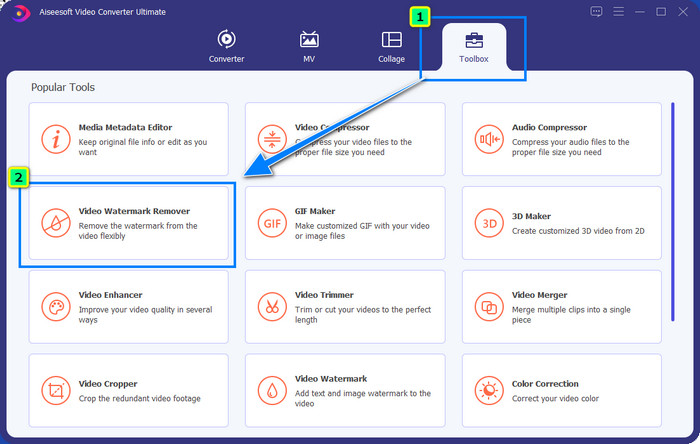
2. lépés. A Eszköztár menüben kattints a Video Watermark Remover opcióra, hogy eltávolítsd a Powtoon által a szerkesztett videódhoz adott vízjelet.
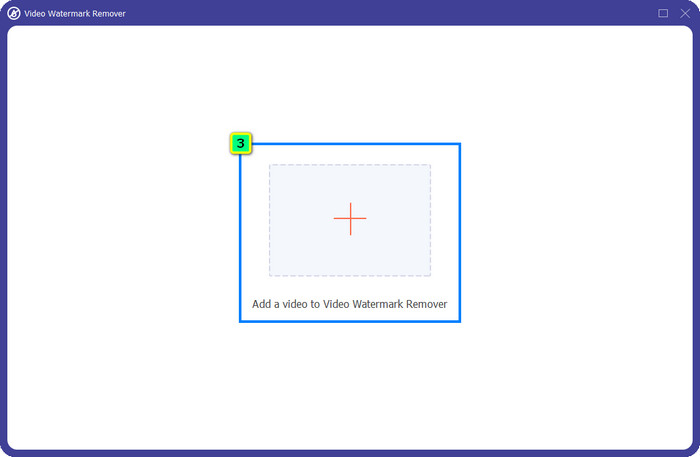
3. lépés. Ezután nyomd meg a + ikont a szerkeszteni kívánt videó feltöltéséhez, válaszd ki a megjelenő mappából a videófájlt, majd kattints az Open gombra.
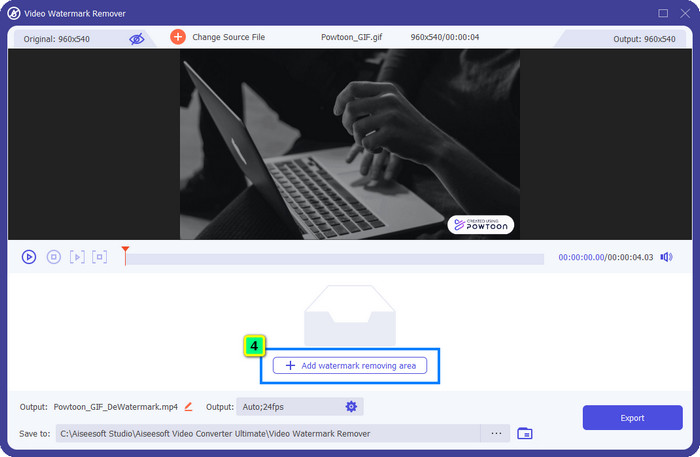
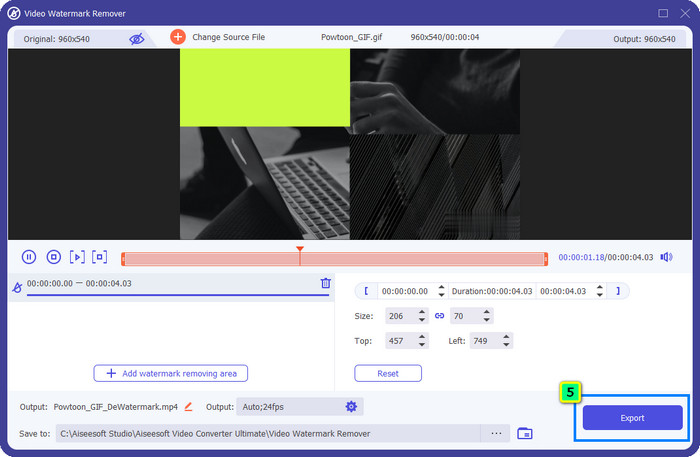
4. lépés. Nyomd meg az Add Watermark Removing Area gombot, majd helyezd a kijelölő keretet a vízjelre; igény szerint módosíthatod a méretét és pozícióját.
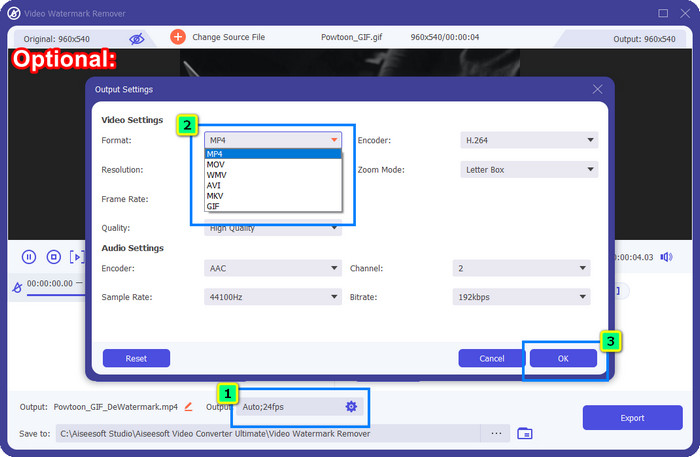
Opcionális: Szeretnéd az elkészült videót új formátumban elmenteni? Kattints az Output résznél a Format menüpontra, és válaszd ki az új videóformátumot. További videó- és hangbeállításokat is módosíthatsz, majd kattints az OK gombra a változtatások mentéséhez.
5. lépés. Nyomd meg az Export gombot, hogy letöltsd a vízjel nélküli videót.
2. rész: Powtoon vízjel eltávolítása előfizetéssel [terv alapú]
Van a Powtoon-nak vízjele? Igen, az ingyenes verzió használatakor vízjelet ad hozzá. De ha megvásárolja a Pro vagy Pro+ készüléket, exportálhatja a végső kimenetet vízjel nélkül. Tehát, ha meg szeretné tudni, hogyan vásárolja meg a szoftvert, hogy vízjel nélkül élvezhesse a szerkesztett videót, kövesse a következő lépéseket.
A Powtoon Pro és Pro+ csomag vásárlásának lépései:
1. lépés. Nyisd meg a Powtoon hivatalos weboldalát, és kattints a Pricing menüpontra, hogy lásd a Pro verzió árait.
2. lépés. Válaszd ki a számodra megfelelő csomagot, a Pro vagy a Pro+ lehetőséget, majd kattints a Get Plan gombra.
3. lépés. Töltsd ki a szükséges számlázási adatokat, lépj tovább a fizetési mód megadásához, majd kattints a Make Secure Payment gombra.
3. rész: Hogyan távolítsuk el a Powtoon vízjelet online ingyen [Web-szolgáltatás]
1. Media.io - Watermark Remover
A Media.io - Watermark Remover képes ingyen eltávolítani a Powtoon vízjelet. Bármely webböngészőben használható, vagyis nem kell letöltened az alkalmazást a használathoz. Bár maga a vízjel-eltávolító ingyenes, stabil és erős internetkapcsolatra lesz szükséged a használatához. A feltöltési és letöltési folyamat hosszabb időt vehet igénybe, mint az elsőként bemutatott vízjel-eltávolító esetében. Ennek ellenére ez a szoftver kiváló választás, és ha szeretnéd megtudni, hogyan kell használni, kövesd az alábbi lépéseket.
Lépések a Powtoon vízjel eltávolításához a Media.io használatával:
1. lépés. Nyisd meg a weboldalt, és kattints a Choose File gombra, hogy hozzáadd azt a videót, amelyről el szeretnéd távolítani a vízjelet. Várd meg a betöltési folyamatot; ez hosszabb időt is igénybe vehet, az internetkapcsolatod sebességétől függően.
2. lépés. Nyomd meg az Add Area gombot, és helyezd a vízjel-eltávolítási területet arra a részre, ahol a vízjel található.
3. lépés. Nyomd meg az Export gombot, hogy elmentsd a szerkesztett Powtoon videót a helyi meghajtódra – ilyen egyszerű.
2. Kapwing
A Kapwing egy másik, vízjel eltávolítására szakosodott online eszköz, amely a videó kivágásával tünteti el a vízjelet. Emellett további szerkesztési funkciókat is kínál, amelyekkel kiemelkedő videókat készíthetsz, szinte a Powtoonhoz hasonlóan. Az itt bemutatott többi vízjelmegoldással ellentétben ez a szoftver megváltoztatja a videó méreteit, mivel a vízjelet levágással távolítod el. Ha nem zavar, hogy a videó egy részét levágod, kövesd az alábbi lépéseket a Powtoon vízjel eltávolításához.
Lépések a Powtoon vízjel kivágásához a Kapwing használatával:
1. lépés. A böngésződben keresd meg a programot, majd nyisd meg.
2. lépés. Kattints az Add Media gombra, hogy importáld az itt kivágni kívánt videót.
3. lépés. Miután elhelyezted a felvételt, kattints a Crop gombra, és állítsd be a képarányt a kívánt méretre.
4. lépés. Ha el szeretnéd menteni a végső videót, kattints a Done Cropping gombra.
4. rész. GYIK a Powtoon vízjel eltávolításával kapcsolatban
Melyik a legjobb platform a videofelbontás növelésére a Powtoonon?
Több millió módja van annak, hogy növeld Powtoon-videód felbontását. Némelyik azonban nem úgy működik, ahogy elvárnád. Ahelyett tehát, hogy a szerencsére bíznád, elvégezzük helyetted a nehéz munkát, neked pedig csak néhány percet kell szánnod a cikk elolvasására. Válaszd ki, hogy a 8 videófelbontás-konverter közül melyik felel meg legjobban az igényeidnek.
Hogyan adjunk vízjelet a videóhoz?
A legjobb módja annak, hogy vízjelet adj egy videóhoz, ha ehhez megfelelő szoftvert használsz – legyen az szöveg, logó, bélyegző, dátum és idő vagy bármi hasonló. Ha van egy kis szabadidőd, érdemes elolvasnod és megértened, hogyan lehet vízjeleket hozzáadni különböző platformokon, egyszerűen.
Miért drága a Powtoon?
A Powtoon az általa nyújtott animációs szerkesztés miatt drágult meg, amelyet többnyire nem lehet más videószerkesztőben használni, akár online, akár offline. Útközben is elérhető, így nem kell indítóprogramot telepítenie a használatához. Ennek ára azonban nem sokak számára elérhető. A Powtoon ingyenes verziója és vízjel helyett próbálja meg a legjobb videószerkesztő alternatívát, az FVC Video Converter Ultimate-t használni. Számos szolgáltatást és funkciót kínál, amelyeket biztosan élvezni fog.
Következtetés
A Powtoonból vízjel nélkül is menthetsz videókat, de ehhez előfizetést kell vásárolnod, hogy a szerkesztett videót bármiféle vízjel nélkül mentsd el. Nem tetszik az előfizetés ötlete? Akkor próbáld ki az általunk bemutatott online vízjel-eltávolítókat. Lassú az internetkapcsolat? Ebben az esetben inkább a FVC Video Converter Ultimate használatát javasoljuk, amellyel gyorsan és professzionális módon távolíthatod el a vízjelet a videóról. Több millió szoftverhez képest a FVC Video Editor kínálja az egyik leghatékonyabb megoldást arra, hogy bármit eltávolíts a videódból. Ezenkívül a program által biztosított funkciók és eszközök segítségével tovább is finomíthatod a felvételt.
-
 Könnyen távolítsa el a vízjelet PDF-ből egyszerű lépésekkel
 Távolítsa el a vízjelet a PDF-ből az alábbi egyszerű lépések végrehajtásával. Tanulja meg, hogyan távolíthat el egyszerűen vízjeleket PDF-fájljaiból ezekkel a csodálatos eszközökkel.
-
 Egyszerű módszerek a vízjel eltávolítására az érettségi képekről
 Szeretné tudni, hogyan távolíthatja el a vízjeleket az érettségi képekről? Ha elolvassa ezt a cikket, megtudhatja, hogyan távolíthatja el egyszerűen a vízjeleket a grad képekről.
-
 A vízjel eltávolítása a videóról a Final Cut Pro segítségével [Teljes útmutató]
 Problémája van a vízjellel a videókon? Nem szólt többet, mert bemutattunk egy oktatóanyagot a vízjel eltávolításához a videóról a Final Cut Pro segítségével.
