


 Video Converter Ultimate
 Screen Recorder
 Videó javítás
 Biztonságos letöltés
Konvertálja a DIVX-et 3GP-vé a leghatékonyabb eljárásokkal
You can’t play your DIVX video on your device because it is not supported? Most people are having the same problem. But you are lucky because we will discuss the most effective and easiest method to convert DIVX to 3GP. Don’t miss this chance, and learn more about converting different files using various trusted and tested applications we will introduce.

1. rész: A legjobb szoftver a DIVX 3GP-vé konvertálásához
Do you want to convert DIVX to 3GP on your devices like Windows and Mac computers? Then your problem is already solved. To convert your DIVX file you can use the Video Converter Ultimate. From the name of the tool itself, it is an ultimate application wherein you can convert 1000+ video file formats, including DIVX, 3GP, MP4, MOV, MTS, WEBM, and more. You can also convert two or more files simultaneously because this tool offers batch conversion. In addition, Video Converter Ultimate has a fast conversion process, which is great if you plan to convert numerous file formats.
Továbbá továbbra is használhatja ezt az offline alkalmazást, ha szeretné szerkeszteni a DIVX-fájlt a konvertálás előtt. Feltételezve, hogy módosítani szeretné a videó színét, lépjen tovább az Eszköztár panelre, és válassza ki a Színkorrekció eszközt a videó fényerejének, kontrasztjának és telítettségének beállításához. Ezenkívül tegyük fel, hogy szinkronizálni szeretné a hangot a DIVX-videófájlban, mielőtt konvertálná. Ebben az esetben megteheti, mert hangszinkronizálási funkciót kínál, így a hang és a videó szinkronizálása egyszerű.
Funkciók:
◆ Videofájl formátumok konvertálása, beleértve az MP4, M4V, FLV, AVI stb.
◆ Különféle témájú zenei videókat hozhat létre.
◆ Az Eszköztár videójavítót, vízjeleltávolítót, kompresszort és egyebeket tartalmaz.
◆ Képes kollázs készítésére.
Előnyök
- Támogatja a különféle fájlformátumokat, például MP4, AVI, FLV, MOV, MTS, DIVX, 3GP stb.
- Barátságos felhasználói felülettel rendelkezik, amely kezdők számára is megfelelő.
- 30-szor gyorsabb konverziós folyamattal rendelkezik
- Windows és Mac rendszeren is elérhető.
- Egyszerre több videót is konvertálhat.
Hátrányok
- Vásárolja meg a Video Converter Ultimate terméket, hogy még több egyedi funkciót élvezhessen.
A DIVX egyszerű 3GP-vé konvertálásához kövesse az alábbi egyszerű útmutatókat.
Step 1: First, you just need to download the Video Converter Ultimate on your devices, such as Windows or Mac computers. Then, go to the installation process and open the application
Ingyenes letöltés Windows 7 vagy újabb rendszerre Biztonságos letöltés
Ingyenes letöltés macOS 10.7 vagy újabb rendszerre Biztonságos letöltés
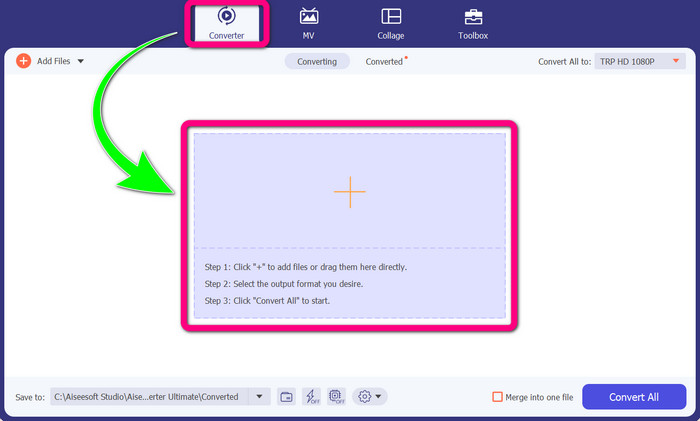
Step 2: When you already open the Video Converter Ultimate on your device, select the Converter panel. Then, click the + icon to add your DIVX video file.
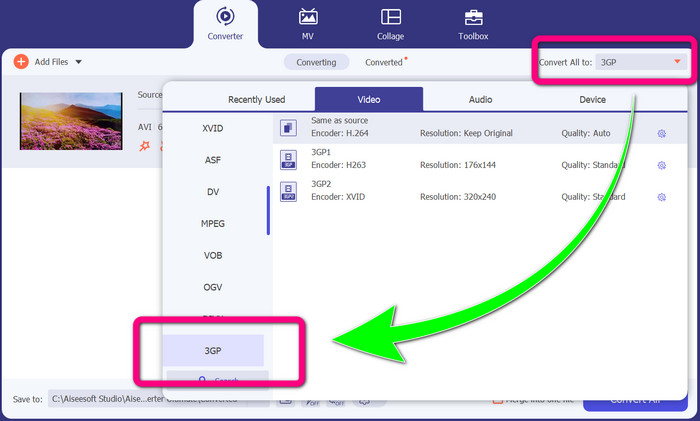
Step 3: After adding your video file, click the Convert all to option, look for the 3GP file format, and select it.
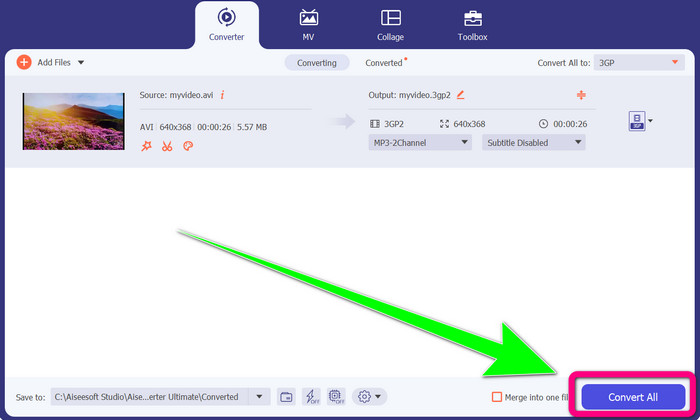
Step 4: If you are done selecting the 3GP file format, click the Convert All button. Wait for the conversion process and save your final video to your device.
2. rész: Kiváló online konverterek a DIVX 3GP-vé konvertálásához
Az FVC Free Video Converter Online használata
One of the best online tools to convert DIVX to 3GP is FVC Free Video Converter Online. This tool can help you convert different file formats in just a few clicks. It supports almost all mainstream videos and audio to MP4, MOV, MKV, FLV, VOB, MP3, AAC, and more. FVC Free Video Converter Online is simple and easy to operate. Even beginners are capable of utilizing this application. Also, if you are a Windows user or a Mac user, you can rely on this tool because it is available on both Windows and Mac. Follow the easy methods below to convert DIVX to 3GP.
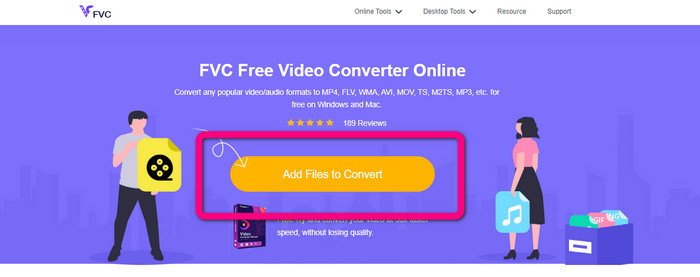
Step 1: Visit the FVC Free Video Converter Online. Then, select the Add Files to Convert button to import your DIVX file you want to convert.
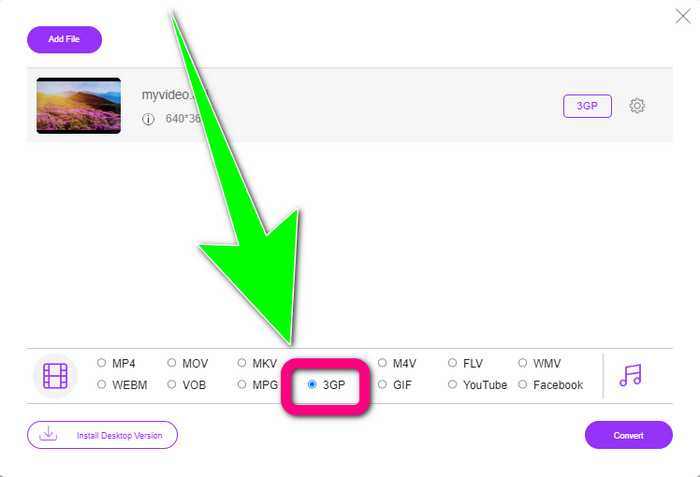
Step 2: After adding your DIVX file, click the 3GP file format from the format options below.
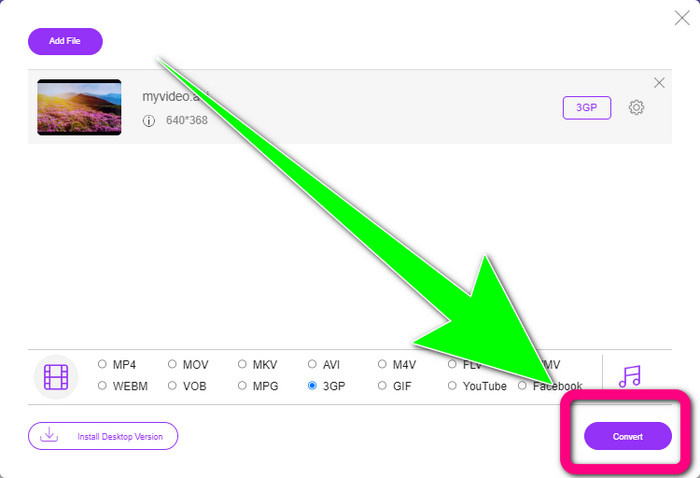
Step 3: Proceed by clicking the Convert button. Wait for the conversion process and save your converted video.
A Convertio használata
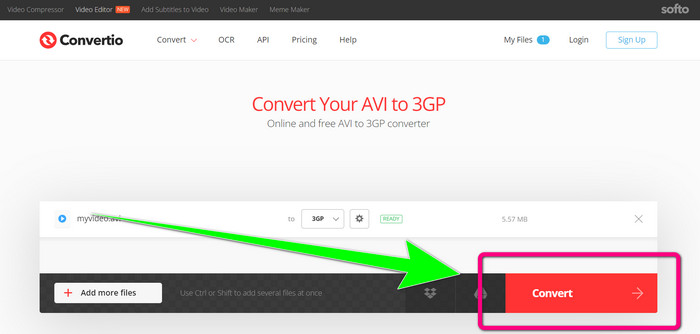
If you want to convert DIVX to 3GP online, Convertio is one of the tools you can utilize. It supports many formats, like 3GP, DIVX, XVID, AVID, MP4, M4V, ASF, HEVC, and more. Aside from converting video files, you can convert images, audio, documents, archive, and other files. Convertio is also a simple tool because you can convert in a few steps, so you won’t have to trouble yourself in converting your DIVX file to a 3GP file. However, just like the other online tools, you can’t operate this software if you don’t have access to the internet. Also, there are some instances that this online tool is not performing very well. The free version of Convertio has a limit. You can only convert with a maximum file size of 100Mb. You must purchase the software to increase the maximum file size and experience great performance. Follow the steps below to convert the DIVX file to a 3GP file format.
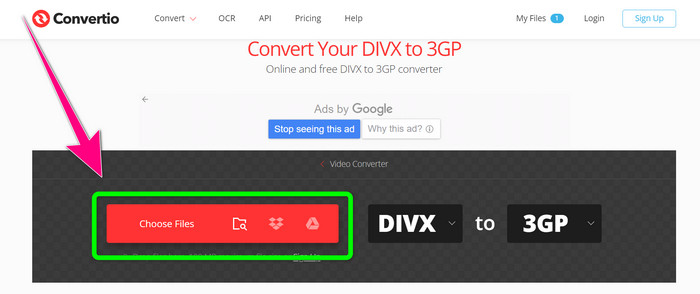
Step 1: Go to the Convertio website. Click the Choose Files button and add your video with a DIVX file format.
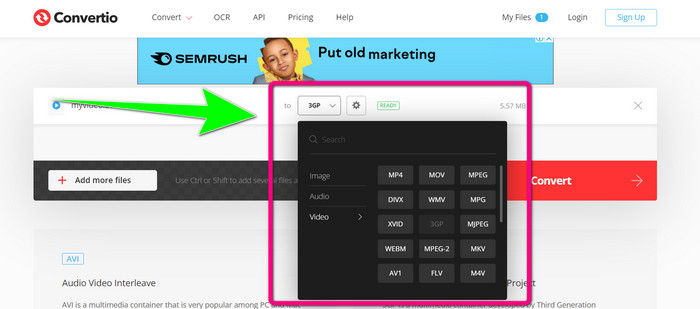
Step 2: After adding your video, go to the format options and select the 3GP file format.
Step 3: When you have selected the 3GP file format, click the Convert button, wait for the conversion process and save your 3GP video file.
3. rész: A DIVX és 3GP fájlformátumok áttekintése
DIVX
DIVX is a video compression software capable of compressing video files up to one-twelfth of the original video with minimal loss in quality. This video format is common in big movie companies like Disney, Dreamworks SKG, Universal, and Paramount.
3GP
3GP is a multimedia container. The Third Generation Partnership Project developed it in 1998 for GSM-based (Global System for Mobile Communications) phones. The 3GP container requires storage space, data usage, and little bandwidth, which is great for cell phones.
További olvasnivaló
Easily Convert MTV to MKV Using These Ultimate Converters
How to Convert TRP to MKV Without Losing the Quality
4. rész: GYIK a DIVX 3GP-vé konvertálásával kapcsolatban
Mi az a DIVX konverter?
It is an excellent tool capable of converting different file types to numerous other file formats. These include AVI, MP4, MPEG, MOV, FLV, and more. Once you are done converting, you can now play your video to any other media player that supports a particular format. FVC Free Video Converter Online is one of the best converters you can use.
A DIVX fájlformátum megegyezik az AVI-val?
A DIVX fájlformátum az AVI tárolón alapul, de tartalmazhat nagyszerű szolgáltatásokat, például fejezeteket és feliratokat. Ezenkívül az AVI és DIVX fájlformátumok is lejátszhatók a DIVX-tanúsítvánnyal rendelkező eszközökön.
Átalakíthatom a DIVX fájlt 3GP-re anélkül, hogy a minőség romlana?
Yes, of course, you can. Using the Video Converter Ultimate, you can convert the DIVX file to 3GP without worrying if the quality will change. This excellent converter can convert different files without losing your video's quality.
Következtetés
As you can see, there are various effective methods to convert DIVX to 3GP using offline and online tools. But sometimes, some online tools are inconvenient, especially if you have a low internet connection so you can use a downloadable application. If you are looking for an outstanding offline tool, you can try Video Converter Ultimate.
-
 A 4 legjobb MKV-3GP konverter Windows és Mac rendszerhez
 Ha könnyen használható MKV-3GP konvertert keres, szerencséje van! Megtaláltuk a legjobb és ingyenes MKV-3GP konvertereket, amelyeket ki kell próbálnia.
-
 Az 5 legjobb végső MOV-3GP konverter, amelyet nem szabad kihagyni
 Ha a legjobb online és offline MOV-3GP konvertereket keresi, akkor jó úton jár. Olvassa el ezt a cikket a MOV 3GP-fájllá konvertálásához.
-
 3 módszer az MPG konvertálására 3GP-vé Windows és Mac rendszeren [ingyenes]
 Ha az MPG 3GP-vé konvertálásának módjait keresi, olvassa el ezt a cikket, hogy megismerje az MPG 3GP-vé konvertálásának legjobb módjait Windows és Mac rendszeren.
