


 Video Converter Ultimate
 Screen Recorder
 Videó javítás
 Biztonságos letöltés
Páratlan és tökéletes módszerek az AMV MP4-re konvertálására
Szeretné, ha AMV videóját minden lejátszóprogramban gond nélkül élvezhetné? Akkor az AMV fájlt MP4 formátumba kell átalakítania. De ne aggódjon! Megadjuk a legjobb megoldást a videófájlok konvertálására. Ez a cikk már letesztelte azokat az átalakítókat, amelyeket itt megismerhet. Így nem kell amiatt aggódnia, hogy az alkalmazások biztonságosak‑e. Emellett bemutatjuk azokat a funkciókat is, amelyeket a szoftver használata közben élvezhet. Ha felkeltettük az érdeklődését, és Ön is azok közé a felhasználók közé tartozik, akik AMV‑t szeretnének MP4‑re konvertálni, olvassa el ezt a cikket, és sajátítsa el a videókonvertálással kapcsolatos tudnivalókat.

1. rész: Az AMV és az MP4 bemutatása
AMV
Fájlkiterjesztés: .amv
Fejlesztő: MTV
Fájlkategória: Videófájl-formátum
Leírás: Az Actions Media Video fájlformátumban mentett videókat, amelyeket egyes kínai hordozható médialejátszók támogatnak, AMV fájloknak nevezik. Egy tömörített, alacsony felbontású (96x96–320x240 képpontos) filmet tartalmaznak. Az AMV médialejátszókhoz mellékelt asztali számítógépes szoftver, valamint a VideoLAN VLC médialejátszó is képes AMV fájlok lejátszására.
Kapcsolódó programok: K‑Lite Codec Pack, VideoLAN és VLC Media Player
AMV
Fájlkiterjesztés: .mp4
Fejlesztő: Moving Picture Experts Group (MPEG)
Fájlkategória: Videófájl-formátum
Leírás: Az AAC és az MPEG-4 videószabvány együttesen határozza meg az MP4 kiterjesztést. Bármilyen médiatípus, beleértve a hangot, a videót, a feliratokat, valamint a 2D és 3D grafikát, tartalmazhat a tárolóban. Szinte minden lejátszó lejátszhatja az MP4 fájlokat Windows rendszeren, de Mac rendszeren telepítenie kell egy beépülő modult, vagy konvertálnia kell az MP4 fájlt egy másik formátumba. A Mozgókép-szakértők nevű csoport.
Kapcsolódó programok: Apple, QuickTime Player, VLC Media Player, Microsoft, Windows Media Player és VideoLAN.
2. rész: Kiváló eljárások az AMV MP4 offline konvertálására
Ha letölthető eszközzel szeretné az AMV‑t MP4‑re konvertálni, megvan a legjobb megoldásunk az Ön számára. Használhatja a Video Converter Ultimate programot. Több mint 100 videóformátumot támogat, többek között az AVI, MKV, WMV, MOV, FLV, M4V, SWF, MTS, M2TS formátumokat és még sok mást. Ez az eszköz intuitív felülettel és egyszerű lépésekkel rendelkezik, így minden felhasználó számára megfelelő. A programmal több fájlt is átalakíthat egyszerre, mivel támogatja a kötegelt konvertálást. Ráadásul az egyik legkiemelkedőbb tulajdonsága az ultragyors konvertálási folyamat: akár 30× gyorsabb, mint más átalakítók. Emellett ezzel az eszközzel az AMV videóit is szerkesztheti. Ha többet szeretne megtudni az alkalmazás további funkcióiról, olvassa el az alábbi kiegészítő információkat.
Jellemzők
◆ Különféle videoformátumok konvertálása, például MP4, AMV, WMV, AVI, MKV, FLV, SWF, MOV és több mint 100 további.
◆ Kötegelt átalakítási folyamatot kínál több fájl egyidejű konvertálására.
◆ Videószerkesztő eszközöket biztosít, például videójavítót, trimmert, vágót, forgatót, színkorrekciót stb.
Kövesse az alábbi egyszerű utasításokat az AMV MP4-re konvertálásához az FVC Video Converter Ultimate használatával.
1. lépés: Először le kell töltenie a Video Converter Ultimate programot Windows vagy Mac rendszerre. Kattintson az alábbi Letöltés gombra. Ezután telepítse és nyissa meg a szoftvert.
Ingyenes letöltés Windows 7 vagy újabb rendszerre Biztonságos letöltés
Ingyenes letöltés macOS 10.7 vagy újabb rendszerre Biztonságos letöltés
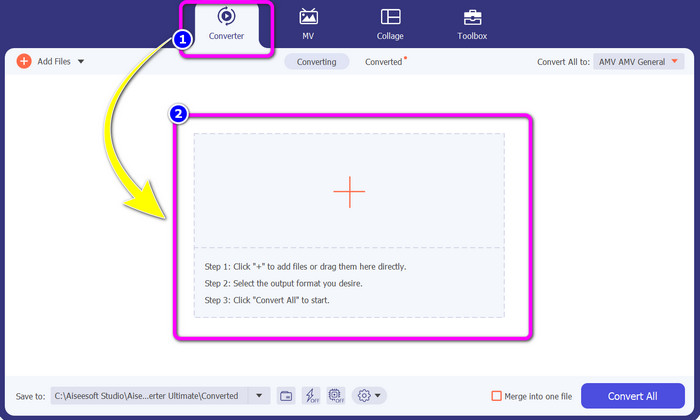
2. lépés: Válassza a Converter panelt, majd kattintson a Plusz jelre. Megnyílik a mappája, és válassza ki azt az AMV videót, amelyet konvertálni szeretne.
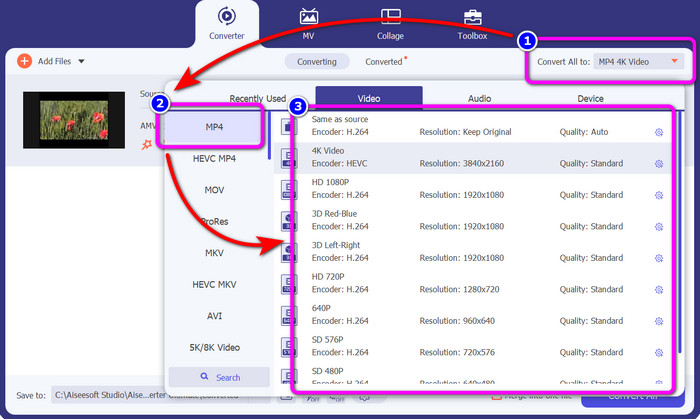
3. lépés: Nyomja meg a Convert All to gombot. Amikor megjelennek a formátumbeállítások, válassza ki a kívánt kimeneti formátumot, az MP4 fájlt. Ezután beállíthatja a videó felbontását akár 4K videó felbontásig. Válassza ki az Önnek megfelelő felbontást, vagy hagyja meg az eredeti videóval megegyező felbontást.
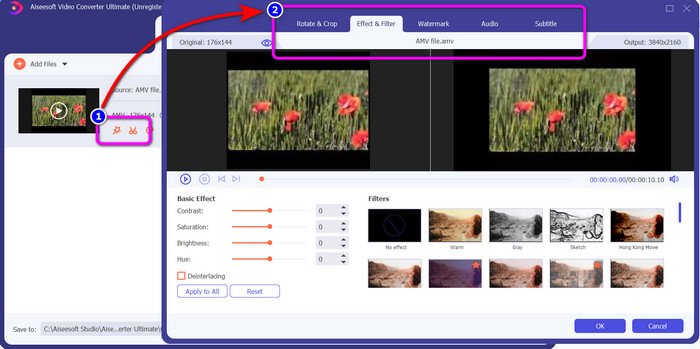
4. lépés: Ha szerkeszteni szeretné a videót, kattintson a Edit ikonra. Ezután már szerkesztheti is a videót: módosíthatja, hozzáadhat vagy eltávolíthat vízjeleket, effekteket vagy szűrőket alkalmazhat, illetve forgathatja és vághatja a videót. Végül kattintson az OK gombra. Így tovább javíthatja a videó minőségét.
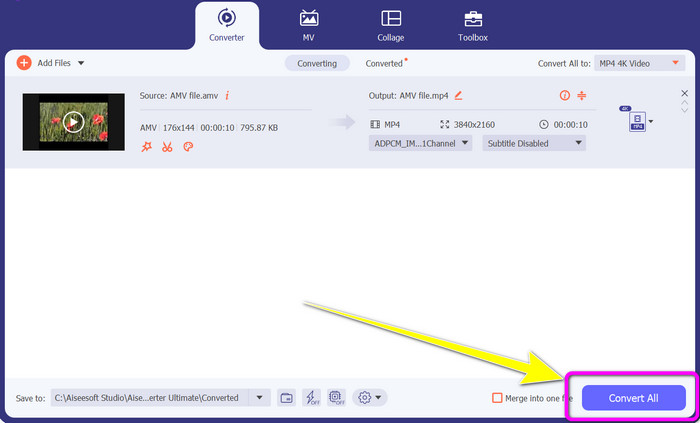
5. lépés: A videó szerkesztése után kattintson a Convert All gombra a konvertálási folyamat elindításához. Ezt követően mentse a végső kimenetet a számítógépére. Nyissa meg az átkonvertált videót a számítógépén, hogy megnézze a végeredményt. Kattintson ide, ha meg szeretné tudni, hogyan lehet DV‑t MP4‑re konvertálni.
3. rész: Az AMV ingyenes online konvertálása MP4-re a legegyszerűbb módja
Az AMV MP4‑re történő online konvertálásának másik módja a FVC Free Video Converter Online használata. Ez az eszköz egyszerű lépésekkel és letisztult felülettel rendelkezik, így kezdő és haladó felhasználók számára egyaránt könnyen elérhető. Néhány kattintással konvertálhat videókat. Emellett ez az átalakító számos videóformátumot támogat, például AVI, MP4, M4V, FLV, MOV, WMV, MKV és további formátumokat. Kötegelt konvertálást is végezhet, hogy egyszerre több fájlt alakítson át. Ráadásul a videó felbontását is módosíthatja a konvertálás során. Az is lehetséges, hogy beállítsa a videó bitrátáját és képfrissítési sebességét. Ezt az online alkalmazást ingyen használhatja, és videóit mindenféle zavaró elem – például vízjelek, logók, matricák, szöveg stb. – nélkül töltheti le. Minden böngészőből elérhető, többek között a Google Chrome, Safari, Internet Explorer, Microsoft Edge stb. alól.
Funkciók
◆ Különféle videoformátumok konvertálása, beleértve az MP4, AMV, FLV, AVI, MOV, VOB, MKV és egyebeket.
◆ Kötegelt átalakítási folyamatot kínál a gyorsabb eljárás érdekében.
◆ Szerkessze a videó bitsebességét, képkockasebességét és felbontását.
◆ Hangformátumok konvertálása, például MP3, FLAC, WAV, AAC, AC3 stb.
◆ Állítsa be a hang bit- és mintavételi sebességét.
Az alábbi egyszerű eljárások segítségével konvertálja az AMV-t MP4-re az FVC Free Video Converter Ultimate segítségével.
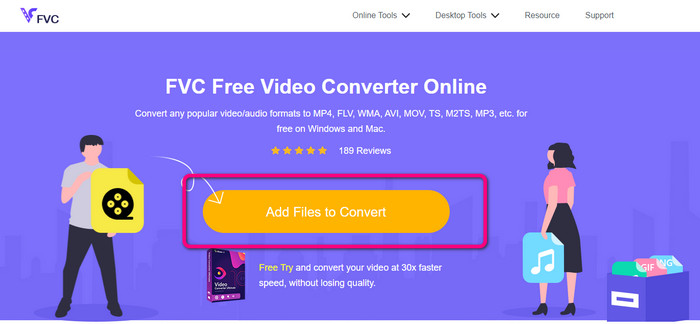
1. lépés: Nyissa meg a böngészőt, és látogasson el a FVC Free Video Converter Online weboldalára. Nyomja meg az Add Files to Convert gombot az átalakítani kívánt AMV videó feltöltéséhez.
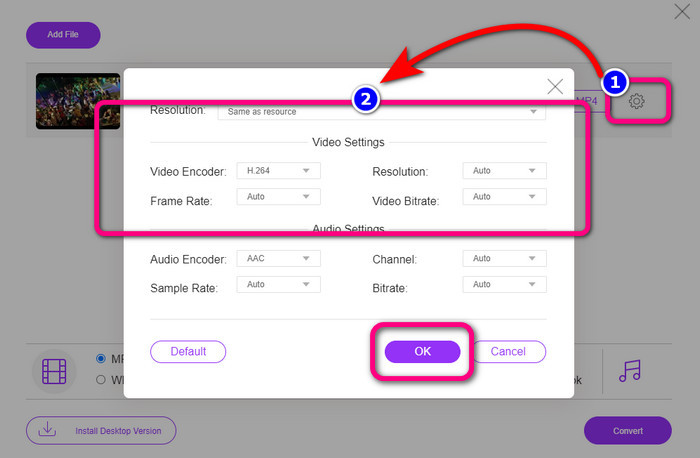
2. lépés: Az AMV videó hozzáadása után kattintson a Setting ikonra, hogy beállítsa a videó képfrissítési sebességét, bitrátáját és felbontását. Ezután nyomja meg az OK gombot.
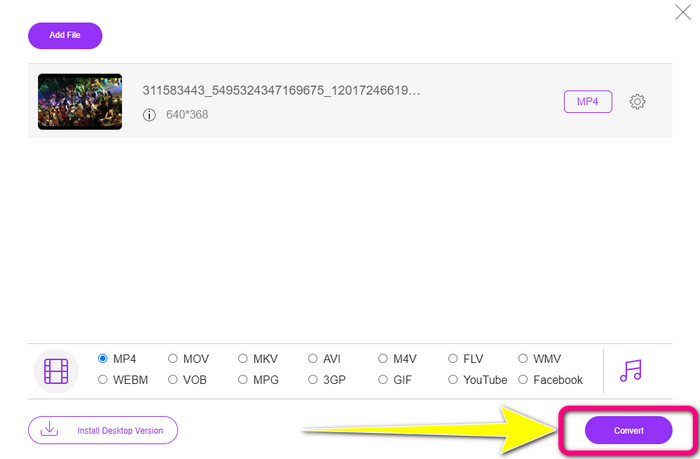
3. lépés: A felület alsó részén válassza ki az MP4 fájlformátumot. Ezután kattintson a Convert gombra. Ezzel az eszközzel AMV‑t is konvertálhat MKV formátumba.
4. rész: GYIK az AMV MP4-re konvertálásával kapcsolatban
1. Az AMV ugyanaz, mint a WMV?
Nem ugyanazok. Az AMV egy MP4 és S1 MP3 lejátszóval kompatibilis videofájl formátum. Más videóformátumokhoz, például a WMV-hez képest kisebb a mérete. Nem igényel nagy feldolgozási teljesítményt a lejátszásához.
2. Mi a jobb, AVI vagy AMV?
Használhatja az AVI fájlt, ha bárhol le szeretné játszani a videót. Az AMV fájlformátum azonban jó választás, ha kisebb fájlméretet szeretne.
3. Hogyan konvertálhatok videofájlokat MP4 formátumba?
Használhatja a Video Converter Ultimate alkalmazást. Szinte minden videoformátumot támogat, és gyorsabban konvertálhatja a videofájlokat.
Következtetés
Az AMV MP4‑re konvertálása egyszerű, ha a fent említett két átalakítót használja. Kezdő és haladó felhasználók egyaránt igénybe vehetik ezeket az eszközöket, mivel mindkettő intuitív felületet és egyszerű lépéseket kínál. Használja tehát a Video Converter Ultimate és a FVC Free Video Converter Online programokat még ma!
-
 Sikeres módszerek a DIVX azonnali MP4-re konvertálására
 Hogyan konvertálhatom a DIVX-et MP4-re? Ha a legjobb megoldást keresi, akkor a megfelelő cikkben jár. Megmutatjuk, hogyan lehet egyszerűen konvertálni a DIVX-et MP4-re
-
 F4V konvertálása MP4-re a leghatékonyabb módszerekkel
 Az F4V videóid nem jó minőségűek? Ezután alakítsa át MP4 fájllá. Ez a bejegyzés kínálja a legjobb módot az F4V MP4-re konvertálására online és offline
-
 Öt népszerű módszer az Xvid MP4 formátummá konvertálására
 Ebben a cikkben tekintse meg ezeket a csodálatos módszereket az Xvid MP4 fájlformátumba konvertálására. Ezenkívül megtudhatja a konvertáláshoz használható legjobb alkalmazásokat
