


 Video Converter Ultimate
 Screen Recorder
 Videó javítás
 Biztonságos letöltés
PSD konvertálása JPG/PNG formátumba: figyelemre méltó módszerek, amelyeket nem hagyhatsz ki
PSD is a file format from Adobe. Some users can open this image file in Adobe Photoshop, Corel, and PaintShop Pro. However, aside from the said programs, you can’t open the PSD format to other programs easily. It is because some programs/editors don’t support a PSD format. In that case, one of the best solutions you can get is to convert it to other file formats. Luckily, JPG and PNG formats are prevalent nowadays. Almost all browsers, programs, and editors support these two formats. So, in this guidepost, we will offer you the best ways to convert PSD to JPG or PNG.

1. rész. Hasonlítsa össze a PSD-t, a JPG-t és a PNG-t
| Fájlformátum | PSD | JPG / JPEG | PNG |
| Fájlkiterjesztés | .psd | .jpg | .png |
| Teljes név | Photoshop dokumentum | Közös Fényképészeti Szakértői Csoport | Hordozható hálózati grafika |
| Által kifejlesztett | Vályogtégla | Közös Fényképészeti Szakértői Csoport | PNG Fejlesztési Csoport |
| Leírás | Az Adobe Photoshop natív fájlformátumát a PSD fájlt. Valószínűleg .psd kiterjesztésű fájlokkal találkozott. Főleg, ha valaha is használta az Adobe Photoshopot; észreveheti őket. A művészek és a tervezők gyakran használták ezt a fájlformátumot. | A képfájl formátum a JPG vagy JPEG fájl. A JPG képfájlok azonos típusúak, függetlenül attól, hogy .JPG vagy .JPEG fájlkiterjesztéssel rendelkeznek. A JPG fájlok megnyithatók webböngészőivel, például Chrome vagy Firefox, Viewer és Paint segítségével. | Egy hordozható hálózati grafika (PNG) fájl ezek egyike. A tömörítési módszer veszteségmentes. Általában a GIF képformátum helyettesítőjének tekintik. A PNG-fájlok azonban nem támogatják az animációkat, ahogy a GIF-fájlok képesek. |
| Tömörítés | Veszteségmentes | Vesztes | Veszteségmentes |
| Kapcsolódó programok/böngészők | Adobe Photoshop, GIMP, XnView, Google | IrfanView, Paint, Adobe Photoshop, GIMP, Microsoft, FastStone Image Viewer, Google Chrome, Internet Explorer | FastStone Image Viewer, Adobe Photoshop, GIMP, Microsoft, Paint, Google Chrome, Internet Explorer |
2. rész. Kiváló módszerek a PSD online JPG/PNG formátumba konvertálására
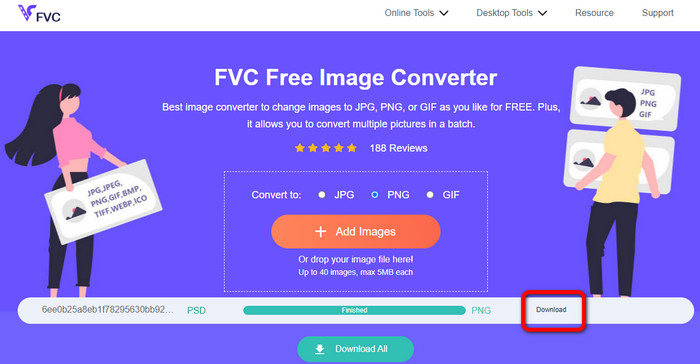
Hogyan lehet PSD-t JPG/PNG-re konvertálni az FVC Free Image Converter segítségével
FVC Free Image Converter is an outstanding online tool you can use to convert PSD to JPG/PNG. This image converter online can expertly convert your PSD to JPG. This software can accept input formats, including EPS, JPG, PNG, TIFF, BMP, and more. Additionally, it has an easy-to-use layout and precise settings. This way, experienced and new users can convert photographs using this tool. Additionally, it is easier to use because it only requires a few steps to convert images. All users can use FVC Free Image Converter because it is available in all browsers. Moreover, FVC Free Image Converter offers free photo conversion. This application is web-based, so you don't need to download any software or plug-ins. Unlike other converters, there won't be any intrusive ads while converting image formats. It also guarantees the high caliber of the photograph. The converted photos will keep the appearance of the original photos. The FVC image file converter also allows for batch conversion. You can convert a large number of pictures at once. This image converter can process up to 40 images.
Konvertálja a PSD-t JPG-be
Step 1. Navigate your browser on the FVC Free Image Converter website. Select the JPG file format from the format options.
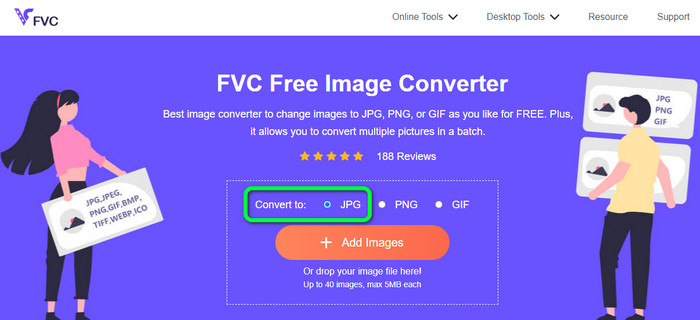
Step 2. After selecting the desired output format, click the Add Images button. When the computer file shows up, choose the PSD image and open it. After the uploading process, it will convert the PSD to JPG automatically.
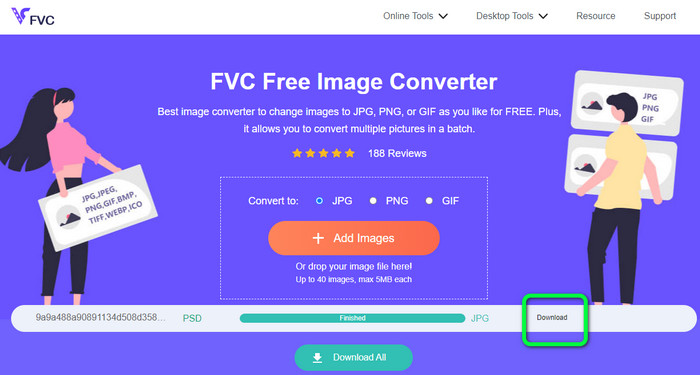
Step 3. After the conversion process, save your converted image by clicking the Download button.
Konvertálja a PSD-t PNG-re
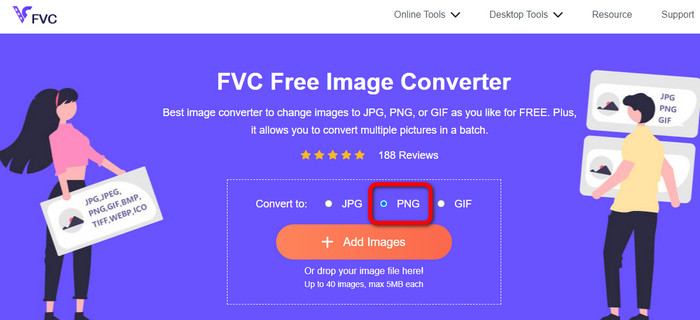
Step 1. When you are on the official website of FVC Free Image Converter, select the PNG format.
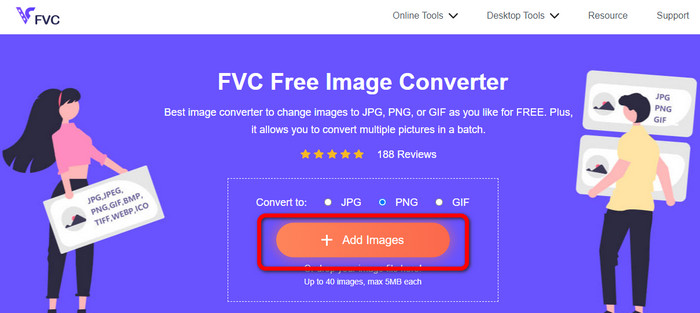
Step 2. Click the Add Images button to upload the PSD image. You can also drop the image file directly into the box. Then, wait for the uploading and conversion process.
Step 3. For the last step, click the Download button to save the final result.
Hogyan lehet PSD-t JPG/PNG-re konvertálni a Zamzaron
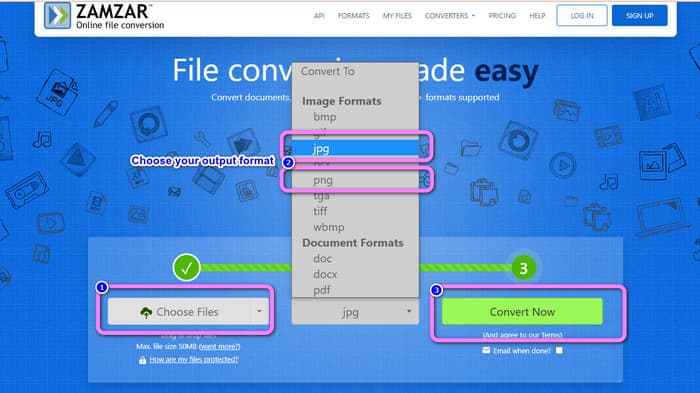
Zamzar is another fantastic online image converter to convert PSD to JPG/PNG. The ability to upload photos up to 50MB in size is fantastic. A computer-based image file can also be uploaded. You can access Dropbox, Drive, or another website by putting its URL. This tool has an easy-to-use UI that increases its usability for all users. Using this software, you can upload photos in CR2, ARW, PNG, 3FR, JPG, GIF, TIFF, and other formats. To make it simpler for all users, you can also convert your image file to several formats. You can convert it to BMP, EPS, PDF, PNG, JPG, and WBMP. However, the conversion process is incredibly drawn out. The converted photographs cannot be saved, as well. Additionally, each session is limited to two photo conversions. Use the steps below to convert PSD to JPG/PNG.
Step 1. Go to the website of Zamzar. Click the Choose Files button. Open the PSD file from your file folder.
Step 2. Navigate to the Convert to options. Choose your desired output format, such as PNG or JPG.
Step 3. The last step is to click the Convert Now button. Wait for the conversion process. Afterward, save the converted file to save it on your desktop. Click here to get how to convert EPS to JPG or PNG.
3. rész. Hasznos módszer a PSD offline konvertálásához JPG/PNG formátumba
Hogyan lehet PSD-t konvertálni JPG/PNG formátumba a Video Converter Ultimate segítségével
Video Converter Ultimate is an effective program to convert PSD to JPG/PNG format. This program offers an easy-to-understand interface, making it perfect for all users. Besides, it also has simple procedures you can follow. This way, converting PSD images to JPG/PNG is easy as 123. Aside from JPG and PNG, it also supports various image file formats. It supports BMP, WEBP, TIF, EPS, and more, which is convenient. You can also access this application on both Windows and Mac computers. Additionally, you can convert many files in a single process with its batch conversion feature. This way, you can convert as many images as you can. Follow the easy procedures below to convert PSD to JPG/PNG.
Step 1. Click the Download button below to get access to Video Converter Ultimate. Windows and Mac versions are available. Then, launch the application after the installation process.
Ingyenes letöltés Windows 7 vagy újabb rendszerre Biztonságos letöltés
Ingyenes letöltés macOS 10.7 vagy újabb rendszerre Biztonságos letöltés
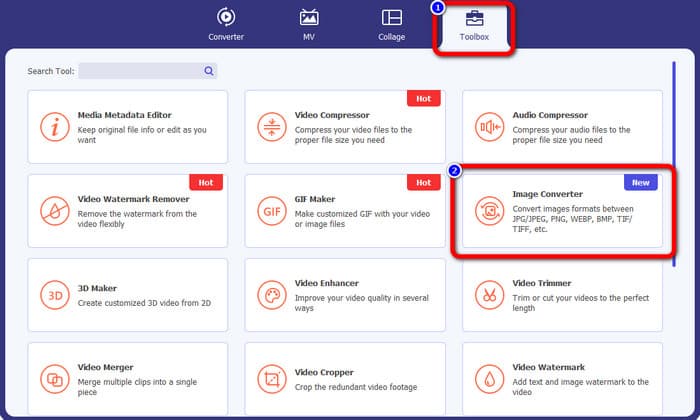
Step 2. Proceed to the Toolbox panel and click the Image Converter tool.
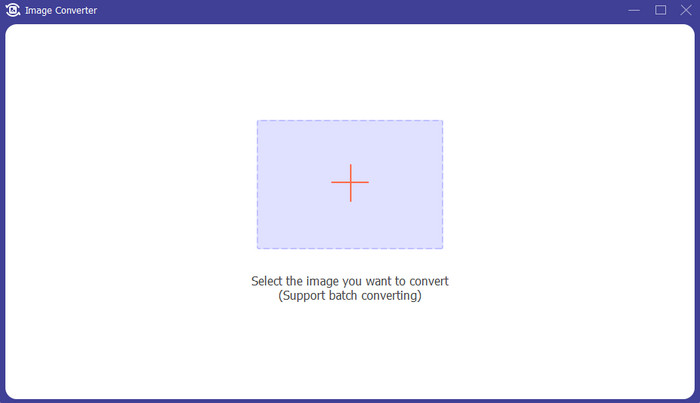
Step 3. Click the + icon to add the PSD image file. You can add more images at once.
Step 4. After adding the PSD images, go to the format options and select the desired output format.
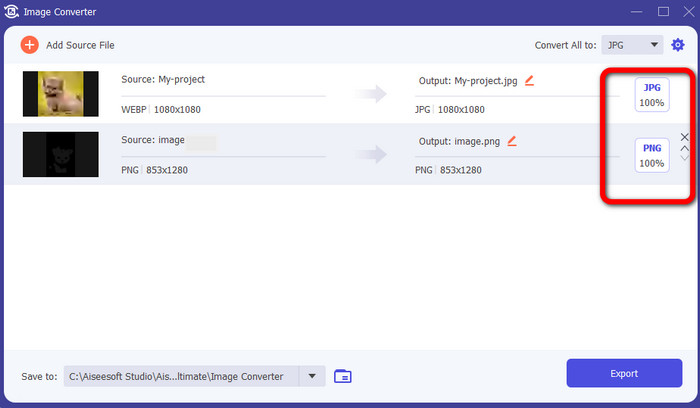
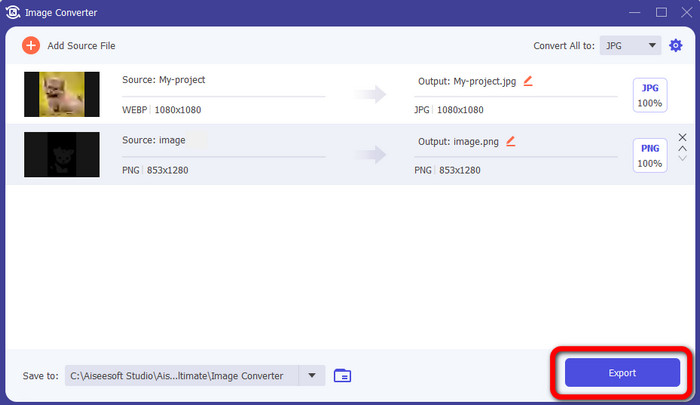
Step 5. Lastly, click the Export button to save your converted images.
Hogyan lehet PSD-t JPG/PNG-re konvertálni a Photoshopban
Photoshop is also another program you can use if you want to convert PSD to JPG and PNG. It also offers effective methods of converting. In addition, Photoshop is available on both Windows and Mac computers. You also can use Photoshop to sharpen images. However, since the program belongs to the advanced editing tools, you need to purchase it to experience more great features. Photoshop can only offer you a 7-day free trial version. Moreover, its interface is also hard to understand.
Step 1. Download Photoshop and launch it on your computer. To view your image, choose File > Open, or, using your file manager, right-click the project PSD file and choose Open with > Photoshop.
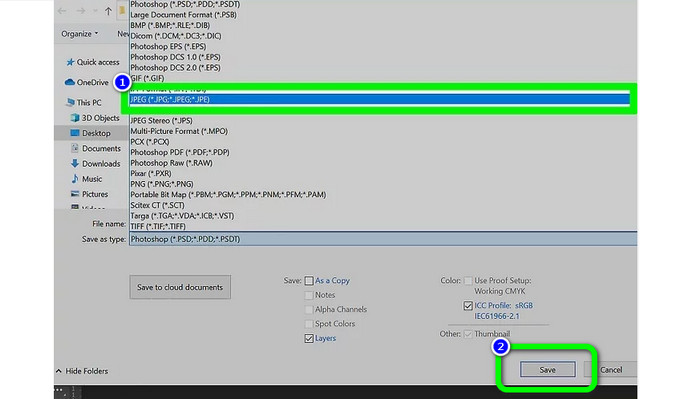
Step 2. Then, click the File tab on the upper left corner of the window. Then, select the Save as option.
Step 3. Navigate to the Save as option. After that, select JPEG/JPG from the format option. Once you are done selecting the JPG/JPEG format, click the Save button.
4. rész. GYIK a PSD JPG vagy PNG formátumba konvertálásával kapcsolatban
1. Mikor használná a PSD-t?
Sok felhasználó használ PSD-fájlokat, amikor kiváló minőségű grafikus adatokkal dolgozik. Hatalmas és bonyolult képeket vagy más nagy felbontású grafikákat és grafikákat tartalmaz.
2. Tudsz PSD fájlt nyomtatni?
Sajnos nincs. Ha PSD fájlt szeretne nyomtatni, akkor azt más formátumba, például PDF-be kell konvertálnia.
3. A PSB egy PSD?
A nagyobb formátumú PSD-fájl egy PSB-fájl. A Photoshop Big vagy PSB a Photoshop-kompatibilis fájl rövidítése, amely több adatot képes tárolni, mint egy átlagos PSD.
Következtetés
PSD file is a nice image format. However, you can’t open it to other browsers or programs. So, if you want to open it, you must first convert the file to the most commonly used formats like JPG and PNG. If you desire to convert PSD to JPG or PNG, use FVC Free Image Converter. It has a simple method which is suitable for you.
-
 Ismerje meg a WebP gyors JPG formátumba konvertálásának legegyszerűbb módjait
 Tanuljunk meg hatékony módszereket a webes képek egyszerű JPG formátumba konvertálására. Ez a cikk kiváló képátalakítókat kínál, amelyekkel képfájlokat konvertálhat.
-
 Tökéletes módszerek a WebP egyszerű konvertálására PNG-re
 Legyen tisztában a WebP PNG-re konvertálásának figyelemre méltó módszereivel. Ez az útmutató tartalmazza a leghasznosabb képátalakítókat, amelyeket kipróbálhat.
-
 Végső módszerek a WebP tökéletes GIF formátumba konvertálására
 Szeretné konvertálni a WebP-t GIF formátumba, de fogalma sincs, mit tegyen? Szerencsére ez a bejegyzés többféle módot mutat be a WebP azonnali GIF formátumba konvertálására.
