


 Video Converter Ultimate
 Screen Recorder
 Videó javítás
 Biztonságos letöltés
3 ingyenes módszer az FLV konvertálására MPG-re
Az MPG, amelyet a Moving Picture Experts Group szabványosított, egy gyakori videoformátum, amely MPEG-1 vagy MPEG-2 videóformátumokat és hangformátumokat tartalmaz. Minden számítógépes platform támogatja, beleértve a Windowst és a macOS-t is. Tudod, hogyan kell FLV-t MPG-vé konvertálni?

A piacon számos videokonverter érhető el, amelyek segítségével könnyedén konvertálhatod az FLV-t MPG-vé. Ez a bejegyzés ezek közül fog bemutatni 3 nagyszerű eszközt, hogy ingyen átalakíthasd FLV fájljaidat MPG formátumba.
1. rész: Az FLV átalakítása MPG formátumba
Ingyenes konvertert fogsz először választani, amikor FLV-t szeretnél MPEG-gé alakítani. Az első részben egy könnyen használható Free FLV Convertert mutatunk be, amellyel az FLV-ből MPG-vé történő videókonverziót elvégezheted. Széles körben támogat minden gyakran használt video- és hangformátumot, többek között az FLV, MPG, MKV, MP4, MOV, WMV, WAV, AAC, MP3, M4A, FLAC formátumokat és még sok mást. Lehetővé teszi, hogy FLV-t MPG-vé alakíts minőségromlás nélkül.

- Bármely FLV átalakítása MPG, MP4, MOV, AVI, MKV, MP3, AAC és így tovább.
- Különféle témákat kínál az FLV fájl szerkesztésére és testreszabására.
- Fejlett többmagos CPU-k és GPU-gyorsítások az FLV konvertálásához MPG -vé gyors sebességgel.
- Támogatja az iPhone 12/11 / XS / XR / X / 8/7, iPad Pro, Samsung Galaxy S21, HUAWEI, SONY, LG stb.
- Konvertáljon egy vagy több FLV fájlt kép vagy hangminőség romlása nélkül.
Ingyenes letöltésWindows 7 vagy újabb rendszerhezBiztonságos letöltés
Ingyenes letöltésmacOS 10.7 vagy újabb rendszerhezBiztonságos letöltés
1. lépés. Ez az FLV konverter lehetővé teszi, hogy FLV-t MPG-vé alakíts Windows 10/8/7 PC-n és Macen egyaránt. A rendszerednek megfelelő verziót választhatod ki, majd ingyen telepítheted a számítógépedre.
2. lépés. Nyisd meg ezt az FLV–MPG konvertert, majd kattints az Add Files gombra az FLV fájl(ok) betöltéséhez.

3. lépés. Válaszd a MPEG formátumot célformátumként az Output format legördülő listájából. A kimeneti formátum melletti Settings ikonra kattintva további profilbeállításokat adhatsz meg. Ennél a lépésnél a konvertált MPG fájlhoz megfelelő kimeneti mappát is kiválaszthatod.
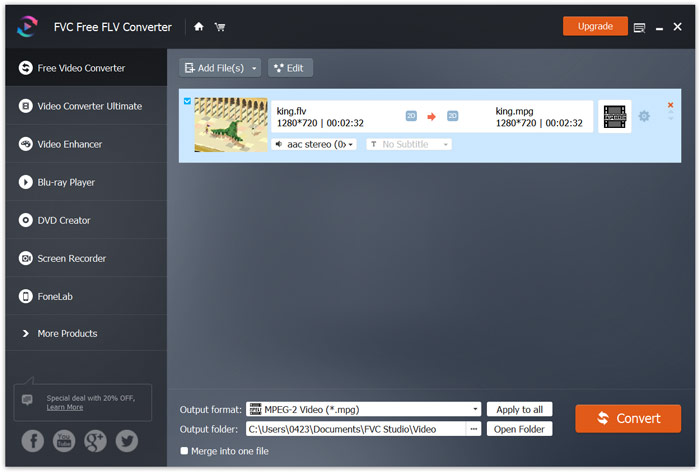
4. lépés. Amint fentebb említettük, ez az ingyenes FLV–MPG konverter számos szerkesztési funkcióval van felszerelve. Így a konvertálás előtt ezekkel szerkesztheted a videódat. Ezt követően kattints a Convert gombra, hogy elindítsd az ingyenes FLV–MPG átalakítást.
2. rész: Hogyan lehet az FLV-t MPG Online-ra váltani
Ha a Google-ben rákeresel arra, hogyan kell FLV-t MPG-vé alakítani, a legelső 20 találat között sok online konvertert láthatsz. Itt a népszerű Free Online Video Convertert ajánljuk számodra. Számos népszerű video- és hangformátummal kompatibilis. Nincs szükség regisztrációra, és nincs fájlméret-korlátozás. Közvetlenül felkeresheted ezt az online FLV–MPG konverteroldalt, és elkezdheted az átalakítást.
1. lépés. Nyisd meg a böngésződet, például az IE-t, a Chrome-ot, a Firefoxot vagy a Safarit, és látogass el erre az Online FLV–MPG konverter oldalra.
Töltse le az asztali verziót a fájlok kötegelt konvertálásához.
2. lépés. Kattints az Add Files to Convert, majd a Download gombra, hogy gyorsan telepíts egy indítóprogramot az FLV–MPEG átalakításhoz. Amikor a launcher készen áll, a felugró ablakban tallózva betöltheted az FLV fájlodat.

3. lépés. Most átirányításra kerülsz a konverterablakhoz. Ott fel vannak sorolva népszerű videoformátumok, mint például MP4, MPG, MOV, AVI, FLV, MKV, WMV és mások. Állítsd be az MPG formátumot célformátumként.
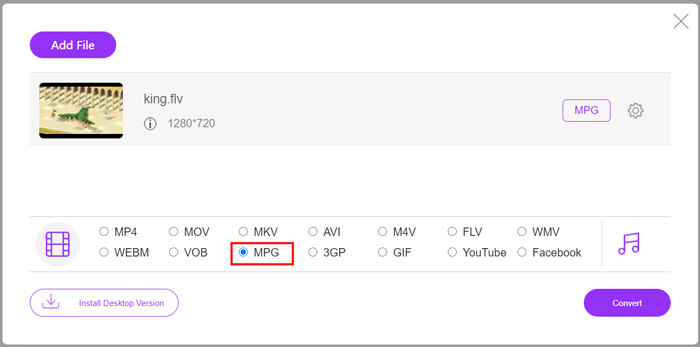
4. lépés. További video- és hangbeállításokhoz kattints a kimeneti formátum melletti Settings ikonra. Ezután kattints a Convert gombra, hogy elindítsd az FLV-ből MPG-vé történő videókonverziót.
3. rész: Az FLV konvertálása MPG formátumba az Aconvert segítségével
Az Aconvert egy másik népszerű online video-, hang-, dokumentum-, kép- és PDF-konverter. Mint teljes körű fájlkonverter, lehetővé teszi, hogy FLV fájljaidat ingyen, online változtasd MPG-vé. Az alábbi útmutató megmutatja, hogyan használd.
1. lépés. Keresd meg és nyisd meg az Aconvert hivatalos weboldalát. Ha ott vagy, kattints a bal oldali panelen a Video lehetőségre. Ezután átkerülsz a Convert video online oldalra.
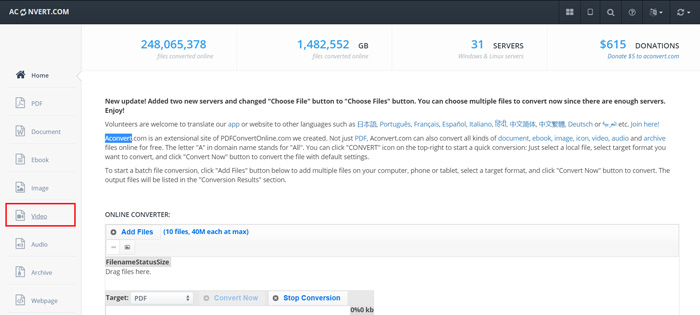
2. lépés. Kattints a Select File gombra az FLV fájl böngészéséhez és feltöltéséhez. Ezután válaszd az MPG formátumot kimeneti formátumként. További beállításokért kattints az Options gombra, majd válaszd a Change size, bitrate vagy frame rate lehetőségeket.
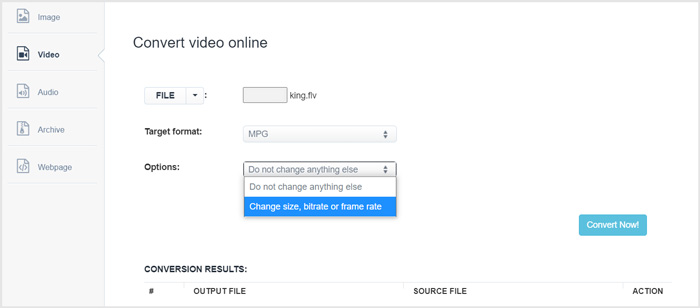
3. lépés. Kattints a Convert Now gombra az online FLV–MPG átalakítás elindításához. Ez az online FLV–MPG konverter elkezdi feltölteni és konvertálni a fájlodat. A fentebb bemutatott online videokonverterhez képest több időbe telik a teljes folyamat befejezése, ezért légy türelmes.
FLV vs. MPG
Az Adobe Flash Player az FLV-t használta videotartalom, például filmek és tévéműsorok továbbítására. Manapság az Adobe már nem fejleszti a lejátszót, és biztonsági okokból azt javasolja a felhasználóknak, hogy távolítsák el. Azonban továbbra is használhatja az FLV formátumot sok nem Adobe/Macromedia programban.
A Moving Picture Experts Group (MPEG) által készített MPG egy elterjedt digitális videóformátum a video-, hang- és metaadatok tárolására. Nagyon hasznos filmek készítésekor az interneten való megosztáshoz. Az MPG-ben lévő fájlok általában MPEG-1 vagy MPEG-2 videó/audió tömörítést tartalmaznak.
4. rész: Gyakori kérdések az FLV átalakításáról MPG-re
1. kérdés: Melyek az FLV hátrányai?
Először is, időigényes és költséges a flash tartalom létrehozása. Az FLV fájlokat a keresőmotorok pókjai nem ismerik fel. Tehát nem veszik fel a webhely optimalizálásába. Ebben az esetben hosszabb várakozási időre van szükség a weboldal flash-hozzáférésével.
2. kérdés: Lejátszhatok FLV fájlokat a Windows Media Player programban?
Igen. A Windows Media Player képes megnyitni az FLV fájlokat. De le kell töltenie és telepítenie kell a CCCP kodeket vagy más szükséges kodekeket az FLV fájlok lejátszásához.
3. kérdés: Mi a legjobb FLV játékos?
A VLC Media Player lehet a legjobb lejátszó számodra FLV fájlok lejátszásához akár Windows PC-n, akár Macen. Természetesen sok más videolejátszó is elérhető az interneten, amelyek segítenek FLV fájlokat megnyitni. További FLV lejátszókat itt találsz.
Következtetés
Ebben a bejegyzésben főként arról beszéltünk, hogyan lehet FLV-t MPG-vé konvertálni. 3 ingyenes videokonvertert ajánlunk, amelyekkel átalakíthatod FLV fájljaidat. Ha van valamilyen jobb módszered az FLV konvertálására, oszd meg a hozzászólásban a többi olvasóval.
-
 MP4-ből MPEG-be: Az MP4 konvertálásának MPEG-be (ingyenes) legnépszerűbb módjai
 Ez a bejegyzés lépésről lépésre ismerteti az MP4 konvertálását MPEG formátumba. A legnépszerűbb 4 ingyenes videoátalakító segítségével az MP4-et tetszés szerint MPEG-1 vagy MPEG-2-re változtathatja.
-
 MPEG-4 fájlok online tömörítése - Nincs letöltés, nincs vízjel
 Nincs elég fájltárhelyed az összes MPEG-4 fájl megőrzéséhez? Íme néhány megoldás, amelyek segíthetnek a videofájlok kicsinyítésében.
-
 A legnépszerűbb 4 ingyenes módszer az FLV videók MP4 formátumba konvertálására asztali és online
 Ez az útmutató négy ingyenes módszert oszt meg az FLV videofájlok MP4 formátumba konvertálására Windows 10/8/7 / XP és Mac OS X rendszereken, így bármilyen eszközön élvezheti a videókat.

