


 Video Converter Ultimate
 Screen Recorder
 Videó javítás
 Biztonságos letöltés
Videórögzítés kikapcsolt képernyővel Windows/macOS/iOS/Android rendszeren
Néha a képernyőfelvétel időigényes, és frusztráló lehet kivárni, amíg minden betöltődik vagy aktív marad.
A képernyő kikapcsolt állapotában történő videórögzítés nemcsak az akkumulátort kíméli, hanem extra adatvédelmet is nyújt, különösen akkor, amikor nem szeretnéd, hogy mások lássák, mi van az eszközödön. Ha tehát azon gondolkodsz, hogy lehetséges‑e kikapcsolt képernyővel videót rögzíteni, a rövid válasz: igen, a megfelelő eszközökkel és beállításokkal.
Ebben a cikkben megtudod, mikor hasznos a képernyő kikapcsolása melletti rögzítés, milyen korlátozásokra számíthatsz, és hogyan tudsz videót rögzíteni kikapcsolt képernyővel Windows, macOS, iOS és Android rendszeren, gyakorlati és könnyen követhető módszerekkel. Vágjunk bele!

1. rész. Mikor érdemes kikapcsolt képernyővel videót rögzíteni?
Sokan teszik fel a kérdést, hogy mikor érdemes kikapcsolt képernyővel videót rögzíteni. Nos, ha szeretnél energiát spórolni, védeni a magánszférádat, vagy elkerülni a zavaró tényezőket felvétel közben, akkor ezt mindenképp érdemes tudnod.
Íme a leggyakorlatiasabb helyzetek, amikor van értelme kikapcsolt képernyővel videót rögzíteni:
Az akkumulátor‑üzemidő megőrzéséhez
A képernyő kikapcsolva tartása csökkenti az energiafogyasztást, ami hasznos hosszú felvételeknél vagy amikor az eszközöd akkumulátora lemerülőben van.
Diszkrét vagy privát felvételhez
A kikapcsolt képernyővel történő rögzítés nem kelti fel a figyelmet, ezért hasznos pillanatok dokumentálásához, hangközpontú videók készítéséhez, vagy amikor a privát szféra kiemelten fontos.
Amikor a képernyő tartalma nem lényeges
Ha a környezetedet, egy előadást, megbeszélést vagy olyan folyamatot veszel fel, amely nem igényel képernyőn történő interakciót, felesleges a képernyőt bekapcsolva tartani.
A véletlen érintések vagy megszakítások elkerüléséhez
A képernyő kikapcsolása megakadályozza a véletlen érintéseket, értesítéseket vagy alkalmazásmegszakításokat, amelyek leállíthatnák vagy befolyásolhatnák a felvételt.
Folyamatos vagy háttérben futó rögzítéshez
Ez ideális time‑lapse felvételekhez, megfigyelési feladatokhoz vagy hosszú munkamenetek rögzítéséhez, amikor nincs szükség a képernyő folyamatos figyelésére.
A túlmelegedés csökkentésére hosszú felvételek során
A képernyő használata hőt termel. Kikapcsolt képernyő melletti rögzítéssel hűvösebb maradhat az eszköz, különösen mobilon.
Röviden: akkor a legjobb kikapcsolt képernyővel videót rögzíteni, amikor a hatékonyság, a magánszféra és a megszakítás nélküli felvétel fontosabb, mint a képernyő láthatósága.
2. rész. Hogyan rögzítsünk kikapcsolt képernyővel számítógépen? [Windows/macOS]
Számítógépen is lehetséges kikapcsolt képernyővel videót rögzíteni, ha a megfelelő eszközt használod. Ha Windows‑ vagy macOS‑felhasználó vagy, számodra ideális megoldás az FVC Screen Recorder.
Ez a képernyőfelvevő lehetővé teszi, hogy akkor is készíts videókat, amikor a kijelző ki van kapcsolva vagy minimalizálva, így ideális hosszú felvételekhez, háttérben futó feladatokhoz, illetve olyan helyzetekben, amikor fontos a magánszféra. Az FVC Screen Recorderrel nem kell végig bekapcsolva tartanod a képernyőt. Miután elindítod a felvételt, az zökkenőmentesen fut a háttérben.
Főbb jellemzői:
- Akkor is rögzít videót, amikor a képernyő ki van kapcsolva vagy minimalizálva.
- Támogatja a Windows és a macOS rendszert.
- Rögzíti a rendszerhangot, a mikrofon hangját, vagy mindkettőt.
- Kiváló minőségű videófelvétel testreszabható felbontással és képkockasebességgel.
- Többféle kimeneti formátumot támogat, például MP4, MOV, AVI stb.
- Zökkenőmentes és stabil háttérben történő felvétel.
- Egyszerű, felhasználóbarát felület.
- Lehetővé teszi az ütemezett és hosszú időtartamú felvételeket.
- Minimális CPU‑használat a jobb teljesítmény érdekében.
Hogyan rögzíts videót kikapcsolt képernyővel a FVC Screen Recorderrel:
1. lépés. Először töltsd le és telepítsd az eszközt a számítógépedre.
Ingyenes letöltésWindows 7 vagy újabb rendszerhezBiztonságos letöltés
Ingyenes letöltésmacOS 10.7 vagy újabb rendszerhezBiztonságos letöltés
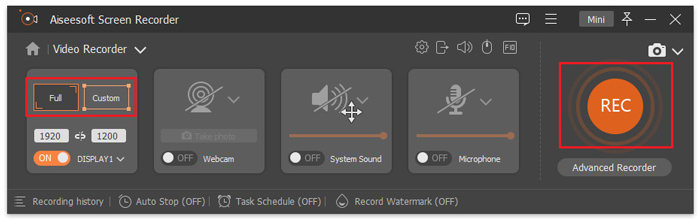
2. lépés. Ezután indítsd el a programot, és kattints a REC gombra a képernyőfelvétel elindításához. Kiválaszthatod a képernyőfelvétel méretét vagy módját. Ne feledd, ezzel az eszközzel időkorlát nélkül és kikapcsolt képernyő mellett is rögzíthetsz. Ha elkészültél, csak kattints a Stop gombra.
3. lépés. Most lehetőséged van a videó szerkesztésére. Ha elégedett vagy, kattints az Import gombra a felvett videó mentéséhez.
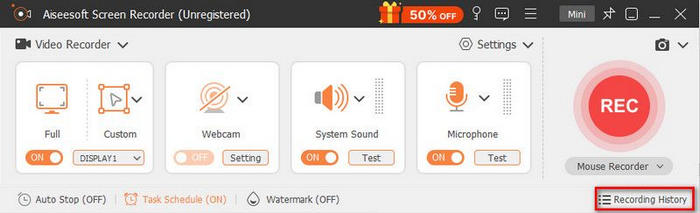
Egyszerű és gyors, igaz? Az FVC Screen Recordert valóban minden felhasználótípusra tervezték, a kezdőktől a haladó technikai tudással rendelkezőkig. Ráadásul az eszköz az MI használatához is alkalmazkodik, hogy tovább javítsa a rögzített stream‑videók minőségét.
3. rész. Hogyan rögzítsünk videót kikapcsolt képernyővel iPhone‑on?
Elsőre lehetetlennek tűnhet iPhone‑on kikapcsolt képernyővel videót rögzíteni, hiszen az iOS úgy van kialakítva, hogy a legtöbb felvételt leállítja, amikor a kijelző kikapcsol. A megfelelő módszerekkel és kerülőutakkal azonban továbbra is tudsz diszkréten videót vagy hangot rögzíteni.
A Discreet fekete képernyős technológiát használ, amely lehetővé teszi, hogy videót és hangot rögzíts, valamint fényképeket készíts akkor is, amikor az iPhone zárolva van. Testreszabhatod az érintéses gesztusokat, így a felvétel indítása és leállítása intuitív és egyszerű, anélkül hogy a képernyőre kellene nézned. Az összes rögzített videó és fotó egy privát galériában tárolódik biztonságosan, ami további védelmet nyújt a magánszférának.
Ez az app ideális diszkrét, kikapcsolt képernyős rögzítéshez, különösen koncerteken, élő eseményeken vagy olyan helyzetekben, amikor a zavaró tényezőket minimálisra kell csökkenteni.
Így használd a Discreet alkalmazást videórögzítéshez kikapcsolt képernyővel iPhone‑on:
1. lépés. Töltsd le és telepítsd a Discreet alkalmazást az App Store‑ból, majd indítsd el az iPhone‑odon.
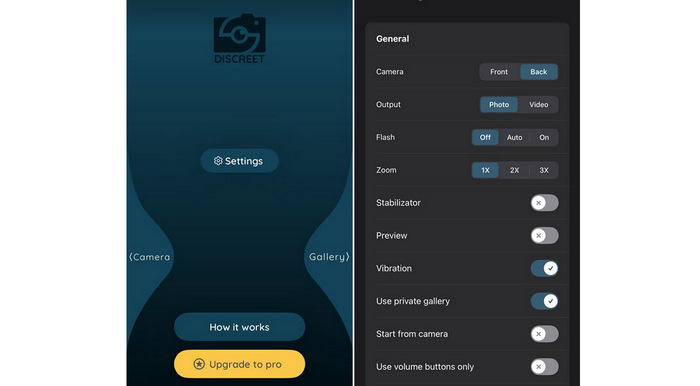
2. lépés. Engedélyezd a szükséges jogosultságokat, például a kamera, a mikrofon és a tárhely elérését, hogy az alkalmazás megfelelően működhessen.
3. lépés. Kapcsold be a fekete képernyő vagy képernyő‑kikapcsolás melletti felvételi módot, hogy az app zárolt iPhone mellett is tudjon videót rögzíteni.
4. lépés. Állítsd be és testreszabhatod az érintéses gesztusokat, hogy a képernyő bekapcsolása nélkül tudd elindítani vagy leállítani a felvételt.
5. lépés. Kezdd el a videó rögzítését. Az alkalmazás a képernyő kikapcsolt állapotában is folytatja a felvételt.
6. lépés. Ha elkészültél, állítsd le a felvételt a beállított gesztussal, majd a videókat biztonságosan eléred az alkalmazás privát galériájából.
4. rész. Hogyan rögzítsünk videót kikapcsolt képernyővel Androidon
Az Android‑eszközök nagyobb rugalmasságot kínálnak a kikapcsolt képernyő melletti videórögzítés terén. Az eszközödtől és az Android‑verziótól függően használhatsz beépített funkciókat vagy harmadik féltől származó Android képernyőfelvevőket, hogy a képernyő kikapcsolása után is folytatódjon a felvétel.
A Camera Background Video Record segítségével akkor is tudsz videót rögzíteni, amikor az Android‑telefonod képernyője ki van kapcsolva. Amint elindítod a rögzítést, az alkalmazás a háttérben tovább veszi a videót, így energiát spórolsz, elkerülöd a zavaró tényezőket, és a felvétel zavartalan marad.
Hogyan használd a Camera Background Video Record alkalmazást:
1. lépés. Töltsd le és telepítsd az alkalmazást az Android‑eszközödre, majd nyisd meg.
2. lépés. Lépj a REC fülre, és válaszd ki a használni kívánt kamerát.
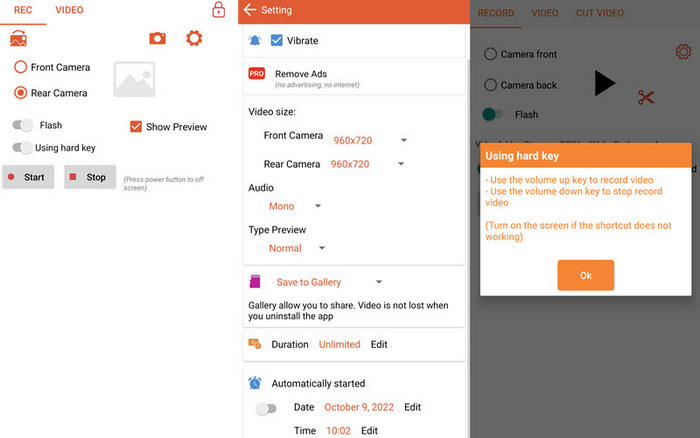
3. lépés. Koppints a fogaskerék ikonra az alapbeállítások, például a videó mérete vagy a hang módosításához, ha szükséges.
4. lépés. Koppints a Start gombra a felvétel megkezdéséhez. A hangerőgombokkal is vezérelheted a felvételt. A videó akkor is tovább rögzül, amikor a képernyő ki van kapcsolva.
5. rész. GYIK a kikapcsolt képernyő melletti videórögzítésről
Tényleg lehetséges úgy videót rögzíteni, hogy a kijelző ki van kapcsolva?
Igen, lehetséges videót rögzíteni kikapcsolt képernyővel, de ez az eszköztől és az alkalmazott eszköztől függ. Számítógépeken az olyan képernyőfelvevők, mint a FVC Screen Recorder, akkor is tudnak rögzíteni, ha a kijelző ki van kapcsolva vagy le van minimalizálva. Mobil eszközökön iOS-en és Androidon a harmadik féltől származó alkalmazások lehetővé teszik a kikapcsolt képernyős vagy háttérben történő videórögzítést, bár a rendszerkorlátozások miatt bizonyos megkötések érvényesülhetnek.
A kijelző kikapcsolt állapotában történő felvétel befolyásolja a videó minőségét?
Nem, a kikapcsolt képernyő melletti felvétel önmagában nem rontja a videó minőségét, amennyiben az alkalmazás vagy eszköz megfelelően támogatja a háttérben történő rögzítést. A megbízható képernyőfelvevők többségénél a felvétel előtt beállítható a felbontás, a képkockasebesség és a hangparaméterek, így a kimeneti minőség akkor is változatlan marad, ha a képernyő ki van kapcsolva.
Biztonságos és legális-e kikapcsolt képernyővel videót rögzíteni?
A képernyő kikapcsolt állapotában történő rögzítés általában biztonságos, ha megbízható alkalmazásokat és eszközöket használunk. A jogszerűség azonban attól függ, hogyan és hol használjuk fel a felvételt. Mindig győződj meg róla, hogy betartod a helyi törvényeket, és tiszteletben tartod mások magánszféráját, különösen akkor, ha más személyeket, megbeszéléseket vagy eseményeket rögzítesz anélkül, hogy erre láthatóan felhívnád a figyelmet.
Következtetés
A kikapcsolt képernyő melletti videórögzítés nemcsak lehetséges, hanem kifejezetten praktikus is, ha akkumulátort szeretnél kímélni, megőrizni a magánéletedet és elkerülni a zavaró tényezőket. A megfelelő eszközökkel Windows, macOS, iPhone és Android rendszeren is könnyedén megteheted mindezt olyan egyszerű és megbízható módszerekkel, mint az FVC Screen Recorder használata.
Nos, mire vársz még? Vedd elő a telefonod vagy nyisd meg a számítógéped, és kezdd el kipróbálni azt a módszert, amelyik számodra a legjobban beválik.
-
 9 legjobb 4K képernyőrögzítő Ultra HD felvételhez 2025-ben
 Képernyőrögzítőt keresel, amely valódi 4K minőségben rögzít? Fedezd fel a 9 legjobb 4K képernyőrögzítő eszközt, amelyek minőségromlás nélküli videókimenetet biztosítanak.
-
 Hogyan rögzíthet egyszerűen képernyőt VLC segítségével [Teljes útmutató]
 Ha azon tűnődsz, hogyan rögzítheted a képernyődet a VLC képernyőfelvételi funkciójával, ne aggódj! Ez a cikk négy egyszerű módszert mutat be, amelyekkel profi módon csinálhatod.
-
 Az 5 legjobb Android-képernyőrögzítő alkalmazás, amelyet 2025-ben meg kell szereznie
 Problémái vannak, mert nem tud képernyőfelvételt készíteni Android-eszközén? Ha igen, ez a cikk áttekintette azokat az Android képernyőrögzítőket, amelyekről letöltheti.
