


 Video Converter Ultimate
 Screen Recorder
 Videó javítás
 Biztonságos letöltés
A Weben elérhető eszközök és platformok listája 3GP Voice/Video Recorderhez
Egy ISO szabványos formátumú konténer, amely kis méretéről ismert, és nagyon alkalmas adatok továbbítására 3G-hálózatokon és hasonló kapcsolatokon keresztül. Néhány fejlettebb 3GP hívásrögzítő ezt használja szabványalapú formátumaként. A 3GP formátum megszületése lehetővé tette számunkra, hogy hatalmas fájlokat is megnézzünk okostelefonunkon még lassú internetkapcsolat mellett is. A legtöbb felhasználó használja ezt a fájlt, mivel támogatja a videó-, hang- és szövegformátumot is. Emiatt a felhasználók továbbra is szeretnének 3GP-videókat rögzíteni, vagy 3GP-hangfájlt új formátumba, például MP3-ba menteni. Ilyen esetben a 3GP videórögzítő vagy a 3GP hangrögzítő nélkülözhetetlen eszközzé válik. Szóval, folytassuk, és nézzük meg a lenti részleteket.

1. rész. A legjobb online 3GP felvevő 3GP videók rögzítéséhez ingyen
FVC Free Screen Recorder
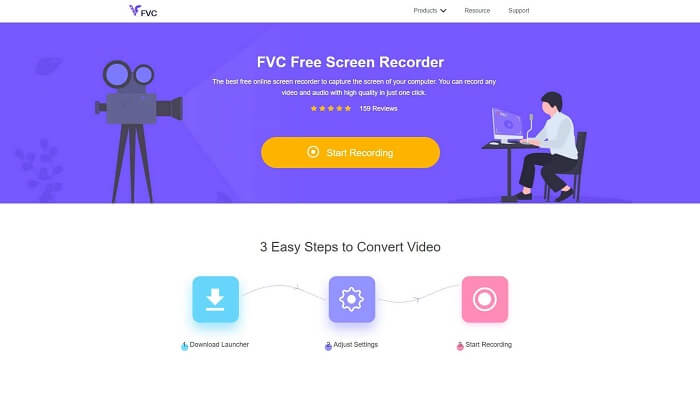
Egy olyan eszköz, amely azoknak a felhasználóknak a legjobb, akik nem szeretnének semmit letölteni, és van stabil internetkapcsolatuk a rögzítéshez. Ha Ön ilyen felhasználó, akkor ez a legjobb ingyenes online képernyőrögzítő, amelyet a FVC fejlesztett ki, ez a FVC Free Screen Recorder. Egy eszköz, amely lehetővé teszi, hogy számítógépén az összes képernyőn történő műveletet rögzítse. Ha játékmenetet, üzleti megbeszéléseket, megbeszéléseket stb. szeretne rögzíteni, akkor ez a legjobb választás. A részletesebb információkért és lépésekért kérjük, olvassa el figyelmesen, és kövesse a felsorolt utasításokat.
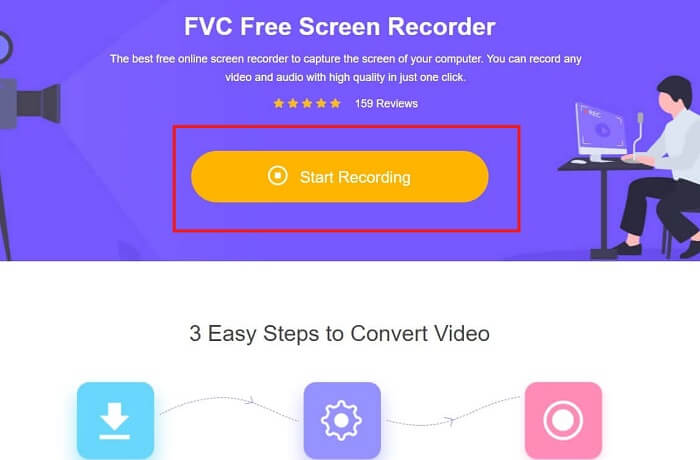
1. lépés. Kattintson erre a linkre, hogy a weboldal fő felületére lépjen. Kattintson a Start Recording gombra, és indítsa el az eszközt.
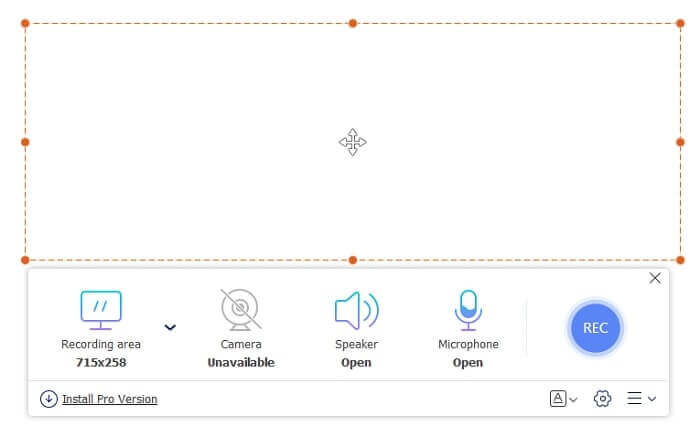
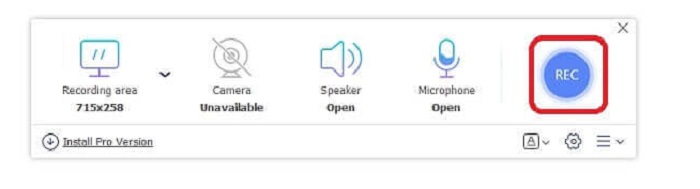
2. lépés. Ha az eszköz már meg van nyitva, egy ilyen lebegő panelt fog látni.
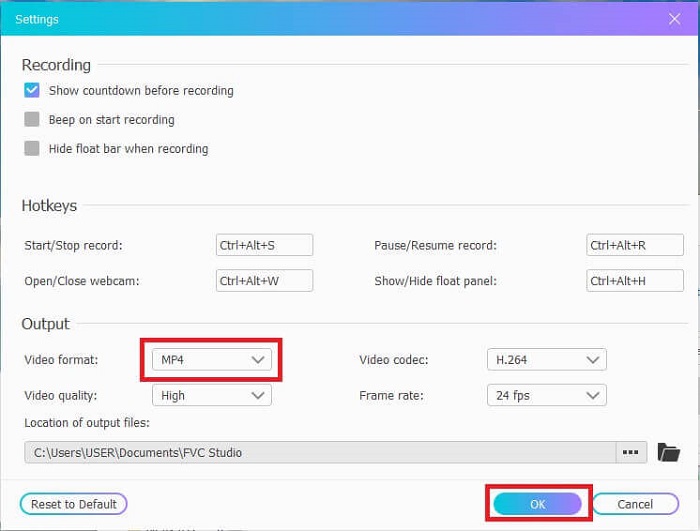
3. lépés. Nyomja meg a Settings gombot a formátum és az egyéb beállítások módosításához, majd kattintson az OK gombra a mentéshez.
4. lépés. A lebegő eszköztáron beállíthatja a keret méretét, vagy a teljes megjelenítéshez kattinthat a Full Screen gombra is. A keretméret mellett található a Webcam, amellyel hozzáadhatja az arcát a felvételhez, a Speaker a rendszerhanghoz, végül pedig a Mic, hogy hozzáadja a saját hangját. Ha készen áll, kattintson a lemezt formázó gombra a felvétel elindításához.
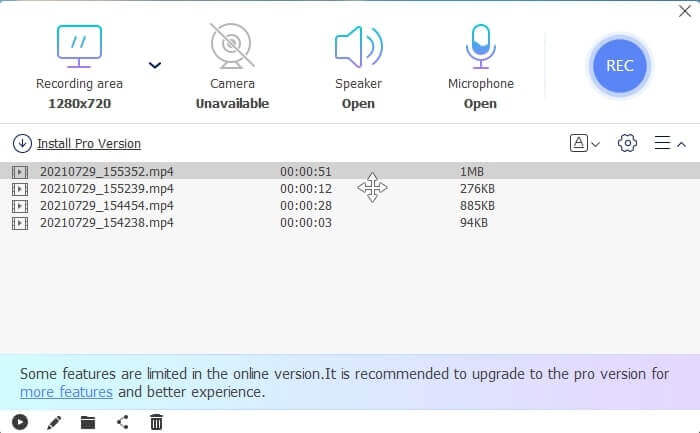
5. lépés. Ha a felvétel befejeződött, kattintson a négyzet alakú gombra; ekkor a lebegő eszköztár alatt megjelenik egy History lista, a legújabbtól a legrégebbiig rendezve.
Előnyök
- A legjobb online ingyenes eszköz, amely minden platformon elérhető.
- Bármely más online eszközzel ellentétben, könnyen használható, és felvétel közben nem jelennek meg hirtelen hirdetések.
- A regisztrációhoz az eszközt kellett használnia.
Hátrányok
- Internetfüggő, nem fog működni internetkapcsolat vagy adat nélkül.
- Nem rendelkezik Lock-in Screen funkcióval. Csak az eszköz prémium verziójában érhető el.
2. rész: Egyéb népszerű 3GP videó- és hangrögzítők Windows és Mac rendszerekhez
1. FVC Screen Recorder
Hallott már valaha az egyik legjobb képernyőfelvevőről, amelyet a felhasználó választott világszerte? Aztán ha nem, akkor ez neked való. FVC Screen Recorder Ez a képernyőrögzítő minden ismert platformon elérhető. A leggyakrabban előforduló problémák a másik képernyőfelvevővel, néhány androidos hangrögzítő 3gp hangkimenet nélkül. Az eszköz használata során soha nem találkozik ilyen típusú problémával, amíg nem kapcsolja ki a hangszórót a rendszerhanghoz és a mikrofont a hang hozzáadásához. Ha szeretné tudni, hogyan kell használni ezt a többcélú eszközt, olvassa el alaposan és kövesse az alábbi utasításokat.
1. lépés. Töltse le az eszközt. Válasszon a jelenleg használt két operációs rendszer közül. Telepítse az eszközt, majd állítsa be a Preferences menüpontot igényei szerint, és kattintson a Finish gombra a folytatáshoz.
Ingyenes letöltésWindows 7 vagy újabb rendszerhezBiztonságos letöltés
Ingyenes letöltésmacOS 10.7 vagy újabb rendszerhezBiztonságos letöltés
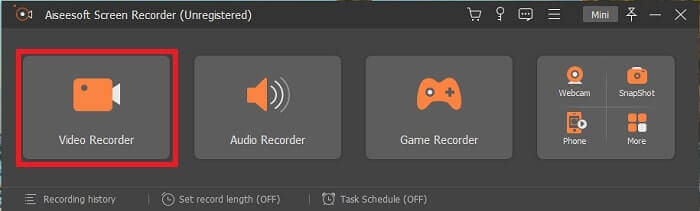
2. lépés. A telepítés után egy ilyen lebegő eszköztár jelenik meg a képernyőn. Ez jelzi, hogy az alkalmazás, amelyet használ, már fut a programon keresztül. Kattintson a Video Recorder gombra.
3. lépés. Miután rákattintott, állítsa a kijelzőt teljes képernyőre, vagy válasszon egy területet. Nyomja meg a System Sound gombot, hogy hozzáadja a számítógép hangját. A többi opció csak attól függ, hogy szeretné-e használni őket. Hozzáadhatja az arcát és a hangját is a Webcam és a Microphone bekapcsolásával.
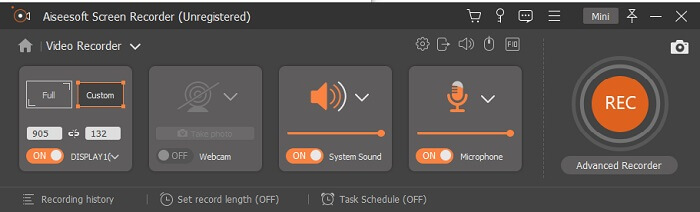
4. lépés. Mielőtt elkezdené, kattintson a fogaskerék ikonra, és állítsa be a beállításokat, ha szükséges, majd kattintson az OK gombra a mentéshez. Miután minden előkészület megvan, kattintson a kerek alakú gombra a felvétel elindításához.
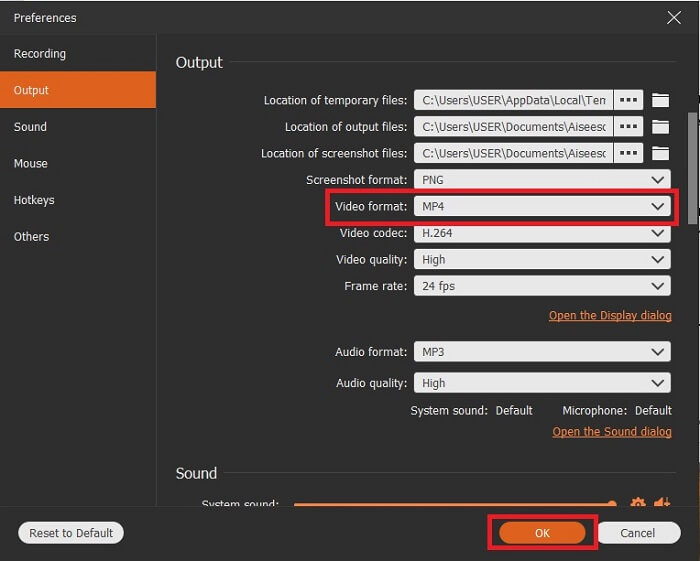
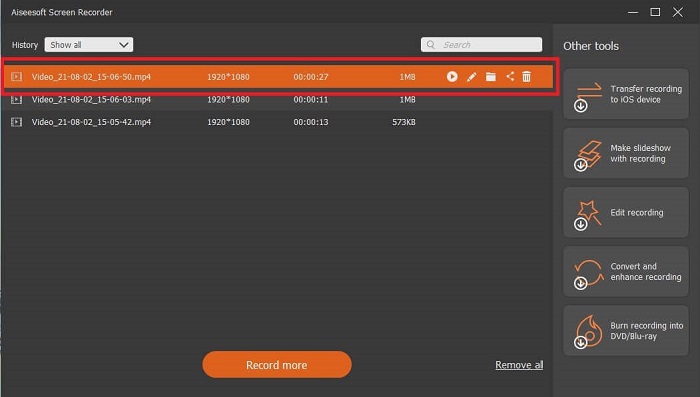
5. lépés. Ha be szeretné fejezni a felvételt, kattintson a kis négyzet gombra az eszköztáron a Stop gomb megnyomásához. Kattintson a Save gombra, és válassza ki, hová mentse. Ezután egy lista jelenik meg a képernyőn. A legújabbtól a legrégebbiig van rendezve. Kattintson a legfelső videóra, hogy újranézze a felvételt.
Előnyök
- Nem internetfüggő. Rögzítsen annyit, amennyit csak akar, bármikor és bárhol.
- Felhasználóbarát és a legjobb választás azoknak a kezdőknek, akik professzionális kimenetet szeretnének, vagy azoknak a szakembereknek, akik könnyen használható képernyőrögzítőt keresnek.
- Ez az egyedülálló funkció, a Lock-in Screen.
Hátrányok
- Fizetős eszköz, de a felhasználók még mindig használják.
- A letöltéshez 2,4 MB tárhely szükséges.
2. ScreenFlow
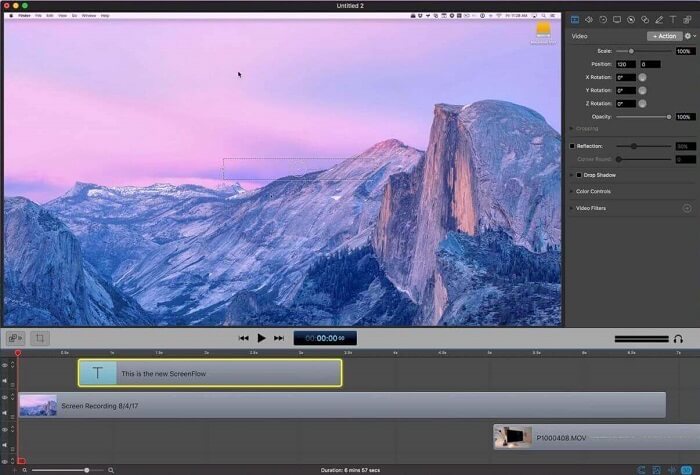
Egy másik legjobb eszköz a Mac felhasználók számára. A Screenflow egy olyan eszköz, amelyet a Mac operációs rendszer legjobb képernyőfelvevő eszközének tartanak. Ez egy fizetős eszköz. Tehát, ha úgy gondolja, hogy ez az eszköz olcsó, akkor a válasz nem. Ennek az eszköznek a költsége majdnem meghaladja a képernyő rögzítő által kínált határértéket. Azt tudja kínálni, amit más, fizetős képernyőfelvevők nyújthatnak. És valamilyen oknál fogva, a mac felhasználók ezt választják személyes választásuk képernyőfelvevőjeként.
Előnyök
- Könnyen használható eszköz, amely elérhető a Mac számára.
- Naprakész eszköz.
- Nincsenek rosszindulatú programokkal kapcsolatos problémák.
Hátrányok
- Csak Mac rendszeren érhető el.
- Ez ugyanolyan költséges lehet, mint az Ön választása.
3. Fraps
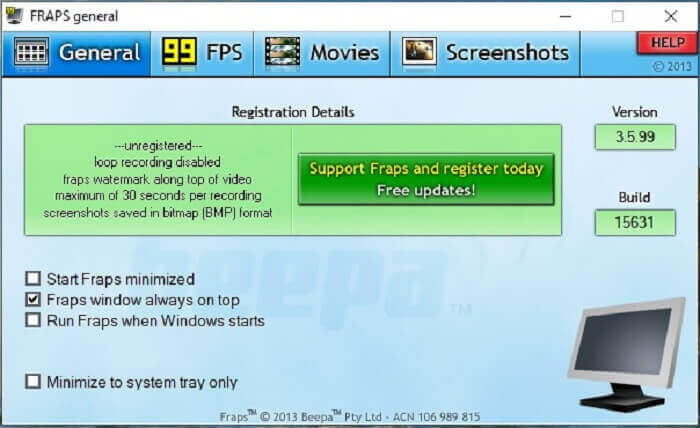
A másik eszközhöz hasonlóan a Fraps könnyen elhelyezhető a legjobb 10 képernyőfelvevő között. Ez az eszköz a képernyő felvételét a lehető legegyszerűbbé teszi. Az eszköz pontos utasításai miatt. De ez az eszköz nem szerepel a frissítésben. Mivel az eszköz kevesebb frissítést kapott, népszerűsége egyre kisebb lett, de egyes felhasználók mégis úgy részesítik előnyben, ahogy vannak.
Előnyök
- Egyedülálló eszköz, amely támogatja az AVI fájlformátumot.
- Felhasználóbarát felület részletes utasításokkal.
- Támogatja a 7680x4800 felbontást.
Hátrányok
- A felület unalmas nézni.
- Az AVI fájlformátum miatt. Ha 20 perces videót rögzít, akkor majdnem 4 GB tárhelyet igényel. Nem a legjobb választás hosszú felvételhez.
3. rész. Összehasonlító táblázat
| FFeatures | FVC Free Screen Recorder | FVC képernyőfelvevő | Screenflow | Fraps |
| Videó/hang képernyő rögzítése |  | | | |
| Jegyzetelés | | | | |
| Malware Safe | | | | |
| Hardveres gyorsítás |  | | | |
| Lezárható képernyő | | | | |
| Fájl méret | Néhány kbps az indítóhoz | 2,1 mb | 85,3 mb | 2,4mb |
| Rendelkezésre álló operációs rendszer | Minden platformon | Minden platformon | Mac operációs rendszer | Windows XP, 2003, Vista és Windows 7 |
| Árkategória | Ingyenes nyílt forráskódú online felvevő | 1 hónapra: $25.00 Egy évre: $31.20 Élettartamú licenc esetén: $55.20 | KÉPERNYŐFOLYAM (mennyiségi kedvezményes árak): $149 KÉPERNYŐFOLYAMSuper Pak: $209 Super Pak + Premium támogatás: $239 | Ingyenes, de regisztrálhat az $37 szolgáltatásra is |
4. rész: GYIK a 3GP felvevővel kapcsolatban
Miért nem tudom lejátszani a 3GP médiafájl formátumomat a médialejátszón?
Lehet, hogy azért, mert a médialejátszója nem támogatja ezt a kodektípust. Ha meg szeretné nézni 3GP-fájlját, használhatja a FVC Free Video Player programot. Ez a médialejátszó ingyenes, és különböző videó- és hangformátumokat támogat. Amíg rendelkezik internetkapcsolattal, igénybe veheti a prémium verziót is, amely több opciót és funkciót kínál, mint az ingyenes változat. Vagy elolvashatja a Best 3GP Players útmutatót, hogy megtalálja az Önnek megfelelőt.
Hogyan menthetek .3gp audio fájlt androidos hangrögzítőből mp3 -ba?
Használjon olyan átalakítót, amely a 3GP-t MP3-ra tudja konvertálni. Egy remek példa a FVC Free Online Video Converter. Több mint 200 különböző médiaformátumot képes konvertálni, amelyek minden platformon elérhetők.
Lehetséges egyesíteni a különböző 3GP fájlokat egy média kimenetben?
Igen, lehetséges a FVC Free Online Merger segítségével. Ez az online eszköz lehetővé teszi, hogy 2 vagy több 3GP-fájlt egyesítsen eggyé. Ez egy újabb kiváló eszköz, amelyet a FVC készített. Kattintson a mergerre a folytatáshoz.
Következtetés
Arra a következtetésre jutunk, hogy a felhasználók többsége még mindig különböző célokra végzi a felvételt. Függetlenül attól, hogy rögzítőként használják -e montázsokhoz, üzleti találkozókhoz, tanári megbeszélésekhez és még sok máshoz. De mégis, bármilyen okból is rögzít, vagy bármilyen formátumban szeretne a végtermék kimenete lenni. Az összes felvevő elvégezheti a munkát, ahogy kérheti.
Az összes különböző, a weben és ebben a listában található rögzítő ellenére talán még mindig azon gondolkodik, melyik a legjobb az Ön számára. Mielőtt ötletet adunk arról, hogy mit érdemes választania, alaposan gondolja végig. Képes-e a képernyőrögzítője teljesíteni a ma – és talán a jövőben – felmerülő igényeit. A FVC Screen Recorder a legjobb eszköz az Ön számára. Ellentétben bármely más itt felsorolt eszközzel, ez az eszköz annyira egyedi, hogy képes kitűnni az összes többi képernyőrögzítő közül az interneten. Mégis mindig egyszerű használni, és a legjobb teljesítményt nyújtja, amit egy kezdő vagy profi elvárhat. Mire vár még? Ne elégedjen meg egy ingyenes vagy drága eszközzel, ha megvehet egy olcsó verziót, amely ennél is többre képes.
-
 4 legjobb ingyenes internetes indító felvevő a videó videó rögzítéséhez
 Keresi a legjobb módot a képernyőn megjelenő tevékenységek rögzítésére az asztalon, fillér fizetése nélkül? Íme a 4 leggyakrabban használt ingyenes internetes indító felvevő.
-
 Az elfogulatlan Cinch Review Audio Recorder és a legjobb alternatíva
 A Cinch Audio Recorder a legjobb módja a zene letöltésére a streaming webhelyekről. Csak többet tudjon meg az elfogulatlan felülvizsgálatról és a cikk legjobb alternatívájáról.
-
 A legjobb 5 legjobb egér- és billentyűzetrögzítő Windows és Mac számára
 Íme az öt legjobb egér és billentyűzet felvevő program, amelyek menthetik az egér mozgását és a billentyűzet kattintásait, és megismételhetik az eseményeket.
