


 Video Converter Ultimate
 Screen Recorder
 Videó javítás
Hogyan lehet az AMV-t FLV-vé konvertálni megbízható és megbízható módon
Azok számára, akik nem ismerik, az AMV az Anime Music Video rövidítése. Az .amv fájlkiterjesztés tömörített videófájlokat jelöl. A Kínában gyártott hordozható médialejátszók használják legnagyobb valószínűséggel az AMV fájlokat. Az alacsony felbontású videófájlok illeszkednek a médialejátszó kijelzőjéhez, amelyen lejátszás közben megtekinthetők. Az Adobe Systems ezzel szemben az FLV (Flash Video File) formátumot fejlesztette ki, amely egy rövid fejlécet, egymásba fűzött hang-, videó- és metaadat-csomagokat, valamint SWF fájlokban tárolt hang- és videóadatokat tartalmaz. A videostream-ek Flash Video formátumban beágyazhatók Adobe-alkalmazásokba és Flash beépülő modulokba. Most, hogy megismerte e két formátum alapjait, készüljön fel arra, hogy elmélyüljön az átalakítók világában. Érdemes megfontolnia az AMV fájlok FLV-vé alakítását.

1. rész. A legkiválóbb konverter az AMV FLV-vé konvertálásához
A Video Converter Ultimate egy professzionális program, amely képes kezelni a videokonvertálási feladatait. Támogatja az egyszerű, veszteségmentes FLV–MOV konvertálást Windows és Mac számítógépeken egyaránt, és ingyenesen elérhető. Emellett az eszköz több mint 100 különböző formátum közötti átalakításra képes, beleértve a nagy felbontású fájlokat is. Egy teljes értékű videószerkesztő is rendelkezésre áll, amellyel vághat, trimmelhet, darabolhat, vízjelet adhat hozzá, illetve speciális effekteket használhat. A videokonvertálás mellett a Video Converter Ultimate támogatja a videóletöltést, videóátvitelt és egyéb funkciókat is. A szoftver használatának elsajátításához ismerkedjen meg a jelen szakaszban megadott útmutatóval.
1. lépés: A szoftver használatához először le kell töltenie azt a számítógépére. Ehhez kattintson az Ingyenes letöltés gombra, amely ennek a lépésnek az alján található. Láthatja, hogy két lehetősége van a letöltésre: Windows vagy Mac. A letöltés után telepítse a szoftvert a számítógépére, majd indítsa el.
Ingyenes letöltés Windows 7 vagy újabb rendszerre Biztonságos letöltés
Ingyenes letöltés macOS 10.7 vagy újabb rendszerre Biztonságos letöltés
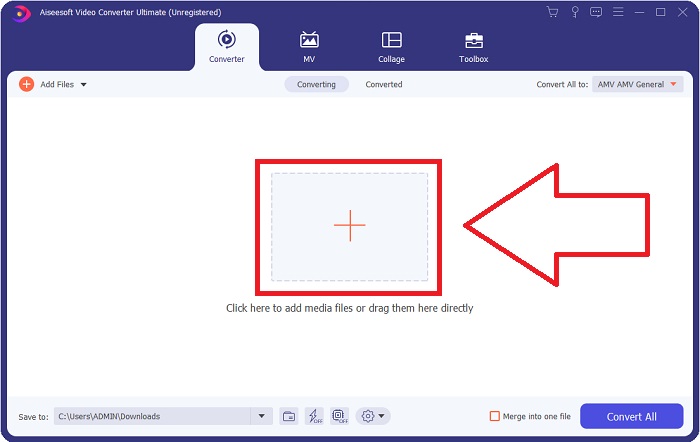
2. lépés: A szoftver indítása után egy ablak fog felugrani. A Converter (Átalakító) felület jelenik meg a képernyőn, ahol azonnal látja a feltöltési területet is. Kattintson a + gombra, vagy húzza rá bármely videófájlját az asztalról a folytatáshoz.
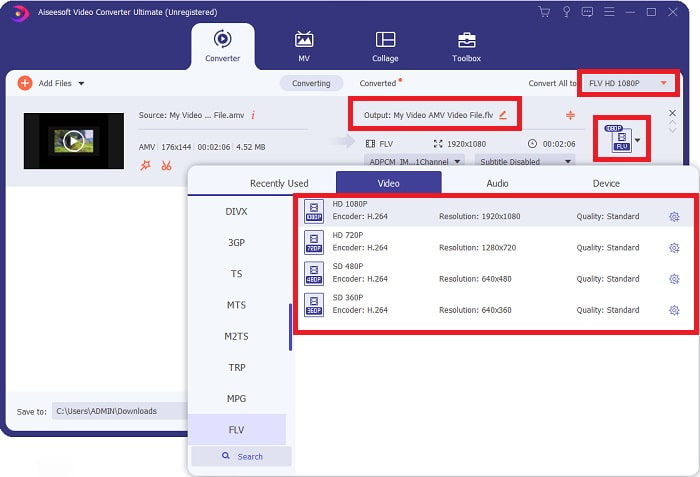
3. lépés: Az AMV videóformátum FLV-vé alakításához a fájl feltöltése után a szoftverben keresse meg a formátumválasztót, majd válassza ki az FLV formátumot. Ezután tetszés szerint kiválaszthatja a kívánt videóminőséget is.
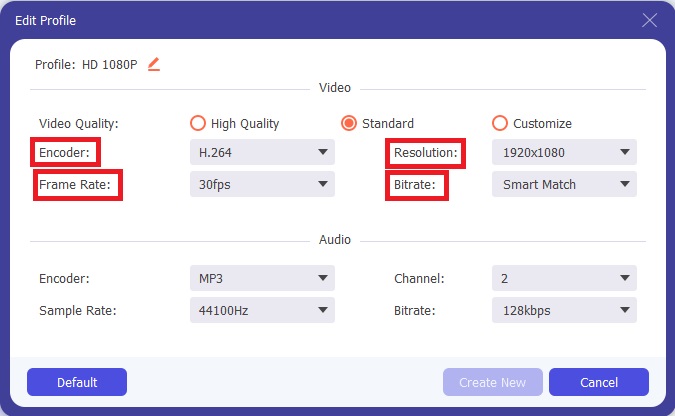
4. lépés: Ha testre szeretné szabni, illetve új videóminőséget szeretne létrehozni, kattintson a fogaskerék ikonra a videóminőségek listája mellett.
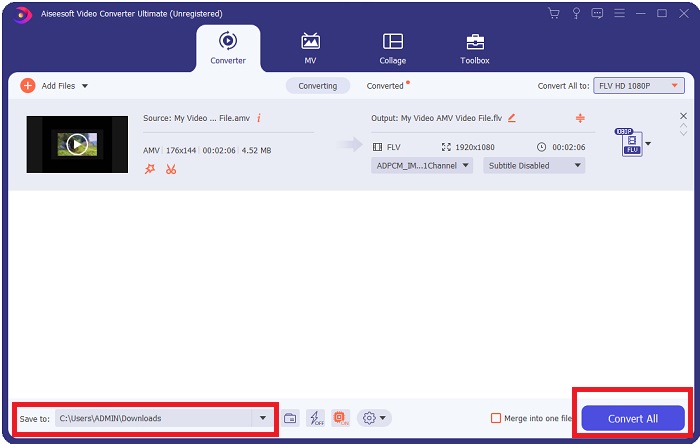
5. lépés: Már majdnem kész! Miután beállította az összes kívánt paramétert és módosítást, válassza ki az átalakított fájl mentési helyét a mappát jelző ikonra kattintva a Mentés ide mező mellett, az ablak alsó sarkában. Ezután elindíthatja a videófájl átalakítását a Összes konvertálása gomb megnyomásával.
2. rész. Az AMV FLV-vé konvertálásakor fontolóra veendő online eszköz
Az online konverterek használata egyszerű, mert nem igényelnek semmilyen szoftver letöltését vagy telepítését. A Free Video Converter Online egy kiváló példa olyan programra, amely gyorsan és könnyen képes AMV-t FLV-vé alakítani. Ezzel a programmal számos hang- és videóformátumot konvertálhat, és teljesen ingyenesen használható. Két fájlt tölthet fel átalakításra, és amikor a folyamat befejeződik, az átalakított fájl automatikusan a merevlemezére kerül mentésre. Most bemutatom az összes lépést, amelyet ismernie kell ennek a remek online eszköznek a használatához.
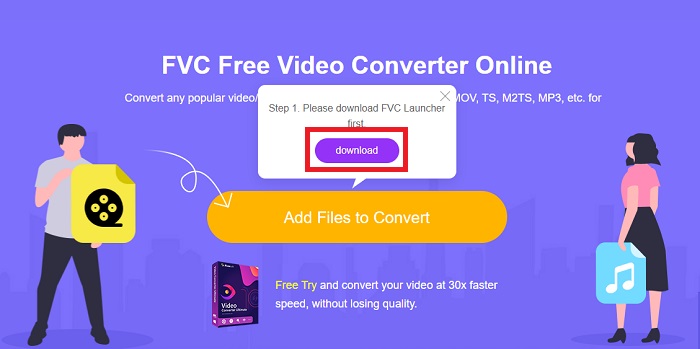
1. lépés: Kattintson erre a linkre, hogy elérje az online eszköz fő weboldalát. A továbblépés után indítsa el az átalakítást az Fájlok hozzáadása a konvertáláshoz gomb megnyomásával. Ezt követően megjelenik a letöltés gomb a képernyő felső sarkában. Miután a launcher telepítése befejeződött, elkezdhet fájlt feltölteni a számítógépéről ebbe az eszközbe.
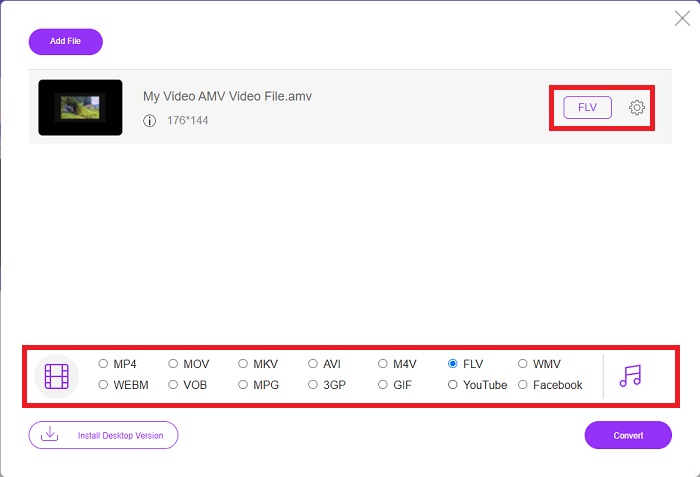
2. lépés: Most, hogy az importált fájl készen áll, kattintson az alul található FLV videóformátumra. Ahogyan az asztali szoftverben is, itt is módosíthatja a kimeneti videó összes beállítását a fogaskerék ikonra kattintva.
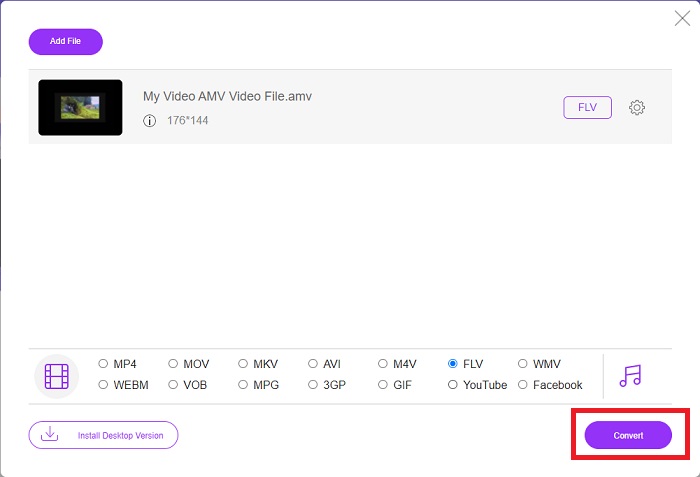
3. lépés: Végül kattintson a Konvertálás gombra, hogy AMV fájljait FLV formátummá alakítsa.
Összefüggő:
3. rész. Kibővített ismeretek az AMV-ről és az FLV-ről
Az AMV optimalizálja az alacsony, sokoldalú médialejátszókat lassú CPU-kkal és kis képernyőkkel, mint például az S1 MP3 lejátszó. A videokodek Motion JPEG fix kvantálási táblázatokkal. Az audiokodek az IMA ADPCM, amelyben minden keret első 8 bájtja a forrás (16 bit), az index (16 bit) és a titkosított 16 bites minták mennyisége (32 bit). Ezeknek az egyszerűsített kodekeknek a dekódolása elhanyagolható. A videó tömörítése alacsony (4 pixel/byte vs. 10 pixel/byte MPEG-2 esetén), de a fájlméretek kicsik a csökkentett felbontás (96x96 nagyobb vagy egyenlő, mint 208x176) és fps (10, 12, vagy 16 képkocka/s). Egy 30 perces videó 128x96 pixelre és 12 képkocka/s-ra tömörítve 80 MB lesz.
Azonban egy kiterjesztésű.flv videofájl, amelyet FLV fájlkiterjesztéssel használhat, ha videót vagy hangot szeretne streamelni az Adobe Flash Player vagy az Adobe Air alkalmazásból az interneten keresztül. Sokáig a Flash Video volt az alapértelmezett videóformátum szinte az összes online videóhoz, beleértve a YouTube-on, a Hulu-n és számtalan más webhelyen lévőket is. Emiatt a streaming szolgáltatások és a szoftverfejlesztők már nem használják az Adobe saját Flash formátumát. Mindezzel az összehasonlítással, itt van egy kis segítség az Ön számára, ez a cikk egy összehasonlító táblázatot tartalmaz:
| Fájlkiterjesztés | AMV | FLV |
| Fájl név | Anime zenei videó | Flash videó fájl |
| Által kifejlesztett | Jim Kaposztas | Adobe System Incorporated |
| Előnyök | ◆ Az AMV a mai napig az egyik legnépszerűbb rajongók által készített anime zenei videó. ◆ A fájl mérete kicsi. | Az Adobe Flash dinamikus és interaktív weboldalakhoz óriási előnyt jelenthet. Annak ellenére, hogy ez egy egyszerű folyamat, az eredmények jelentősek lehetnek. A Flash egykor az egyszerű videojátékok népszerű választása volt. |
| Hátrányok | ◆ Nem kompatibilis a legtöbb médialejátszóval és eszközzel; gyenge minőségű. | Az FLV népszerűségének csökkenése hátrányt jelent. Az FLV tartalom létrehozása időigényes és költséges lehet. A Flash támogatásának hiánya iOS-eszközökön súlyosan korlátozza új felhasználók vonzását. |
| A fájlt támogató programok | ◆ VLC Media Player ◆ iOrgsoft AMV Converter | ◆ RealPlayer ◆ Apple QuickTime Player ◆ VLC Media Player ◆ MPlayer |
4. rész. GYIK az AMV-ről FLV-vé konvertálással kapcsolatban
Mi a célja az AMV-nek?
A szinkronizálás és az egység az AMV-ben többféle videószerkesztési stílust érhet el. Lehetőség van nyers szerkesztés elérésére egyszerű nagyítási és kicsinyítési „effektusokkal”, valamint egyszerű átmenetekkel. A sok példa között a következők.
Hogyan készülnek az AMV-k?
Ahhoz, hogy egy AMV sikeres legyen, olyan dalt kell használnia, amely szorosan kapcsolódik a témához, és szinte tökéletesen leírja azt. Bárki, aki ezt olvassa, azt válaszolhatja: „Hú, ez csodálatos! Ez a dal az övé, az ő főcímdala. Emiatt jó darabot választottál.
Az FLV jobb minőségű?
Az FLV formátum és az MP4 kiváló minőségű videó és audio digitális kódolás tárolására alkalmas. Az FLV fájlok minősége vita tárgya, de az FLV előnyei és hátrányai megvitathatják a fájlformátumot. Az MP4 nagyobb tömörítési aránya kisebb minőségromlást eredményez.
Következtetés
Összegezve, tudni fogja, milyen fontos a legjobb konverter kiválasztása az AMV FLV-vé konvertálásakor. Mások gyenge minőségű és nem szinkronizált videókat készítenek az átalakítás után. De a cikkben javasolt két konverter a csúcsminőségű konverter, amelynek nem kell aggódnia a minőség miatt.
-
 A legjobb módszer az AMV AVI-vé konvertálására [Jóváhagyva]
 Nehéz dolga van az AMV formátumú videofájl AVI formátumba konvertálásával? Íme néhány tipp, amelyeket csak ebben a cikkben találhat meg.
-
 3 legújabb AMV konverter áll rendelkezésre az AMV MOV formátummá konvertálásához [2022]
 Nem tudja, hogyan konvertálja az AMV fájlokat MOV formátumba? Ezután ez a cikk a 3 AMV-MOV konverterről szól, amelyeket online vagy offline használhat.
-
 4 ellenőrzött módszer a TS FLV-vé konvertálására asztali / online
 Alapértelmezés szerint nem nyithatja meg a TS-t számítógépén vagy mobilján. A videofájlok megtekintésének egyetlen módja a TS konvertálása FLV formátumba vagy más formátumba konkrét útmutatónk segítségével.
