


 Video Converter Ultimate
 Screen Recorder
 Videó javítás
A 2 legjobb DivX konverter: Hogyan lehet a DivX-et FLV-vé konvertálni Windowson és PC-n
A DivX az egyik első, DVD-ken használt, proprietáris filmkonténer-formátum. Ez a tömörítési formátum lehetővé teszi, hogy nagy minőségű videót tároljunk anélkül, hogy nagy tárhelyre lenne szükség. Még ha a DivX‑fájlok helytakarékosak is, a lejátszásukhoz akkor is egy speciális kódolót kell telepíteni. Ezt azonban elkerülhetjük, ha a fájlt FLV-re vagy más támogatott formátumra konvertáljuk. Szeretné tudni, hogyan lehet a DivX‑et FLV-vé konvertálni? Akkor olvassa el az alábbi részletes leírást, és döntse el, melyik konverter felel meg Önnek a legjobban.

1. rész. Konvertálja a DivX-et FLV-vé az FVC Video Converter Ultimate segítségével
Ez a kiváló DivX‑konverter a legjobb felhasználói felülettel és renderelési folyamattal rendelkezik az összes többi konverterhez képest. A FVC Video Converter Ultimate vált a vezető konverterré, amelyet letölthet Windowsra vagy Macre. A fájlok konvertálása ezzel az eszközzel, valamint a hardveres gyorsításnak és a villámgyors átalakításnak köszönhetően egyszerűbbé és gyorsabbá vált. Ellentétben a letölthető vagy online használható eszközökkel, ez a legkönnyebb, mégis rendkívül erős program. Emellett DivX‑fájljait FLV, MP4, MOV, AVI, MKV és további 200+ formátumba is átalakíthatja. Most már szeretné megtanulni, hogyan kell használni ezt az eszközt? Akkor kövesse az alábbi lépéseket.
Lépések a DivX FLV-vé konvertálásához az FVC Video Converter Ultimate segítségével:
1. lépés. Töltse le az FVC Video Converter Ultimate programot az asztalára az alábbi letöltés gombra kattintva. Miután letöltötte a fájlt, kattintson rá a telepítéshez, majd gyorsan állítsa be a programot.
Ingyenes letöltés Windows 7 vagy újabb rendszerre Biztonságos letöltés
Ingyenes letöltés macOS 10.7 vagy újabb rendszerre Biztonságos letöltés
2. lépés. Kattintson a + gombra a fájl hozzáadásához, vagy ha a konvertálni kívánt fájl kettőnél több, javasoljuk, hogy húzással ejtse be őket a felületre.
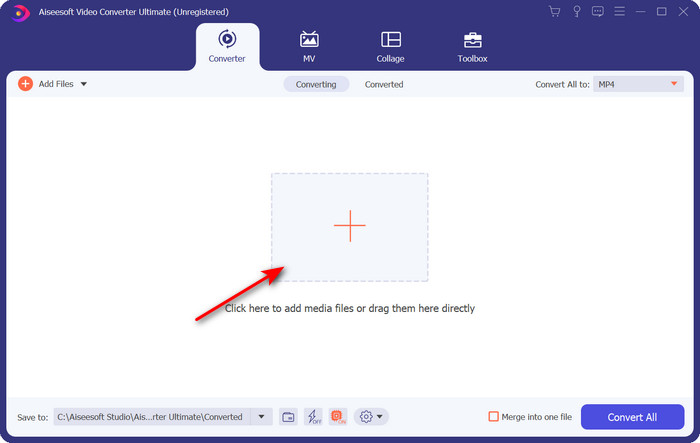
3. lépés. A DivX fájlt FLV-vé alakíthatja, ha a legördülő gombra kattint.
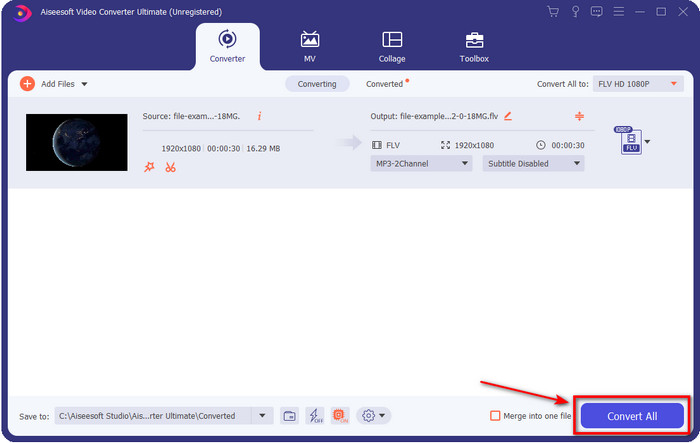
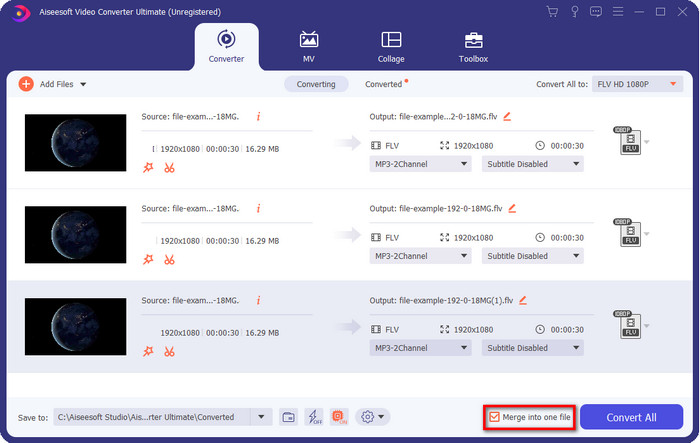
Ha a DivX‑fájljait egyesíteni szeretné és egyetlen fájlban akarja összefűzni, akkor jelölje be a négyzetet, hogy az összes DivX‑fájlt az átalakítás után egyesítse.
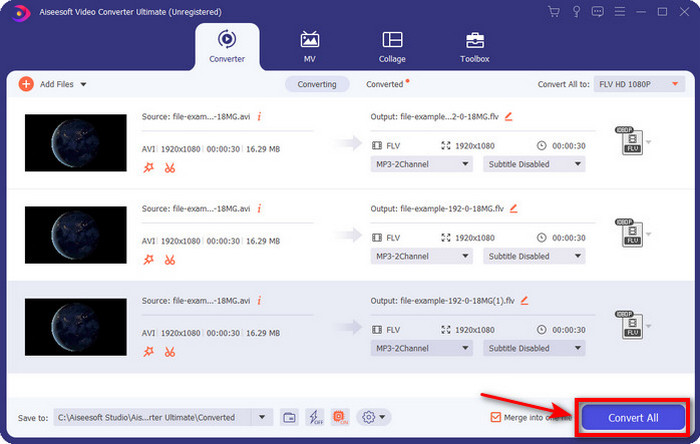
4. lépés. Az átalakítás elindításához kattintson a Convert All gombra. Nem kell sokat várnia, mert a folyamat kevesebb mint egy percet vesz igénybe. A folyamat végeztével egy mappa jelenik meg a képernyőn a konvertált .flv fájllal.
Előnyök
- Konvertálja a DivX-et FLV-vé 30-szor gyorsabban, mint a többi online és offline konverter.
- Minden operációs rendszerben elérhető, például Windows és Mac.
- Speciális videószerkesztési funkciók állnak rendelkezésre.
- Konvertáljon annyi fájlt, amennyit csak szeretne a kötegelt átalakítás segítségével.
Hátrányok
- Meg kell vásárolni és telepíteni kell a számítógépére.
2. rész. Konvertálja a DivX-et FLV-vé az FVC Free Video Converter Online segítségével
Ha online megoldást keres DivX‑fájljai konvertálására, akkor használja az FVC Free Video Converter Online webes eszközt. Ez az online program közepes számú formátumot támogat, minden böngészővel kompatibilis, és ingyenesen használható. Bár a konverter online érhető el, nem kell aggódnia az idegesítő hirdetések miatt a weboldal felületén. Ha úgy érzi, hogy ez az online megoldás a legjobb segítség az Ön számára, kövesse az alábbi részletes lépéseket.
Lépések a DivX FLV-vé konvertálásához az FVC Free Video Converter Online segítségével:
1. lépés. Először kattintson erre a hivatkozásra, hogy megnyissa az online konverter weboldalát.
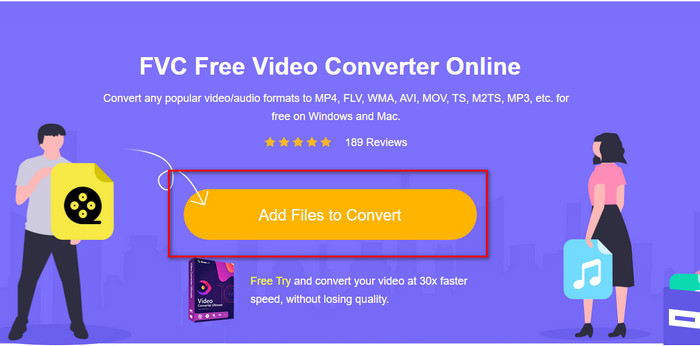
2. lépés. Ezután kattintson az Add Files to Convert gombra, és engedélyezze az eszköz megnyitását. Válassza ki a fájlt a mappából, majd nyomja meg az Open gombot.
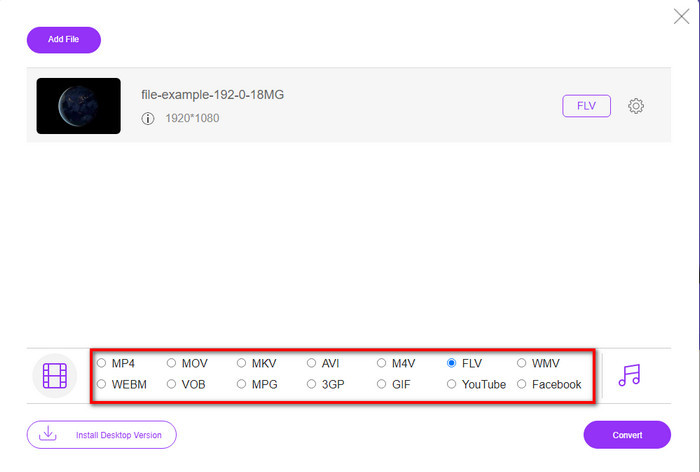
3. lépés. Válassza ki az FLV formátumot vagy az alul elérhető egyéb formátumok egyikét.
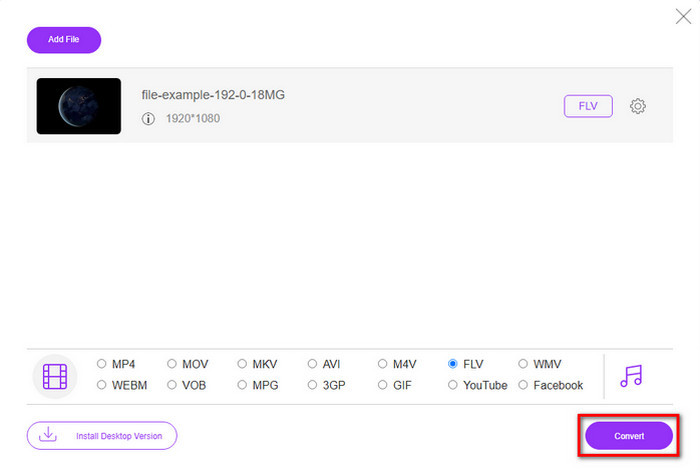
4. lépés. Ha elkészült, kattintson a Convert gombra az átalakítási folyamat elindításához.
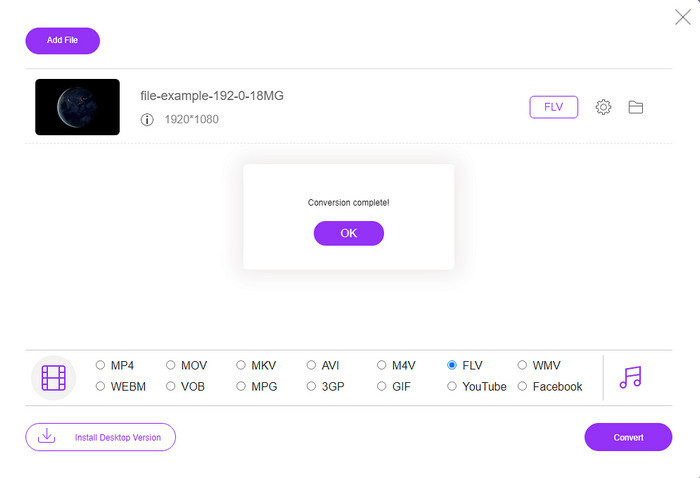
5. lépés. Az átalakítás befejeződik, és a képernyőn megjelenik a mappa a fájllal együtt.
Előnyök
- Nem kell letöltenie a szoftvert a meghajtóra.
- Malware-mentes, és nincsenek bosszantó hirdetések a felületen.
- Korlátlan hozzáférés az online konverterekhez bárki számára.
Hátrányok
- Támogatja a korlátozott formátumokat és kódolókat a konvertáláshoz.
- Nem rendelkezik olyan fejlett funkciókkal, mint az FVC Video Converter Ultimate.
3. rész. DivX kontra FLV
DivX
A Digital Video Express, a DivX rövidítése, a legjobb formátum a nagy tömörítésű videofolyamokhoz és DVD-khez minimális minőségváltozással. Ez a kodek majdnem úgy működik, mint az MPEG-4, de a fő különbség az, hogy szabadalmaztatott. Sőt, nem játszhat le .divx videót megfelelő szoftver segítsége nélkül. Ahelyett, hogy megfelelően lejátszaná Windowson vagy Mac-en, még okostelefonokon is, csak értesítést kap arról, hogy ez a formátum nem támogatott. Bár a formátum használata kissé bosszantó, mégis segít megtakarítani a sávszélességet és a helyet a meghajtón.
FLV
Azonban az FLV vagy a Flash Video a leggyakrabban használt formátum a HTML 5-ben. Ez a formátum a DivX-től eltérően működik, mivel ez a formátum az Adobe Air és a Flash Player támogatását használja a médiafájlok hatékony terjesztéséhez az interneten. Ezenkívül ez volt a régóta szabványos formátum a videók beágyazására olyan videómegosztó platformokon, amelyek médiafájlokat tartalmaznak. Bár az FLV jobb, mint a DivX, ha a fájl tömörítéséről beszélünk, a DivX mérete kisebb, mint az FLV. De ha gyorsabban szeretné terjeszteni a fájlt az interneten, akkor a fájl kiterjesztése .flv legyen.
4. rész. GYIK a DivX FLV konvertálással kapcsolatban
A DivX konvertálása után változik a minősége?
Bár a DivX fájlok régi verziójú formátumúak, továbbra is képes kis méretűre tömörítve kiváló minőségű videókat tárolni. Tehát, miután a DivX-et FLV, MP4, MOV, AVI vagy bármilyen más formátumba konvertálta, a DivX videó minősége nem változhat. Ha azonban nem megfelelő eszközt használ, amely nem támogatja a jó minőségű kimenetet, a minőség romlására számíthat. De ezt elkerülhetjük a fent elérhető eszközök használatával.
Miért nem tudok DivX fájlokat lejátszani a Windows Media Playeren?
Noha a DivX‑fájlok az interneten népszerűvé váltak, a Windows Media Playeren is lejátszhatók, ha letölti a megfelelő kodeket. Ha azonban nem szeretne ezzel bajlódni, olvassa el ezt a cikket, és ismerje meg azt az 5 DivX lejátszót, amellyel lejátszhatja ezt a fájlt.
A DivX fájlok konvertálása időt vesz igénybe?
Nos, ez a DivX fájl méretétől függ. Minden esetben minél nagyobb a DivX fájl, annál tovább kell várnia a konvertálással. Tegyük fel, hogy hardveres gyorsítással és gyors konverzióval rendelkező eszközt használ. Ebben az esetben szerencséje van, mert nem kell várnia, és nem kell sok időt töltenie a fájl konvertálásával.
Következtetés
Összességében a fent említett részletes információk segítenek megérteni, miért érdemes a DivX‑et FLV-vé konvertálni. A legjobb eszköz használata a legjobb kimenet eléréséhez elengedhetetlen, hogy elkerüljük a kellemetlenségeket. Az interneten végzett keresésünk során megtaláltuk a legjobb konvertert, amelyet online és offline egyaránt használhat. Továbbá, ha online megoldásként az FVC Free Video Converter Online eszközt szeretné használni, akkor egyszerűen kattintson a hivatkozásra. Ha viszont a lehető legkiválóbb végső eredményt szeretné, amely több mint 200 formátumot támogat és speciális funkciókkal rendelkezik, akkor feltétlenül töltse le az FVC Video Converter Ultimate programot.
-
 4 módszer a DivX konvertálására MOV-vé ingyen [Online és offline]
 Küszködsz a DivX korlátaival, vagy nincs meg a médialejátszód az ilyen formátumú videók eléréséhez? Ha MOV formátumba szeretné konvertálni, olvassa tovább ezt a cikket, hogy kitöltse a hiányosságokat.
-
 Kivételes megközelítés az M2TS FLV online és offline konvertálásához
 Próbálta már az M2TS-t FLV-vé konvertálni egy másik platformon? Olvassa el ezt a cikket, ha többet szeretne megtudni a legjobb könnyen használható online eszközről és szoftverről, amelyet érdemes megfontolni az M2TS FLV-vé konvertálását.
-
 A legjobb 3GP-FLV konverter a 3GP-ből FLV-vé konvertáláshoz [2022]
 Próbálta már a 3GP-t FLV-vé konvertálni, de nem tudja, milyen konvertert fog használni? Olvassa el ezt a cikket, hogy megtudja a 3GP FLV-vé konvertálásával kapcsolatos összes részletet.
