


 Video Converter Ultimate
 Screen Recorder
 Videó javítás
2 ajánlott konverter az F4V FLV-re cseréléséhez oktatóanyagok segítségével
Az Adobe Flash Player támogatja az F4V és az FLV formátumot lejátszási média‑konténerként, hogy internetes tartalmakat lehessen streamelni. Noha a formátum Adobe‑alapú, ez a két típus mégis sok szempontból különbözik egymástól. Például az FLV‑ben kódolt adatok nem azonosak az F4V‑ével, mivel az FLV hasonlít a SWF‑re. Továbbá, ha szeretnéd az F4V‑t FLV‑vé konvertálni, és olyan kódolót használnál, mint a SWF, olvasd el ezt a cikket, hogy többet tudj meg.

Az F4V FLV-vé konvertálására szolgáló legtöbb választási konverter 1. 2. része
1. Pick. FVC Video Converter Ultimate
A FVC Video Converter Ultimate a leginkább ajánlott F4V–FLV konverter, amelyet letölthetsz Windowsra vagy Macre. Ez az eszköz a lehető leggyorsabb és legmegbízhatóbb konvertálási folyamatot kínálja, amelyet valaha tapasztalhatsz, és már felhasználók millióit elégítette ki. Ráadásul a formátumváltás nem az egyetlen erőssége ennek a programnak. Képzeld csak: itt szerkeszthetsz is, például vághatod a videót, egyesítheted a klipeket, felerősítheted a hangot, vághatod (crop) a képet és még sok mást. Ha egy olyan egyedi konvertert szeretnél, amely teljes mértékben kielégíti az igényeidet, akkor ez a program a megfelelő választás. Az alábbi részletes lépések bemutatják, hogyan alakíthatod át az F4V fájljaidat FLV formátummá néhány percen belül.
Hogyan konvertáld az F4V‑t FLV‑vé az FVC Video Converter Ultimate segítségével:
1. lépés. A szoftver letöltéséhez a számítógépedre kattints a letöltés gombra.
Ingyenes letöltés Windows 7 vagy újabb rendszerre Biztonságos letöltés
Ingyenes letöltés macOS 10.7 vagy újabb rendszerre Biztonságos letöltés
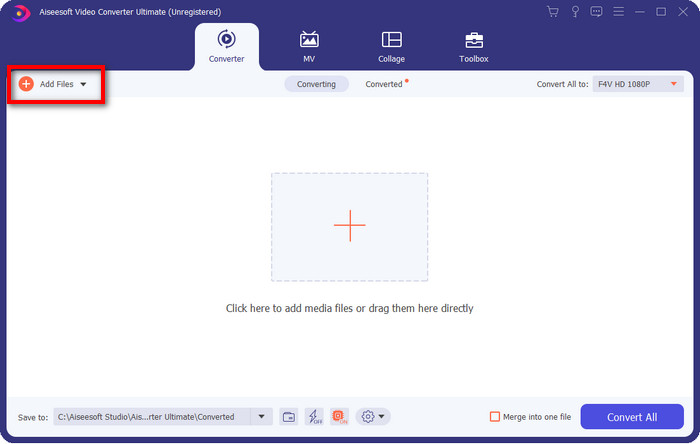
2. lépés. Kattints a szoftverre az indításhoz, illeszd be a fájlt a Add Files gombra kattintva a felület jobb felső részén, majd kattints az Open gombra, miután kiválasztottad az átalakítani kívánt F4V fájlt.
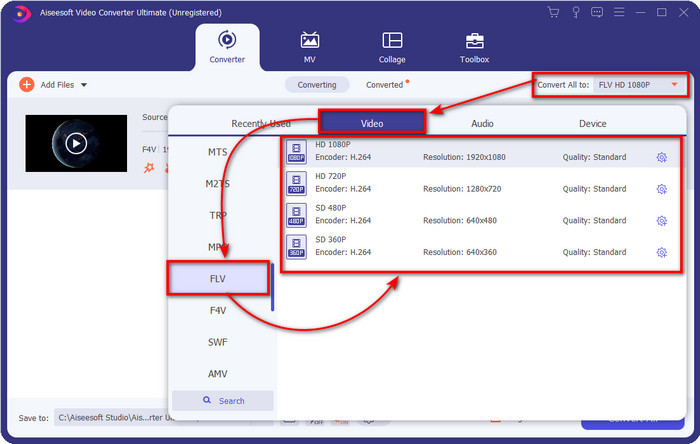
3. lépés. Kattints a Convert All to gombra, és változtasd meg a formátumot FLV‑re.
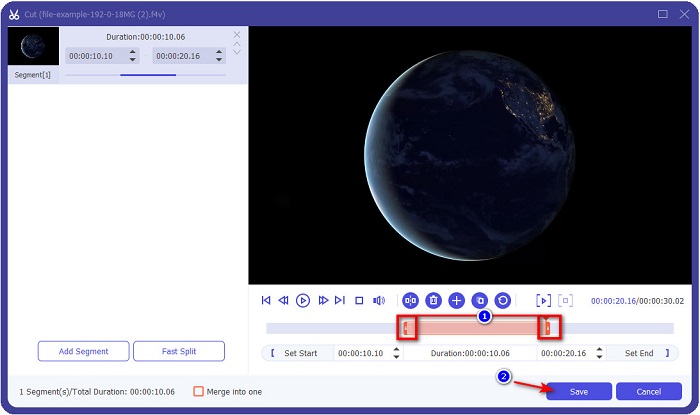
Szeretnéd rövidebbé tenni a videót? Ha igen, kattints az olló ikonra. Állítsd be a csúszkát a kívánt hosszúság szerint, majd kattints a Save gombra a módosítások mentéséhez.
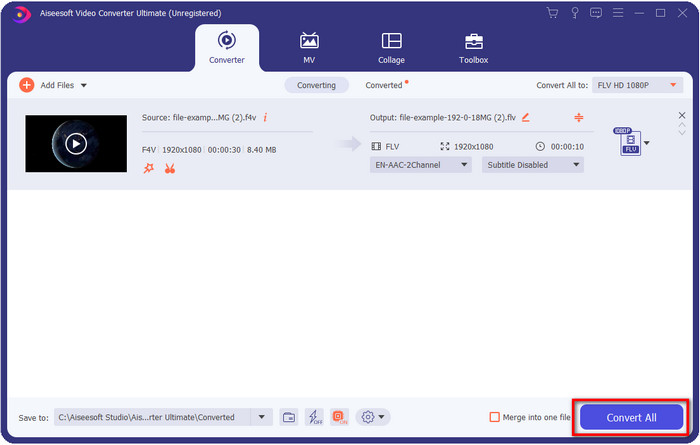
4. lépés. Az F4V FLV‑vé alakításához kattints a Convert All gombra, és a folyamat azonnal elindul. Megnyílik a számítógép egyik mappája, ahol a fájlod található.
Előnyök
- Könnyedén konvertál több F4V-t FLV, AVI, MOV, MKV és 200+ további formátummá.
- Itt elérhető a hardveres gyorsítás és a gyors konverzió a konvertálás felgyorsítása érdekében.
- Az összes Windows és macOS rendszeren elérhető.
- A rendkívüli videószerkesztési funkciók az Eszköztár alatt találhatók, hogy a videó fenomenálisan nézzen ki.
Hátrányok
- Használat előtt meg kell vásárolni.
- A konvertert le kell tölteni az asztalra.
2. Pick. FVC ingyenes online videokonverter
A FVC Free Video Converter Online segít, hogy a konvertálási folyamatot online végezd el. Ez az eszköz minden böngészőben elérhető, és lehetővé teszi az F4V FLV‑vé alakítását online, korlátozások nélkül. Ugyanakkor kötegelt (batch) konvertálást nem tudsz vele végezni, mert ezt nem támogatja. Ennek ellenére ezzel az online konverterrel elérheted a kívánt kimeneti formátumot. Szeretnéd tudni, hogyan? Akkor kövesd az alábbi lépéseket.
Hogyan konvertáld az F4V‑t FLV‑vé az FVC Free Video Converter Online segítségével:
1. lépés. A webes eszköz megnyitásához kattints erre a linkre.
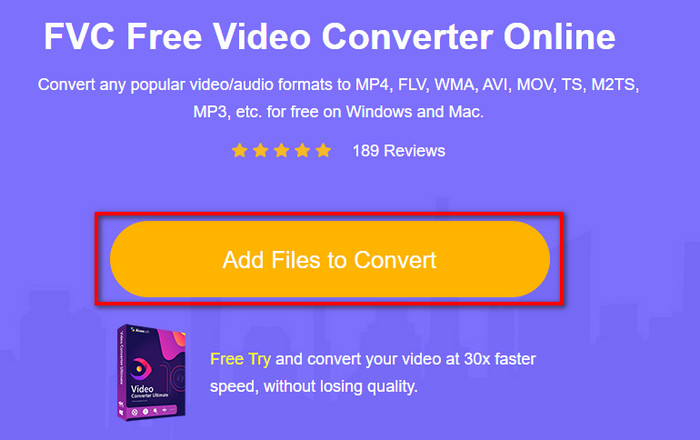
2. lépés. A webes konverter fő felületén kattints az Add Files to Convert gombra. Keresd meg az F4V fájlt a megjelenő mappában, majd nyomd meg az Open gombot.
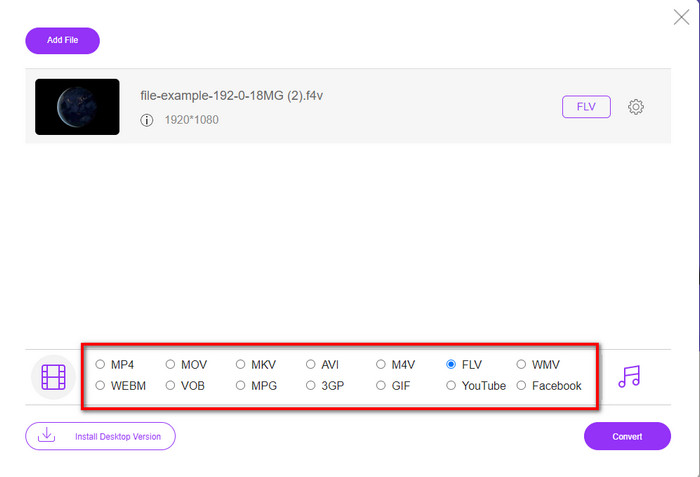
3. lépés. Az alsó részen sok formátum közül választhatsz; kattints az FLV‑re.
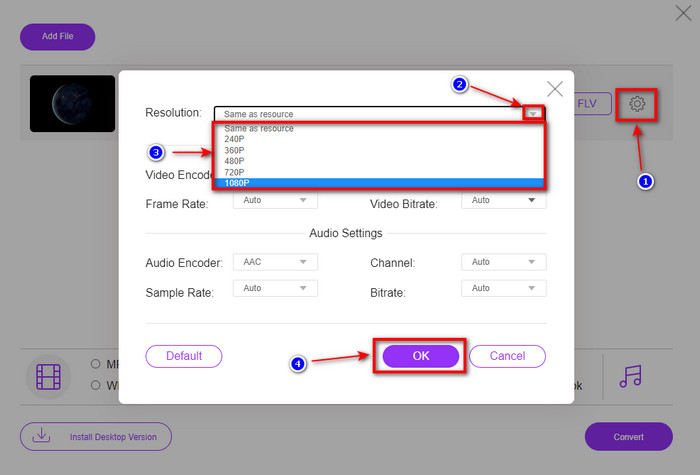
Szeretnéd megváltoztatni a videó felbontását? Akkor kattints a fogaskerék ikonra, nyisd le a legördülő menüt, és válaszd ki a kívánt videóminőséget.
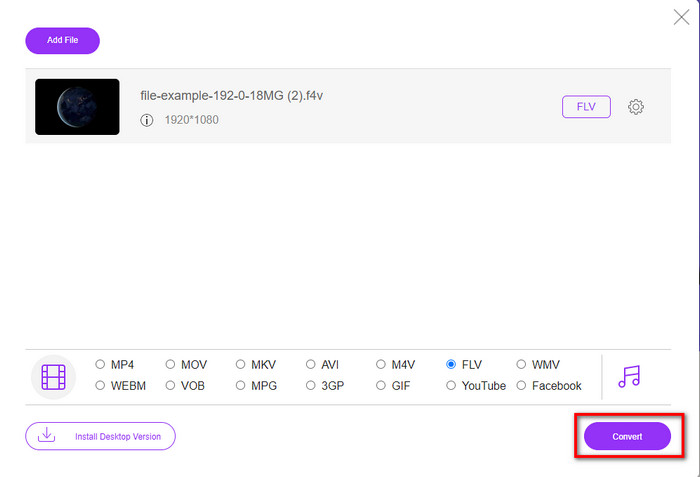
4. lépés. Indítsd el az F4V–FLV konvertálási folyamatot a Convert gombra kattintva.
Előnyök
- Elérhető az összes webböngészőben.
- Ingyenes és könnyen használható online konverter.
- Rosszindulatú programoktól mentes, és nincsenek hirdetések a fő webhelyen.
Hátrányok
- Internet kapcsolat elengedhetetlen.
- Nem támogatja az olyan videószerkesztő funkciókat, mint az FVC Video Converter Ultimate.
2. rész. F4V vs. FLV: Melyik formátum a legjobb
Amint az elején említettük, ez a két formátum Adobe-tároló, amellyel terjesztheti őket az interneten. Most azonban hasonlítsuk össze a két formátum közötti különbségeket az alábbi részletek elolvasásával.
Az F4V formátum egy Quicktime tároló, mint az MP4 formátum. Ez egy ISO-alapú médiafájl formátum a videók interneten keresztüli streameléséhez. Ezenkívül ez a formátum az FLV frissített verziója. Ennek ellenére sok probléma van az FLV-n lévő videó és hang kódolásával. Ezenkívül nem hozhat létre olyan HTML-weboldalt, mint az FLV.
Az FLV olyan fájlok, amelyek szerkezete majdnem megegyezik az SWF-fel. Ezt a formátumot jobban támogatja az Adobe Flash Player és a legtöbb HTML 5. Támogatja a videó- és hangtömörítést, például a Sorenson Spark vagy a VP6 kodekeket. Sőt, ha úgy dönt, hogy letölt egy videót az internetről, ez a formátum a legjobb választás. Az F4V-vel ellentétben, ha HTML-t szeretne generálni a weboldalán, ez a formátum az Ön számára.
Az lenne a legjobb, ha az F4V-t FLV-vé konvertálná, mert az FLV-vel elérhető előnyök nem érhetők el F4V-n. Bár azt mondják, hogy az F4V az FLV új verziója, az FLV egyedisége mégis olyan, amelyet az F4V sok szempontból nem képes másolni.
3. rész. GYIK az F4V FLV konvertálással kapcsolatban
Hogyan tudok F4V videókat lejátszani?
Egy erőteljes médialejátszó segítségével ezt erőfeszítés nélkül megteheted, erre az egyik legjobb példa az Aiseesoft Blu-ray Player. Kövesd ezeket az egyszerű lépéseket, hogy megtudd, hogyan játszd le az F4V fájlokat. Először töltsd le a szoftvert az asztali gépedre, majd indítsd el. Töltsd be a fájlt az eszközbe az Open File gombra kattintva. Betöltés után a fájl automatikusan lejátszásra kerül.
Melyik a jobb? F4V vagy MOV?
Nos, ez attól függ, milyen célra szeretnéd használni. Például az F4V kiválóan alkalmas médiafájlok webes terjesztésére minőségromlás nélkül. Ha azonban Macen szeretnél videót szerkeszteni, akkor a MOV formátum a jobb választás. Tehát ha Macen akarod szerkeszteni az F4V videóidat, meg kell tanulnod, hogyan konvertáld az F4V‑t MOV‑vá.
Az F4V jó minőségű kimenetet tartalmaz?
Az F4V fájlok 1080 vagy 720 videominőséget tartalmazhatnak, de a fájl mérete minimális marad.
Következtetés
Most, hogy megtanultuk, hogyan alakítsuk át az F4V‑t FLV‑vé a konverterek segítségével, eljött az idő, hogy a vélemények alapján kiválaszd a megbízható konverteredet. Ha ingyenes online konvertálási folyamatot szeretnél átélni, akkor használnod kell az FVC Free Video Converter Online eszközt. De ez a webes eszköz nem múlhatja felül a fent bemutatott végső (ultimate) konvertert. Minden további felvezetés nélkül mi az FVC Video Converter Ultimate használatát részesítjük előnyben, mivel ezzel a konvertálás könnyen és gyorsan elvégezhető. Ez a fenomenális konverter egyedülálló, és számos felhasználót lenyűgözött egyedi funkcióival. Így most már elmondhatjuk, hogy ezeknek az eszközöknek a segítségével egy lépéssel közelebb kerültünk a sikerhez.
-
 4 legújabb online és offline konverter az F4V AVI formátumba konvertálásához
 Nincs ötlete, hogy milyen konverterrel konvertálja az F4V-t AVI-ba vagy bármilyen más videoformátumba? Ezután olvassa el ezt a cikket, miközben megtanulja, hogyan konvertálhat a rendelkezésre álló eszközzel.
-
 Hogyan lehet az F4V-t MOV-vá konvertálni a minőség elvesztése nélkül [Megoldva]
 Ha nehezen ismer fel néhány videóformátumot, például az F4V-t. Olvassa el ezt a cikket, ha többet szeretne megtudni az F4V és MOV videoformátumról, és megtudhatja, hogyan konvertálhat F4V-t MOV-ba különböző módszerekkel.
-
 Konvertálja a TRP-t FLV-vé a legegyszerűbb offline és online módszerekkel
 Gyorsan és gond nélkül szeretné konvertálni a TRP videofájlját FLV formátumba? Olvassa el ezt a cikket, hogy a helyzetnek leginkább megfelelő szoftvert és online szolgáltatást kínálhassa.
