


 Video Converter Ultimate
 Screen Recorder
 Videó javítás
5 gyors és könnyed módszer az MKV ingyenes FLV-vé alakítására [Online és offline]
Nem tudod megosztani MKV fájljaidat az interneten, mert túl nagy a fájlméret? Miért nem inkább konvertálsz, ahelyett hogy túlságosan összezsugorítanád a fájlt, és ezáltal rontanád a minőséget? Ezt a problémát megoldhatod, ha elküldés előtt elolvasod az alábbi részleteket. Nem kell egy órát azzal töltened, hogy elolvasd ezt a cikket, úgyhogy minden további szó nélkül nézzük meg azt a hat konvertert, amellyel MKV-t FLV-vé konvertálhatsz.

1. rész. Top of the Line A legjobb letölthető MKV-FLV konverter
A FVC Video Converter Ultimate segítségével könnyedén és hatékonyan alakíthatod át az MKV-t FLV-vé, erőfeszítés nélkül. Ez a kimagasló konverter teljesen eltér a listán szereplő többi konvertertől, illetve azoktól, amelyeket már használtál vagy még nem. Ez az egyik legjobb kódoló és dekódoló program, amelyet letölthetsz PC-re vagy Macre, és hibátlanul működik offline is, még akkor is, ha nem csúcskategóriás asztali géped van.

FVC Video Converter Ultimate
Több mint 4 987 355 letöltés- Alakítsa át az MKV-t FLV, AVI, MP4, MOV formátumba vagy 200+ formátumba, amelyek elérhetők Windows és Mac rendszeren.
- Tegye MKV formátumát kompatibilissé az összes asztali számítógéppel és eszközzel.
- Kötegelt átalakítást végezhet az MKV formátumokhoz vagy más formátumokhoz.
- Bolondbiztos konverter, amelyet bárki használhat.
- Támogatja a nagyfelbontású kimenetet és akár 4k videóminőséget is.
Ingyenes letöltés Windows 7 vagy újabb rendszerre Biztonságos letöltés
Ingyenes letöltés macOS 10.7 vagy újabb rendszerre Biztonságos letöltés
Útmutató az MKV FLV-vé konvertálásához a FVC Video Converter Ultimate segítségével
1. lépés. Töltsd le az alkalmazást a meghajtódra, majd kövesd a telepítési folyamatot.
Ingyenes letöltés Windows 7 vagy újabb rendszerre Biztonságos letöltés
Ingyenes letöltés macOS 10.7 vagy újabb rendszerre Biztonságos letöltés
2. lépés. A telepítés után nyisd meg az alkalmazást, hogy hozzáadd az MKV fájlokat; húzd és dobd a fájlt a felületre, vagy kattints az Add Files (Fájlok hozzáadása) gombra.
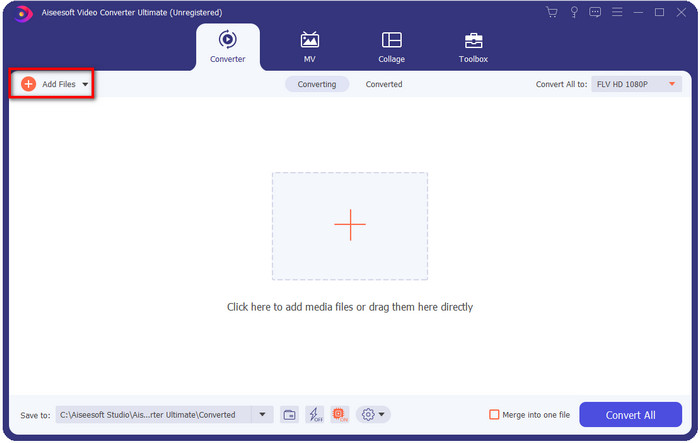
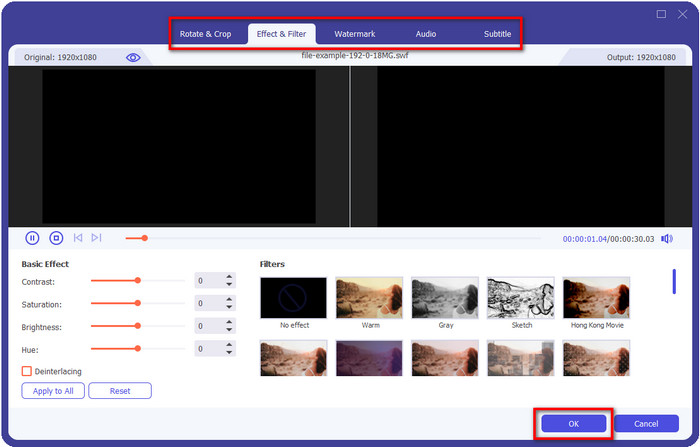
Ha szerkeszteni szeretnéd az MKV fájlokat a konvertálás előtt, kattints a varázspálca ikonra, hogy egy kis „varázslatot” adj a kimenethez, például Effektusok hozzáadása, Vágás, Feliratok hozzáadása és egyebek. A videóhoz hozzáadott módosítások mentéséhez kattints az OK gombra.
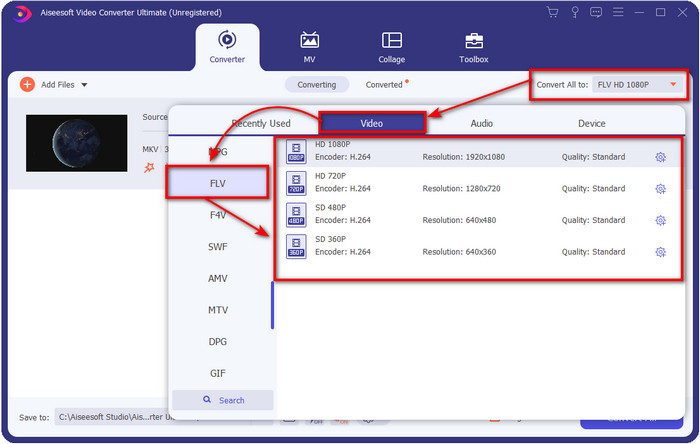
3. lépés. Kattints a legördülő gombra, és válaszd ki az FLV formátumot a listából.
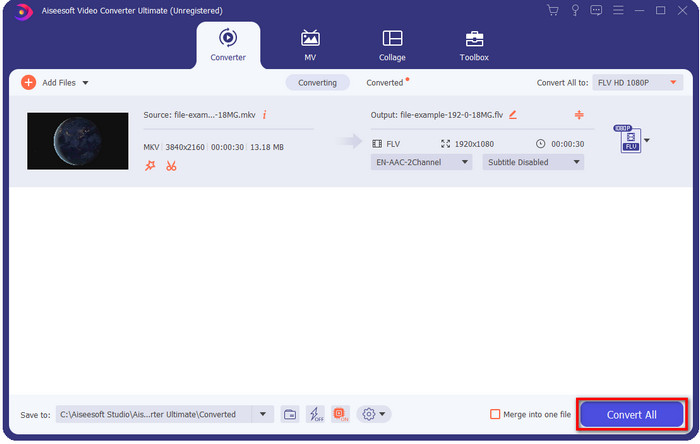
4. lépés. Kattints a Convert All (Összes konvertálása) gombra, hogy elkezdd az MKV FLV-vé alakítását ingyen. A folyamat befejezése után megjelenik egy mappa az új FLV fájllal.
2. rész. 4 legjobb web alapú MKV FLV konverter
1. FVC Free Video Converter Online
A FVC Free Video Converter Online egyszerű, mégis lenyűgöző, ingyenes online MKV–FLV konvertert kínál, amely minden böngészőben elérhető. Közepes méretű formátumválasztékot is támogat, amelyek közül választhatsz és feltölthetsz. Bár az eszköz internetkapcsolat-függő, a fájlok konvertálása és feltöltése itt egyszerűbb és gyorsabb. Tudni szeretnéd, hogyan kell használni? Akkor kövesd az alábbi lépéseket.
Előnyök
- Bárki használhatja, aki rendelkezik internettel.
- Felhasználóbarát és könnyen érthető felület.
- Nincs korlátozás a fájl méretére.
- Speciális beállítások a videóhoz és a hanghoz.
Hátrányok
- Közepes méretű formátum.
1. lépés. Az online konverter megnyitásához kattints erre a linkre.
2. lépés. Nyomd meg az Add Files to Convert (Fájlok hozzáadása konvertáláshoz) gombot a fájl hozzáadásához a számítógéped mappájából, majd kattints az Open (Megnyitás) gombra.
Töltse le az asztali verziót a fájlok kötegelt konvertálásához.
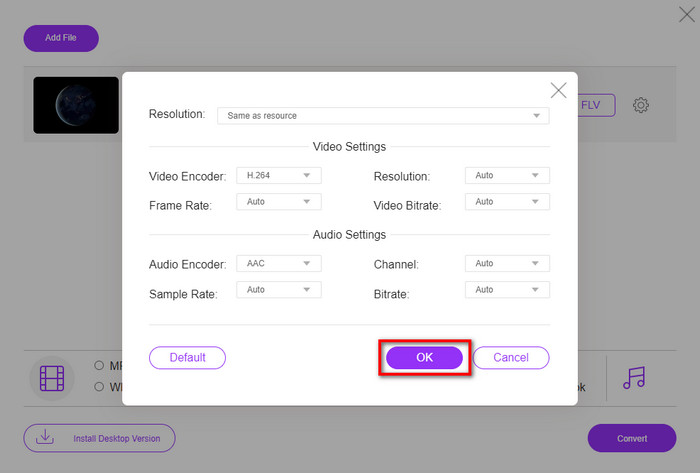
Bár itt nem tudsz videókat szerkeszteni, a videó- és hangbeállításokat módosíthatod a fogaskerék ikonra kattintva.
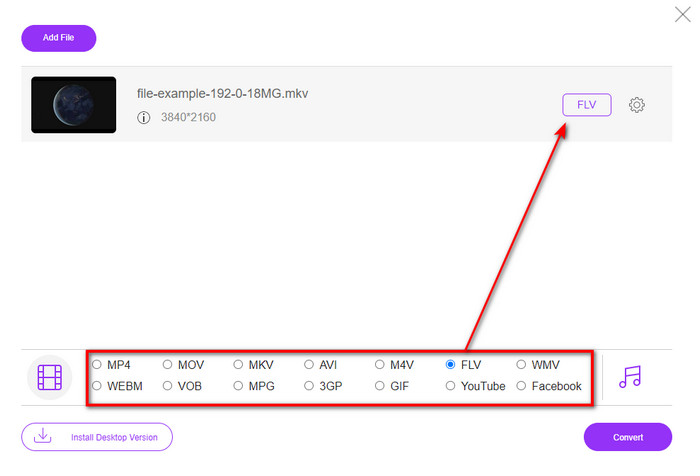
3. lépés. Válaszd ki az FLV formátumot a listából.
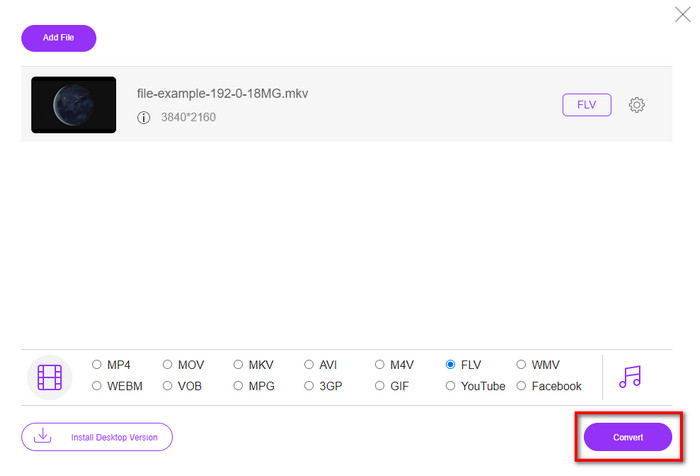
4. lépés. Kattints a Convert (Konvertálás) gombra a konvertálási folyamat elindításához.
2. Mconverter
Az egyik legbiztonságosabb online MKV–FLV konverter, amelyet használhatsz, az Mconverter. A videó- és hangformátumok konvertálásán kívül képeket, archívumokat, dokumentumokat és számos más médiaformátumot is átalakíthatsz itt. Habár a konverter ingyenesen használható, minden egyes feltölthető fájlméretnek van egy korlátja.
Előnyök
- Videókat, hangokat, dokumentumokat és sok mást konvertálhat online.
- Támogatja a többszörös konverziót.
- Könnyen kezelhető.
Hátrányok
- A fájl mérete nem haladhatja meg a 200 MB-ot.
- Néhány hirdetés a fájl konvertálása közben.
1. lépés. Nyisd meg az Mconvertert a böngésződben, húzd be az .mkv fájlt, és dobd a kijelölt mezőbe.
2. lépés. Kattints az FLV formátumra, és a folyamat automatikusan elindul.
3. lépés. Ha elkészült, automatikusan letöltődik a meghajtódra.
3. Freeconvert.com
A Freeconvert.com segít abban, hogy ingyen, online alakítsd át az MKV-t FLV-vé. Ez a webes konverter könnyen érthető felhasználói felülettel rendelkezik, amelyet bárki használni tud. Ugyanakkor ez az online konverter csak kisebb formátumválasztékot támogat, és a webes felületen sok a reklám.
1. lépés. Keresd meg a Freeconvert.com oldalt a keresőmotorodban.
2. lépés. Kattints a Choose File (Fájl kiválasztása) gombra az .mkv fájl feltöltéséhez a számítógéped mappájából, nyomd meg a legördülő gombot, és válaszd ki az FLV formátumot.
3. lépés. Kattints a Convert FLV gombra a konvertálás elindításához, majd a letöltéshez kattints a Download FLV gombra.
Előnyök
- Egy ingyenes online konverter, amelyet használhat.
- Biztonságos és egyszerű webkonverter.
- Támogatja az 1 GB-os fájl konvertálását.
Hátrányok
- Támogatja a kisméretű formátumot.
- A konvertálás és a letöltés folyamata sok időt vesz igénybe.
4. Movavi Online Video Converter
A Movavi Online Video Converter az egyik ajánlott konverter, amellyel online alakíthatod át az MKV-t FLV-vé. Ez a Movavi Video Converter ingyenes webes verziója, amelyet a felhasználók nagy számban használnak világszerte az eszköz hatékonysága és professzionális megjelenése miatt.
1. lépés. Nyisd meg kedvenc böngésződet, és keresd meg a Movavi weboldalát.
2. lépés. Kattints a +Add Your Media (+Média hozzáadása) gombra a konvertálni kívánt fájl hozzáadásához. Kattints a legördülő gombra, majd nyomd meg a Video opciót; keresd meg az FLV formátumot, és kattints rá.
3. lépés. Nyomd meg a Convert (Konvertálás) gombot a konvertálási folyamat elindításához.
Előnyök
- Nincsenek hirdetések webes felülete.
- Egyszerű konverter, amelyet bárki használhat.
- Támogatja a közepes méretű formátumot.
Hátrányok
- A formátum konvertálása több időt vesz igénybe.
- Internet-függő, mint a többi webkonverter.
3. rész. Összehasonlító táblázat
| Jellemzők | FVC Video Converter Ultimate | FVC ingyenes online videokonverter | Mconverter | Freeconvert.com | Movavi Online Video Converter |
| A formátumok konvertálása |  | | | | |
| Internet függő |  | | | | |
| Kötegelt konverzió | | | | | |
| Speciális szerkesztési funkciók | | | | | |
| Elérhető platformok | Asztali alapú eszköz | Web-alapú eszköz | Web-alapú eszköz | Web-alapú eszköz | Web-alapú eszköz |
MKV vs. FLV
A 2002-ben kiadott Matroska multimédiás konténer formátum egy nyílt forráskódú formátum, amely számos videó-, hang-, kép- és feliratsávot tartalmazhat. Így egyszerűen használhatja rövid videoklipek, TV-műsorok és filmek tárolására. Nagyon népszerű az anime rajongók körében.
Az Adobe Flash Player az FLV-t használta videotartalom, például filmek és tévéműsorok továbbítására. Manapság az Adobe már nem fejleszti a lejátszót, és biztonsági okokból azt javasolja a felhasználóknak, hogy távolítsák el. Azonban továbbra is használhatja az FLV formátumot sok nem Adobe/Macromedia programban.
4. rész. GYIK az MKV-ról FLV-vé konvertálással
Miért túl nagyok az MKV fájlok?
Két elsődleges oka van annak, hogy az MKV fájlok túl nagyok. Az első ok, hogy ez a formátum korlátlan mennyiségű tartalmat és elemet képes egyetlen fájlban tárolni: videót, hangot, metaadatokat. A második ok, hogy ha a videó hosszú, akkor értelemszerűen a fájlméret is nagy lesz. Azonban tömörítheted az MKV fájlt ezzel az MKV tömörítővel, amelyet használhatsz. Ha viszont egyszerűbb megoldást szeretnél, érdemes megfontolnod az MKV fájlok MP4, AVI, MOV, FLV stb. formátumba történő átkonvertálását.
Az MKV jobb, mint az AVI?
Az MKV és az AVI szinte hasonló formátumok, mivel mindkettő képes nagy felbontású videót és nagy fájlméretet kezelni. Ezek a konténerek azonban eltérő célokra és struktúrával készültek, ami egyedivé teszi őket. Például az AVI egy tömörítetlen formátum, amely nyers videót tud tárolni, és elsősorban lejátszási célokra ideális. Ez szolgált alapul az MKV formátum kifejlesztéséhez is. Noha az MKV fájlok tömörítőt használnak, a tartalmuk és elemeik sokkal gazdagabbak, mint amit az AVI képes kezelni. Ha tehát meg szeretnéd őrizni a videóid magas minőségét, válaszd az MKV formátumot. Ha viszont a kompatibilitás a fontos, akkor az AVI a jobb választás. Ha szeretnéd megtudni, hogyan konvertálhatod az MKV-t AVI-vé, kattints erre a linkre.
A kézifék kezeli az MKV-t FLV-vé?
A kézifék képes kezelni ezt a feladatot, de ez a konverter nem támogatja azokat a macOS és Windows programokat, amelyek nem 10 felettiek.
Következtetés
Összegzésként: mostanra már tudod, hogyan konvertálhatod az MKV-t FLV-vé online és offline. A fenti eszközök nem véletlenszerűen kerültek kiválasztásra; a felhasználók igényei alapján választottuk ki őket. Keresés és tesztelés közben arra jutottunk, hogy ez a hat eszköz teljesít a legjobban konverterként. Közülük azonban a FVC Video Converter Ultimate messze felülmúlta az elvárásainkat. Szeretnéd megismerni ennek a kivételes konverternek a további képességeit is? Akkor mire vársz még? Töltsd le most!.
-
 MKV-ból MOV-ba - Hogyan lehet konvertálni az MKV-t MOV-ba
 Hogyan konvertálhatom az MKV-t MOV-ra Mac-en? Az iMovie képes olvasni az MKV-t? Mit jelent a MOV formátum? Ez a bejegyzés 2 egyszerű módszert ismertet az MKV konvertálásához MOV-ba ingyenes online és professzionális videokonverterekkel.
-
 Hogyan lehet átalakítani az MKV videókat animált GIF -re Photoshop/FFmpeg nélkül
 Miután letöltötte és megtekintette az MKV filmeket a számítógépén, érdemes megosztania néhány csodálatos pillanatot barátaival vagy az interneten GIF -ként. Ebben a cikkben megismerheti az MKV GIF -re konvertálásának 2 legegyszerűbb módját.
-
 Tippek és trükkök az MKV fájlok MP3 formátumba konvertálásához [2025]
 Gondjai vannak a megfelelő konverter kiválasztásával az MKV-hoz MP3-ba? Ezután olvassa tovább ezt a bejegyzést, miközben különböző megoldásokat mutattunk be egy problémára.

