


 Video Converter Ultimate
 Screen Recorder
 Videó javítás
 Biztonságos letöltés
A VOB ingyenes konvertálása FLV-vé asztali és online megoldásokkal 2022-ben
Files in VOB format are typically stored in the VIDEO_TS folder at the root of a DVD. VOB videos contain a majority of the data stored on the disc, including video, audio, subtitles, DVD menus, and other navigation contents. But if you want to upload VOB files to social networks, such as YouTube, you have to change the format of VOB files to video streaming supported formats like FLV – the standard for streaming media over the Internet. So in this article, we will explain how to convert VOB to FLV online or with a free VOB to FLV file converter for better streaming.

1. rész: A VOB konvertálása FLV formátumba ingyenes asztali szoftverrel
To change the format of your VOB files to FLV quickly, try FVC Free FLV Converter. With this freeware, you can transform video files from VOB to FLV, MP4, AVI, WMV, MOV, and many others. Furthermore, the program is capable of performing basic video-editing tasks if needed. Just download the VOB to FLV file converter and follow the easy steps below.
Ingyenes letöltésWindows 7 vagy újabb rendszerhezBiztonságos letöltés
Ingyenes letöltésmacOS 10.7 vagy újabb rendszerhezBiztonságos letöltés
Step 1. Launch FVC Free FLV Converter
Először töltse le a VOB FLV átalakítót Windows vagy Mac rendszerére. Miután letöltötte a telepítőfájlt, kattintson rá duplán, és kövesse a képernyőn megjelenő utasításokat. Ezt követően indítsa el a számítógépén, és az alábbiak szerint kezeli a kezelőfelületét.

Step 2. Add VOB files to the program
Hit Add File(s) button, select your VOB files and click Next to continue.

Step 3. Choose FLV as the output format
Then, choose FLV file format from the Output format field
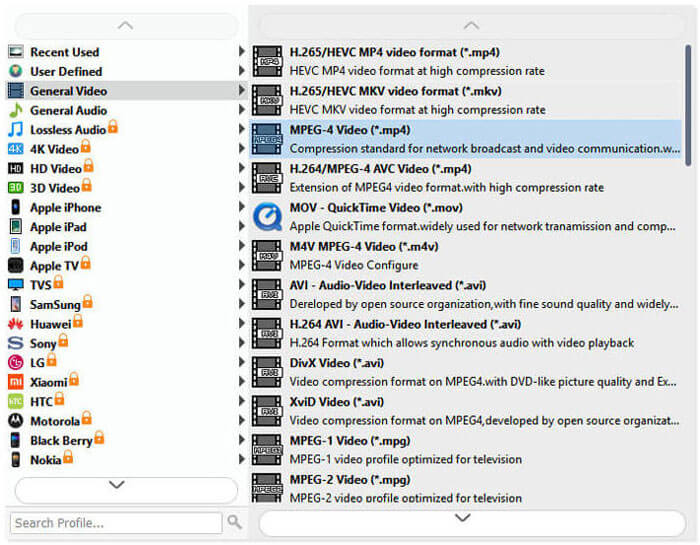
Step 4. Transform VOB to FLV
Click the Open Folder button and choose the folder where you want the converted files to be saved. To start converting your VOB files to FLV, click the Convert button. Once the conversion is complete, the folder that contains converted files will open automatically.
2. rész: A VOB konvertálása FLV Online-ba
Az online szolgáltatások használata a VOB FLV-vé alakításához szintén jó választás. Két online VOB – FLV konvertert választottunk, amelyek közül választhat. Mindezek az online eszközök ingyenesek, és sok felhasználó gyakran használja őket. Olvassa el, hogy megtudja, hogyan konvertálhatja a VOB-t FLV-vé a számítógépén az online eszközök segítségével.
FVC Free Online Video Converter
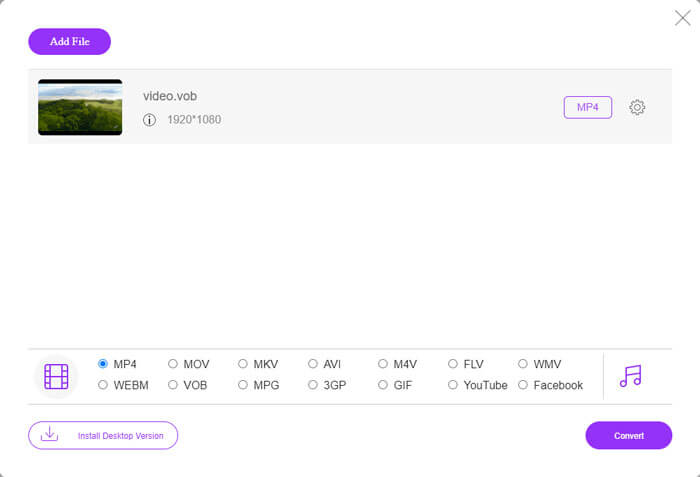
FVC Free Online Video Converter is a full-featured online tool that supports the most popular video and audio formats. Converting files with this online service is secure, and your converted files will be deleted from the server as soon as you download the result. The conversion requires no software installation and the whole conversion process is simple.
Az alábbi lépéseket követve módosíthatja a VOB fájlokat FLV-re.
Step 1. On the FVC Free Online Video Converter website, click the Add Files to Convert button to add your VOB files. The first time you go to use this tool, you’ll need to download and install the launcher first.
Step 2. Make sure that FLV is selected as the output format in the Video category at the lower bottom of the window.
Step 3. Hit the Convert button, and then decide the folder destination. After the conversion process is complete, your converted file will be downloaded automatically and the folder that stores the converted files will be open.
ConvertFiles
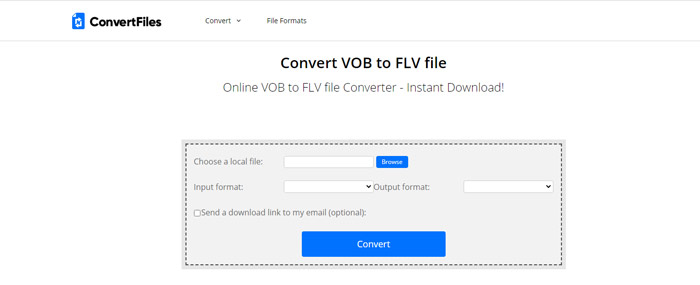
A ConvertFiles egy másik ingyenes online VOB-FLV-konverter. Ez a szolgáltatás percek alatt ingyenesen konvertálhat különféle fájltípusokat. Ez a szolgáltatás szükség esetén elküldheti az átalakított fájl letöltési linkjét az e-mail címére. Az átalakítás nem igényel szoftver telepítést, és az egész átalakítási folyamat egyszerű. De vegye figyelembe, hogy ez az online eszköz 250 MB méretű fájlokat képes konvertálni.
Így használhatja ezt az online VOB-FLV átalakítót.
Step 1. Visit the webpage of ConvertFiles, click Browse and add your VOB files to the program.
Step 2. Then, select Flash Video File (.flv) from the Output format drop-down list.
Step 3. Click the Convert button to start converting VOB files to FLV. When the file is converted successfully, you’ll see the link and you can click to go to the download page to download your converted files.
3. rész: A VOB és az FLV formátumok összehasonlítása
| Összehasonlító paraméter | VOB | FLV |
| Fájlkiterjesztés | .vob | .flv |
| Által kifejlesztett | DVD Fórum | Adobe Systems |
| Videó 00-kodekek | MPEG-1, MPEG-2 | On2 VP6, Sorenson Spark, Képernyő videó, 2. képernyő videó, H.264 |
| Audio kodekek | MP1, MP2, PCM, AC-3, DTS | MP3, ADPCM, Nellymoser, Speex, AAC |
| A VOB / FLV fájlokat megnyitó programok | Windows Media PlayerVLC Media Player | VLC Media PlayerAdobe Flash Player |
4. rész: Gyakran ismételt kérdések a VOB-FLV konverzióról
Mi a VOB?
VOB (for video object) is the container format in DVD-Video media. VOB can contain video, audio, subtitles, DVD menus with navigation through chapters on a DVD disc. The VOB format is usually formatted as MPEG-2 and can be opened by almost any media player. Read on Top 5 VOB Players for Windows 10/8/7 PC and Mac to learn more VOB players.
Mi az FLV?
FLV is a container audiovisual format used to stream digital video content over the Internet using Adobe Flash Player 6 or newer. You can play FLV using Windows Media Player, VLC, Adobe Media Player, Winamp, RealPlayer, or other FLV players.
Tartalmaznak-e audiót a VOB fájlok?
Igen. A VOB fájl videó-, hang-, felirat- és DVD-menüt tartalmaz.
Következtetés
Amint látja, az MP4-et átalakíthatja FLV formátumba, miközben megőrzi az eredeti videó kiváló minőségét egy ingyenes VOB fájl-átalakítóval. Ezenkívül online is elvégezheti a VOB – FLV átalakítást. A fent említett asztali és online VOB to FLV konverterek mind ingyenesek. Reméljük, hogy talál egy kielégítő megoldást, amely a legjobban megfelel az Ön igényeinek.
-
 Mi a VOB fájl és hogyan lehet ingyenesen VOB fájlt GIF -re alakítani
 Szeretne többet megtudni a VOB-fájlokról és arról, hogyan oszthatja meg azokat a bemásolás után? vagy Miért kell a VOB-t GIF-be konvertálni? Ezután figyelmesen olvassa el ezt a cikket.
-
 VOB to MP4 - 3 módszer a VOB fájlok MP4 formátumba konvertálására ingyen, ömlesztve
 Ez a cikk 3 ingyenes VOB to MP4 átalakítót és a kapcsolódó oktatóanyagokat ismerteti. Könnyedén ingyen konvertálhatja a VOB-ot MP4 fájlokká a Windows / Mac / online rendszeren.
-
 Hogyan tömörítsük a VOB fájlokat online és ingyenes
 Módszereket keres a VOB fájlok tömörítésére? Ebben a cikkben megismerheti a VOB fájlok méretének csökkentésének legjobb módját.
