


 Video Converter Ultimate
 Screen Recorder
 Videó javítás
 Biztonságos letöltés
Hogyan lehet az ICO-t azonnal PNG-re konvertálni [Teljes módszerek]
Az ICO egy képfájl számítógépes ikonokhoz, különösen a Microsoft Windows rendszeren. Ikonfájlok tárolására szolgál. Az ICO azonban nem túl elterjedt más programokban és eszközökön. Ezért ha más programokkal is meg szeretné tekinteni a képeit, át kell őket alakítania egy másik formátumba. Ha kisebb fájlméretű képfájlt részesít előnyben, a PNG az egyik legjobb választás. A PNG formátum kisebb fájlméretet biztosít, és szinte minden programban megtekinthető. Ebben az esetben a cikk a legjobb megoldást kínálja önnek. Képkonverterek használatával megismerheti a leghatékonyabb módszereket az ICO PNG-vé konvertálásához.

1. rész. ICO vs. PNG
| Fájlformátum | ICO | PNG |
| Fájlnév kiterjesztés | .ico | .png |
| Teljes név | Ikon | Hordozható hálózati grafika |
| Által kifejlesztett | Microsoft | PNG Fejlesztési Csoport |
| Leírás | ICO egy olyan típusú képfájl, amely képikonokat tárolhat. A Microsoft Windows operációs rendszerek az ICO fájlkiterjesztést használják az ikonfájlok tárolására. Bittérképes képeket tartalmaz. Ezenkívül a webhelyek ICO-fájlokat használnak kedvenceikként. A 24 bites színekkel rendelkező képek támogatottak. Ezenkívül a Windows csak a végrehajtható fájlok ikonjait menti el ICO formátumban. A Windows ICO-fájlokban található képek mérete 16×16 és 256×256 pixel között van. A régebbi ICO-fájlok csak 48×48 pixeles képeket tudnak tárolni. | A raszterkép fájltípus egy hordozható hálózati grafikus ill PNG. A GIF formátum ebbe fejlődött. Oliver Fromme 1995-ben fejlesztette ki a PNG formátumot olyan feladatok elvégzésére, amelyeket a GIF-ek nem tudnak. A GIF-fel ellentétben a PNG formátum szabadalommentes, és szélesebb színválasztékot biztosít. A PNG jelenleg az egyik legszélesebb körben használt képformátum. A PNG-t bármely képszerkesztő programban megnyithatja licenc nélkül, mert a szabadalom nem védi a fájlt. Ez a formátum veszteségmentes tömörítést is használ. |
2. rész. ICO konvertálása PNG formátumba ingyenesen online
A FVC Free Image Converter az egyik legjobb online eszköz az ICO PNG-vé alakítására. Ez a webalapú képkonverter bármilyen képfájlformátumot képes JPG-vé alakítani. Az alkalmazás által kezelhető bemeneti típusok közé tartozik a JPG, PNG, JPEG, TIFF, BMP, WEBCO, ICO és még sok más. Emellett áttekinthető felületet és egyértelmű beállításokat kínál. Így a szakértők és a kezdők egyaránt konvertálhatnak fényképeket ezzel a programmal. Használata is egyszerűbb, mivel csak néhány lépést igényel a képek átalakítása. Az összes böngésző támogatja az FVC Free Image Convertert. Ide tartozik a Safari, a Microsoft Edge, az Internet Explorer, a Google Chrome és a Mozilla Firefox. Az FVC Free Image Converter teljesen ingyenes fotókonvertálást kínál. Ez az eszköz webalapú, így nincs szükség sem szoftver, sem beépülő modul letöltésére. A képek könnyedén átalakíthatók böngészős felhasználásra.
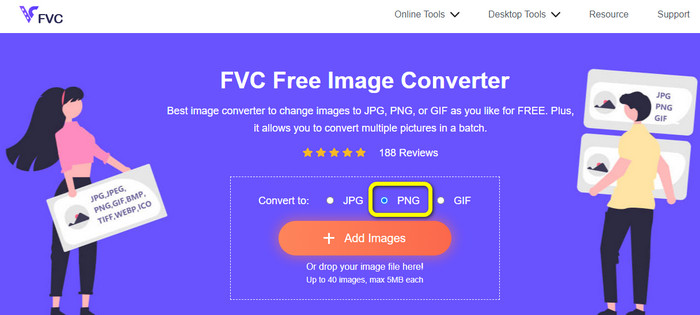
1. lépés: Nyissa meg az FVC Free Image Converter weboldalát. Ezután lépjen a Convert to (Konvertálás erre) opcióhoz, és válassza ki a PNG fájlformátumot.
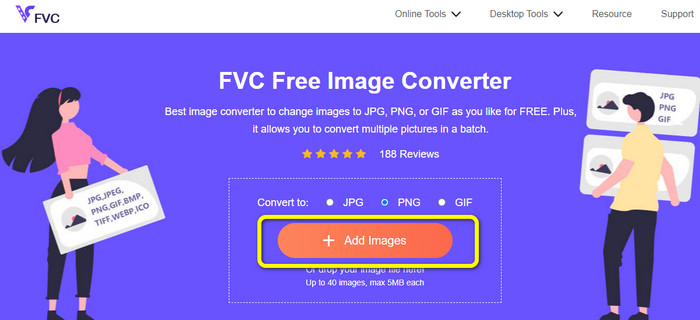
2. lépés: Ezután kattintson az Add Images (Képek hozzáadása) gombra. A számítógép fájlkezelője megjelenik a képernyőn. Válassza ki az átalakítani kívánt ICO formátumú fájlt, majd kattintson az Open (Megnyitás) gombra. Kattintson újra az Add Images gombra további fájlok hozzáadásához és kötegelt konvertálás végrehajtásához.
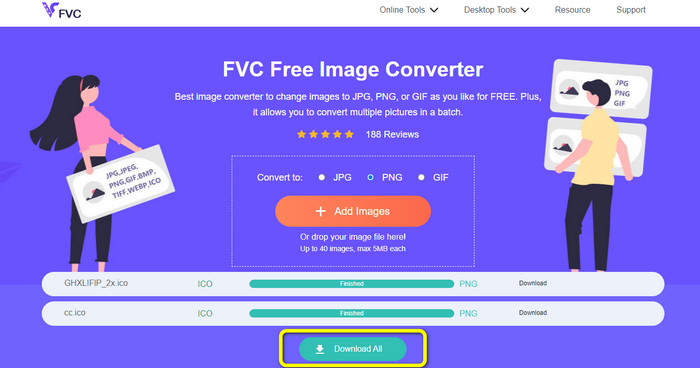
3. lépés: A képe automatikusan PNG-vé alakul. A konvertálási folyamat után kattintson a Download All (Összes letöltése) gombra a képek mentéséhez. Ezután már meg is nyithatja az átalakított képfájlt.
3. rész: Az ICO egyszerű konvertálása PNG-re Mac rendszeren
A Preview egy előre telepített Mac program. A képek megtekintése mellett képfájlok konvertálására is használható. Így az ICO fájlt azonnal PNG formátumba alakíthatja. A konvertálási folyamat ráadásul gyors. A képeket néhány másodperc alatt átalakíthatja, ami minden felhasználó számára kényelmes. Továbbá kötegelt konvertálást is kínál, tehát egyszerre több képfájlt is konvertálhat. Ezenfelül a konvertáláson túl további funkciókat is élvezhet. A program képes a fényképek átméretezésére és körülvágására. Ugyanakkor a konvertálási folyamat kihívást jelenthet, különösen a nem professzionális felhasználók számára. A beállítások nehezen követhetők. Ha ezzel a programmal szeretné az ICO fájlt PNG formátummá alakítani, érdemes szakember segítségét kérnie. Kövesse az alábbi lépéseket az ICO PNG-vé alakításához Macen.
1. lépés: Nyissa meg a mappát, és kattintson az ICO képfájlra. Kattintson rá jobb gombbal, majd válassza az Open with > Preview (default) (Megnyitás ezzel > Preview (alapértelmezett)) lehetőséget.
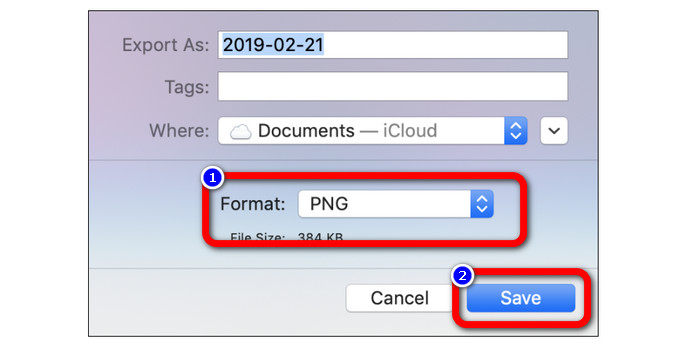
2. lépés: A Preview alkalmazásban menjen a felső menüsoron a File (Fájl) menüpontra, és válassza az Export (Exportálás) opciót.
3. lépés: Ezután a formátum opciók közül válassza ki a kívánt kimeneti formátumot, vagyis a PNG-t. Ezt követően kattintson a Save (Mentés) gombra. Így a képe ICO formátumból PNG formátumba konvertálódik.
4. rész: ICO konvertálása PNG-re Windows rendszeren
Az egyik legjobb offline képkonverter a Video Converter Ultimate. Ezzel a kiváló konverterrel gyorsan átalakíthatja az ICO fájlokat PNG-vé. Emellett a gyors konvertálási sebességnek köszönhetően sok fájlt is átalakíthat. Kötegelt konvertálási módot is kínál, amely lehetővé teszi több fájl egyidejű konvertálását. A Video Converter Ultimate számos képfájltípust támogat, többek között PNG-t, BMP-t, WEBP-t és TIF-et. Ez az offline képkonverter felhasználóbarát felületet és egyszerű konvertálási folyamatot biztosít. Minden szintű felhasználó könnyedén átalakíthatja a képeket ezzel a módszerrel. A konvertálási folyamat ebben a konverterben szintén gyors. Rövid idő alatt rengeteg fényképet konvertálhat. Ezenkívül ez a konverter Macen és Windows PC-n is elérhető.
1. lépés: Telepítse a Video Converter Ultimate programot Windows rendszerére. Az installálás után indítsa el a programot. A konverter gyors eléréséhez kattintson az alábbi Download (Letöltés) gombra.
Ingyenes letöltés Windows 7 vagy újabb rendszerre Biztonságos letöltés
Ingyenes letöltés macOS 10.7 vagy újabb rendszerre Biztonságos letöltés
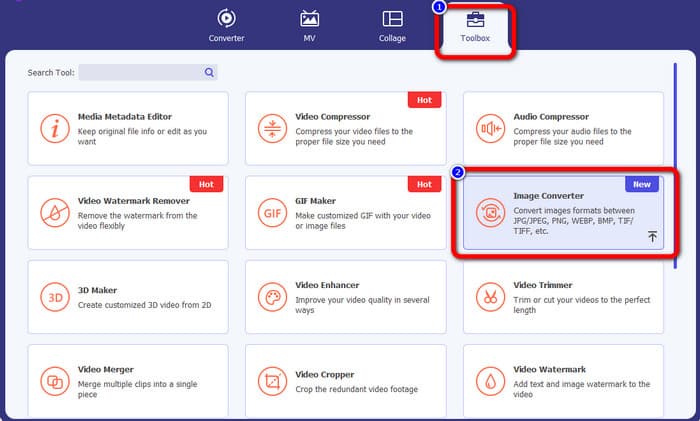
2. lépés: A program elindítása után menjen a felső felületen a Toolbox (Eszköztár) panelre. Ezután kattintson az Image Converter (Képkonverter) funkcióra. Egy új felület jelenik meg a képernyőn.
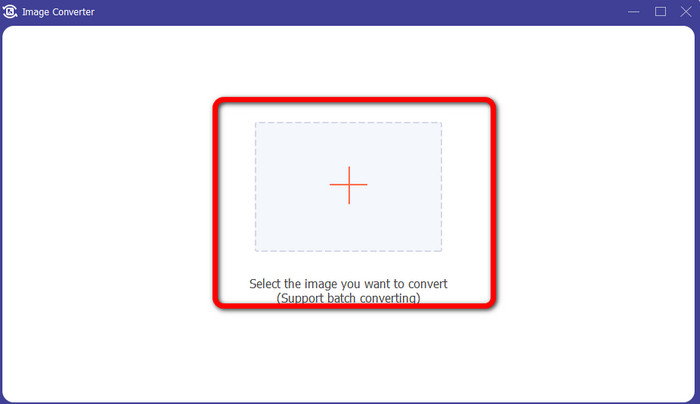
3. lépés: Amikor az új felület megjelenik, kattintson a Plus ikonra. Amikor felugrik a mappaablak, válassza ki az átalakítani kívánt ICO képet, majd kattintson az Open (Megnyitás) gombra.
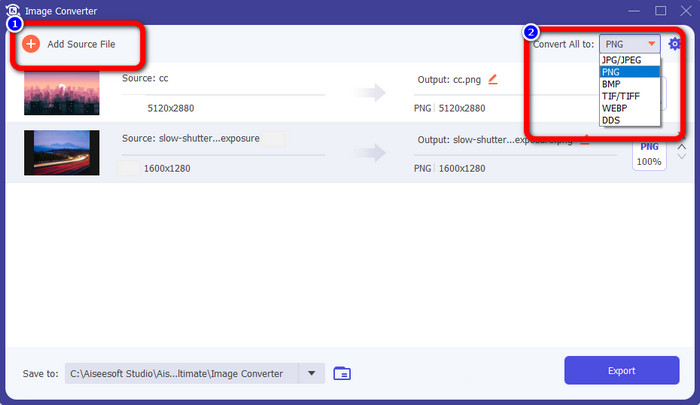
4. lépés: Ha több fájlt szeretne hozzáadni kötegelt konvertáláshoz, kattintson az Add Source File (Forrásfájl hozzáadása) gombra. Menjen a felület jobb felső sarkába, és kattintson a Convert All to (Összes konvertálása erre) opcióra. Válassza ki a PNG formátumot kívánt kimeneti formátumként.
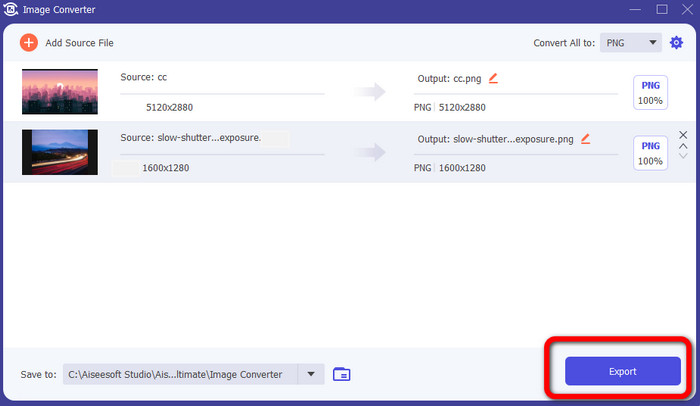
5. lépés: Végül indítsa el a konvertálási folyamatot az Export (Exportálás) gombra kattintva. Ezt követően a fájlok az ön által megadott helyre mentődnek el ebből az képkonverterből.
5. rész. GYIK az ICO PNG-re konvertálásával kapcsolatban
1. Hogyan menthetek el egy ICO-t PNG formátumba a Photoshopban?
Sajnos a Photoshopban nem menthet ICO-t PNG-ként. Ennek oka, hogy a Photoshop nem támogatja az ICO képfájlformátumot. Ha ICO-t PNG formátumba szeretne menteni, használhat egy képkonvertert, például az FVC Free Image Converter-t. Ez az online konverter lehetővé teszi az ICO fájlok egyszerű PNG-vé alakítását.
2. Használható a PNG ICO-ként?
Igen, ez az. További információkért az ICO fájlok lehetnek PNG fájlok. Az ICO egyidejűleg tartalmazhat PNG fájlt és bitmap + alfát.
3. Melyik a legjobb ICO-PNG konverter, amelyet használhatok?
A legjobb ICO–PNG konverter az FVC Free Image Converter. Ez a konverter azonnal képes átalakítani a fájlját. Ráadásul ingyen használható.
Következtetés
Mostanra megismerte a legegyszerűbb módszereket az ICO PNG-vé gyors konvertálásához. Ha azonban olyan képkonvertert keres, amely ingyenes és könnyen használható, válassza az FVC Free Image Converter eszközt.
-
 A legtöbb egyszerű módszer az SVG PNG-re konvertálására
 Ismerje meg, hogyan módosíthatja képfájlját SVG-ről PNG-re hasznos képátalakítók segítségével. Olvassa el ezt az útmutatót, hogy megtudjon mindent, amit az átalakításról tudnia kell
-
 Teljes körű módszerek a JPG-ből PNG-be konvertálására online és offline
 Hasznos módszereket keres a JPG PNG fájlformátumba konvertálására? Ez az útmutató tartalmazza a választ, amire szüksége van. Ezen módszerek felfedezéséhez olvassa el a cikket
-
 Teljes részletek a JPEG és a JPG és a PNG közötti különbségekről
 Ez a bejegyzés elegendő információt nyújt a JPEG és a JPG és a PNG közötti különbségekről. Ezenkívül megtanulja, hogyan konvertálhat képeket ezekre a fájlokra
