


 Video Converter Ultimate
 Screen Recorder
 Videó javítás
 Biztonságos letöltés
PSD konvertálása JPG/PNG formátumba: figyelemre méltó módszerek, amelyeket nem hagyhatsz ki
A PSD az Adobe egyik fájlformátuma. Egyes felhasználók meg tudják nyitni ezt a képfájlt az Adobe Photoshopban, a Corel programjaiban és a PaintShop Pro-ban. Az említett programokon kívül azonban a PSD-formátumot nem lehet könnyen megnyitni más programokban. Ennek oka, hogy egyes programok/szerkesztők nem támogatják a PSD-formátumot. Ilyen esetben az egyik legjobb megoldás, ha más fájlformátumba konvertáljuk. Szerencsére a JPG és PNG formátumok manapság nagyon elterjedtek. Szinte az összes böngésző, program és szerkesztő támogatja ezt a két formátumot. Ebben az útmutatóban tehát a legjobb módszereket mutatjuk be, hogyan lehet PSD-t JPG-vé vagy PNG-vé konvertálni.

1. rész. Hasonlítsa össze a PSD-t, a JPG-t és a PNG-t
| Fájlformátum | PSD | JPG / JPEG | PNG |
| Fájlkiterjesztés | .psd | .jpg | .png |
| Teljes név | Photoshop dokumentum | Közös Fényképészeti Szakértői Csoport | Hordozható hálózati grafika |
| Által kifejlesztett | Vályogtégla | Közös Fényképészeti Szakértői Csoport | PNG Fejlesztési Csoport |
| Leírás | Az Adobe Photoshop natív fájlformátumát a PSD fájlt. Valószínűleg .psd kiterjesztésű fájlokkal találkozott. Főleg, ha valaha is használta az Adobe Photoshopot; észreveheti őket. A művészek és a tervezők gyakran használták ezt a fájlformátumot. | A képfájl formátum a JPG vagy JPEG fájl. A JPG képfájlok azonos típusúak, függetlenül attól, hogy .JPG vagy .JPEG fájlkiterjesztéssel rendelkeznek. A JPG fájlok megnyithatók webböngészőivel, például Chrome vagy Firefox, Viewer és Paint segítségével. | Egy hordozható hálózati grafika (PNG) fájl ezek egyike. A tömörítési módszer veszteségmentes. Általában a GIF képformátum helyettesítőjének tekintik. A PNG-fájlok azonban nem támogatják az animációkat, ahogy a GIF-fájlok képesek. |
| Tömörítés | Veszteségmentes | Vesztes | Veszteségmentes |
| Kapcsolódó programok/böngészők | Adobe Photoshop, GIMP, XnView, Google | IrfanView, Paint, Adobe Photoshop, GIMP, Microsoft, FastStone Image Viewer, Google Chrome, Internet Explorer | FastStone Image Viewer, Adobe Photoshop, GIMP, Microsoft, Paint, Google Chrome, Internet Explorer |
2. rész. Kiváló módszerek a PSD online JPG/PNG formátumba konvertálására
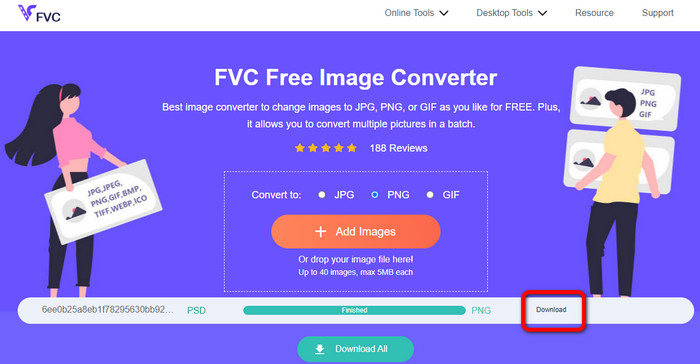
Hogyan lehet PSD-t JPG/PNG-re konvertálni az FVC Free Image Converter segítségével
Az FVC Free Image Converter egy kiváló online eszköz, amellyel PSD-t JPG/PNG formátummá alakíthat. Ez az online képkonvertáló professzionálisan tudja a PSD-fájlt JPG-vé alakítani. A szoftver képes számos bemeneti formátum fogadására, többek között EPS, JPG, PNG, TIFF, BMP és más formátumokra. Emellett egyszerűen használható felülettel és pontos beállításokkal rendelkezik. Így haladó és kezdő felhasználók egyaránt tudnak fényképeket konvertálni ezzel az eszközzel. Használata azért is könnyű, mert csak néhány lépésre van szükség a képek átalakításához. Az FVC Free Image Converter minden böngészőben elérhető, így minden felhasználó használhatja. Ráadásul az FVC Free Image Converter ingyenes fotókonvertálást kínál. Ez egy webalapú alkalmazás, tehát nem kell semmilyen szoftvert vagy bővítményt letöltenie. Más konverterekkel ellentétben a formátumok átalakítása közben nem jelennek meg zavaró hirdetések. Emellett garantálja a fényképek magas minőségét is. Az átkonvertált fotók megőrzik az eredeti képek megjelenését. Az FVC képfájl-konvertáló a kötegelt konvertálást is támogatja. Egyszerre nagy mennyiségű képet tud konvertálni. Ez a képkonvertáló akár 40 képet is képes feldolgozni.
Konvertálja a PSD-t JPG-be
1. lépés. Nyissa meg böngészőjében az FVC Free Image Converter weboldalát. Válassza ki a formátumbeállítások közül a JPG fájlformátumot.
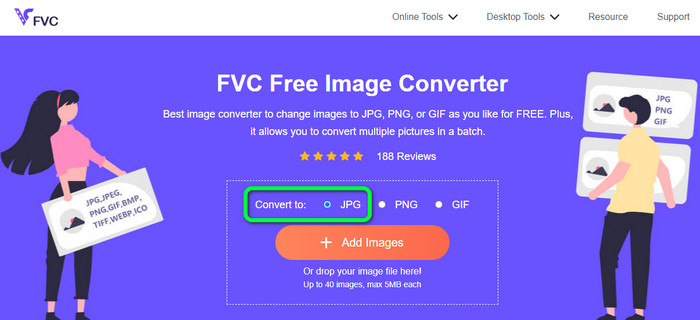
2. lépés. Miután kiválasztotta a kívánt kimeneti formátumot, kattintson az Add Images gombra. Amikor megjelenik a fájlkezelő ablak, válassza ki a PSD-képet, majd nyissa meg. A feltöltési folyamat után a program automatikusan JPG-vé konvertálja a PSD-fájlt.
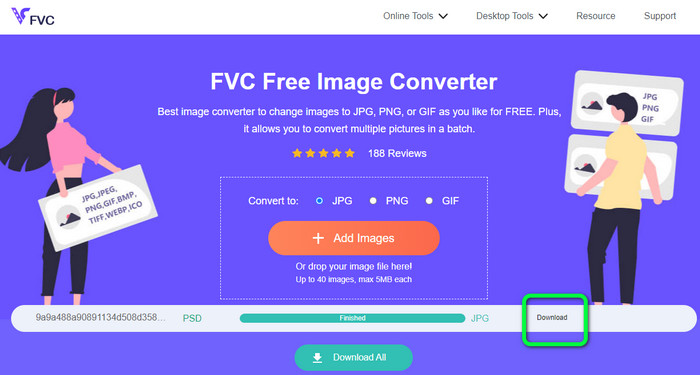
3. lépés. A konvertálási folyamat befejeztével a Download gombra kattintva mentse el az átalakított képet.
Konvertálja a PSD-t PNG-re
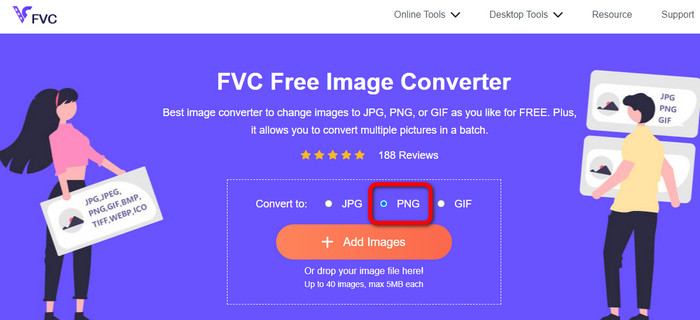
1. lépés. Amikor az FVC Free Image Converter hivatalos weboldalán van, válassza a PNG formátumot.
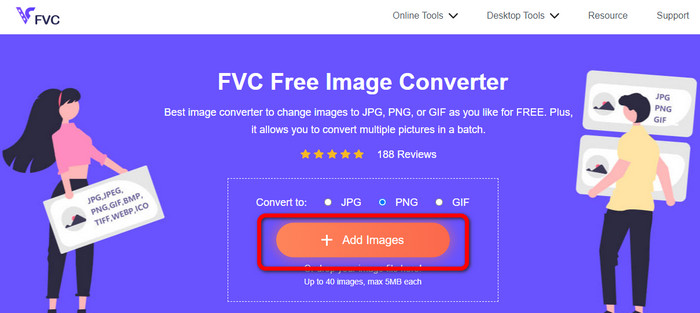
2. lépés. Kattintson az Add Images gombra a PSD-kép feltöltéséhez. A képfájlt közvetlenül is bedobhatja a mezőbe. Ezután várja meg a feltöltési és konvertálási folyamatot.
3. lépés. Az utolsó lépésként kattintson a Download gombra a végső eredmény mentéséhez.
Hogyan lehet PSD-t JPG/PNG-re konvertálni a Zamzaron
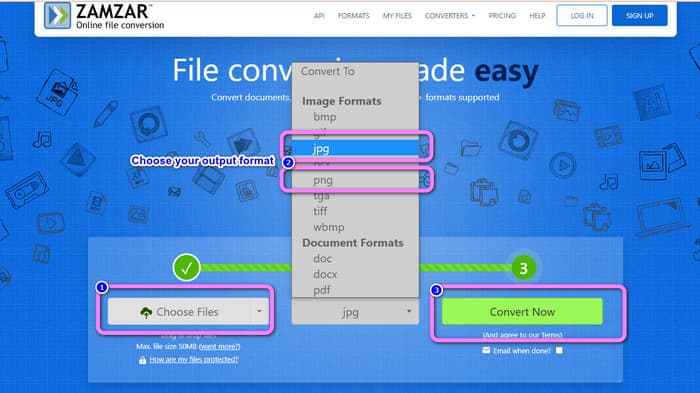
A Zamzar egy másik remek online képkonvertáló, amellyel PSD-t JPG/PNG formátummá alakíthat. Nagyszerű funkciója, hogy akár 50 MB méretű fotókat is fel lehet tölteni. Feltölthet képfájlt a számítógépről is. Elérheti a Dropboxot, a Drive-ot vagy más webhelyet is az adott URL megadásával. Ez az eszköz könnyen használható felülettel rendelkezik, ami minden felhasználó számára növeli a használhatóságát. A szoftverrel CR2, ARW, PNG, 3FR, JPG, GIF, TIFF és más formátumú fotókat tölthet fel. A felhasználók számára egyszerűbbé téve a kezelést, a képfájlokat számos különféle formátumba konvertálhatja. Átalakíthatja BMP, EPS, PDF, PNG, JPG és WBMP formátumba. A konvertálási folyamat azonban rendkívül elhúzódó. Az átkonvertált képeket sem lehet azonnal elmenteni. Ezenkívül egy munkamenetben legfeljebb két kép konvertálható. Az alábbi lépéseket követve konvertálhat PSD-t JPG/PNG formátumba.
1. lépés. Lépjen a Zamzar weboldalára. Kattintson a Choose Files gombra. Nyissa meg a PSD-fájlt a fájlkezelő mappájából.
2. lépés. Keresse meg a Convert to opciókat. Válassza ki a kívánt kimeneti formátumot, például a PNG-t vagy a JPG-t.
3. lépés. Az utolsó lépés, hogy kattintson a Convert Now gombra. Várja meg a konvertálás befejeződését. Ezután mentse el az átalakított fájlt az asztalára. Kattintson ide, ha meg szeretné tudni, hogyan lehet EPS-fájlt JPG-vé vagy PNG-vé konvertálni.
3. rész. Hasznos módszer a PSD offline konvertálásához JPG/PNG formátumba
Hogyan lehet PSD-t konvertálni JPG/PNG formátumba a Video Converter Ultimate segítségével
A Video Converter Ultimate egy hatékony program a PSD JPG/PNG formátummá alakításához. A program könnyen érthető felületet kínál, így minden felhasználó számára ideális. Emellett egyszerű lépéseket kell követni. Így a PSD-képek JPG/PNG formátummá konvertálása gyerekjáték. A JPG és PNG mellett számos egyéb képfájlformátumot is támogat. Támogatja például a BMP, WEBP, TIF, EPS és más formátumokat is, ami nagyon praktikus. Az alkalmazás Windows és Mac számítógépen egyaránt elérhető. Ráadásul kötegelt konvertálási funkciót is kínál, így egy folyamatban több fájlt is átalakíthat. Ennek köszönhetően annyi képet konvertálhat, amennyit csak szeretne. Kövesse az alábbi egyszerű lépéseket a PSD JPG/PNG formátummá alakításához.
1. lépés. Kattintson az alábbi Download gombra, hogy letöltse a Video Converter Ultimate programot. Windows és Mac verzió egyaránt elérhető. Ezután az installálás befejeztével indítsa el az alkalmazást.
Ingyenes letöltés Windows 7 vagy újabb rendszerre Biztonságos letöltés
Ingyenes letöltés macOS 10.7 vagy újabb rendszerre Biztonságos letöltés
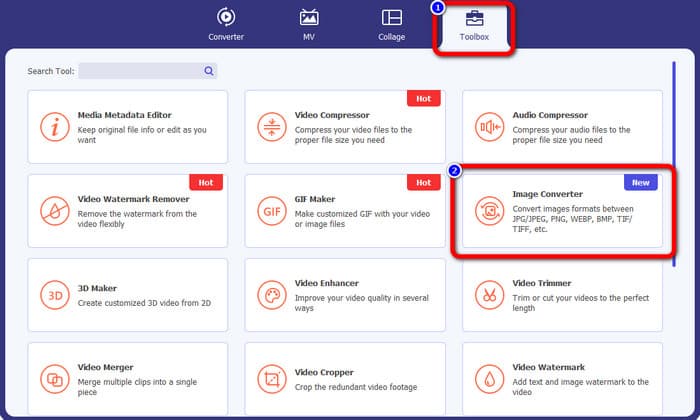
2. lépés. Lépjen a Toolbox panelre, és kattintson az Image Converter eszközre.
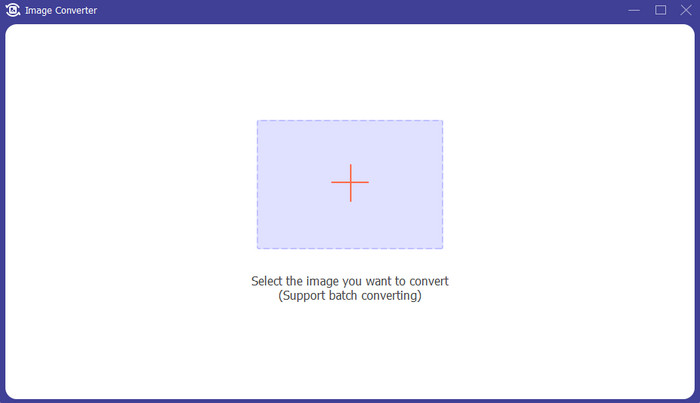
3. lépés. Kattintson a + ikonra a PSD-képfájl hozzáadásához. Egyszerre több képet is hozzáadhat.
4. lépés. Miután hozzáadta a PSD-képeket, menjen a formátumbeállításokhoz, és válassza ki a kívánt kimeneti formátumot.
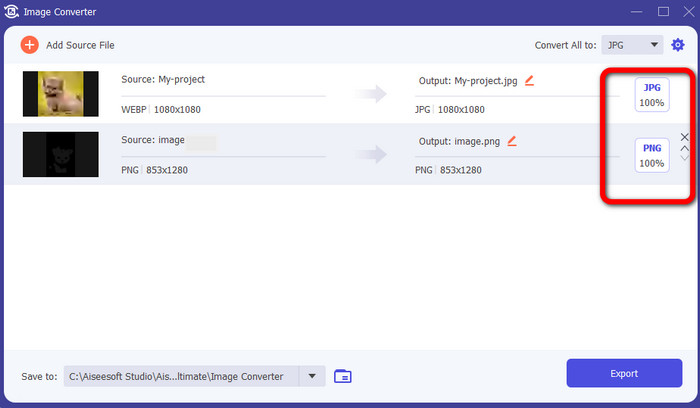
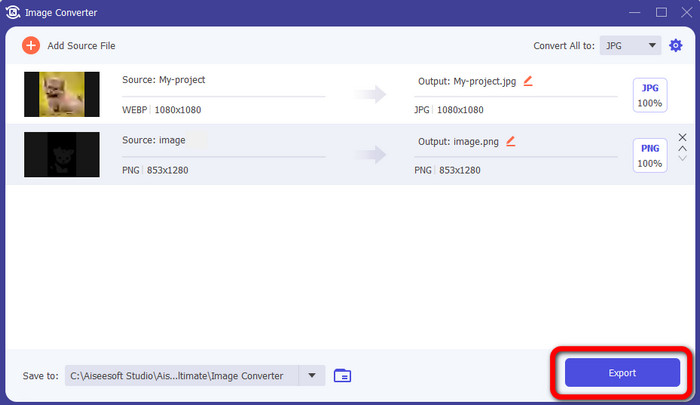
5. lépés. Végül kattintson az Export gombra az átalakított képek mentéséhez.
Hogyan lehet PSD-t JPG/PNG-re konvertálni a Photoshopban
A Photoshop egy másik program, amellyel PSD-t JPG- vagy PNG-formátummá konvertálhat. Szintén hatékony módszereket kínál az átalakításhoz. A Photoshop Windows és Mac számítógépen is elérhető. Emellett használhatja a Photoshopot a képek élesítésére is. Mivel azonban a program a profi szerkesztőeszközök közé tartozik, a fejlettebb funkciók használatához meg kell vásárolni. A Photoshop csak 7 napos ingyenes próbaverziót kínál. Ezenkívül a felülete is nehezen átlátható.
1. lépés. Töltse le a Photoshop programot, és indítsa el a számítógépén. A kép megnyitásához válassza a File > Open menüpontot, vagy a fájlkezelőben kattintson a jobb gombbal a PSD-projektfájlra, és válassza az Open with > Photoshop lehetőséget.
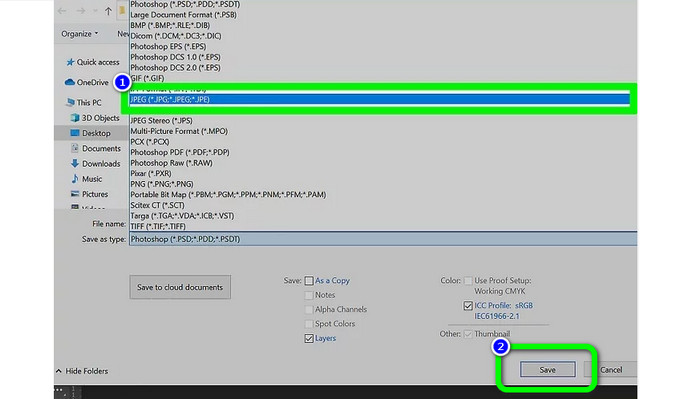
2. lépés. Ezután kattintson a File fülre az ablak bal felső sarkában. Majd válassza a Save as opciót.
3. lépés. Keresse meg a Save as beállítást. Ezután válassza ki a JPEG/JPG formátumot a formátumlistából. Miután kiválasztotta a JPG/JPEG formátumot, kattintson a Save gombra.
4. rész. GYIK a PSD JPG vagy PNG formátumba konvertálásával kapcsolatban
1. Mikor használná a PSD-t?
Sok felhasználó használ PSD-fájlokat, amikor kiváló minőségű grafikus adatokkal dolgozik. Hatalmas és bonyolult képeket vagy más nagy felbontású grafikákat és grafikákat tartalmaz.
2. Tudsz PSD fájlt nyomtatni?
Sajnos nincs. Ha PSD fájlt szeretne nyomtatni, akkor azt más formátumba, például PDF-be kell konvertálnia.
3. A PSB egy PSD?
A nagyobb formátumú PSD-fájl egy PSB-fájl. A Photoshop Big vagy PSB a Photoshop-kompatibilis fájl rövidítése, amely több adatot képes tárolni, mint egy átlagos PSD.
Következtetés
A PSD-fájl egy jó képfájltípus, azonban más böngészőkben vagy programokban nem tudja megnyitni. Ha tehát meg szeretné nyitni, előbb a leggyakrabban használt formátumok egyikévé, például JPG- vagy PNG-fájllá kell konvertálnia. Ha PSD-t szeretne JPG-vé vagy PNG-vé konvertálni, használja az FVC Free Image Converter eszközt. Egyszerű módszert kínál, amely tökéletesen megfelel az Ön számára.
-
 Ismerje meg a WebP gyors JPG formátumba konvertálásának legegyszerűbb módjait
 Tanuljunk meg hatékony módszereket a webes képek egyszerű JPG formátumba konvertálására. Ez a cikk kiváló képátalakítókat kínál, amelyekkel képfájlokat konvertálhat.
-
 Tökéletes módszerek a WebP egyszerű konvertálására PNG-re
 Legyen tisztában a WebP PNG-re konvertálásának figyelemre méltó módszereivel. Ez az útmutató tartalmazza a leghasznosabb képátalakítókat, amelyeket kipróbálhat.
-
 Végső módszerek a WebP tökéletes GIF formátumba konvertálására
 Szeretné konvertálni a WebP-t GIF formátumba, de fogalma sincs, mit tegyen? Szerencsére ez a bejegyzés többféle módot mutat be a WebP azonnali GIF formátumba konvertálására.
