


 Video Converter Ultimate
 Screen Recorder
 Videó javítás
 Biztonságos letöltés
Hogyan lehet gyorsan konvertálni az SVG-t JPG-be [Szuper egyszerű módszerek]
Előfordulhat, hogy több okból is szeretnél SVG-képet JPG-formátumba konvertálni. Az egyik lehetőség az egyszerűbb szerkesztés. Az SVG-khez vektoralapú képszerkesztőre van szükség, azonban a raszteres képszerkesztők sokkal elterjedtebbek a felhasználók körében. Ilyen például a Microsoft Paint vagy az Adobe Lightroom. A Lightroom használata SVG szerkesztéséhez akkor lehet megoldás, ha először JPG-vé alakítod a fájlt. Az online megosztás szintén indok lehet az SVG–JPG konvertálásra. A JPG-t szinte mindig elfogadják azok a weboldalak és alkalmazások, amelyek képfeltöltést tesznek lehetővé, SVG-t viszont ritkán. Például az Instagram elfogadja a JPG-t, de nem fogadja el az SVG-t. A cikk gyakorlati módszereket mutat be arra, hogyan lehet SVG-t JPG-vé alakítani. Emellett megismerheted a legjobb online és offline képkonvertálókat is, amelyeket használhatsz.

1. rész. Hasonlítsa össze az SVG-t és a JPG-t
| Fájlformátum | SVG | JPG |
| Fájlnév kiterjesztés | .svg | .jng |
| Által kifejlesztett | World Wide Web Consortium | A JPEG bizottság |
| Által kifejlesztett | SVG egy vektoros képfájl formátum XML alapú 2D grafikákhoz. Az animáció és az interaktivitás támogatott. Az XML szövegfájlokban az SVG képek és viselkedésük definiálva van. Mivel az SVG-fájlok csak XML-fájlok, bármilyen szövegszerkesztővel szerkeszthetők. | JPG webhelyekhez és e-mailekhez használják, mivel csökkentett fájlmérettel rendelkeznek. Mivel azonban a JPG veszteséges, ez befolyásolja a képminőséget a tömörítés után. Az eredményül kapott „veszteséges” fájl a minőség elvesztését jelzi. A digitális fényképezőgépek memóriakártyái JPG formátumot használnak. |
| Műszaki információk | Az SVG egy olyan formátum, amelyet az XML-alapú vektor alapú webes grafika meghatározására használnak. Ez a fájl nem veszíti el a képminőséget még nagyítás vagy átméretezés esetén sem. Az SVG-fájl elemei és attribútumai mind animálhatók. | A JPG egy képfájl formátum állóképek szerkesztéséhez. Ez szimmetrikus tömörítési technikát biztosít, amely processzorigényes. Időigényes a tömörítés és a dekompresszió egyaránt. A JPEG a Nemzetközi Távközlési Unió közös szabványa. Ide tartozik a Nemzetközi Szabványügyi Szervezet is. |
| Kapcsolódó programok | Adobe Photoshop Adobe előnézet Corel Paint Shop Pro Corel SVG Viewer | Microsoft Windows Photo Gallery Viewer Adobe Photoshop Adobe előnézet Corel Paint Shop Pro |
2. rész. Az SVG online JPG formátumú konvertálásának legjobb módja
A legjobb eszköz, amelyet használhatsz, a FVC Free Image Converter. Könnyedén képes SVG-t JPG-vé konvertálni. Emellett több SVG-fájlt is át tud egyszerre alakítani JPG-be. Felhasználóbarát, könnyen követhető felületet és útmutatásokat kínál, ami ideális a felhasználók számára. Ez a képkonvertáló támogatja a kötegelt konvertálást, és egy kattintással letöltheted a számos átalakított fájlt. Az eszköz egyik előnye, hogy nem tartalmaz zavaró hirdetéseket, így a fájlok konvertálására koncentrálhatsz reklámok nélkül. Továbbá számos bemeneti formátumot támogat, például PNG, BMP, TIFF, GIF stb. A konverter telepítése sem szükséges, böngészőből vezérelhető. A konvertálás után a képminőség az eredetivel megegyező marad, így biztos lehetsz benne, hogy a képed továbbra is kiválóan fog kinézni. Emellett az oldal biztonságosan kezeli az adataidat: a képek átalakítása és mentése után automatikusan törli az összes feltöltött információt.
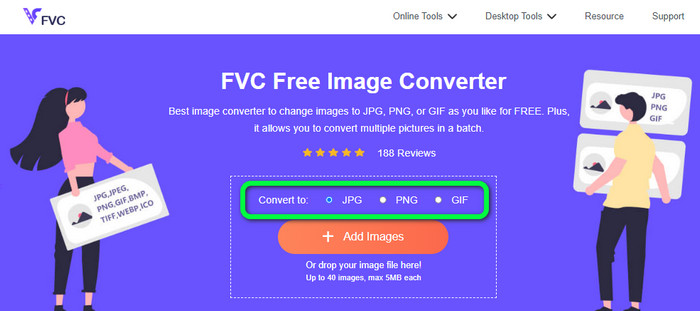
1. lépés: Lépj a FVC Free Image Converter fő weboldalára. Mielőtt hozzáadnád az SVG-képfájlt, válaszd ki a kívánt kimeneti formátumot. Kattints a JPG formátumra a formátumopciók közül.
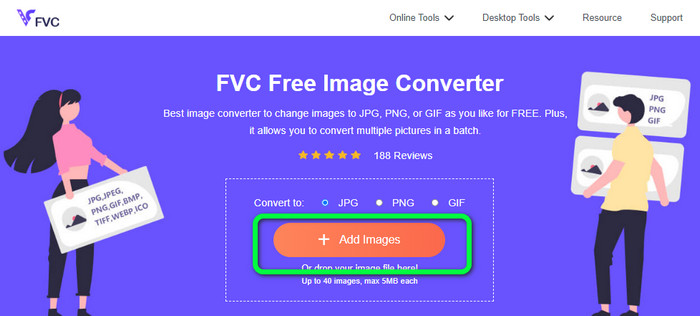
2. lépés: Kattints a felület közepén található Add Images gombra. Ezután megnyílik a fájlkezelő ablak. Válaszd ki azt az SVG képet, amelyet konvertálni szeretnél, majd nyisd meg. Az SVG-fájlt közvetlenül a mezőbe is bedobhatod. A kötegelt konvertáláshoz kattints ismét az Add Images gombra, és adj hozzá további fájlokat.
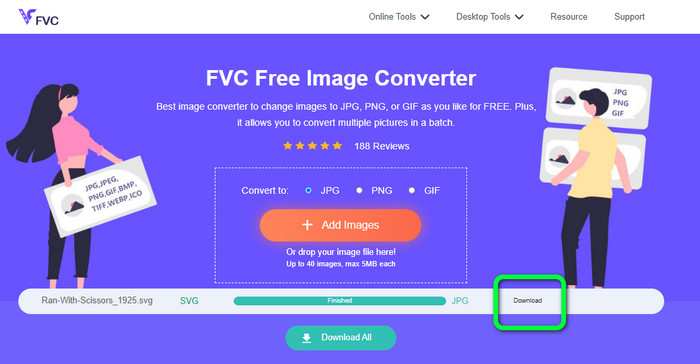
3. lépés: A fájl feltöltése közben a rendszer automatikusan átalakítja a képet. Végül kattints a jobb oldali felületen található Download gombra. A mentési folyamat után nyisd meg a konvertált képet a számítógépeden.
3. rész: Egyszerű módszer az SVG fájl JPG formátumba konvertálására Windows rendszeren
Ebben a részben megismerheted a leghatékonyabb módszert az SVG JPG-vé konvertálására Windows rendszeren, offline módon. Az egyik eredményes megoldás a HitPaw Video Converter használata. A HitPaw Video Converter Image Convert funkciója leegyszerűsíti a kötegelt képátalakítást. Különféle formátumú fotókat és grafikákat importálhatsz, majd az általad kívánt formátumba konvertálhatod őket. Tömeges vagy egyedi formátumváltáshoz is kiváló választás. Támogatja az összes elterjedt képformátumot, például a PNG, JPG, HEIC, RAW, BMP és más formátumokat. Így ezt az eszközt használhatod arra is, hogy BMP-t JPG-vé vagy PNG-vé konvertálj. Emellett ez a letölthető program a konvertáláson túl egyéb funkciókat is kínál: zenéket és videófájlokat tölthetsz le vele, illetve a videóidat forgathatod, vághatod, szűrőket alkalmazhatsz rajtuk. Ugyanakkor a HitPaw Video Converter használata nem egyszerű, különösen a kezdők számára. A felülete zavaros, így nehéz átlátni, és a telepítési folyamat is sok időt vesz igénybe.
1. lépés: Telepítsd a HitPaw Video Converter programot Windows rendszerre. A telepítés befejezése után indítsd el az alkalmazást.
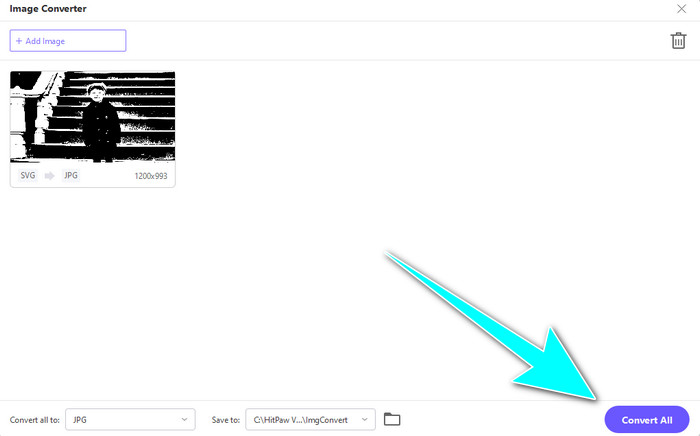
2. lépés: Lépj a Toolbox panelre, és válaszd az Image Converter eszközt. Válaszd ki a számítógéped mappájából azt az SVG-képfájlt, amelyet konvertálni szeretnél.
3. lépés: Kattints a felület bal alsó sarkában található Convert All to opcióra. Ezután válaszd ki a JPG formátumot kimeneti formátumként.
4. lépés: Végül kattints a felület jobb alsó sarkában található Convert All gombra. Várd meg a konvertálási folyamat végét. Ezután már meg is nyithatod a képet PNG-fájlformátumban.
4. rész: SVG konvertálása JPG formátumba Mac rendszeren
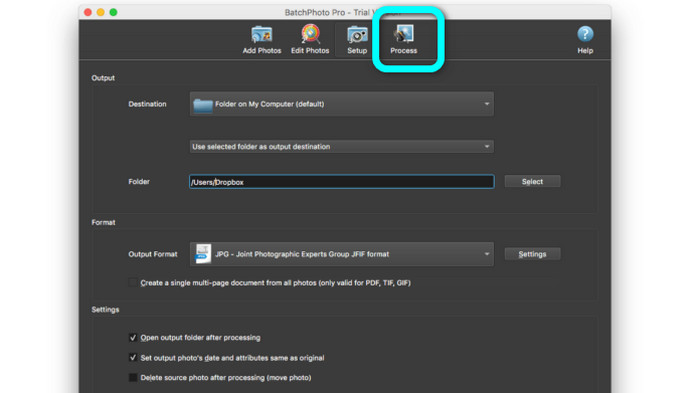
Ha Macen szeretnél SVG-t JPG-vé alakítani, használd a BatchPhoto Pro programot. Számos képformátumot támogat, többek között a JPG, PNG, ICO, SVG, EPS és további több mint 170 típust. A képeket akár PDF-ként is elmentheted. Kötegelt konvertálási módot is kínál, így egyszerre több fájlt is átalakíthatsz. A képkonvertáláson túl további funkciókat is nyújt: szerkesztheted a fotókat méretezéssel, forgatással és színbeállítások módosításával. Ugyanakkor a program folyamatos használatához meg kell vásárolni a szoftvert, mivel csak néhány napos próbaverziót kínál. A konvertálási folyamat is nehezen átlátható, a nem profi felhasználók számára bonyolult lehet a képek átalakítása.
1. lépés: Töltsd le és telepítsd a BatchPhoto Pro programot. Letöltheted az ingyenes próbaverziót is. A telepítés után indítsd el az alkalmazást.
2. lépés: A felület felső részén válaszd az Add Photos opciót. A kattintás után add hozzá azokat az SVG-képeket, amelyeket JPG-formátumba szeretnél konvertálni. Egyszerre több fájlt is hozzáadhatsz.
3. lépés: Lépj a felület felső részén található Set Up opcióra. Keresd meg az Output Format beállításokat, és válaszd a JPG formátumot.
4. lépés: Kattints a Process opcióra a konvertálás elindításához. Ha elkészült, lépj a kimeneti mappába, és ellenőrizd a konvertált képet.
5. rész. GYIK az SVG JPG formátumba konvertálásával kapcsolatban
1. Miért érdemes az SVG-t JPG-vé konvertálni?
Az SVG-hez képest a JPG jobban megfelel a közösségi médiához és más eszközökhöz. Ez az egyik legnépszerűbb képformátum, amelyet manapság használhat. Az SVG-ben ezt a fájlt csak webböngészőben tudja megnyitni. Tehát az SVG-t JPG-vé kell konvertálni a nagyobb kompatibilitás érdekében.
2. Mik az SVG fájlok előnyei és hátrányai?
Az SVG-fájlokat bármilyen méretűre bővítheti vagy kicsinyítheti a minőség romlása nélkül. Az SVG-ket nem érdekli a megjelenítés típusa vagy a képméret. Az, ahogyan látszanak, állandó. Az SVG-k a tervezőknek és a fejlesztőknek is nagy szabályozást biztosítanak a megjelenésük felett. Jobb, mint szövegszerkesztőben szerkeszteni őket. Még más vizuális elemek, például az árnyékok és a színátmenetek is állíthatók. Vannak azonban jobb formátumok, mint az SVG a részletes, jó minőségű fényképekhez. A felhasználók pixelek helyett pontok és útvonalak felhasználásával készítenek vektorgrafikát. A kód is szükséges.
3. Hogyan nyithatok meg SVG fájlt?
Az SVG-fájl megnyitásának legegyszerűbb módja, ha a böngésződet használod. Nyomd meg a billentyűzeten a Ctrl+O billentyűkombinációt, majd válaszd ki a megtekinteni kívánt SVG-fájlt, és kattints az Open gombra.
Következtetés
Ennyi! A fenti információk segítségével Windows, Mac rendszer alatt és online is konvertálhatsz SVG-t JPG-vé. Egy külön program letöltése azonban macerás lehet. Ha egyszerűbb módon szeretnél képeket konvertálni, használd a FVC Free Image Converter eszközt. Ez az online képkonvertáló lehetővé teszi, hogy közvetlenül a böngészőben alakítsd át a képeket.
-
 Hasznos módszerek a TIFF egyszerű konvertálásához JPG/PNG formátumba
 Ne hagyja ki ezeket a kiváló módszereket a TIF JPG/PNG formátumokká alakítására. Ez a bejegyzés megadja a szükséges információkat, amelyeket tudnia kell. Ez magában foglalja a különbségeiket.
-
 JPEG konvertálása JPG-be hatékonyan [Öt felsorolt módszer]
 Jöjjön el, és szerezze meg a legegyszerűbb oktatóanyagokat a JPEG JPG képfájlformátumba konvertálásához. Kattintson erre az útmutatóra, és kezdje el megtanulni a preferált módszereket
-
 Az 5 legjobb oktatóanyag a PNG gyors konvertálásához JPG formátumba
 Ha PNG fájlját JPG formátumba kell konvertálnia, itt megtudhatja a legjobb módszereket. Azt is megtudhatja, hogy mi a különbség a PNG és a JPG fájlformátumok között
